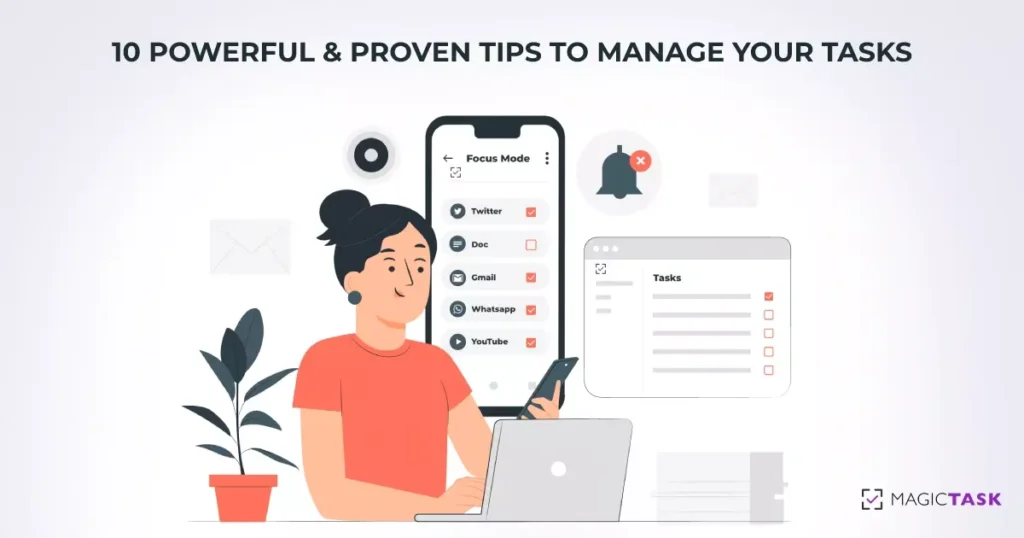
10 Powerful and Proven Tips to Manage Your Tasks

Tips to Manage Your Tasks

Efficiently managing their tasks is a skill every professional needs and has to develop throughout their career. But task management is more than just completing the assignments on time. It's more than ensuring that the deliverables are up to the requirements.

Effective task management considers the big picture and how small tasks contribute to larger projects. It takes into account how the projects are helping you achieve your long-term goals. In effect, task management comes down to aligning your daily tasks with your visions and goals.

Here are ten powerful tips experts have developed over the years to help you manage your tasks effectively and efficiently.

1. Plan Your Day Well

When you start your day, plan how you'll spend your time. The most effective way to manage your tasks is to not plan them when you're doing them. When you're going through your day, you should be able to check off your assignments one after another. You should avoid thinking about the tasks you have to do when you're in the middle of a job.

If you use a task manager or a more straightforward planner, look at your pending tasks, consider the time you'll have to invest in them, and plan out when you'll be doing them. Check if you have everything you need to do the tasks on your list once you get to them. If you're designing a blog image, ensure you won't have to ask around for details when you get to them. If you're planning to get groceries, see if you have the grocery list prepared.

The irony of not having a clear plan is that you'll be planning throughout the day. At the end of the day, you may also realize that you missed out on some tasks.

2. Prioritize Your Tasks
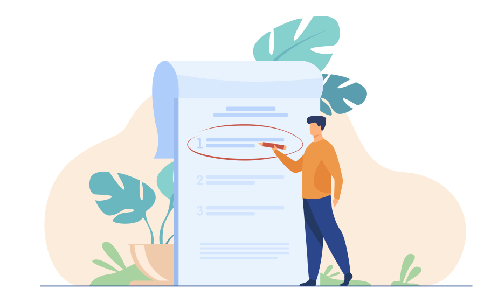
Prioritize Important Tasks

Planning can help keep you on track to a large extent, but even the best-made plans may be disrupted by chance. Your team may assign new tasks to you, an assignment may take longer than you expected, or you may have a personal emergency. Either way, you may have to move your tasks around now and then.

Prioritizing your pending tasks will help you do this quickly. If you face any delays, you can quickly decide which tasks you can do later. When planning your day or week, look at your pending assignments and mark them from high to low priority.

It may appear as if you can do this on the fly. If you're interrupted by a new task or an emergency, you can just look at your pending tasks and decide which ones you can push for the next day or week. This approach is necessary; you need some flexibility around your plans. But with this, you won't be able to consider your goals. You would end up prioritizing tasks based on their deadlines without taking your long-term goals into account.

3. Set Clear Deliverables and Deadlines

While planning your tasks, describe precisely the end results or deliverables and set deadlines for them. The popular productivity method GTD or 'Getting Things Done' suggest practitioners clearly define the next step or action to complete a given task along with the deliverables.

With this approach, you'll have a clear idea of how to get started or tackle a task when you get to it. You won't have to spend time asking your colleagues or clients for more details or clarification. You can just do the task and check them off your list.

The idea is to streamline your tasks. When you're working on an assignment and know exactly what's expected, you won't have to interrupt yourself.

For example, picture you're writing a section of a book. If you don't know what's expected in that section, you'll have to keep going back to the team for their assistance. Instead, if you have a clear outline and a set of references, you can just get to writing it.

4. Focus on One Thing at a Time

At some point in our lives, we've all tried to do at least two different things simultaneously. It could be listening to a podcast while doing the dishes or tackling other tasks while stuck in a meeting. While it may appear to be more productive doing many things at once, odds are you'll be taking more time than if you were to do them one after another.

As much as we'd like to claim otherwise on our resumes, human brains are not good at multitasking or parallel processing. Just try watching a movie and holding a conversation at the same time.

But even if we don't plan on it, we sometimes end up doing multiple things at the same time. We may be thinking about our to-do list while creating a budget report or weekend plans while working on a website UI on a Friday afternoon.

To complete your tasks efficiently, focus on just one task and put all your energy into it. If you find your mind wandering, take a short break and write down whatever is in your head.

5. Build a Distraction-free Environment

Distraction-free work environment

The definition of a distraction-free environment varies among individuals. Some people can work their way through their to-do lists while sitting in a crowded cafe or a bar. And there are others who can't get anything done unless they're alone in their room. Either way, if you're constantly disturbed, you need to find a better environment.

These distractions aren't necessarily just a TV playing loudly in the next room or a toddler throwing a tantrum. This can come from a workplace chat with an intense discussion or your phone buzzing with notifications.

To get through your tasks efficiently:

  • Create an environment that won't have you leaving your tasks now and then.
  • If you're having too many notifications, deal with them all at once and ignore them when you're working.
  • If the notifications aren't important, turn them off when you sit down for work.

6. Make Sure You're Physically Well and Schedule Your Breaks

You can easily track how your ability to finish tasks go down when you're not physically well. If you have a headache or feel sleepy, you won't be able to focus on the task at hand. You may make many mistakes or take too long to complete simple tasks. Being healthy and energetic is key to managing your tasks well.

Even on the days, you have too many tasks to do, make sure you take the time to have your food on time and stay hydrated. Sometimes it may appear as if you're completing many tasks at a stretch, but you may be draining yourself quickly. Keeping track of our energy and focus levels is essential even if we appear to be at our most productive selves.

The Pomodoro technique may be worth exploring if you find yourself drained after going on a productive streak for a few hours. Work for 25 minutes, then take a five-minute break. Consider drinking some water, taking a short walk, and returning to work at the end of the five minutes. Repeat this cycle around four times and then take a more extended 30-minute break. This technique will help you stay in the 'zone' or 'flow' state without getting drained.

7. Use the Right Tech to Reduce Your Cognitive Load

You can't focus on the task at hand when you have too many things in your head. Even if you're thinking about your set of tasks or something related to work, you won't be able to put all your energy into the task at hand.

But the good thing is with the tech we have around us, we don't have to. There are plenty of task management tools, calendars, and reminders around us that can help us reduce our cognitive load. It may be a good idea to consider these gadgets and tools as a secondary brain. If anything in your head is bothering you, add that to your to-do list or task management tool. Once you add them, you can stop worrying about them until you're tackling them. (This is the central theme of the popular task management technique 'GTD' or 'Getting Things Done')

8. Delegate Your Tasks as Needed

Doing all the tasks yourself is not the best way to manage them. If you're working with a team, get their help to complete your tasks and reach your goals.

If you have the habit of micromanaging, you may find it difficult to delegate tasks to someone else. You may be worried if they'll be able to complete them on time or up to your satisfaction. But once you start delegating, you'll realize that you're finishing your tasks much quicker and more efficiently. If you struggle with delegating tasks, try letting go of low-risk tasks and assigning them to someone. Once you get comfortable, you'll be able to trust others with more critical tasks.

Delegating the tasks will help you manage your tasks better and also build a better team. Your team will learn new skills and feel more empowered. They'll be more confident in their abilities and step up in the face of new challenges.

On the other hand, if you don't delegate, they may become too dependent on your assistance and come to you for help on every little thing.

9. Communicate Well With Your Team

Communication Within Your Team

Poor communication is bound to slow down your team and make them inefficient. It can produce poor-quality of work or output and can warrant repeated reworks. You must learn to communicate effectively with your team to manage your task efficiently.

While it's important to delegate, you should also ensure that your team understands what's expected of them from each task. You should clearly communicate the deliverables, encourage them to ask questions, and answer them in detail.

The way of communication can also affect how tasks are executed in your team. If the team tends to schedule meetings or call whenever they have questions, it can distract everyone. Try to create a culture of asynchronous communication within your team; if a meeting can be an email, make sure it is.

10. Find a Task Management or Productivity Technique That Works for You

A simple google search is enough to show that there is an abundance of task management tools and techniques out there. Plenty of solutions promise to streamline your tasks and make you and your team more efficient. You'll also find plenty of tips, tricks, and techniques to help you become more productive.

While they all may be effective, what works for someone else may not work for you or your style of approaching tasks. Figure out the tools and approaches that help you finish your tasks efficiently, and ignore the rest.

Don't become less productive by spending time trying to learn the latest productivity technique or tools.

Looking for Solutions to Manage Your Tasks More Efficiently? Check Out MagicTask

MagicTask is a task management system designed for teams and individuals alike. The platform is designed to give users a complete picture of their pending and completed tasks and dive deep into individual assignments. The platform is gamified to bring out the competitive spirit within teams in a fun and exciting way.

And the best part? You and your team can use it for free. Give it a try and manage your tasks better.
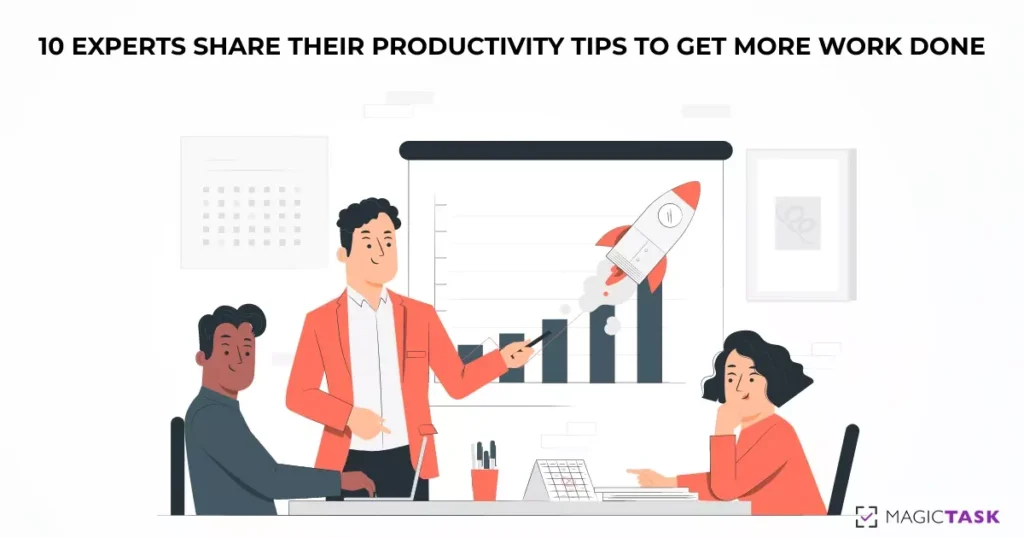

10 Experts Share Their Productivity Tips to Get More Work Done

Productivity Tips to Get More Work Done

If you google productivity tips, you’ll easily find a ton of articles and techniques. The last two decades have seen the rise of a lot of productivity techniques, apps, and even gadgets that promise to make you more productive.

CEOs and founders have often made the headlines talking about their techniques and lifestyle habits that help them be more productive.

We’ve also seen a rise in life coaches and productivity experts who help boost your productivity to a whole other level.

In this article, we explore 10 productivity tips from experts who’ve mastered the art and science of making the most of their workday.

1. Liz Sumner

Liz Sumner

Ask yourself what is it I need to Find Out, Decide, or Do

says Liz Sumner, a productivity coach specializing in helping women with transitions in their careers. According to her, most of our roadblocks to productivity are associated with these three steps: Find out, Decide, or Do. We either need more information to proceed, or we need to make a decision, or we have to do it.

Often when faced with a large amount of work, we don’t know how to get started and often end up procrastinating on them. We often don’t know how to just get started. According to Liz, we can overcome this by approaching the tasks with these actions.

First, find out what we need to know to finish the task. It’s not the best idea to get started without all the information since we may have to constantly stop and search for it.

Once you have all the information, make your decisions. In some situations, the task itself may be making a decision; if so, make the decision. If not, decide if you want to work on the task, or if you want to delegate it to someone, or do it at a later time.

Once you’ve made the decision, carry out the task, or move on to the next one on your list.

2. Lori Cheek

Lori Cheek

After running a small business for nearly five years, I've learned that the best way to get things done efficiently is to schedule everything

says Lori Cheek, founder and CEO of Cheekd, an online dating platform that wants to make missed connections a thing of the past.

If you’re someone who has worn way too many hats or is wearing them, you’ll know that it's very easy to simply forget what to do. You may miss deadlines, meetings and appointments, and other tasks that have to be done at or within a time. Even simply having too many things in your head can distract you and slow you down. This is the essence of the Getting Things Done or the GTD method.

But by using a schedule or a project management tool, you can reduce your cognitive load. You won’t have to worry about everything else and just focus on what you’re doing. With this, you’ll notice that you’re quicker at what you do, and as a bonus, you won’t miss out on or forget any tasks.

3. Jeff Stoller

Jeff Stoller

Focus on one thing at a time

According to Jeff Stoller, business executive, entrepreneur, and author, it's best to focus on one thing at a time even when you have a lot to do. He compares it to going to the gym; you may have a whole routine, but you do it one exercise or one workout at a time.

While many people may put multi-tasking on their resumes, the fact is that the human brain can’t handle many different things at the same time. We won’t have any focus at all, all the tasks will be trying to get our attention at the same time and essentially serve as a distraction.

Instead, try to approach one task at a time. Put all your energy and focus into it. Once that’s done, move on to the task and check off your entire list one after another.
4. Adam Daily

Write down one or two things that you absolutely need to get done.

And “make sure that at least one of them revolves around something that will put more money in your pocket,” says Adam Dailey, CEO of Funly Events.

When there are too many things for you to do, it may not be easy to prioritize all of them. You may have to move around a couple of things throughout the day, and it may be tough to choose which. By writing them down, you ensure that your two most important things are done by the end of the day. At the same time, you'll have the flexibility for other things that may come along.

Another aspect of this is that you’re forced to make choices that matter most to you every day. Instead of your day deciding it for you, you’re actively deciding which path you want to go down. This helps you decide where you want to reach and what you’re trying to achieve. Adam Dailey suggests you keep the piece of paper inside your pocket so that you are reminded of these tasks throughout the day.

5. Greg Rudolph

Greg Rudolph

Keep an "easy work" file

According to Greg Rudolph, CEO of Board Blazers, keeping an ‘easy work’ file ensures “you have a simple task ready to go whenever you find yourself with a few free minutes in your day. The idea is simple; every day you’ll have a list of large tasks. Once you start these tasks, it's best to complete them in a go as it will take time for you to focus back if you get disturbed.

But you’ll also have a lot of smaller often repetitive tasks as well. These tasks usually won't take too much time to complete or to focus back on even if you’re disturbed. When you start the day, have a list of these small tasks by your side. Every time you have to wait for something or you’re not able to carry out other tasks, tackle these small tasks. These tasks could be typing in paper records or paying your utility bills or any other task that won’t need much cognitive space.

6. Bill Fish

My biggest tip for productivity is to stay off of instant messaging platforms as much as possible.

says Bill Fish, founder and president of ReputationManagement.com. According to him, instant messaging platforms are like “someone standing behind you tapping you on the shoulder every five minutes, but you don't know when the next tap is going to be.”

Instant messaging platforms offer the convenience of reaching out to your colleagues the moment you need them. But it also places a responsibility or obligation for you to respond the moment you receive a message. This prevents you from reaching your peak productivity as you may be disturbed at any moment.

So it's best to use emails as much as possible. If not, treat instant communication platforms like emails – with no obligation to respond instantly. Build a culture among your teammates, so they know that you’ll respond when you’re free. Train your teammates to share all the details of the problem they want you to respond to, to reduce unnecessary back and forth.

7. Ann Herrmann-Nehdi

Ann Herrmann-Nehdi

Manage your brain instead of letting it manage you

This is what Ann Herrmann-Nehdi, CEO of Herrmann International and author of The Whole Brain Business Book has to say about being productive. The idea is to avoid creating distractions for yourself in the form of multitasking. Our brain can do one thing well at a time, but as we add more things, either they all take way too long, or the output quality suffers.

If there’s anything in your mind that’s not letting you focus, just add a reminder for it and then put all of your energy into the task at hand. It may be a good idea to do a brain dump before you sit down for work daily or at the end of the week. Add all the tasks or information in your head into a calendar or a project management system. Avoid at all costs the nagging feeling inside your head that tells you that you’ve forgotten to do something.

8. Laura MacLeod

Laura MacLeod

Be direct and clear with co-workers and supervisors.

According to Laura MacLeod, HR expert and founder of From the Inside Out Project, this can help you be more productive at your workplace. Clear communication is often an underrated aspect of peak productivity. When you know exactly what’s expected of you and you have all the information necessary to make that happen, it's easy for you to charge through your tasks.

The opposite is also true; when you are not sure about the outputs or are unable to access the necessary resources, you will be held back from your tasks.

To be your most productive self, make sure you have all the information you need for the tasks you’re doing that day. Build a culture of effective communication with your teammates. When you do receive the information, organize them together. Try to ensure you don’t have to look for information when you’re in the middle of something.

9. Nellie Akalp

Nellie Akalp

When I'm in the office and feeling drained or unmotivated, what helps me the most is to get outside of the building and take a short and brisk walk

Nellie Akalp, CEO of CorpNet.com says this is a “sort of a re-boot” that helps them ready to work again. Being at your best physical and mental health is crucial to get you to peak productivity. If you’re not feeling well, or if you’re burned out, you won’t be able to reach there.

Sitting all day in front of your PC is not the best way to be productive. Make sure you take a break every once in a while and step away from your work. Take a walk, drink some water, and if you’re hungry, have some food.

When you do step away from the table, make sure you’re still not thinking about it. Take a complete break, and then come back to your desk fully recharged.

10. Helene Segura

Helene Segura

Avoid "reminder dismiss syndrome," which is when those pesky reminders pop up while you're working on something else and you end up dismissing those nudges until that task has become another fire to put out.

This is what Helene Segura, author and speaker have to say about productivity. Many times we make the effort to set up reminders and alarms to make sure we get our tasks done. But when the alarm rings, we procrastinate.

While we cannot avoid this every time, it's going to take a serious hit on your productivity if you make it a habit. You’ll pile up your tasks until it becomes too big to handle. You’re also likely to miss deadlines and maybe even forget some of the tasks.

If you’re setting a reminder, use it as a tool to push yourself through to complete the tasks. Don’t push it off to another day.

Be More Productive With MagicTask

MagicTask is a state-of-the-art task management solution for individuals and organizations. The tool helps you collaborate efficiently and make sure that your tasks are completed on time.

Its gamified approach and exciting themes are designed to make you more productive. Check it out now; it's free to use.

How to Use Task Management Tools to Track Your Goals

Track your goals

A task management tool is one of the best ways to improve your product. Task management tools offer an efficient and streamlined way to organize your tasks and ensure you finish them on time. It helps users focus on their task and offer a bird's eye view of their projects and deadlines.

But being productive is much more than investing in a project management solution.

Being productive is about achieving your goals in the most efficient manner. Not every tool or technique will work for all of us, no matter how popular. You need to test them and track your goals to see if a particular method works for you. Here are a few ways to track your goals using a task management tool.

7 Ways to Use Task Management Tools to Track Your Goals

Tracking goals is not just making sure that you complete tasks before deadlines and tracking the time you take to achieve them. It's about setting goals and making sure the work you do daily is bringing you closer to them. It begins with figuring out your goals.

1. Set SMART goals

Often when you ask people what their goals are, they say, "I wanna make more money" or 'I want to get a promotion at my job. The problem with these goals is that they are easy to achieve but also, at the same time, impossible to achieve. In short, these goals are not well defined.

To achieve your dreams, you need to define them, and you need to build clear goals. And based on these goals, you need to define metrics that show how close you're to achieving these goals. This is where the idea of SMART goals comes.

SMART stands for Specific, Measurable, Achievable, Relevant, and Time-bound. When you define a goal, you need to be specific about what you're achieving instead of vague statements of where you want to be. For example, instead of saying you want to make more money, mention how much you want to make. Define your net worth or your monthly income goals. You should be able to tell if you've achieved it.

Set smart goals

Another aspect is that you should be able to measure your progress. If you're saying, "I want to be rich," you can claim to have achieved your goal any day. But if you mean that you want a network of one million dollars, you can measure where you are, where you want to be, and the gap between the two.

The third aspect is that it has to be achievable. This is a bit more tricky to measure. Imagine you're working as a computer programmer and have no experience playing soccer. If you set your goal to become a national player, you're setting yourself up for failure.

The fourth part is that it should be relevant. This is also a bit tricky, but the general idea is that your goals should be relevant to you. It should make sense for your life. If you're planning to start a family, it may not make sense for you to find a new job abroad in the next three months.

The last part of this is that your goals should be time-bound. There's no point in having goals you may achieve at some point in life. You need to define when you achieve your goals.

Instead of saying you want to own a home, say you want to own a home within two years. And define what kind of house you want, the size, the cost, the location, and other details.

2. Sort and arrange your tasks into projects

Most of the tasks are usually a part of a big project. The tasks are typically connected and may even be dependent on each other. So it won't make much sense to use a single task among these as a goal.

But by adding all related tasks under a project, you can have a better picture of your tasks. Imagine you're renovating your house. For this project, you can add tasks like sourcing the materials, allocating the budgets, find vendors under a single project.

You can also order them according to priority and link interdependent tasks. Once a task is completed or moved to the next stage, you can mark them in the task management tool. With this approach, you'll get clarity on the individual tasks and the status of the entire project. You can find the pending tasks and figure out what is holding you back. It will also allow you to plan the following actions and even delegate them to others if necessary.

In this situation, you can set goals and metrics for the entire project and then work on the same for the individual tasks.

3. Prioritize your tasks based on your long-term goals

Goals are not achieved in a single step; they're the cumulative results of projects and tasks performed daily. So to achieve your goals, you must align these tasks with these long-term goals.

For example, if you're planning to own a home, you'll have to save up for a long time (generally). To build up these savings, you'll need to create a source of income, research, and make sound investments every day. These small tasks add up over time to help you make enough savings to help afford a home.

So you must ensure that your tasks are connected with your goals. And you should prioritize these tasks based on which goals are important to you.

Picture that you want to get a promotion at your organization in two months and build a house in 3 years. You need to set tasks for both of these goals. When you decide what to do every day or week, you need to look at where you are with your goals. Based on this, you need to pick your tasks.

Some experts recommend that you make sure that you do at least two tasks a day that directly or indirectly generates an income for you. Similarly, you can set tasks for other goals as well.

4. Define your tasks well

It's not enough to define just the goals alone, but also the tasks. When you're adding different tasks in the task management tool, you should also ensure that you add all the relevant details.

The task should have detailed descriptions of what the deliverables or the output will look like. Without this, you may keep extending the scope of the task, and it will never be finished. It would be best if you had a clear idea of when a task is completed.

It should also have details like the due, the references, and resources for completing the task, as well as the following action to complete the job. Without a due date, you may keep rescheduling the tasks indefinitely.

You should also set clear metrics for each task. You should be able to tell what percent of a task is done.

If there's ambiguity in the definition of tasks, you may not be able to gauge how far along you're to reaching your goals. If the different stages are not defined, you won't be able to tell how many tasks are close to completion and how many are delayed.

5. Divide your tasks into small increments

Task list

When you create a single enormous task, it won't be easy to figure out what percent of the task is completed. For example, imagine you've set one of your tasks as migrating your organization's legacy infrastructure to the cloud. With this single large task, you can't tell how much of your work is done and how much you're left with.

This also makes it difficult for you to prioritize tasks. An enormous task may be 90% done, but since you don't know how much more work is left, you may keep prioritizing it even when other tasks are more urgent.

Keeping a large task as is also makes it difficult to delegate tasks. You may find that while other tasks have received updates, there are no changes on this one task, even after a long while.

In an ideal scenario, it's best to create tasks that take almost similar amounts of time and resources. But this may not often be very practical since all tasks are unique and depend on who handles them. In these situations, for enormous tasks, you can create an entire project and fill them with smaller tasks. For smaller tasks, you can add subtasks.

This makes it easier to approach large tasks and track their progress.

6. Check your progress regularly

To keep track of your goals, you should check your progress regularly on the task management tool you're using. To make the best use of the tool, you should be able to tell the status of your tasks from a glance at your task boards. You should be able to tell which ones are delayed, which ones you've delegated to someone else, and which tasks you need to focus on.

The task management tool should work for you; it should help you make fewer decisions and take up less cognitive space. You should use this as an extension of your brain or external storage. Once you've put your tasks on it, you shouldn't have to worry about them.

For this, you should regularly update the tasks on your task management tool. Whenever there's a change to a task, update it on your task management solution. Maybe there's new information, and you've assigned it to someone else, either way, make sure it's up on the system. If you're working with a team, ensure they regularly update the assigned tasks. It would help if you didn't have to follow up on them manually.

This approach let ensures that when you're looking at the progress, you're looking at the real and latest status of your tasks.

7. Use a gamified task management system

MagicTask dashboard

A gamified approach motivates you and your team to complete your tasks on time. With MagicTask, you can compete with your teammates or even with a global leaderboard on the tasks you've completed.

Leaders and project managers often implement gamification into their teams. But this may often take up more resources and time to set up and manage. With built-in gamification, you can motivate yourself and your team. And you can get more tasks done with fewer resources.

Task management tools are powerful – just let them work for you.

Task management tools are powerful assets for you to be more productive and efficient. They ensure that you do quality work within the deadlines. They're more than a to-do list; these tools help you collaborate better, manage multiple projects, and give you a bird's eye view of your existing tasks. But you have to let them work for you. You have to actively use them to benefit from them.

If you're looking for a powerful, gamified, and collaborative task management system, check out MagicTask. It has a seamless and user-friendly interface, comes with fun themes, and helps you easily track your goals. Check it out now; it's free to use.

7 Habits That Are Killing Your Productivity (and How to Fix Them)

Habits Killing Productivity and How to Fix Them

There’s nothing better than the satisfaction of a productive day. The dopamine rush is just pure bliss when you’ve finished all the tasks for the day, and all the deliverables are exactly how you imagined them to be. But many things in our day-to-day lives can prevent us from achieving the goals we set for ourselves.

Among these, the most common, and quite probably the biggest challenge is probably ourselves. Some of the habits that we’ve developed over the years can prevent us from achieving our true potential and hold us back from peak productivity.

Let’s have a look at a few of them and how we can overcome them.

1. Micromanaging

Micromanaging your team kills your productivity and your entire team’s. If you’re a micromanager, you know it's not easy to just let go and let your team do their job.

This habit often stems from perfectionism – you want things to be done in a certain way and to a certain standard. Or maybe you just don’t want to let go of your duties or don’t trust others to do your job as well as you did.

Micromanaging and not delegating your tasks can affect your team morale. It’s also likely that your team will develop a culture of relying on you to make every single decision. This will hamper your productivity even further.

How to stop micromanaging?

It’s not easy to unlearn micromanaging. One way to approach this would be to see delegating as one of your tasks. Picture training your team as one of your duties. When you delegate tasks, your team will learn more skills, and their confidence will grow. And by considering team building as one of your tasks or jobs, you’ll be able to let go.

2. Always using synchronous communication

Avoid team meetings

We’ve all heard this at least once “this meeting could have been an email.” But the fact is most people are used to just creating a meeting or calling someone any time they need to discuss something. While we cannot completely avoid meetings or calls, too many of them can kill your productivity.

Meetings and phone calls demand our complete attention. And it requires everyone to be available at the same time even if they’re busy with something else.

In general, we’re at our peak productivity when we’re in “the zone” – when our mind is occupied with the task at hand, and all our attention is on it. But if we get disturbed, it will take close to 30 minutes for us to reach this state.

How to handle this?

The solution? Switch to async communication. The idea is simple: if it can be an email, make it an email. Don’t expect the other person to respond to your messages earlier. Don’t just send a “hi” and wait for the other person to reply before asking your queries. Send all the information you wish to convey and let the other person reply on their own time.

And if you have to call or need a meeting, try to schedule it in advance.

3. Not spending enough time on yourself

While it may seem counter-intuitive, spending all your time working is not the best way to be productive. You need to spend time on yourself.

Often when you’re in the zone, you may find yourself doing hours of work without thinking about anything else. You may not notice that you’re getting hungry and forget to have your lunch or dinner on time. But while it may appear as if you’re powering through a lot of work, the quality of the end product will be affected soon enough.

The same applies even if you’re not getting enough sleep or rest throughout the day. You need to take a break when you’re not in your best mental or physical state. But if you don’t take a break when you’re not feeling great, you’re looking at possible burnout, and you may not be able to work for a few days.

Another aspect of this is that many people often find it difficult to say no to more work or responsibilities. With this approach, they’re setting themselves up for too much pressure, which will slow them down.

How to solve this?

To solve this, you have to listen to your body. If you have these habits, it may not be easy to get out of this, and you’ll have to actively work towards it. If you’re feeling hungry, don’t wait, just go have some food. If you’re too tired, take a power nap. And if you’re feeling too overwhelmed with work, take a day off. Soon, you’ll be able to tell what your body and mind need and ensure you’re constantly at peak energy levels.

4. Keeping your phone too close to your workspace

This is way too familiar for most people. Few people can resist the temptation of a notification tone. For most working professionals, their phones are attached to them almost 24/7. And every time our notifications go off, rarely can we resist checking it out and taking a stroll through all of our social media apps.

But we cannot completely switch off our phones or avoid them fully either. For most people, phones are part of their work life.

Distracted by phone while working

So how do we find a balance to this?

A possible solution stems from the principles of UI/UX design. When app designers don’t want us to do something — for example, cancel a subscription or close a pop-up ad — they make it difficult for us to do it. Maybe they may add a couple of additional steps to the process, or in the case of a pop-up ad, make the close button hard to hit with our fingers.

We can apply this same idea to detach ourselves from our phones. The easiest way to do this is to keep your phone a couple of feet away. Just make sure you can hear the phone’s notification sounds, but it's away enough that you'll have to walk towards it to pick it up. The additional few steps ensure we will only pick up the phone when necessary.

Android users can also use Focus Mode on their phones. In this mode, the phone will remind us how long we’ve been at work using a countdown timer. Every time we pick up the phone, it will essentially remind us to get back to work. And, of course, you won’t get any notifications. In iOS, a similar feature simply called ‘Focus’ is available.

5. Trying to multi-task

Once again, this may seem counterintuitive, but multitasking kills your productivity. In this case, multi-tasking is not handling four different tasks one after the other in four hours but rather trying to do four different tasks at the same time. For instance, trying to design a social media post while taking part in a meeting or trying to listen to a webinar while working on your budget.

It’s not impossible to multitask, but we’ll either be compromising on the quality of the work or the productivity. If we’re working on social media in the middle of a meeting, you'll zone out from the meeting. Or you'll find yourself staring at the screen without getting any work done.

multitasking

The best approach is to list tasks, prioritize them, and tackle them one after another.

You can also try the Pomodoro technique if you have too many tasks to handle. The technique is pretty straightforward – work for 25 minutes and then take a 5-minute break. Once you’ve done this four times, take a longer break for around 25 to 30 minutes.

With this technique, you’ll always be in your peak productive phase. Your mind will have enough rest, and you’ll be able to power through your tasks easily.

6. Using the wrong tools

Maybe you can cut down a tree with a pocket knife, but should you?

In many situations, people are unwilling to shift to a different tool, even when better tools are available. It may be the comfort of what they’re used to or not wanting to spend time learning a new tool when the existing one just works. In some cases, they just may not know that a better alternative is available to them.

Using the right tool can help you become more productive and get more tasks done in less time. It can also reduce your cognitive overload and make your tasks easier. With the advances in AI, many software solutions offer advanced automation. Automation can reduce the user’s workload significantly. And it does this without compromising the quality and offering consistent output.

Besides using the right tools for doing your tasks, you can also improve your productivity by using task management tools. Tools like MagicTask can help you organize and prioritize your tasks and make sure they are finished on time. You can get a bird’s eye view of your workflow and improve on any inefficiencies.

MagicTask dashboard

7. Spending too much time trying to optimize your productivity

There are way too many apps out there promising to keep track of your productivity and help you get more tasks done in a short time. You’ll also find YouTube tutorials, articles, research papers, and advice from life coaches on how you can be more productive. While these solutions work to a large extent, you don’t need all of them.

Too often, we get trapped in metrics and numbers while we try to become productive. And this means we may end up spending way too much time worrying about being productive and less time being productive.

To be productive, you don't have to invest in learning new techniques or setting up new apps and solutions. Just keep these ideas in your mind:

  • You work best when not disturbed.
  • You get more tasks done when you’re in the zone.
  • It’s easy to do tasks one after another instead of all at once.
  • Before sitting down to work, make sure you’re not hungry, are well rested, and feel good about the day.
  • Stick to asynchronous communication as much as possible.
  • You can also use a task management tool like MagicTask to keep track of everything.

If you’re spending time learning a new technique or tool, see if using it is helping you be more productive. Otherwise, just let it go.

Use a Task Management Tool, and Build Better Habits

Task management tools can help you power through your work efficiently. They help you easily get rid of habits that are holding you back. 

Check out MagicTask, a gamified task management tool for web and mobile that helps users boost productivity while maintaining a work-life balance through the use of gamification and hyper-simplicity, Try it out now for free.

GTD 101: The Complete Guide to Getting Things Done

Complete guide to getting things done

Having to face many tasks alone can be a massive roadblock to productivity. When there are too many things to do, we often find it difficult to get started and put them away.

Once we get started, our mind may drift to our list of things to do, trying to keep track of them.

The GTD or the Getting Things Done method is a solution that can help you get a handle on all the tasks and become more productive.

What is The GTD System?

The GTD, or Getting Things Done, is a productivity technique developed by David Allen. The method was published in 2001 in a book of the same name.

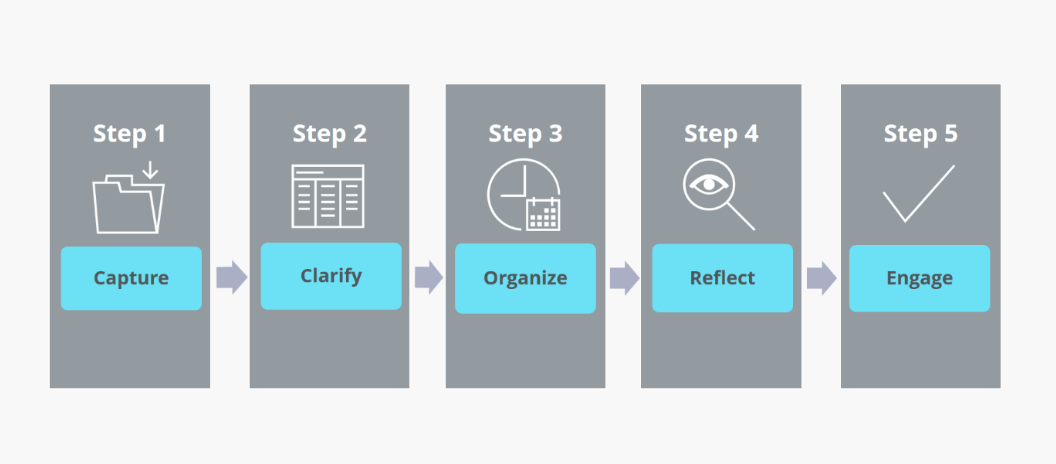
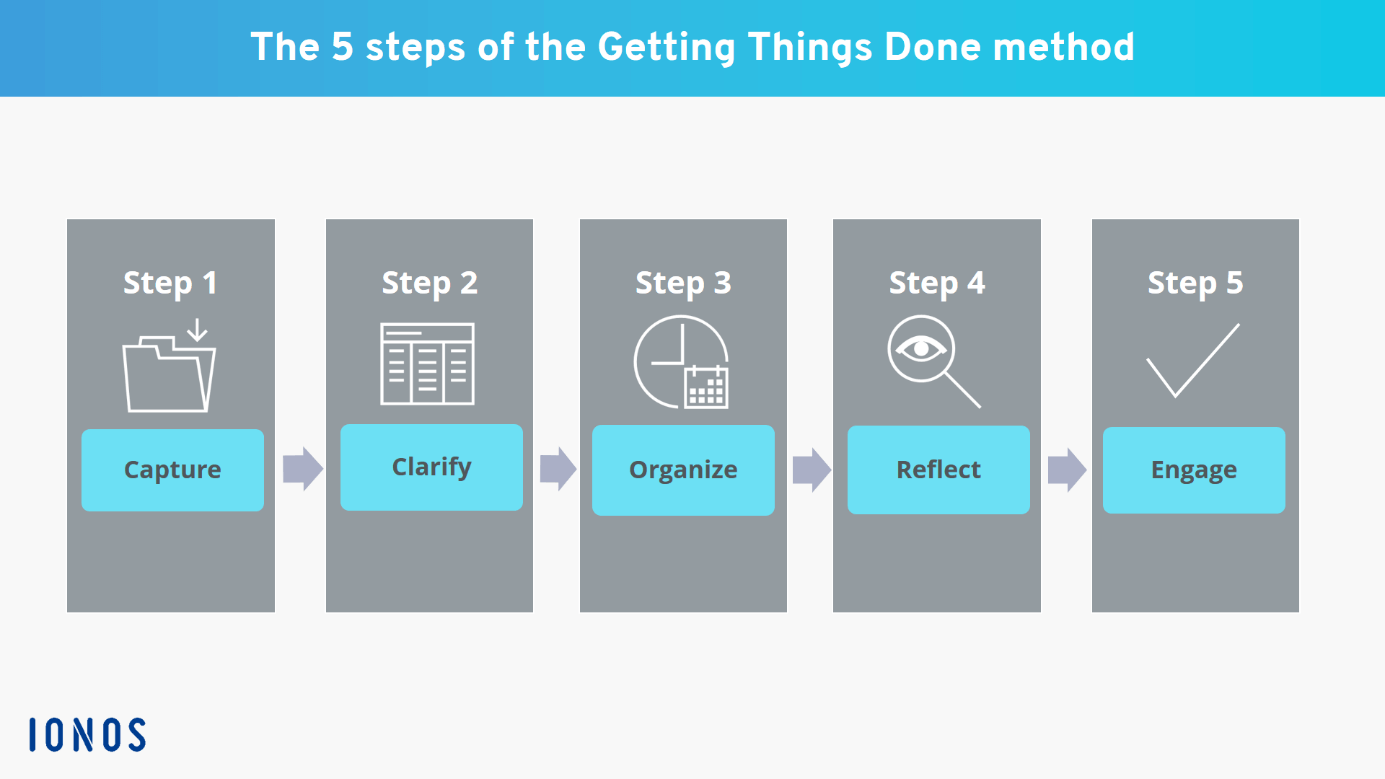
This method's workflow occurs in five phases – capture, clarify, organize, review, and engage. The central idea behind the technique is that our brain is not good at storing things, but it can process them well.

Even if we may not have put it into words, the concept is relatable for most. If we try to keep all the information related to our tasks in our heads, we will be disturbed by these thoughts. When juggling too many balls in the air, we won't be able to put our attention to any of these.

This method encourages practitioners to move the details of tasks from their minds to a notepad or an app. With this, they don't have to worry about or forget these things. Then they can put their energy into the task at hand.

Users are advised to plan out their entire set of tasks before they get started. Once they get started, they don't have to worry about moving things around or further planning when they're in the middle of something.

Benefits of The Getting Things Done System

person completes his task

Since its launch in 2001, the technique has been lauded in magazines and newspapers worldwide. Wired ran an article about the method in 2005, followed by another in 2007. Guardian interviewed David Allen in 2005 about the technique; in 2007, Time magazine called it the self-help business book of its time.

In a 2008 paper from the Free University of Brussels, the authors recommended the book saying that the recent insights into psychology and cognitive science support its ideas.

Here are some benefits the Getting Things Done method offers practitioners.

It helps you reduce your stress

When you have too many things to do, or you have too many things on your mind, you’re bound to be stressed out. Professionals who wear many hats at their jobs are likely to carry too much information in their heads.

And when you have too many things, constant alarm bells will be going in your head. These things will stress you out and drain your energy.

The GTD method helps users offload some of this information and responsibilities from their heads. It helps practitioners reduce their cognitive overload and so their stress.

It ensures that you don’t forget your tasks

We cannot rely on our brains to remember every one of our tasks and responsibilities. And in some cases, we shouldn’t, when the stakes are too high. Our brains can store information about our tasks for a day or two. But beyond that things, keeping these things will take up too much cognitive space, and they’ll start slipping out of our minds.

The GTD system empowers you to use technology and tools to complete your tasks on time. It encourages users to use reminders and project management tools and makes sure that we don’t miss our deadlines.

Improved productivity

Our minds work best when it's organized without clutter and when we have the task at hand to focus on. As we add more things to our minds, we reserve energy for them, and the work we’re handling becomes slower. This is why it's not a good idea to multi-task; you can’t write an article at the same time in an online meeting. Nor can you prepare dinner while planning the family budget.

The Getting Things Done method helps you plan out your entire day or week before you even get started on your work. It ensures that you have enough time for all your tasks. And it helps you get more things done in a short while since you’ll have more energy to work with.

It empowers you to focus on the task at hand

GTD helps you get into the zone and put all your energy into what you’re doing at the moment.

We’re at our peak productivity when we have an uninterrupted stress-free time to work. But we can’t reach this space when too many things are in our heads.

The Getting Things Done method helps individuals remove things that are taking up their cognitive space from their heads. It helps individuals prioritize the tasks at hand. It allows them to forget about things that don’t need their immediate attention.

Better management of time

Most people usually approach a typical workday in a straightforward one-task-after-another approach. There’s not much planning involved here. Often the planning happens throughout the day as they approach the different tasks.

The Getting Things Done approach encourages practitioners to plan out their entire day before they get started. By taking the time to plan their activities, practitioners can head straight through the tasks.

The approach also advises the users to decide the course of action and expected outcome right at the planning stage. This way, they don’t have to worry about how to do something, they have to do it.

And, of course, it helps you Get Things Done

The Gettings Things Done method is all about helping you go through your workday in the least stress-free and most productive manner. And it does the job well.

How Does GTD System Work?

The technique has two elements to it: the control processes and the perspective. The control process is the workflow, and its goal is to clear the mind of anything that doesn’t need immediate attention. It dictates how users can approach the different tasks and finish them off.

The Getting Things Done approach works in a bottom-up approach. Instead of looking at the big picture first, the method encourages practitioners to clear the little things first.

The perspective part is more about life as a whole and is about looking at the bigger picture.

Here, the clarity you’ve gained by finishing the smaller individual tasks is used to look at things from the top.

The method suggests users do a weekly review to gain this clarity by looking at six “horizons of focus.” they are:

  • Horizon 5: Life
  • Horizon 4: Long-term visions
  • Horizon 3: 1–2 year goals
  • Horizon 2: Areas of focus and accountability
  • Horizon 1: Current projects
  • Ground: Current actions

By looking at this big picture, users should be able to decide which aspects of their life or which projects should get their attention.

What Are the 5 Steps of the GTD System?

The control process or the workflow of the GTD system is made of these five steps.

5 steps of GTD system

Source: IONOS

1. Capture

This is the first phase in the Getting Things Done system. Here you create an inbox, and you add all the thoughts in your head. Your inbox can be a notepad, an app, or anywhere you can write it down.

At this point, you write down all the thoughts in your head. This includes an idea for decorating your room, a call you need to make, phone numbers, a shopping list, and a prompt for a poem you want to write. about anything that pops up in your head goes into this list.

It’s important to keep in mind that this is not the phase where you organize. You don’t try to organize things when you add them to your inbox, you drop them in and forget about them.

And when you’re starting to use this method, you may have to sit down for a while and think about everything in your head that may need action. In GTD terminology, these are called ‘open loops’ – they keep circling in your head, and you need to close them. But once you’ve started doing this for a while, you can just drop these things into your inbox as and when it pops up in your head.

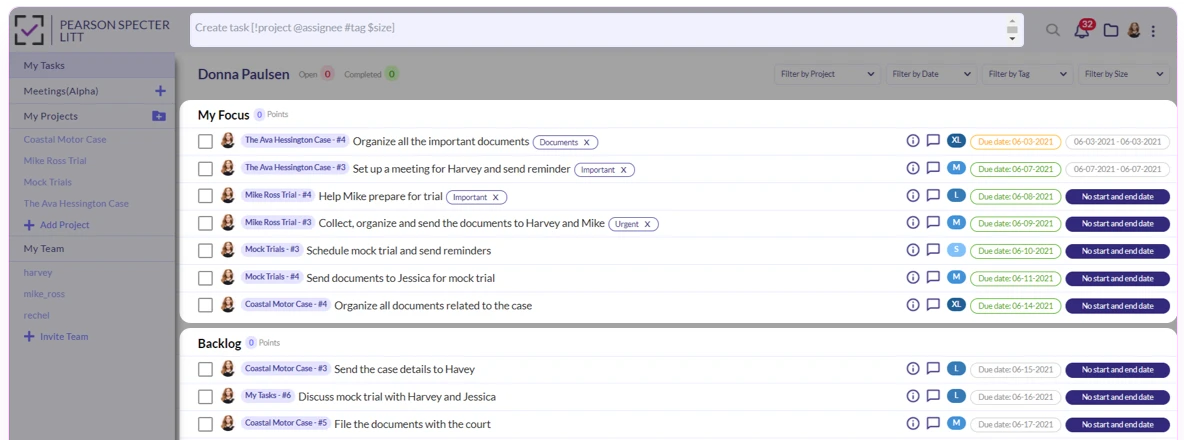
Pro tip: Instead of writing it down in your head, we suggest you capture (put) all your tasks in the MagicTask system. Later on, you can separate them into focus and backlog according to priority.

MagicTask my tasks

2. Clarify

This is where you make decisions about the things in your hand. Go through every item in your inbox.

If it's not actionable and

  • there’s nothing you can do about the item or if it's not relevant anymore, delete it
  • not something to be done, but rather a reference item – for example, a marketing brief or an email, attach it to the relevant project, task, or document.

If it's not actionable at the moment or doesn’t have a due date,

  • add it to a someday/maybe list

If it's actionable, write down the next step to be done and

  • If it can be done in 2 minutes or less, do it right away.
  • If someone else can do it, delegate it to them.
  • If it has to be done by a certain due date, add a reminder to your calendar.

3. Organize

In many references, you may find clarify and organize shown as a single step, and you may be handling it in practice. But the method advises practitioners to at least keep in mind that these are two distinct actions. Either way, at the end of the organization, all the items that weren’t trashed must be on lists or calendars.

These lists are

Next action lists

They’re the list of things that you have to do; they don’t have to be done at a particular time or within the due date. This works more or less like a to-do list. The GTD method advises users to create lists for different locations or contexts, like things to do at home, at work, and at the grocery store.

Project lists

These are action items that are part of a project or a list of more than two tasks. Every time you have an item that takes more than one step, start a new project. You can use project management tools like MagicTask for this. Of course, you can set up your project management tools according to your preferences.

Calendar

Obviously,  this is where you add projects that have to be done at a later date.

Waiting for lists

This is for all the things you’re waiting on from other people. It could be the invoices from your vendors you’re waiting for, the finished designs for your website you’re yet to receive, and others. This is the list of tasks you can’t do without input from other people.

Someday/maybe, list

These are things that don’t need your immediate attention; the things you can do when you’re free. These could music and movie recommendations, redecorating your workspace, and similar items.

4. Reflect

This phase may not be relevant when you start, but you need this from the next day or week onwards. This is where you reflect on the list of tasks you have to do, the things you got done, and what you need to focus on the next day or week.

Users can use the horizons of focus discussed earlier in this phase to prioritize their tasks.

5. Engage

This is where you do the tasks in your lists. Once you’ve captured, clarified, organized, and reflected on your tasks, it will be easier for you to get started and go through them. You’ll have a lot fewer decisions to make, and you can just power through them.

Try the GTD system and Get Things Done

GTD is a powerful tool for getting things done. It helps individuals get clarity on their tasks and focus on what’s important to them. And it helps reduce stress for users.

If you’re looking for a great tool to implement GTD, check out MagicTask for free.

The Pomodoro Technique: Time Management Method You Should Try

The Pomodoro Technique

Organizations and researchers have been exploring productivity techniques for a long time. In fact, a significant part of management research is associated with empowering employees and workers to be their most productive selves.

While the techniques have evolved and improved over time, research suggests that there is still a lot of room for improvement. According to many sources, an average employee is only productive for around two to three hours in a typical 8-hour workday.

The Pomodoro technique is an approach lauded by productivity gurus all over the world. In this blog post, we explore this technique and its benefits.

What is Pomodoro Technique?

The Pomodoro technique is personal time management or productivity technique developed in the late 1980s.

Francesco Cirillo, an Italian university student developed it to help him focus on his course and studies. And the name Pomodoro — the Italian word for tomato — came from the tomato-shaped kitchen timer he was using to set his intervals.

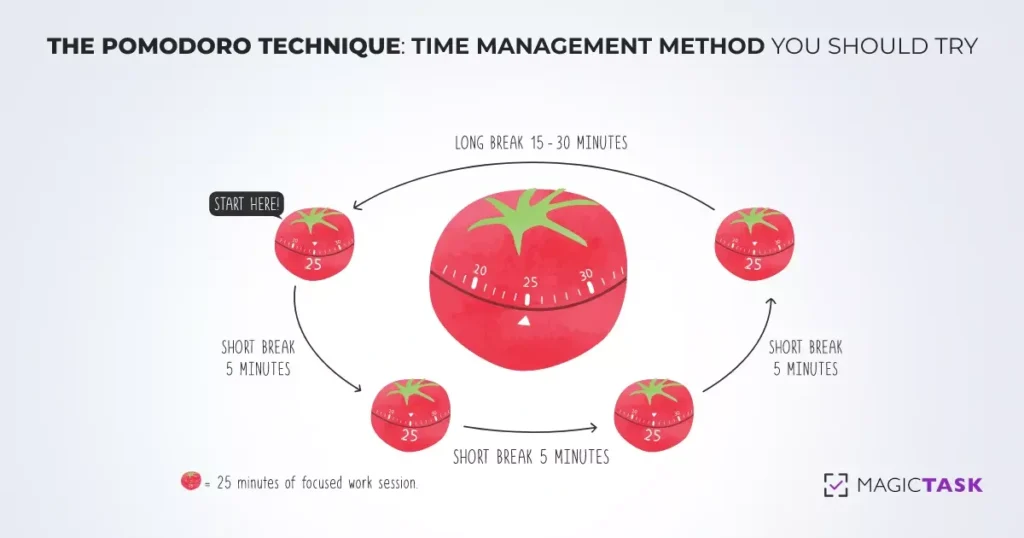
In this technique, every 30-minute interval is termed a Pomodoro. Practitioners of the technique work for 25 minutes, followed by a 5-minute break. After every 4 Pomodoros, they take a longer 25 to 30-minute break.

The technique has grown in popularity over the years. Cirillo even released a book about it titled “The Pomodoro Technique: The Life-Changing Time-Management System.”

Cirillo has suggested practitioners use a simple kitchen timer and a pen-and-pencil approach. But over the years, many productivity apps have evolved around this technique allowing users to set timers and stick to their schedules. Even then, the low-tech approach can help train our brains over time. Setting the timer and listening to the alarm bells can train our brains to enter a flow state or to be in the zone with these stimuli.

Besides helping you become more productive, the Pomodoro technique also helps us learn our capabilities. By working in strict intervals, we gain a better understanding of how much time it will take us to do a task. And in the long run, it will help us plan the day better and finish our tasks on time.

The technique finds success because it appreciates the limitations of our brains and minds. It realizes that it is simply impossible or severely draining for a person to be engaged for a long time in an activity that needs a lot of focus.

If we sit down to work straight for 2 hours, odds are our minds will start to wander around the 45 min mark (or less). But by taking appropriate breaks, we’ll be productive for 100 minutes(ideally) out of the 120 minutes.

How to Use The Pomodoro Technique?

The technique is fairly easy to understand and use. But it may take a while for you to perfect it and reap the benefits.

Here’s how you use it.

  1. Create a list of tasks
  2. Set a timer for 25 minutes and start working
  3. Once the timer rings, mark off the tasks you’ve done
  4. Set the timer for 5 minutes and take a break
  5. Once the break is over, go back to step two.
  6. Repeat these steps four times (for a total of 2 hours).
  7. After you’ve done these four times, take a break for 30 minutes.

Let’s dive deep into these individual steps:

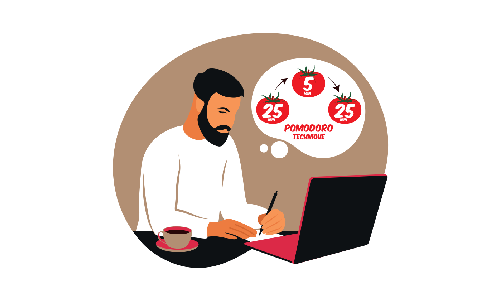
Man Using Pomodoro Technique

1. Creating a list of tasks

Make sure you create tasks to work on for at least two hours. Each session is about being productive as well as training your brain to work in this pattern. So you mustn’t be sitting idle after completing your work or taking a break earlier. You need to keep your mind focused during this period.

As we mentioned before, it may take a while for you to gauge accurately how much work you can perform in a given time. But when you’re just getting started, you can just err on the side of caution and add more tasks to your list.

2. Set a timer for 25 minutes and start working

Once you start working, you must be focused only on the tasks on your list. It’s very important that you’re not disrupted by emails or Slack messages, or app notifications.

It’s also important that you’re occupied with these tasks until the end of these 25 minutes. Because of this, it may be a good idea to split your list of tasks into ones that will take a lot of time and ones that can be done in a jiffy. For example, you can make a list of tasks like preparing the budget, evaluating employee performance, and finishing an article. And in a separate list, you can add things like checking your email or following up with your colleagues.

In this way, if you finish a task before 25 minutes but don’t have the time for another huge task, you can check off the tasks in the second list.

3. Once the timer goes off, mark the tasks you’ve finished.

The moment the timer goes off, drop what you’re doing. Make sure that you clearly note how much work you were able to do in 25 minutes. This will help you become better at planning your tasks.

4. Set the timer for 5 minutes and take a break.

During this period, you need to log off completely from your work. Step away from the table and don’t think about work at all. Take a walk, drink some water, and completely recharge. If you’d like, take a power nap. Whatever you do, make sure you’re completely separate from your work. Your body and mind need to completely understand the triggers. Ideally, you shouldn’t even be in front of your desk or even in your room.

While not an ideal situation, the consensus is that if you face an unavoidable interruption during your 25 minutes of work, it's best to take a break then. And start again once you’ve solved the issue.

5. Once the break is over, go back to step two

As soon as the five-minute break is over, set the timer again and start working for another 25 minutes. Once again, you mustn’t delay the return once the five minutes are over.

6. Repeat these steps four times (for a total of 2 hours)

Every 30-minute interval is considered a Pomodoro. The first 25 minutes of this are spent working followed by 5 minutes of break. To be at your most productive self, you’re advised to have a single session of four Pomodoros or a total time of 2 hours.

7. After you’ve done these four times, take a break for 30 minutes.

After 4 Pomodoros, take a break for around 25 to 30 minutes. Just like the five-minute breaks, make sure you completely disassociate from work during this period as well. But of course, this doesn’t mean you have to sit idle.

It may be a good idea to engage in tasks that are not associated with your work. If you’re writing a novel, go take a walk or water your plants. If you’re designing a house, maybe go do the dishes or the laundry.

Why Pomodoro Technique is So Effective?

The virtues of the Pomodoro technique have been lauded by CEOs, managers, and business owners globally. Practitioners claim that the technique helps them manage their time more effectively. So why is the technique so effective? Let’s explore.

Pomodoro Technique

It helps you avoid the fear of large tasks

When faced with large tasks — maybe writing a huge novel or calculating the salary for 2000 employees — we are often afraid to get started. We take one look at it and start putting it off.

The Pomodoro technique helps us approach large tasks in smaller segments. Instead of working for 6 hours straight, it helps us focus just on the next 25 minutes. The technique helps us get started.

It helps you learn and understand yourself and use it to your advantage

We’re often unaware of our capabilities. We don’t know how much it may take for us to finish a task. Sure we may know that we sit in front of the laptop for 7 hours to write an article or search for clients, but we rarely know how much of that time we’re working. This makes it difficult for us to plan our day efficiently.

The Pomodoro technique encourages us to take note of how much time or how many Pomodoros it took for us to complete a task. And over time, this helps us gauge our capabilities, plan better, and become more productive.

It puts you in the productive zone

The Pomodoro technique puts you in that focused mode where you’re least distracted by anything else. It gives you more freedom to be not distracted.

Normally when you’re working, and you get a message from a colleague, you may have to respond to that message as soon as possible. This makes you distracted, and it may take you a while to get back into the zone. But with the Pomodoro technique, you know that you’ll soon be available to look at the messages and hence can ignore them when you’re working. It helps you remain in your productive mode with the least distractions.

It uses rewards as motivation

The five-minute break at the end of every 25 minutes acts as a reward. This motivates you to power through your tasks. It works like positive reinforcement training rewarding you for a task done. And soon, it will help you get started and finish your tasks on time.

It helps you trigger peak productivity

The actions of a human brain can be pictured as responses to stimuli. When the sunlight hits your eyes, you realize that it's time to wake up, when your brain perceives a threat, it triggers a flight or fight response. While some of these responses are innate, the rest are learned. And you can train your brain to act in a certain way in response to a trigger. For example, if you ring a bell before you feed your dog, the dog will start salivating every time it hears the bell.

Similarly, the Pomodoro time management technique essentially trains your brain. It teaches your brain to go into the most productive mode when you set the timer. And it trains your brain to relax when you hear the time timer go off. It trains your brain to become productive when you sit down to work.

Final Words

The Pomodoro technique is proven to help individuals power through their tasks. But while you can get started with the recommended intervals, you should find a time interval that works well for you.

How to Use MagicTask to Organize Work and Life

Use MagicTask to Organize Work and Life

Task management is not easy. The years of effort organizations across the world have put into developing efficient strategies is proof of this.

We’ve all been in situations when we sat in front of our PCs and didn’t know where to start. And then we look at the list of things we need to do, and our immediate reaction is to just panic.

But these efforts have been fruitful, and we now have a pretty good understanding of how we can complete them and deliver on time.

Companies have also come up with many technological solutions that help individuals handle their tasks on time – both at work and at home. And Magic Task is one of those solutions that do this well. It helps teams and individuals complete their tasks effectively and collaborate with their team members on different projects.

Let’s have a look at how you can use MagicTask to be more efficient and organized.

7 Easy Ways to Keep Work and Life Organized With MagicTask!

1. Set Up Recurring Tasks

If you have a lot of recurring tasks, it's not a good idea to rely on your memory to complete those. Too many tasks increase your cognitive load and affect the quality of your work. When there are too many things around you, it's easy to forget any of them.

It’s not easy to keep track of recurring tasks like monthly reviews, paying your bills, and daily workout schedules without any tools. The trouble with recurring tasks is that not all tasks happen at the same intervals of time. And setting individual reminders every time you need to do them can get tiring pretty quickly.

MagicTask simplifies this. Rather than recreating tasks each time after it finishes, you can just set up recurring tasks, and it will send you regular reminders about them. This feature will help you keep your mind at ease and ensure that you complete your responsibilities on time.

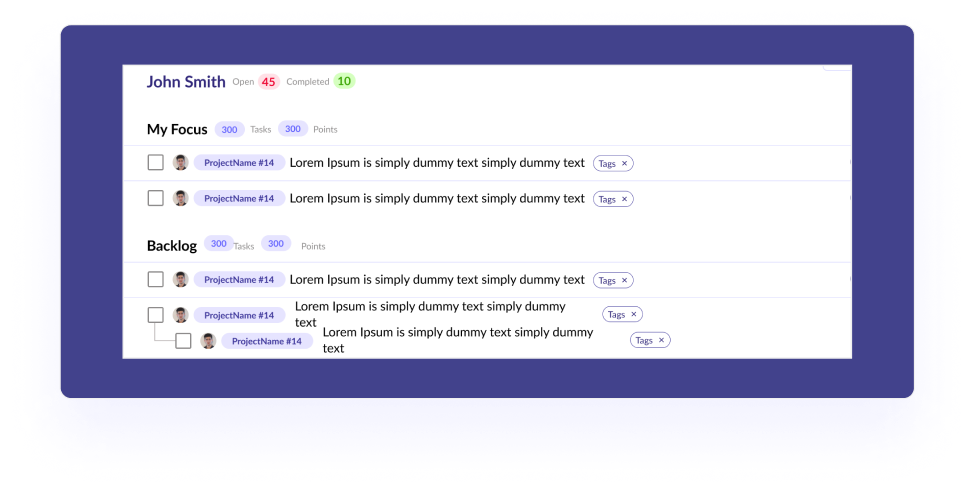
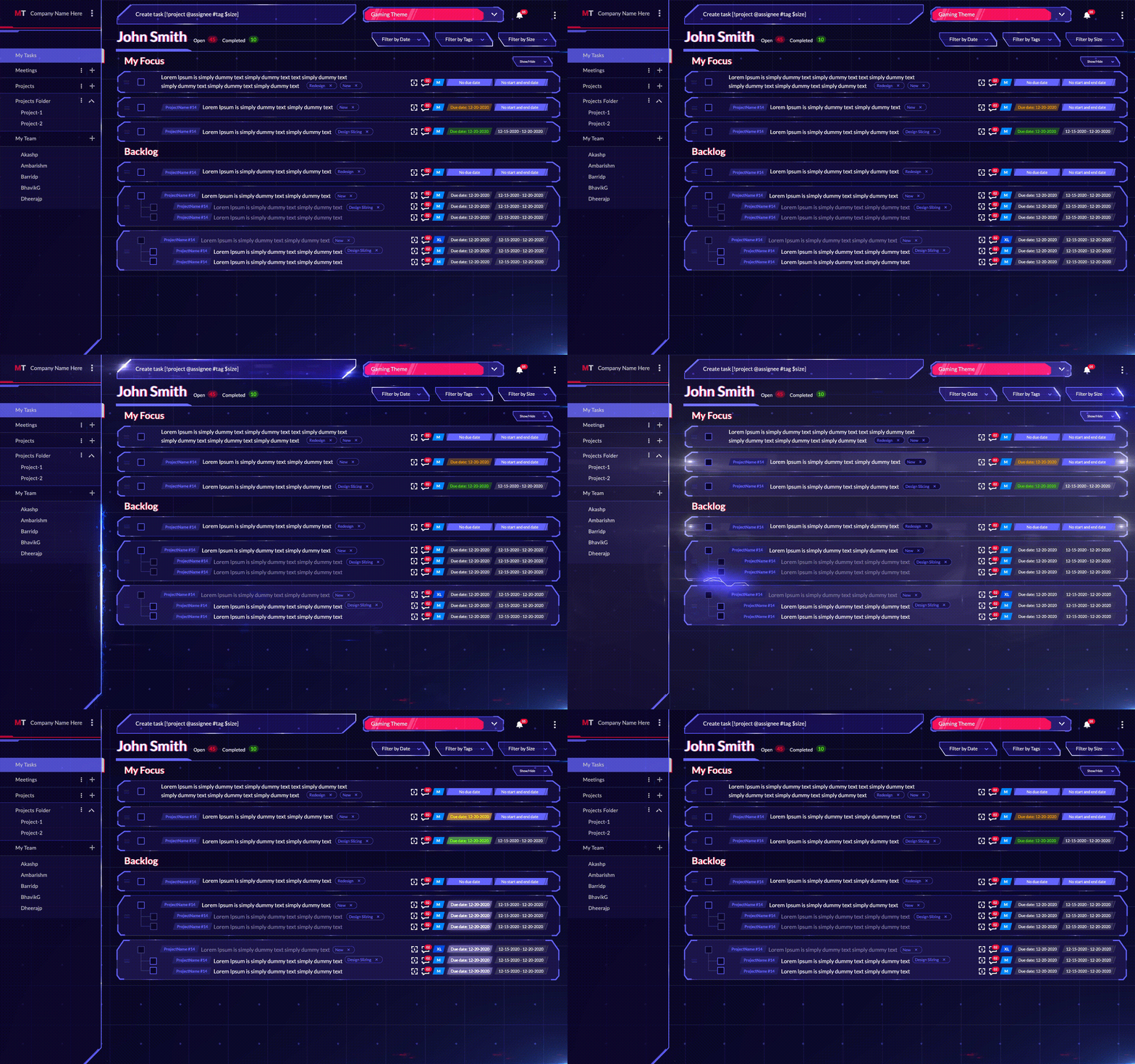
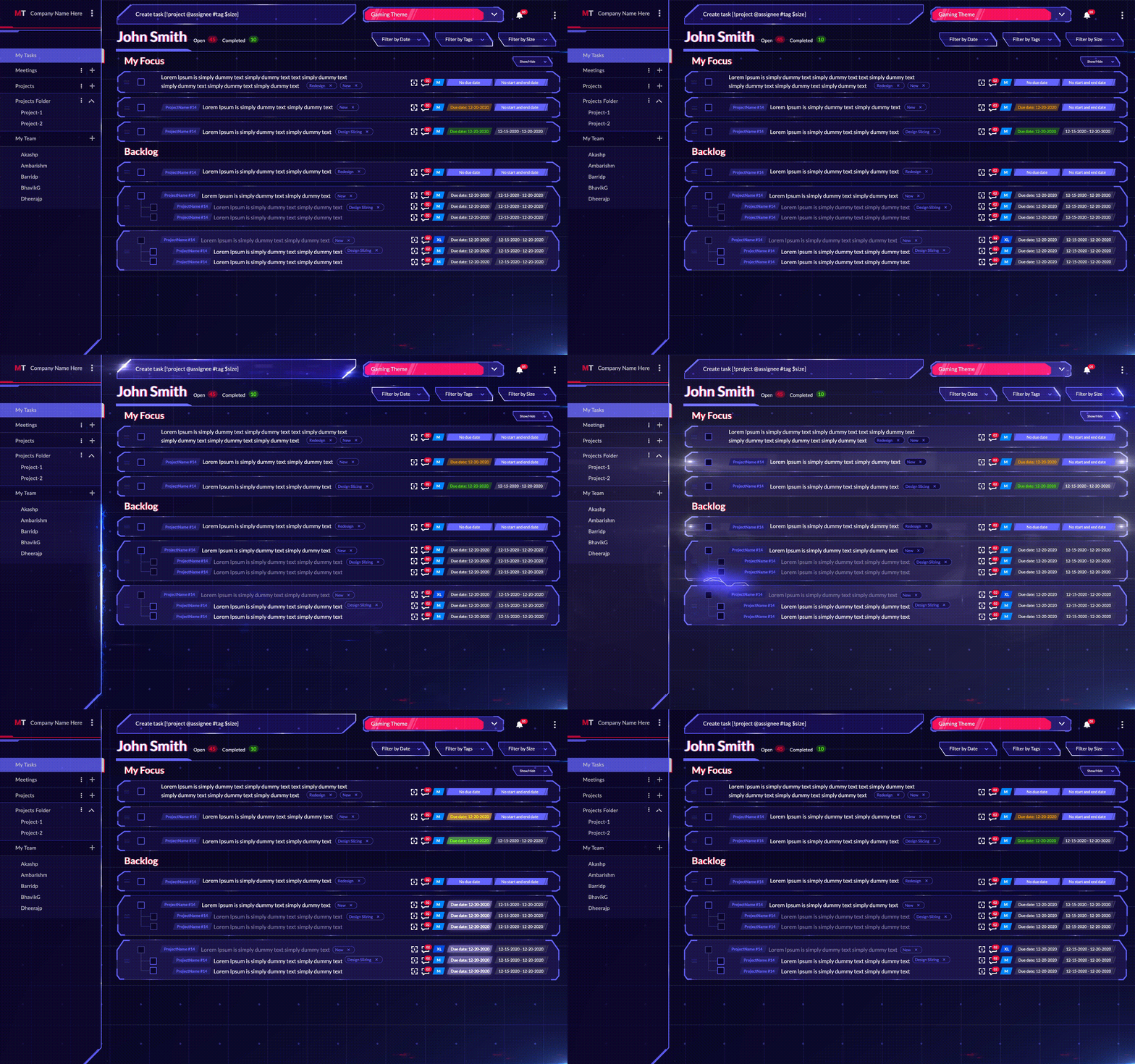
2. Use 'My Focus' and 'Backlog' Tasks to Organize

MagicTask Dashboard

When you have a lot of tasks to complete, and you’re keeping them all in your head, odds are they look like bits of paper just floating around with notes on them. To make sure you do them all on time, you need to straighten them out and make sense of it.

When you’re working on a complex project or just doing your day-to-day tasks, you can simplify the whole thing by breaking them down into smaller tasks and prioritizing them. You can arrange them from various smaller tasks to complete bigger tasks or based on their importance.

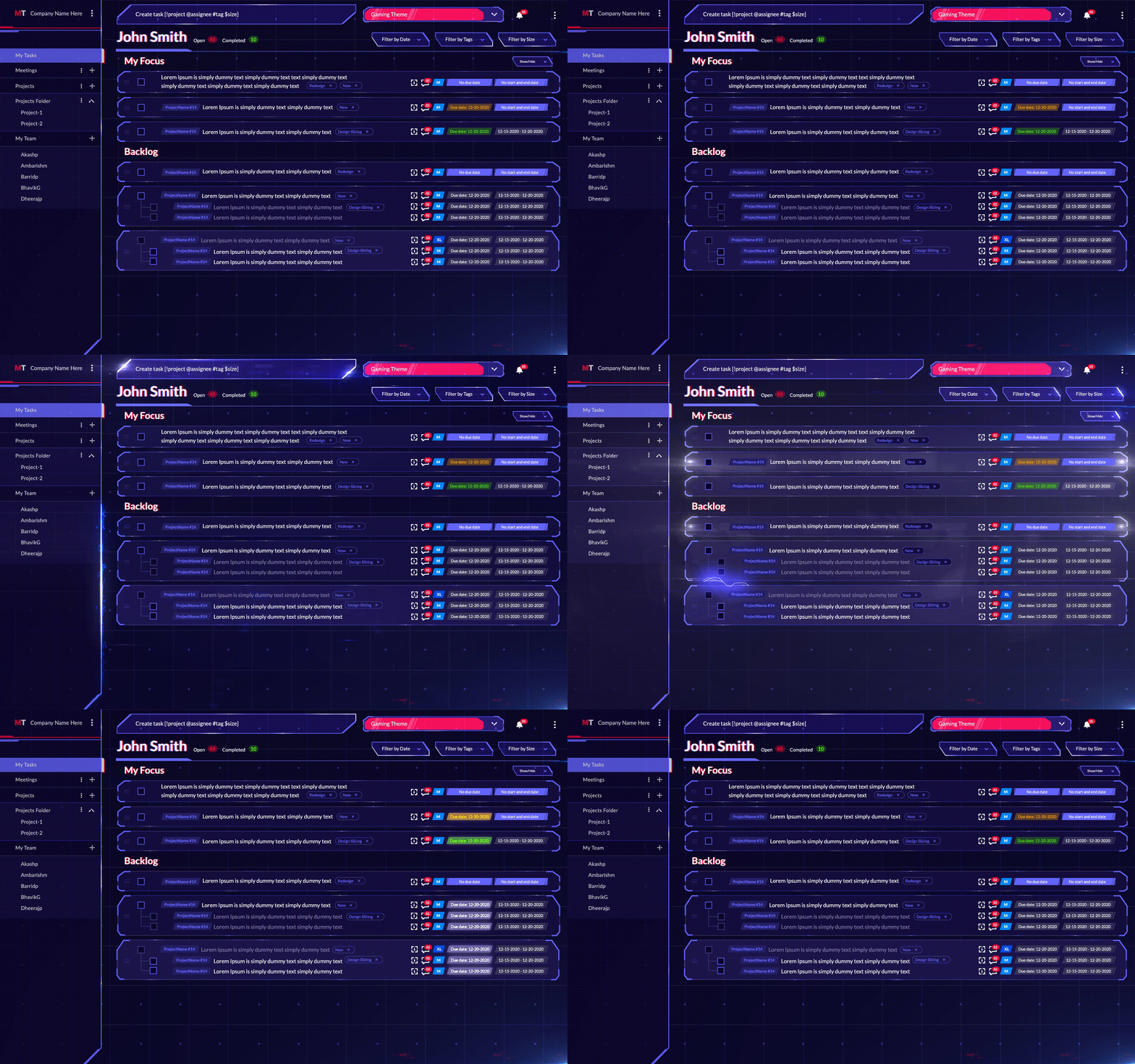
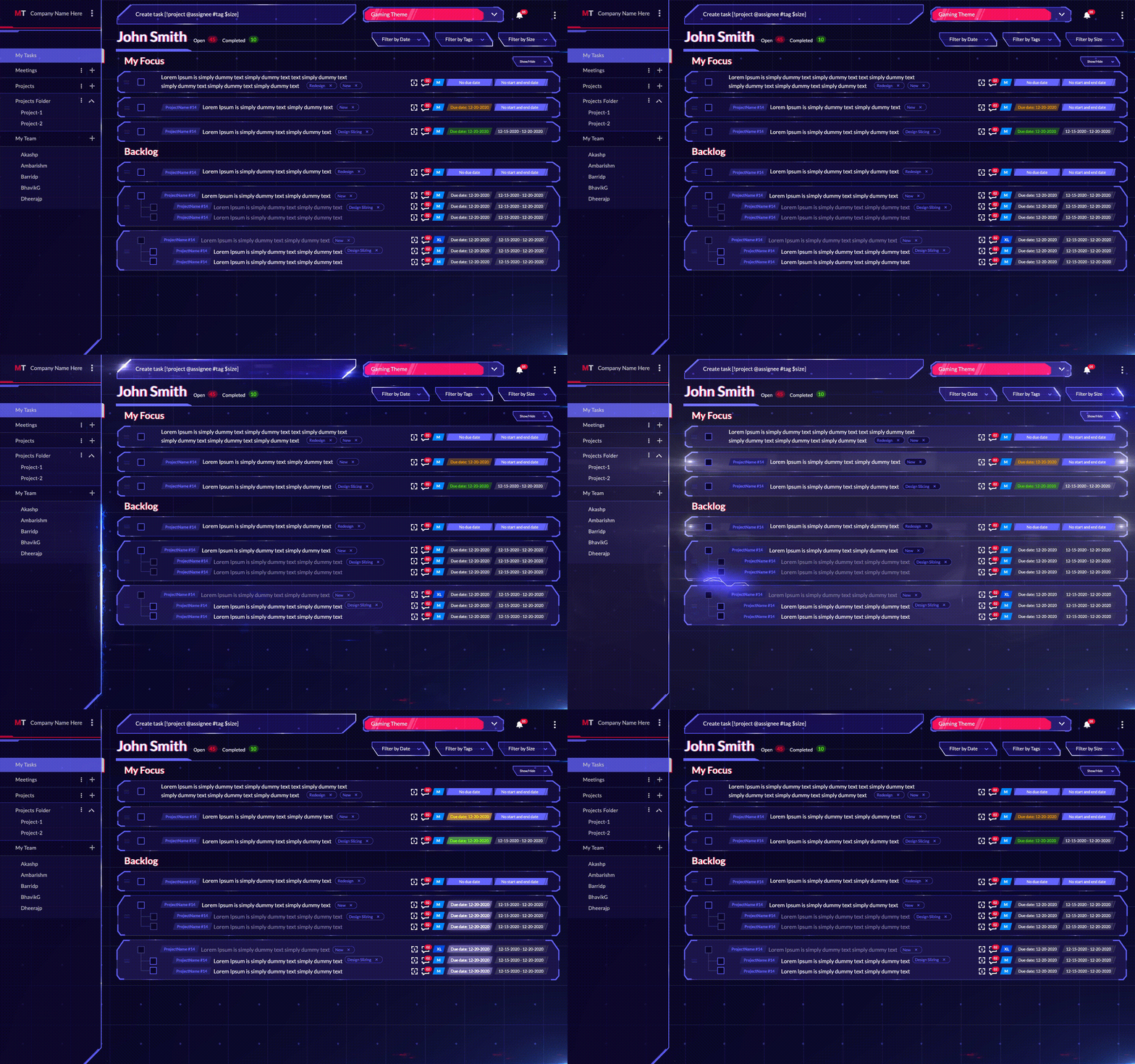
And with MagicTask, you can do this easily. You can assign importance or priorities to tasks, and when completed, you can check them off. You can drag the tasks that need your immediate focus to the My focus section. It will help you and your team identify the most important task and finish them quickly.

For example, if you have 8 tasks and you need to complete three of them today, just them to the My Focus section. This lets you and your team understand the priorities easily and reduces miscommunication.

MagicTasks also have a backlog section which acts more or less like a to-do list. Here you can add the tasks which don’t require your immediate attention and can be done as and when you’re free.

For example, you may have to reply to your emails, water your plants, or do the laundry. Backlog helps you keep track of these small tasks that don’t have a defined deadline.

3. Assign Tasks to Family Members or Team Members

This is a useful feature when you need your family or team members to do some tasks for you. It’s as simple as creating a task and clicking your team member's name next to it.

MagicTask offers a streamlined method to deliver all the information related to the task with this feature. When you assign a task, they’ll get a notification, and they can visit the board to get all the information they want, such as deadlines, deliverables, and others. If they have any questions or need additional information, they can just leave a comment.

This is a great way to communicate each member's role and responsibilities. Whether it is your family or a work team, everyone knows what they’re supposed to do, which reduces unnecessary back and forth. It won’t be easy to communicate task-related information if you’re working remotely or are in different time zones. MagicTask makes this easy, reduces the risk of miscommunication among team members, and prevents delays.

Also Read: Why is Delegating Tasks Important and How to Do It Effectively?

4. Create Projects/Workspaces for Different Uses

MagicTask is a lot more than a to-do list. It helps you organize your tasks based on priority, deadlines, and status, and helps you collaborate easily with others. And one way of doing this is to organize your tasks into different projects or workspaces.

Workspaces act more or less like different workplaces. For example, if you’re working with two different teams, you can create two different workspaces and make sure all the tasks remain separate. You can then invite your team members to their respective workspaces and assign them the tasks. This makes sure that everyone gets a complete picture of their project, even if they’re not working on all the tasks. Workspaces also let other team members assign tasks to each other.

Projects, as the name suggests, are used to bring all the tasks for a project under a single umbrella. They act pretty much like whiteboards at your office. You can create different projects when your team is working on multiple projects and sort your tasks accordingly. This helps teams understand how their task connect to the projects and makes it easy to collaborate.

Even if you are not working together, it’s still helpful to differentiate tasks between your work and your personal life. It will help you keep track of the tasks and stay focused when completing them.

5. Create Subtasks for the Main Tasks

Tasks and Subtasks

Sometimes you may have to divide a single task into multiple smaller tasks. For example, if you need to publish an article, you’ll need to write the content, design the graphics, and optimize it for SEO. Or if you need to cook dinner, you may have to assign different family members to buy groceries and chop the vegetables before you’re free to start cooking.

Here you can create one large task and create smaller subtasks on your MagicTask workspace. This makes it easy to understand what all have to be performed before a task can be completed. And it makes the work more transparent.

The process can also easily improve productivity. When faced with a large task, your team members may find it difficult to get started. But by divvying them up into smaller tasks, it will be much easier to face them and check them off.

6. Themes and Gamification

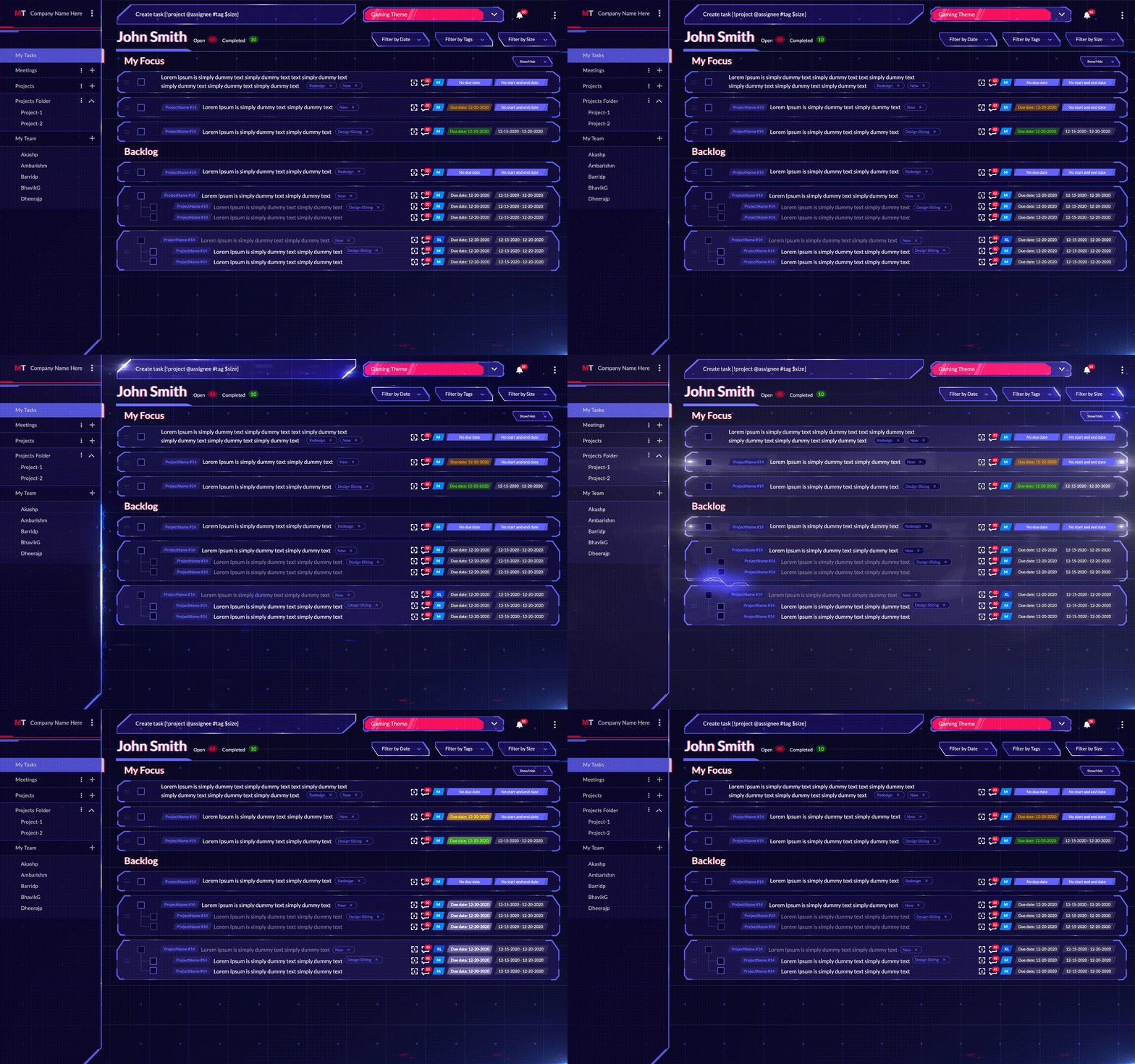
MagicTask is a platform developed by gamers for gamers. Its unique gamified approach makes it fun and engaging to use. But these features are not limited to just gamers. Anyone looking to organize and manage their life or work will find these useful.

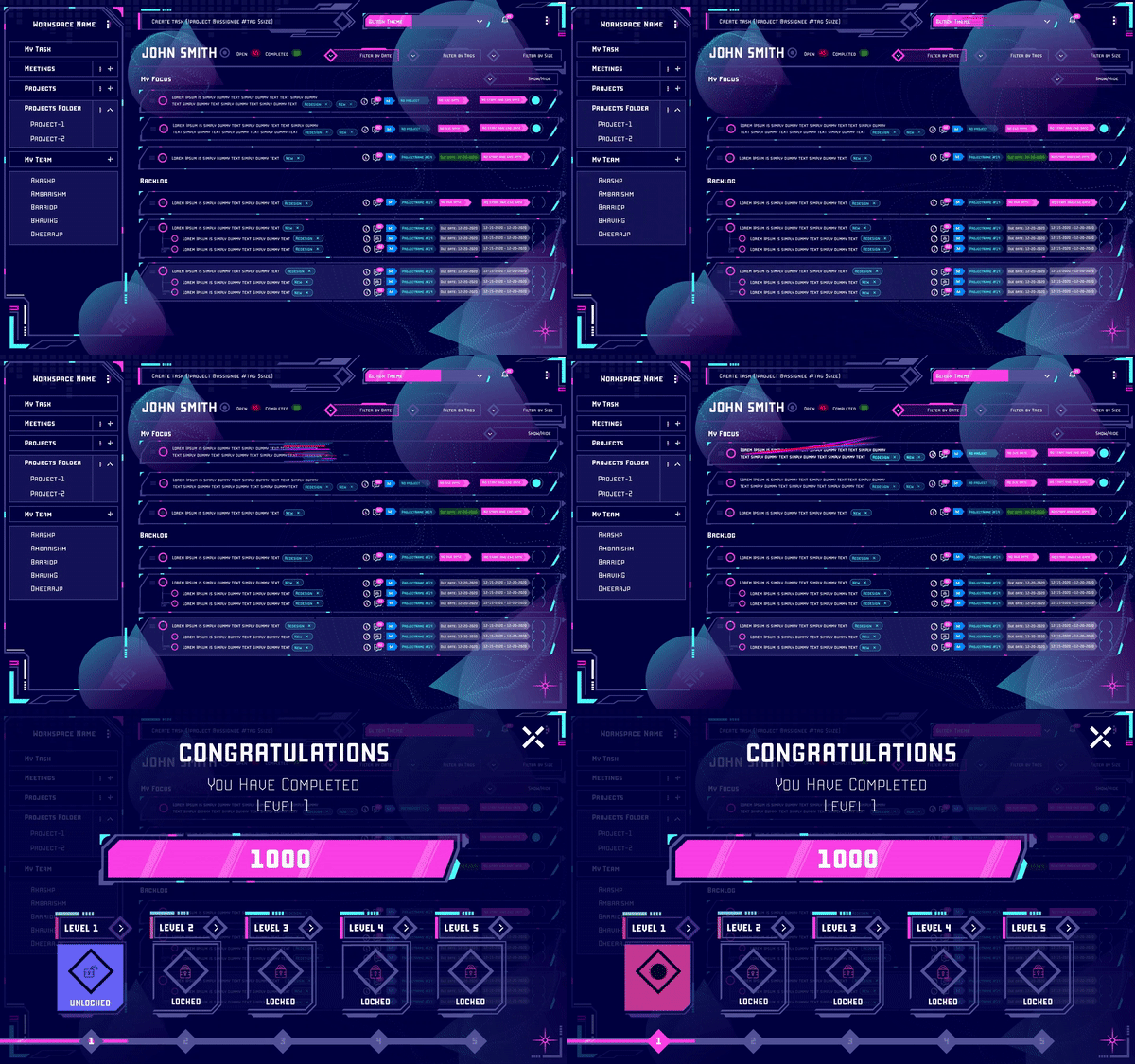
To use different themes, you can just head to the themes tab and make a purchase. You’ll notice that all the themes you have purchased are available there. And you can easily switch between these themes to set your productivity in the right channel.

All of these themes have unique interfaces, animations, and even sound effects to make them more engaging, exciting, and personal. As you use MagicTask more often, you get points with which you can level up the themes in your collection. Every time you level up, you can access more animations and sounds. The inbuilt gamification within the platform makes work and task management more exciting.

Theme Levels

Besides leveling up with use, MagicTask also lets you compete with your team in your workspace. It lets you collect points and see where you rank among your colleagues, adding friendly competition to your workplace.

These themes and games make otherwise boring task management more fun and enjoyable for the team and reduce stress for them. Many organizations often invest significantly to bring gamification into their workplace. With MagicTask, businesses don’t have to look for third-party solutions.

7. Reminders and Notifications to Improve Task Management

Managing a project or a workplace is not just assigning tasks and waiting for the deliverables. It's about following up regularly, making sure your teammates are on track and that they have all the information they need. And for this, you need to be on top of every activity in your workspace. This is where reminders and notification becomes useful.

When your team member needs more information, or if they mark a task as completed, you need to take the next steps. One must be on the lookout for progress and problems and respond as soon as one can. With this upcoming feature, the app will send you a notification and an email when a team member comments on your task.

This feature will also update you about task progress and alert your teammates about due dates and comments.

Try Out MagicTask – It’s Free, and You’ll Love it

MagicTask is completely built from scratch based on years of research and user feedback. The solution makes task management simple and efficient – both for your work and personal life. It helps you organize your tasks into easily manageable sections. And it helps your team collaborate efficiently.

The gamification and themes make your experience more colorful and exciting. It helps make your team more competitive and productive.

And the best part? MagicTask is free to use. Take it for a spin, and take your productivity to another level.

8 Effective Ways to Make the Most of Your Workday

Make the Most of Your Workday

Most studies indicate that across all industries employees are productive for less than 60% of their working hours. In a typical 8-hour 5 day work week, this means organizations lose out on around 2 days of work in a week per employee. And it is proof that there’s a lot of room for improvement in how we tackle our workdays.

Experts and researchers have been exploring ways to improve productivity for a long time. In this article, we will explore a couple of techniques that have been proven to help you make the most of your workday.

Becoming more productive is more about learning habits and less about learning hard rules. Here are 8 strategies you can make as a part of your work day to get the most out of it.

1. Start the day well

This may seem simple enough and we may have all heard it way too many times. And we know it's true; we know what a well-rested morning can boost our productivity and how a sleepless night can ruin it. So before you sit in front of your desk, make sure you’re charged up for the day ahead. Make sure you’re full of energy, and that you have everything you need right in front of you.

Make sure that you get a full 8 hours of sleep every day to wake up refreshed. It may be a good idea to get a couple of minutes of workout before you begin your day.

Studies have shown that workday exercises make you better at time management by 72% and help you complete your tasks for the day.

Start your work day

It’s also important to have a healthy breakfast before you get started on your day. If you commute daily for work, this may be more difficult but at the same, it makes it even more important. Without proper nutrition, you’re likely to feel tired at work, get headaches, and be unable to focus.

And before you sit down, keep a bottle of water next to you and check if you need anything else for the task ahead. There’s nothing more distracting (and annoying) than having to get up three or four times to get something you forgot.

Start the day well, and ace it.

2. Get the most of your day by moving around

You cannot go through your entire workday sitting in front of your desk. And you shouldn’t. Our jobs often demand that we sit in front of our workstations to get our tasks done. So it may seem a bit counterintuitive to suggest that we move around to improve our productivity. But the fact is, our minds can only focus for so long, and if we don’t take enough breaks, we will be distracted.

Productivity experts often use the Pomodoro technique to complete the tasks for the day. The technique emphasizes the importance of taking breaks. The followers of the technique work on a task for exactly 25 minutes and then take a 5-minute break. After 4 cycles of this, they take a longer 15 to 30 minute break.

The technique makes sure that you’re in the ‘zone’ when you’re working with zero distractions. The breaks help you take care of the distractions and put all your energy into the work when you’re back. While 25 minutes is the prescribed duration, it's best to find a frequency that works for you.

It may also be a good idea to invest in a standing desk. Besides affecting your productivity, sitting for a long time puts you at an increased risk of lifestyle diseases. You can also set timers on your phone so that you take a walk every now and then and step away from the desk. Short walks can help you stay alert, focused, and energetic throughout the day.

3. Make sure you’re physically well

Becoming your most productive self may be a mental exercise but you also need to be physically fit and comfortable. There’s a reason why some Chess Grandmasters load up on carbs before competitive matches and actually lose weight during.

If you’re not comfortable, if you’re feeling hungry, or if you’re sweating, it will be a distraction for you. Make sure your workspace is comfortable for you and that you spend time taking care of yourself. When engrossed in urgent or important work, when you’re in the ‘zone,’ it’s easy to lose track of your time. We often forget to eat or drink water until we’re done with the work or we get a bad headache.

Skipping meals may seem to be improving productivity in the short run, but you’ll become tired or worse later in the day. If this happens a lot to you, it may be a good idea to set reminders and make sure you have enough food and water on time.

Being a place we spend a lot of time at, it’s a good idea to invest in your workspace. Make sure that your screen is at the right height and that you’re not stretching your neck to see clearly. Invest in a keyboard that supports your wrists and helps you type comfortably. And make sure you have a comfortable chair, preferably with lumbar support.

4. Do one thing at a time and do it well

Focus on one thing at a time

While multitasking may be necessary for some situations, it is rarely efficient. It’s best to stick to one task and finish it before moving on to the next. Switching between tasks usually makes you less efficient at all of them. When you move from one task to another, it takes almost 25 minutes to focus on the new one.

Before you set out to do your tasks, prioritize them, and tackle them one after another.

It’s also important to minimize distractions during your workday. Before you sit down for a task, check your messages, your emails, and other notifications.

A good technique would be to make it difficult for you to engage with your distractions. For example, if you get distracted by notifications from your phone, keep the phone on silent, and keep it 10 feet away from you. Since you’ll have to walk over to get your phone, you’re less likely to check your notifications. If you’re using Teams or Slack, set your notifications so that only the important ones alert you.

If you’re working in an office environment, try not to get distracted by your colleagues when you’re in the middle of something. Wearing headphones will signal your colleagues that you don’t want to be disturbed.

As for headphones, for some music can help focus, while for others it can be distracting. If it's distracting, listening to white noise may be a good option to explore.

5. Plan the day before you start the day

Before you start your day, make a list of everything you have to do. Make sure that you have enough time for all of them and then order them according to their priority. Having a plan is similar to setting targets for yourself. As you go through the day, it will help you keep track of your progress and make sure you can complete them on time.

If you’re not completing the tasks on time, it could mean you need to pick up the pace. A plan helps you set the pace for yourself.

When you set the plan, make sure that you’re not overextending yourself and that you leave enough room to take breaks. Leave enough time for you to have food and walk around a bit. And ensure there’s enough flexibility in the plan for any emergencies. Every once in a while you may have to take up a few extra tasks, but it's best if this doesn’t become a pattern. When you don’t get enough time to work on a task, the quality suffers.

It will not be easy to create a plan that works exactly as you designed it. But over time you’ll understand your own performance and get better at it. And you’ll be able to make better use of every workday.

6. Take help – prioritize and delegate tasks

delegate tasks

Sometimes the best way to get your tasks done is to ask someone else to do them. The saying goes “there’s cheap, fast, and good, and you get to pick two of them.” And if you want something done quickly and well, you need to get more people on it.

Delegating the tasks helps you focus on the important ones; it helps you see the big picture. For example, if you’re working on a mobile app, a single person can’t handle the UI design, front end, and back end for it. Even if they could, it will either take a lot of time, or it won’t be good. But by delegating the different tasks, you’ll get the entire project done on time and well.

Delegating tasks also improves communication among your team and helps build a better team. The team learns more skills and becomes more empowered.

7. Stick to asynchronous communication

Communication with colleague

Getting constant calls and taps on your shoulder while working can kill your productivity more than anything. And asynchronous communication is the solution for that. The idea with async communication is that you reduce the number of calls and meetings as much as possible. And instead, you use messaging tools and email for communication.

Getting on a call means two people have to be available at the same time and if they’re in the middle of something they have to drop it. And if it's a meeting with more than two people, it means all of those people need to be available at the same time. Or they have to drop whatever they’re doing to be on the call.

This means all the team members will lose their productivity. And if your team members expect you to immediately respond to their messages, you’ll be interrupted every few minutes.

With async, you can effectively manage your time and stick to your schedule.

8. Use the right tools

It was Abraham Lincoln who said, “if I have five minutes to chop down a tree, I’ll spend the first three sharpening the axe.” This is one of the best principles you can keep in mind to get the most out of your day.

Whatever the task at hand, make sure you have the best tools to do them. And spend the time to learn them. Once you’ve mastered the right tools, you’ll be able to do the tasks much more easily. And many digital workplace tools often offer advanced automation solutions which can help you get more done in a short time.

You can also use task management tools like MagicTask. These tools help you visualize the tasks, prioritize and delegate them, and make sure they are completed on time.

MagicTask Dashboard

Invest in productivity, and make the most of your workday

Invest in the right tools and the right hardware, and invest in yourself to get the most out of your workday. With the right approach, you can save a lot of time, finish more tasks, and get the maximum out of your work day.

25+ Amazing Productivity Statistics and Trends for 2022

Productivity Statistics and Trends

From an employer's perspective, employee productivity is one of the biggest contributors to company profits. Every minute an employee is not working at their peak productivity, it costs the organization.

Because of this, most organizations make significant investments to improve employee productivity. Many organizations offer their employees mental health programs and the latest productivity tools and invest in creating the most productive environments for them.

Improved productivity results in faster deliveries, higher profits, and improved customer retention. and improved employee morale.

Here are 25+ productivity statistics that reiterate why employers should care about it and the key challenges to improving it. Some of these statistics also showcase employee perspectives on productivity and how organizations can work with it.

State of Employee Productivity

The last two years have seen a lot of changes in how and where employees work. The COVID-19 pandemic has brought about a dramatic shift in many companies’ operational styles. And as the pandemic appears to be over in many countries around the globe, organizations are building new modes of operation.

  • 75% of global organizations are planning to invest in technology to improve productivity.
  • 86% of employees prefer to work alone to be most productive compared to 27% that preferred an open office environment. (Source)
  • Six out of ten workers felt more productive working from home than they expected it to be. (Source)

Many are considering new models of work, such as a 4-day work week and easing back into the office. Many organizations are also considering a hybrid model of work, hoping to gap the bridge between employees when working remotely. And to cope with these changes, organizations are investing in tools for improved communication and productivity.

  • Productivity has improved by more than 61.8% from 1979 to 2020. (Source)
  • The top-performing professionals are almost 8 times more productive than the average professional. (Source)
  • The average worker works at the office for around 8 hours but is only productive for around 3 hours. (Source)
  • Employees spend 32% of their time at work on social media. (Source)

Employee Productivity

Over the years, we have seen the average employee becoming more productive. But there’s still a huge gap between the top-performing workers and the average employee.

This showcases that there is room for improvement and that the average employee still spends a lot of time not being productive.

In fact, the average employee spends close to 60% of the time at the office not working. Social media continues to be a major contributor to employee distractions at the workplace.

  • Being physically unwell or under stress can reduce employee productivity by around 77%. (Source)

Employers have understood the correlation between employee well-being and productivity. Many organizations invest in mental health programs and gym packages for their employees. They encourage their teams to take time off as required and be their most productive selves at the workplace.

Many employers offer subscriptions to apps for meditation and workouts and even buy fitness trackers for their employees.

When shifting to remote work, some organizations offered packages for employees to build a home office. They encouraged employees to get the best hardware for their workspaces and asked them to get comfortable desks and chairs to build a productive environment in their homes.

Employee Engagement Statistics

The last year has seen the emergence of the Great Resignation and ‘quite quitting.’ Employees are actively disengaging from their workplaces and often being just present.

Many employees felt they were not being adequately compensated or that they were not being valued. And this made them do just the bare minimum at work, instead of the traditionally seen “going over and beyond for the company” attitude.

  • 15% of employees are actively disengaged at work, up from 14% in 2020. (Source)
  • Only 21% of employees are actively engaged at work (Source)

And employers are losing out on profits because of this. Disengaged employees are costing employers to the tune of hundreds of billions of dollars globally every year. Globally only a very small portion of workers is actively engaged at work.

  • A disengaged employee costs the company annually around 34% of its salary. (Source)
  • Disengaged employees cost companies close to $500bn a year. (Source)

When an employee is actively pursuing organizational goals and putting their energy towards them, it helps the company reach its goals easily. Engaged employees are more productive and make the organization more profitable. Businesses with highly engaged employees are more likely to succeed than those without. They’re also proven to improve customer ratings and sales.

  • A highly engaged workforce improves company profits by 21% and employee productivity by 17%. (Source)
  • The businesses with the highest employee engagement are 2 to 5 times more likely to succeed than those with the lowest engagement rates. (Source)
  • According to Harvard Business Review, 71% of business executives considered employee engagement as an important factor for business success. (Source)
  • Employee engagement improves sales by around 18% and customer ratings by around 10%. (Source)
  • An engaged force is 41% less likely to be absent from work and improves profitability by 23%. (Source)

Organizations need to invest more in solutions and initiatives that improve employee engagement. And researches and surveys have shown that instead of pizza parties or happy hours, employees value organizations that provide more regular benefits and better working conditions.

They value organizations that help them learn more and where they could best utilize their talents. Organizations can look into better benefits, improved communication within the organization, and other initiatives to empower and motivate employees.

When employees put more into their work, they demand more from their organizations – be that in the form of promotions or raises. Companies that recognize this and actively motivate their employees showcase high engagement and productivity.

Productivity Challenges and Its Solutions

Productivity Challenges

Often the biggest challenge to productivity is often the environment. In many organizations, employees don’t have the right tools to do their jobs. Inefficient tools and lack of information slow down the employees and reduce their productivity.

  • Employees spend almost 1.8 hours every day looking for information. (Source)
  • Employees spend a total of 321 minutes at work looking at both their personal and work email. (Source)

In fact, an average employee spends a significant part of their day looking for information. This can be information related to the task at hand, or it could be information about the organization. Simply by making this information available, organizations can improve employee productivity.

For example, if you’re using a project management tool to assign tasks, ensure that every you include all the information they may need to perform that. This includes details regarding the deliverables, due dates, who they can work with, and other information.

  • Executives often spend 23 hours a week in meetings. (Source)
  • 34% of professionals in the US felt that poorly organized meetings are the biggest cost to their organization. (Source)
  • Being interrupted at work costs workers up to 6 hours a day. (Source)

In a survey conducted by Slack, 69% of respondents said they were more productive when working asynchronously.

A common refrain that we hear in almost all organizations is, “this meeting could have been an email.” While meetings are necessary, we can all agree that we’ve all been in one too many unnecessary meetings. They take up time and energy and require everyone to be available at the same time. And it seriously brings down productivity.

  • A 2022 study showed that 81% of employees felt more productive when they had flexibility over their working hours. (Source)

With a lot of organizations working remotely, the number of meetings has gone up significantly. And many organizations and productivity experts have been promoting async communication. The general idea of async communication is that if a meeting can be an email, make sure that it is. This allows employees and organizations more control over their time.

  • According to McKinsey, automation solutions improve productivity by 0.8% to 1.4% annually. (Source)

Companies can also explore automation tools to improve employee productivity. Particularly in software development, IT, and project management, there are plenty of tools that can automate various tasks.

This will let employees focus on more important tasks without affecting the quality of the deliverables.

WFH and Remote Work Statistics

Work from Home

While there were companies that were completely remote even before the pandemic, COVID-19 made it absolutely necessary in many industries. And it completely changed the working environment for many professionals, quite possibly for years to come.

Changes during the pandemic revealed opportunities for improvement – some necessary, some for convenience – for both employees and employers. Many organizations are planning to extend these changes or completely rebuild their organizational culture around them.

  • 16% of companies in the world are currently completely remote.
  • 25% of all workers in the US are expected to be remote by end of 2023. (Source)
  • 90% of employees claimed they were as productive from their homes as they were from the office, if not more. (Source)
  • 55% of workers felt they spend more hours at work when remote. (Source)

Most studies and surveys show that employees were more productive working from home than they were at the office. There were fewer distractions, fewer people interrupting your work, fewer impromptu meetings, and therefore more time to focus on the task at hand. It also meant you could plan your breaks. But this is also often correlated with poor work-life balance when working remotely. Employees often reported being unable to disconnect from work.

  • 70% of remote workers said it was difficult to be a part of the conversation during meetings. (Source)

The most commonly heard difficulty with the shift to remote work was the difficulty in communication. Team members often found it difficult to be on the same page when remote. Many organizations invested in better communication tools to improve this situation. And as mentioned earlier, many trained themselves in async communication.

  • Almost 50% of the workforce would take a 5% pay cut to work part-time. (Source)
  • At least 55% of the workforce wants to work from home at least three days a week. (Source)
  • 70% of the workforce would consider forfeiting benefits like health insurance or PTO to maintain a remote work model. (Source)

This may be why most companies offer a hybrid work model for their employees. Employees get the benefits of working from home and can sync up with their teammates when they’re at the office. That said, a significant number of roles in the US are expected to be completely remote by the end of 2023.

As long as organizations invest in the right tech and empower their employees, productivity should remain at its peak, even when working in a remote or hybrid model.

Productivity is Profitable, but We Have to Work for It

Better productivity delivers better results in better time. From an organization’s perspective, improved productivity leads to better profits, better sales, and improved customer satisfaction. For an individual, it means they can focus on more important tasks and can find more value in their time.

But to be at their most productive selves, organizations must create the best environment for their employees. They must create an environment that motivates and encourages employees to engage more. And individuals have to invest in themselves; they have to figure out what works for them, what empowers them to focus more and use those techniques.

10 Best Todoist Alternatives Worth Considering In 2022

Best Todoist Alternatives

Todoist is a great task management app that has been around for a while. But there are plenty of other options out there.

In this blog post, we’re going to talk about the 10 best Todoist alternatives that are just as good as and often considerably better than the titular app.

Without further ado, let's dive in. 

Why Do You Need a Todoist Alternative?

First things first, in case you’re not familiar with this app, the idea behind it is pretty simple – a digital to-do list. 

The thing is, though, for all of its valuable features such as progress tracking, deadline reminders, and effortless task delegation within a team, Todoist is also lacking in some other regions.

Most crucially, these would be:  

  • No time-tracking feature 
  • There’s no option to make customizable statuses (that would precisely reflect your team’s different work tasks) 
  • The free version only allows five projects. 
  • Two paid versions give you more options: Todoist Business at $5 a month and Todoist Premium at $3 a month.

The problem with Todoist is not so much its price. Instead, it’s the fact that running a growing business can leave you wanting more in terms of its features if you were to opt for this app.  

It’s safe to say at this point that it’s becoming a tad outdated. In a way, it’s the format itself that limits this app. To be fair to Todoist, though, its makers don’t claim it to be anything more than an elaborate digital to-do list maker. 

That said, if you’re running a business or have a need for a more advanced piece of gamified organizational tool – you’ll definitely want to check out some Todoist alternatives. 

10 Best Todoist Alternatives for 2022

Below, we’ve compiled the best Todoist alternatives currently available. 

1. MagicTask

Fancy making your online work environment feature cool-looking hubs and menus reminiscent of such iconic games as Saints Row IV, Minecraft, or some of the latest Call of Duty installments? 

If the answer is a resounding ‘Yes’, have we got an app for you. 

Representing one of the best Todoist free alternatives, MagicTask is undoubtedly the most visually well-rounded productivity tool currently on the market. Its sleek gamified features make running this app a piece of the cake, even if you’re a beginner.

What’s more, if you have any experience in gaming, figuring out the features of this app will come naturally to you. Even if you’ve never played a computer game in your life, the attractive visuals and the simple interface will help you quickly pick up the basics of running this thing.

The good stuff doesn’t end with just the visuals, though. 

MagicTask Dashboard

What makes it different from Todoist: In terms of features you get, Magic Task puts focus on a clean interface, real-time cooperation, and clever and intuitive task organization. Everything in this app is made to make your life as a project manager or an employee easier. Setting goals, tracking progress, and delegating tasks are all a walk in the park with this app on your side. 

Available For: Mobile, tablet, and web

Best Features: 

  • Real-time collaboration – allows you to easily view project updates and new tasks, as they are added and amended by the project manager. This improves the workflow and makes troubleshooting a piece of the cake. 
  • Simple, gamified design – Looks like a game menu and has all the features of an elaborate business app. This app is the world of gaming and the world of business coming together to make tackling projects and earning points fun and efficient. 
  • Theme collection – One of the ‘side-quests’ that you can engage in while using this app is collecting different themes. Switching between these can make you feel like you’re in the Saints Row IV universe one day, and that you’re picking a champ in a Valorant lobby the other. 
  • Advanced workspaces – feature allows you to segment your teams in a way that you can oversee all of the members with ease. Also, it enables you to monitor what they’ve been up to recently and how their projects are going.


Pricing: 

  • Standard: Free 
  • Themes: In-app purchases that cost anywhere from $0.99 to $9.99(these are optional, and you can use this app fully without buying new themes)


2. Asana

Representing some of the better-known Todoist free alternatives, Asana comes with a host of easy-to-use and cleverly-designed features.

Among other niceties, you can count various options in the category of scheduling tasks according to the carefully-determined timelines of your choice. There is even an option to include task milestones, so you can feel accomplished after you've done your tasks for the day.

That is, you'll get not only a sense of accomplishment – but an actual in-app milestone.

What makes it different from Todoist: Focuses on team projects, and it gives you task accomplishment milestones

Available For: Mobile, tablet, and web

Best Features: 

  • Easily stay on top of all of your tasks and team projects 
  • Sharing information with individuals and groups 
  • Color-coding of projects for easy distinguishing and tracking
  • A clever and dynamic commenting system


Pricing: 

  • Basic: Free 
  • Starter: $13.49 a month/ per person
  • Premium: $30.49 a month/ per person
  • Enterprise: Customizable depending on your business needs

3. Trello

Trello

Revolving around a simple but clever design based on Kanban boards, this app can be an excellent option for both novice and advanced users.

Trello is an absolute breeze to get the hang of because of its intuitive drag 'n' drop system.

You can easily customize and create your own online professional dashboard – complete with all your entrepreneurial hopes and dreams.

What makes it different from Todoist: A clever organization system based on kanban, board, and card layouts. 

Available For: Mobile, tablet, and web

Best Features: 

  • Synchronization with various devices 
  • Can be integrated with other apps 
  • Simple layout that makes organizing tasks a breeze

Pricing: 

  • Basic: Free 
  • Starter: $13.49 a month/ per person
  • Premium: $30.49 a month/ per person
  • Enterprise: Pricing options can be requested by a quote


4. Google Keep

Initially developed as a simple note-taking app, GoogleKeep represents one of Todoist alternatives that experienced a couple of upgrades that have made it more attractive as a tool for running a business. Or simply jotting down your grocery list. The beauty of this app is in its simplicity. 

What makes it different from Todoist: Using GoogleKeep, you can take notes, add images, as well as create to-do lists that you can check off after you’ve completed the individual items on the list.

Available For: Mobile, tablet, and web

Best Features: 

  • Simple note-taking application 
  • Works well with other Google apps 
  • Easy to use, even for complete rookies

Pricing: 

  • Basic: Free


5. Any.do

Another fantastic little app that works wonders for organizing an individual’s day, but not so much a small business itinerary, comes in the shape of Any.do. 

As its memorable name suggests, this is one of the Todoist free alternatives based on a fairly straightforward idea. As one of the more prominent Todoist alternatives, this app focuses heavily on the to-do list-making part of the deal. 

What makes it different from Todoist: Advanced calendar as well as planner functions

Available For: Mobile, tablet, smartwatch, and web

Best Features: 

  • Simple task prioritization system
  • Drag ‘n’ drop design 
  • Rescheduling tasks and moving them around is easy and intuitive


Pricing: 

  • Basic: Free 
  • Premium: $5.99 a month/ per person

6. ProofHub

Proofhub

As our entry number six, we’ve got an app that's the polar opposite of Any.do in terms of its target market. 

While Any.do concentrates on helping people make to-do lists, ProofHub is all about teams, sharing files, as well as sharing feedback quickly and seamlessly. If you want to get something done well by your employees and within a specific time frame – getting them on this app can be a great way to track them in a non-intrusive way, so to speak. All in all, certainly one of the more prominent Todoist alternatives. 

What makes it different from Todoist: Elaborate time-tracking and task delegation systems complete with Gantt charts 

Available For: Mobile, tablet, and web

Best Features: 

  • Online proofing and sharing feedback
  • Visual timeline with Gantt charts for easily organizing complex tasks
  • Advanced time-tracking


Pricing: 

  • Trial: Free 
  • Essential: $45 a month/ flat (not per person
  • Ultimate Control: $89 a month/ flat


7. Clarizen

Aiming to create an app that can act as a kind of umbrella piece of software for doing business online, the designers behind Clarizen furnished this program with a whole load of features. 

From creating complex online teams that function as smoothly as a greased lightning to creating automated work processes from scratch – Clarizen is one of Todoist alternatives that has it all. 

Thanks to this platform's sheer robustness and stability, sharing data between coworkers can happen in real-time and with zero interruptions or delays. 

What makes it different from Todoist: A complex project management system complete with resource sharing, a flexible interface, and project progression checker 

Available For: Mobile, tablet, and web 

Best Features: 

  • Clever process automation 
  • Sharing resources and data easily with all members of a project
  • Intuitively-made interface


Pricing: 

  • Trial: Free 
  • Enterprise: $45 a month/ per person
  • Unlimited: $60 a month/ per person
  • Clarizen Salesforce Edition: $100 a month/ per person

8. Wrike

If you want to put an accent on workflow and the tempo of your worker’s submissions and achievements – then Wrike might be one of the interesting Todoist-free alternatives for you. 

Using this piece of software, you can view the status of various projects you’ve delegated and get informed of real-time updates. Ease of communication and support also play a significant role in the appeal of this app. 

What makes it different from Todoist: Includes real-time reports and status updates for team projects 

Available For: Mobile, tablet, and web 

Best Features: 

  • Gives you the ability to monitor, control, and support your team members
  • Image and video tagging for easy feedback
  • Gantt charts that allow you precise and detailed project planning

Pricing: 

  • Basic: Free 
  • Professional: $9.80 a month/ per person
  • Business: $24.80 a month/ per person
  • Enterprise: Customizable depending on your business needs

9. Meistertask

Fancy having a sizable virtual dashboard like Homer Simpson has on his job, with plenty of buttons and flashing lights that help you control various essential processes? 

Well, if the answer is ‘yes,’ Meistertask is where it’s at. This app allows you to be the true Meister, as Germans would say it, of your team. 

It allows you to customize your dashboard, so you can easily track the progress and progress of your team members on multiple different projects. Simple to use, and it helps you monitor your workers’ progress in a non-intrusive way – pretty neat. 

What makes it different from Todoist: Comes with task automation capability, as well as time-tracking 

Available For: Mobile, tablet, and web 

Best Features: 

  • Customizable and visually-appealing task panel 
  • Quick and efficient task assignment
  • Integratable with such communication tools as Slack, GitHub, or Zapier

Pricing: 

  • Basic: Free 
  • Professional: $8.25 a month/ per person
  • Business: $20.75 a month/ per person
  • Enterprise: Customizable depending on your business needs

10. Quire

Dream. Plan. Achieve. 

A slogan such as this can give you an idea of what one of the Todoist-free alternatives that are well-developed looks like. The dreaming part, of course, is left to you, but it’s the planning part where this app truly shines. 

If you want to break down an enormous task into a bunch of smaller, bite-sized ones – this app will do the trick. Also, you can easily change the permission roles for different members of your team. Thanks to this feature, you don’t need to worry about having to make separate accounts every time you get a new project manager. 

What makes it different from Todoist: Allows you to create elaborate tasks and subtasks 

Available For: Mobile, tablet, and web 

Best Features: 

  • Customizable permission roles for different members of your team
  • Simple task creation and tracking with a nested-style task list
  • Easy viewing of different projects


Pricing: 

  • Basic: Free 
  • Professional: $8.50 a month/ per person
  • Premium: $14.95 a month/ per person
  • Enterprise: $19.95 a month/ per person,  or -customizable depending on your business needs

Conclusion

All in all, whether you’re trying to build a small business, buy some pears and apricots from a local fruit stand, or assemble a team of workers – using any of the Todoist alternatives can be a great solution. 

Having learned about the different peculiarities of the individual apps we presented, the ball is now in your court to pick the best one for your needs.