
Change Realm Skip to main content

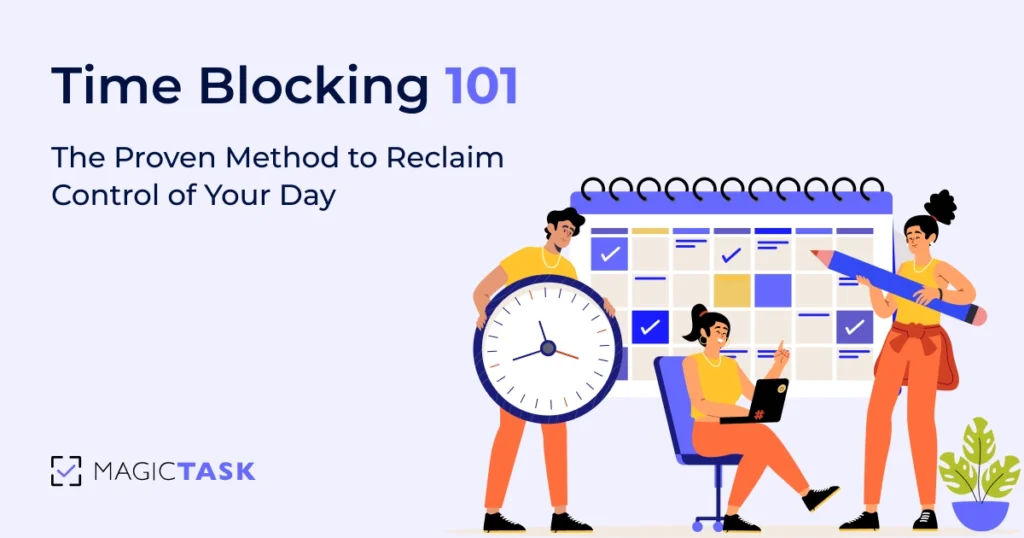
Time Blocking 101: The Proven Method to Reclaim Control of Your Day

Time blocking

Time blocking is a simple way to take control of your schedule. You decide exactly what you’ll do and when you’ll do it, instead of letting your calendar run the show.

Rather than chasing tasks all day, you assign blocks of time to the work that matters most.

This approach brings structure to the chaos. In fact, a study cited on Wikipedia notes that professionals who time block accomplish 53% more tasks than otherwise. That kind of consistency has a direct impact on your productivity.

If you’re ready to bring this game-changing method into your daily routine, you’re in the right place. In this blog, I’ll break down how to make time blocking work in real life so you can finally feel like your day is yours again.

Let's start with the basics.

What is Time Blocking?

What is time blocking

Time blocking is a time management technique where you plan your day by assigning specific tasks or groups of related tasks to fixed time slots on your calendar.

Instead of juggling a running to-do list, you schedule each task with a defined start and end time, turning every minute into a focused appointment with your work.

This helps eliminate the constant “What should I do next?” question and ensures that your most important work gets the uninterrupted time it needs.

For example, you might block:

  • 8:00 to 9:00 a.m. for strategic planning
  • 9:00 to 11:00 a.m. for client calls
  • 11:30 to 12:00 p.m. for a gym break to reset your mind

This simple shift from reacting to planning can completely change how your day feels and what you actually get done.

Fundamentals of Time Blocking

Now that you understand the basics of time blocking, let’s go deep into its fundamentals. 

Time blocking does not necessarily mean assigning a big chunk of your day to one particular task.

You assign clear start and end times to each activity. Those blocks can be as short as 15 minutes for quick check-ins or as long as two hours for deep work sessions. 

By treating each block like an appointment with yourself, you create a visible promise. Over time, you’ll get a better sense of how much you can fit into each block. That means less guesswork and fewer moments of wondering where the hour went.

Once you’ve mapped your day into slots, you need to fine-tune each block so it aligns with both the task at hand and your natural rhythms.

Pay attention to your energy peaks. If your mind fires on all cylinders mid-morning, reserve that span for your toughest challenges. Slot in lighter admin or collaborative work for post-lunch doldrums.

And don’t forget buffer zones.

Even a five-minute gap between blocks helps you wrap up one commitment and mentally gear up for the next. 

Finally, if time blocking feels too rigid some days, consider its close cousins:

  • Time boxing for deadline-driven blocks
  • Task batching for grouped repetitive work
  • Day theming to dedicate entire days to specific focus areas

Difference Between Time Blocking, Task Batching, and Day Theming

Each of these techniques provides a framework for organizing your work, but they differ in scope and pace.

Below is a side-by-side comparison to help you decide which approach best fits your workflow.

Method What It Does Best For Duration Example
Time Blocking Assigns start/end times to each task Deep work, meetings, or precise scheduling 15 min – 2 hours 9–10 AM: Draft report
10–10:30 AM: Email triage
Task Batching Handles a batch of similar tasks in one session High‐switch‐cost activities like emails, calls 30 min – 1 hour 2–3 PM: Return all client calls
Day Theming Reserves a whole day for one theme or project Big, uninterrupted work or creative blocks Half–full day Wednesday = “Strategy & Planning Day”

You’ll find that when each hour or part of the day has a purpose, it’s easier to resist distractions, honor your peak energy windows, and finish what you start.

Carving your day into dedicated time slots can pay off in productivity, focus, and peace of mind.

Benefits of Time Blocking

Time blocking delivers measurable improvements across focus, output, and well-being. Here’s what the data says about why carving your day into dedicated blocks works:

1. Productivity Gain

A study by the Harvard Business Review found that individuals who implement time blocking report a 30% increase in daily productivity compared to those who do not use the method.

2. Faster Work

Visual planning helps work 40% quicker and with fewer mistakes, thanks to sustained focus and reduced context switching.

3. Less Distractions & More Control

On average, it takes 23 minutes and 15 seconds to regain focus after an interruption.

By batching your work into uninterrupted time blocks, you protect those deep-work periods and reclaim hours of lost productivity each week.

Using time blocking helps you feel significantly more organized and confident in meeting deadlines and managing your workload.

4. Reduced Stress & Higher Job Satisfaction

The American Psychological Association reports that delineated work intervals lower stress levels and boost overall job satisfaction, transforming a frenetic workday into a series of attainable wins.

These benefits combine to create a powerful productivity engine with clearer priorities, deeper focus, and the peace of mind that comes from knowing precisely what you’ll tackle and when.

But, what about how?

Step-by-Step Guide to Implementing Time Blocking

Implementing time blocking doesn’t demand a complete life overhaul; just a clear inventory of your priorities, realistic time estimates, and a willingness to treat your own schedule as sacred. 

Here’s a step-by-step guide to implementing time blocking:

1. Identify Tasks and Priorities:

Start by emptying your mind onto paper, a digital note, or any simple task management tool such as MagicTask.

Jot down every project deadline, meeting follow-up, personal errand, and side hustle idea.

This “brain dump” clears mental clutter and gives you a comprehensive view of everything demanding your attention.

Once everything is out, group similar items together, such as project work, administrative tasks, and personal commitments. From there, assign each task a priority based on two questions:

  • Urgency: Does this need to happen today or within the next week?
  • Impact: Which tasks move the needle most toward your goals?

Aim to surface three to five “core” tasks that are both urgent and high-impact. These will form the foundation of your time-blocked calendar.

Less critical tasks can be scheduled into quieter slots or delegated, while low-value items may be deferred or removed altogether.

By the end of this step, you’ll have distilled a sprawling to-do list into a lean set of clear priorities, setting the stage for accurate time estimates and a calendar that reflects what truly matters.

2. Estimate Time for Each Task

Once your priorities are clear, the next step is to assign realistic time slots to each item.

a) Use Past Experience

Think back to similar tasks you’ve done before. Ask yourself:

  • How long did it actually take to draft that report?
  • How much time did you spend preparing for your last client call?

Use real data as your baseline, not best-case guesses.

b) Break Down New Tasks

If it’s a task you’ve never done before:

  • Break it into smaller chunks, such as:

    • “Gather research”
    • “Outline key points.”
    • “Draft copy”
  • Estimate each sub-task individually, then total them up.

c) Build in Buffer Time

Tasks almost always take longer than expected. Interruptions, context switching, or unexpected questions add up.

To stay on track:

  • Add 15 to 25% extra time to each estimate.
  • Or schedule a short flex block after every two or three time blocks to absorb spillover.

Why It Matters?

These small adjustments help your plan survive real life.

You’ll avoid the stress of constantly falling behind, and by the end of this step, you’ll have a realistic, flexible draft schedule for the week.

3. Design Your Daily Schedule

Now that you’ve estimated how long each task will take, it’s time to map everything onto your calendar.

Start by opening a blank calendar view. Block off the highest-value work during your peak focus hours.

Then slot in your secondary tasks, like emails, meetings, and admin, into shorter mid-day windows. 

Don’t forget to carve out buffer zones between blocks (15–30 minutes) for overruns or quick breaks. These “overflow” slots prevent you from falling behind when unexpected things pop up.

Here’s an example layout you might use:

Time Task
09:00–11:00 Deep Work (Project X)
11:00–11:30 Email Triage
11:30–12:30 Team Sync
12:30–13:30 Lunch Break + Socializing
13:30–15:30 Focused Analysis
15:30–16:00 Buffer / Quick Wins
16:00–17:00 Admin & Follow-Up
17:00–17:30 Review & Plan

Integrating MagicTask into Your Time-Blocking Routine

Time blocking is a valuable method, but it can take away a lot of your time if you don’t have a tool that streamlines the setup and upkeep of your schedule.

MagicTask turns your carefully planned schedule into an addictive, gamified experience that rewards you for sticking to it.
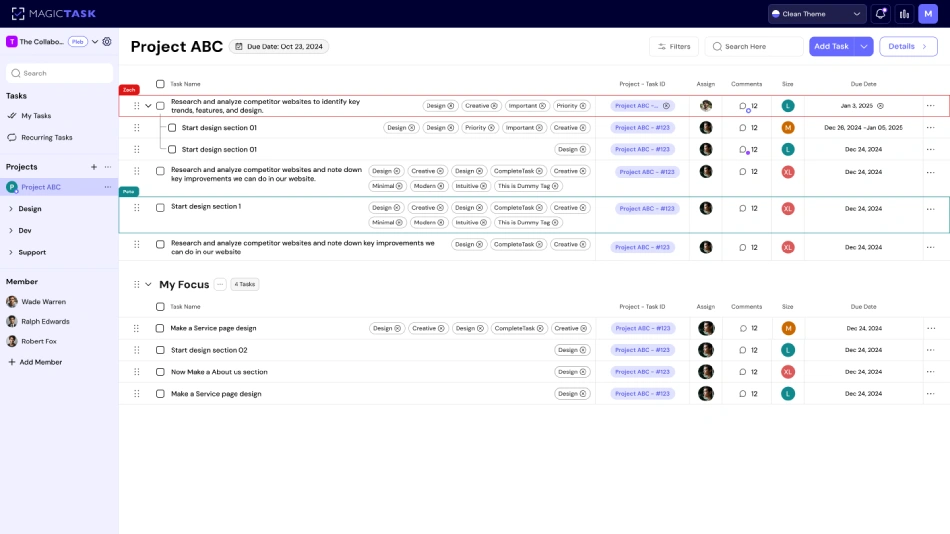
MagicTask

1. Drag & Drop into Blocks

In MagicTask, every task lives in your Backlog until you’re ready.

Simply drag an item into your calendar-style “My Focus” lane, and it’s locked into that time block; no more wondering which task comes next.

2. Points for Precision

Finish a task within its allotted block, and you instantly earn points and progress toward your next level. That dopamine hit reinforces the habit of honoring your schedule, not ignoring it.

3. Theme Unlocks for Consistency

Hit your daily time-blocking goals three days in a row, and you’ll unlock a fresh interface theme, complete with animations and sounds, that makes opening the app feel like logging into a new game world.

MagicTask’s upcoming Google Calendar integration means you’ll see your time blocks alongside every meeting, call, or personal appointment you’ve already scheduled.

No context switches, no double bookings; just one unified view of your day.

Syncing takes two clicks, and from that moment on, your MagicTask lanes mirror your calendar colors and time slots in real time.

By weaving MagicTask’s gamification into your time-blocking routine, you transform each calendar segment from a to-do that drags you down into a do-to that propels you forward.

Suddenly, reclaiming control of your day feels less like discipline and more like play.

Techniques for Effective Time Blocking

These three techniques will help you make every minute count without feeling trapped by your schedule.

1. Emphasizing Deep Work Sessions

Deep work is your ticket to high-impact results. Pick a 60–90 minute window when you’re feeling a burst of energy. During this block:

  • Mute all notifications and close unrelated tabs.
  • Treat your calendar invite like a meeting with your most important client because it is.
  • At the start, write a one-sentence goal (“Draft client proposal introduction”), and at the end, give yourself a quick self-check: “Did I nail that intro?”

By guarding these blocks fiercely, you train your brain to sink into complex thinking without the constant tug of pings or people.

Over time, you’ll notice that big, thorny projects finally get traction instead of languishing on your to-do list.

2. Reducing Procrastination with Structured Blocks

When tasks lurk in the shadows, your mind invents excuses. The antidote? Give every block a clear mission. Instead of blocking “Work on Q3 report,” label it “Outline five budget recommendations.” That precision removes the “Where do I even start?” drag that fuels procrastination.

  • Break major deliverables into micro-tasks you can complete within a single block.
  • Reserve 10 minutes at the start of each block to review your objective and resources.
  • Keep a running log with just a few bullet points of what you accomplished in that session.

This level of structure turns your calendar into a launch pad for action, rather than a reminder of everything you haven’t done.

3. Encouraging Goal Follow-Through with Clear Deadlines

Blocks without deadlines often bleed together.

To prevent scope creep, anchor each segment with a firm finish line. Instead of “Email clients,” set “Send status report to Client A by 11:30 AM.”

Research shows that deadlines boost completion rates as your brain craves an endpoint almost as much as a starting bell.

  • Add due times to your tasks and sync them to your calendar.
  • Build a two-minute end-of-block ritual: review what’s done, adjust tomorrow’s blocks, then hit refresh, stand up, and stretch.
  • Celebrate small wins immediately, such as a quick theme switch in MagicTask, a “✔️” on your notebook, or a five-second fist pump.

With clear deadlines and mini-celebrations, each block becomes a satisfying mini-project that trains your brain to honor commitments, making it that much easier to dive into the next one.

Time Blocking – Addressing Common Pitfalls

Even the most meticulously planned day can veer off course if you don’t build in flexibility, match tasks to your natural energy, and make room for life beyond work.

Here’s how to sidestep the most common time-blocking traps and keep your schedule working for you, not against you.

1. Avoiding Over-Scheduling and Rigidity

It’s tempting to pack every minute with a block, only to discover you’ve created a prison of hours you can’t escape.

When your day looks like a series of immovable appointments, any hiccup, like a delayed meeting, a last-minute request, throws everything into chaos.

How to prevent it:

  • Build in buffer zones. After each deep-work block, schedule a 5–10 minute “flex” period. Use it to catch up, stretch, or recalibrate.
  • Review and adjust weekly. Treat Sunday or Friday afternoon as your “time-block tuning” session. Move leftover tasks into next week’s plan instead of trying to squeeze them into already full days.
  • Embrace “soft” blocks. Label some segments loosely, “Admin catch-up” or “Creative overflow”, so you have breathing room when priorities shift.

2. Incorporating Energy Levels into Planning

Your brain isn’t built for uniform performance.

Those morning hours when you feel sharp deserve your toughest challenges; the afternoon slump calls for lighter work or a break. Ignoring this rhythm turns time blocks into uphill battles.

How to align with your energy: 

  • Map your peaks and valleys. Track when you feel most alert and when you drag. Block demanding tasks, like writing, analysis, or strategy, in your peak window.
  • Reserve low-energy stretches for routine work. Email triage, calendar updates, or filing fit perfectly into that post-lunch dip.
  • Experiment with block lengths. You might do 90 minutes of deep focus at 10 AM, but need only 30-minute sprints by 3 PM.


3. Balancing Personal and Work Commitments

A calendar that’s all work and no life is a recipe for burnout.

Time blocking should help you excel on the job and still make your kid’s soccer game, your workout, or that dinner date non-negotiable.

Strategies for true balance:

  • Block “you” time first. Schedule exercise, family meals, or even a daily walk before you fill in work tasks, so downtime isn’t the afterthought it usually is.
  • Use recurring personal blocks. If Saturday mornings are for chores or Sunday evenings for planning, treat them like any other high-priority meeting.
  • Reassess boundaries monthly. Life changes with new projects, family schedules, or health needs, and your blocks should shift, too.

When you sidestep these pitfalls, your time-blocking system becomes a living framework that bends with reality, honors your natural rhythms, and safeguards your well-being. 

Conclusion

Time blocking turns a scattered to-do list into a clear plan for your day. By carving out time for focused work, breaks, and personal moments, you protect your most valuable resource: your attention.

When paired with MagicTask, that structure becomes something you actually enjoy. You drop tasks into your schedule, stay on track, and earn rewards for showing up.

Ready to take back your day? Start with one task, block the time, and let MagicTask guide you from chaos to clarity.
How to Build a Productive Routine in a Fun Way (And Actually Stick to It)

how to build a productive routine

We all want to feel on top of our day, but the truth is, most routines fall apart by Wednesday.

With surprise meetings, constant notifications, and a to-do list that never seems to shrink, it’s hard to keep any real momentum.

But that’s usually not a motivation problem. It’s a system problem.

Learning how to build a productive routine isn’t about waking up early or cramming more into your day. It’s about creating a structure that fits how you think, how you work, and what actually keeps you going.

In this guide, I’ll walk you through a simple, flexible approach to building a routine you can stick with, one that helps you stay focused without burning out.

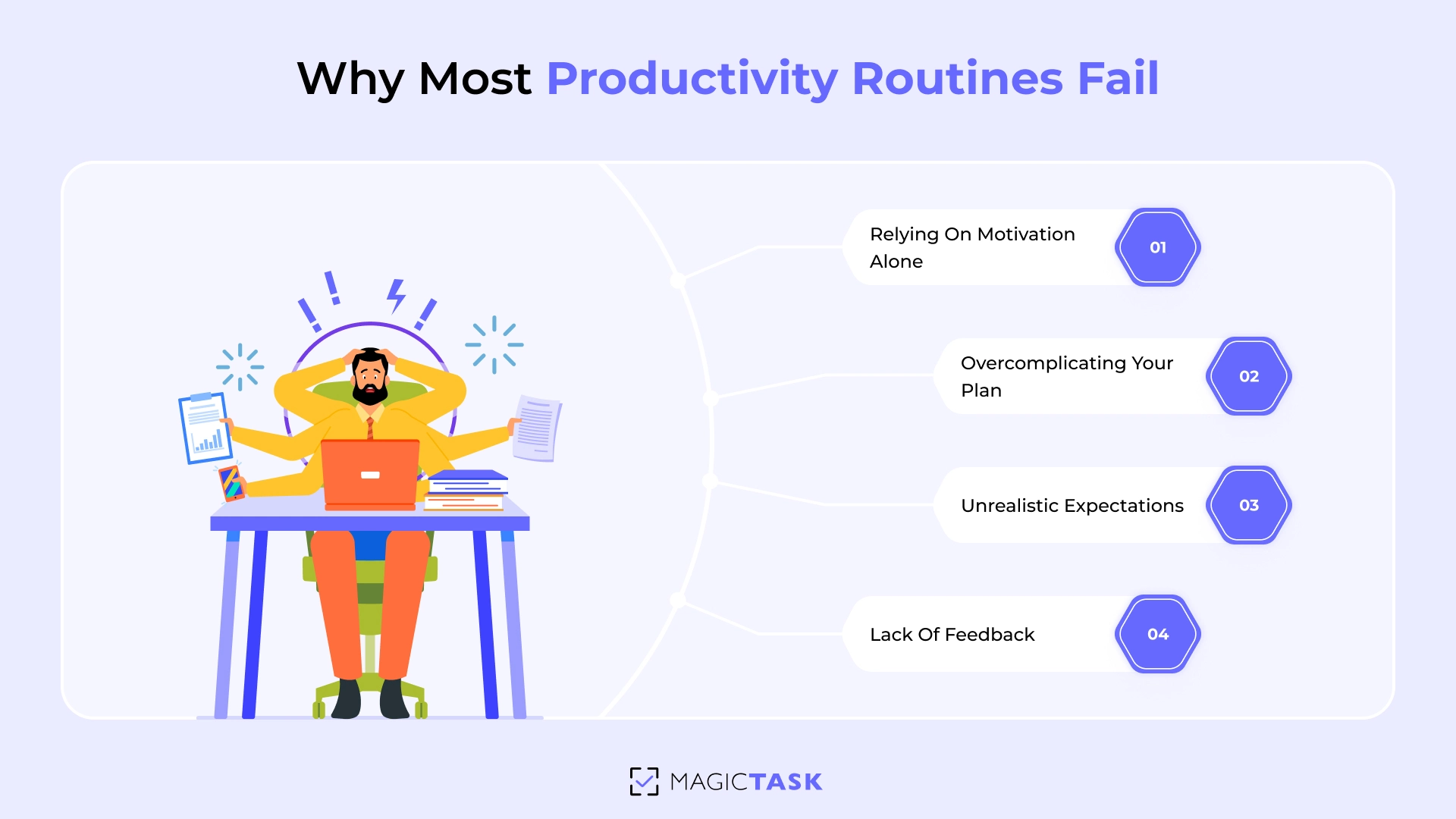
Why Most Productivity Routines Fail

So, why do most productivity routines fail?

Before you can build one that actually sticks, it helps to understand why so many fall apart in the first place. Here are some common reasons why most productivity routines fail:

1. Relying on Motivation Alone

When you kick off a new routine, you’re riding a wave of enthusiasm. But motivation is fleeting.

Research on self‑control shows that willpower operates like a muscle; it wears down with each use.⁤

Without built‑in support, those first‑day adrenaline highs give way to “I’ll do it tomorrow,” and before you know it, the routine is history.

2. Overcomplicating Your Plan

It’s tempting to pack your system with every best practice, like color‑coded trackers and extended checklists.

But every additional layer adds friction, which means more opportunities to stall out.

The more complex your routine, the more decisions your brain has to make, and the harder it becomes to get started when decision fatigue sets in.

Why Most Productivity Routines Fail

3. Unrealistic Expectations + Lack of Feedback

One of the biggest reasons routines don’t stick is that we expect too much, too soon. We assume that if we follow a new system for a few days, the results will follow immediately.

But when the changes aren’t immediate or dramatic, it’s easy to feel like it isn’t working.

The truth is, progress in any routine is often slow and subtle. And without regular feedback, it becomes harder to stay motivated.

You finish a report, respond to ten emails, and check off three tasks, but none of it feels like real progress.

Research backs this up. A study by Phillippa Lally and colleagues found that it takes an average of 66 days for a new behavior to become automatic.

So if you’re expecting major results within a week or two, there’s a good chance you’ll give up before the habit has time to stick.

How to Build a Productive Routine

Now that we’ve looked at why most routines fall apart, let’s focus on how to build one that actually works.

This isn’t about following a strict set of rules. It’s a straightforward approach you can make your own. So, let's start.

Step 0: Build a System That Supports Daily Action

When it comes to building a productive routine, you need to first build a system that supports it.

Without that foundation, it's easy to get pulled in every direction, reacting to emails, jumping between tasks, and relying on bursts of motivation to push through.

A strong system gives you structure. It helps you capture what matters, plan with clarity, and follow through with less friction.

Here’s what that system should include:

  • Capture & Clarify: A single place to drop every task, idea, or commitment so nothing slips through the cracks.
  • Prioritize & Plan: A method for sorting your work by urgency, importance, and effort so you always know what deserves your focus.
  • Execute & Review: A daily rhythm of time blocking, focused sessions, and quick end-of-day check-ins that reinforce progress and prepare you for what’s next.

The goal is to make taking action feel natural and noticing progress feel effortless.

And the good news? You don't have to build anything from scratch.

MagicTask is designed to do the heavy lifting while keeping things fun.

In MagicTask, productivity starts with a simple framework: mind dumping your tasks, prioritizing what matters, and focusing on getting things done. It keeps the process clear and manageable from start to finish.

On top of that, MagicTask adds a layer of gamification that makes it more rewarding to stay on track.

Step 1: Mind Dump All Your Tasks

Now that your system is in place, the very first action is to clear your mental clutter, and that starts with a full mind dump.

Every unfinished thought, whether it's an email you need to write, an idea you haven't worked out, or an errand you've been putting off, takes up space in your mind.

Spend 10–15 minutes capturing absolutely everything in your brain. Open MagicTask (or any other task management system) and just get it all out!

Once everything is out of your head and into MagicTask, you’ll start to see what needs your attention. Some tasks can be grouped, some might not be worth doing at all, and a few may be easy to hand off or automate.

Step 2: Prioritize and Organize Your Tasks

A clear plan helps you stay focused, use your time efficiently, and build a productive routine you can actually stick to.

Now that everything is out of your head, the next step is to prioritize your tasks for the day.

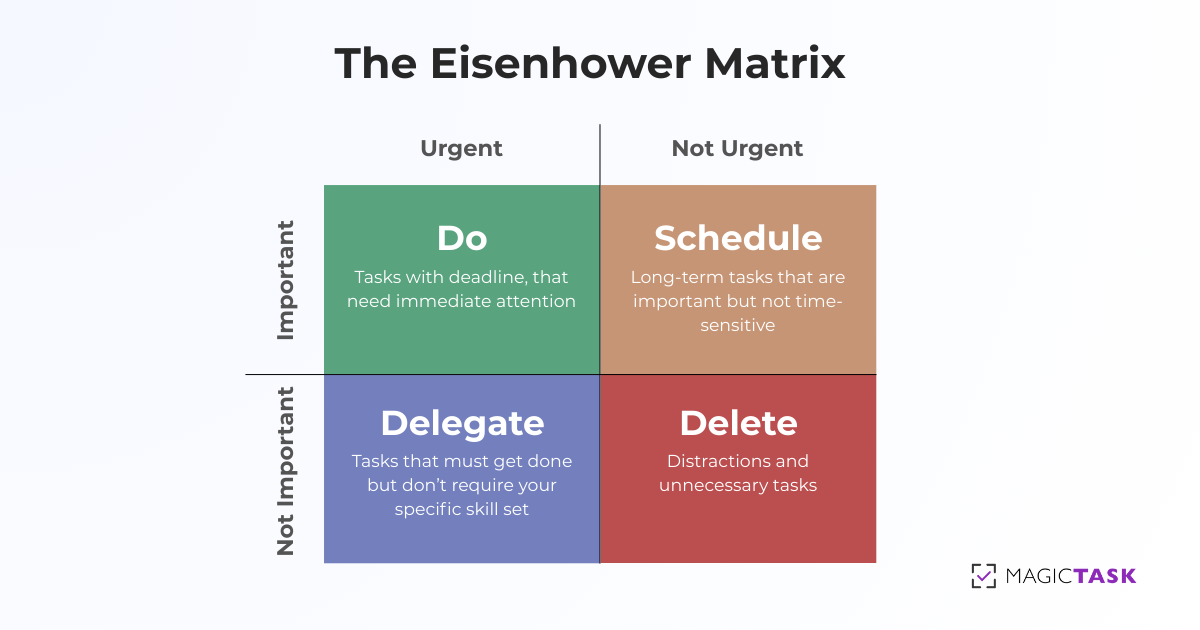
Use the Eisenhower Matrix to split your list into four quadrants.

This simple 2×2 grid helps you see at a glance which tasks demand immediate action, which deserve scheduled focus, which you can delegate, and which you can drop altogether.

Urgent (Due soon) Not Urgent (Due later)
Important (High impact) Do Now Schedule
Not Important (Low impact) Delegate Eliminate

Eisenhower Matrix

  • Do Now: Critical, deadline-driven work you must tackle first.
  • Schedule: High-value projects that warrant uninterrupted blocks on your calendar.
  • Delegate: Tasks that someone else can handle, freeing you for your most important work.
  • Eliminate: Low-value activities that clutter your day without moving the needle.

Step 3: Assign Realistic Sizes to Your Tasks

Once you’ve sorted your priorities, the next step is to figure out how much effort each task will take. This helps you plan your day without overloading it or guessing what you can actually get done.

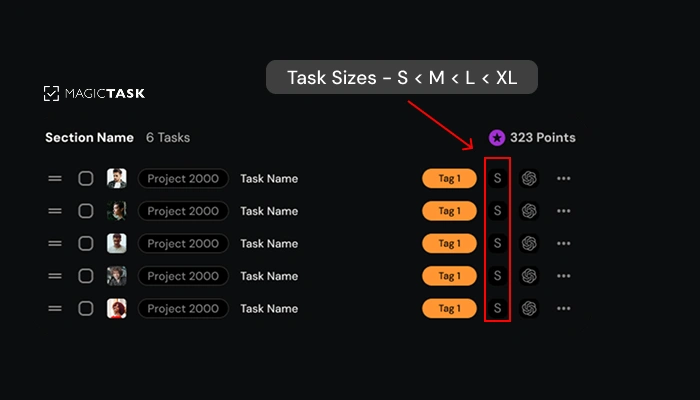
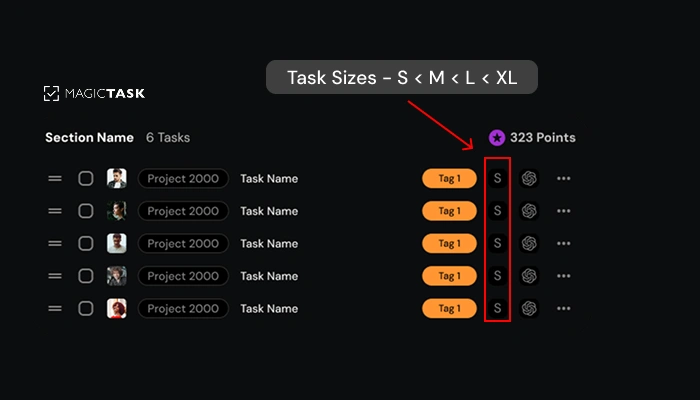
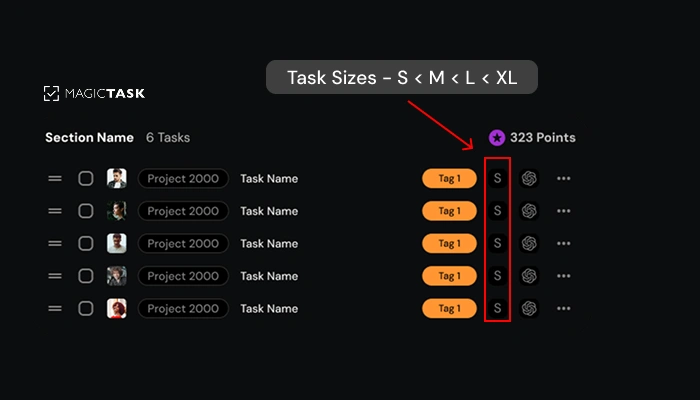
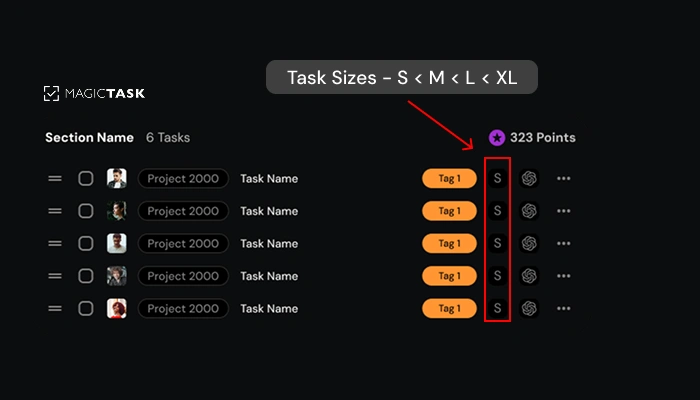
In MagicTask, you can size each task as S, M, L, or XL. It’s a simple way to get a feel for how heavy something is before you commit to it.

The sizing isn’t just about time; it can also reflect how complex or mentally draining a task might be.

Here’s a loose guide to help you out:

Size Effort Example
S Under 15 minutes Send a follow-up email
M 15–60 minutes Draft a slide deck outline
L 1–3 hours Write a full blog post
XL Half to full day Develop a client proposal from scratch

This isn’t meant to be exact. Just use it as a rough way to understand your workload.

Task sizing

Once you’ve sized your tasks, you’ll be able to mix and match your day in a way that feels balanced, knocking out quick wins while still making time for the deeper stuff.

Step 4: Time Block Your Important Work

Now that your tasks are sized and prioritized, it’s time to give them space on your calendar.

Why?

If tasks just sit on your list, they’re easy to ignore. Time blocking makes sure the work actually happens.

Open MagicTask and look at the high-priority items you’ve lined up. Think of each one like a meeting with yourself, something that deserves its own time and focus.

Here’s how to do it:

1. For larger tasks (like writing a client proposal or outlining a big project), block out 60 to 90 minutes when you know you’ll have the focus.

  • For example, you might create a time block on Tuesday morning from 9:00 to 10:30 labeled “Draft Proposal.”

2. For quicker items (like a team check-in or follow-up email), find smaller pockets of time to plug them in. Maybe a 15-minute slot after lunch when your energy dips.

MagicTask makes this process simple.

You can see your tasks in one view and check your Google Calendar alongside them, so it’s easy to decide what to do next and when to do it.

By giving your most important work a clear place in your day, you’re turning intention into action and avoiding that all-too-familiar scramble.

Step 5: Track Your Progress to Stay Motivated

Once your day is carved into focused time blocks, the real magic happens when you can actually see yourself moving forward.

Psychological research, often called the Progress Principle, shows that people who notice even tiny wins feel more engaged and energized throughout the day.

Every time you tick off a completed item, your brain rewards you with a burst of dopamine, reinforcing the very behavior you want to repeat.

MagicTask makes that feedback loop effortless and delightful.

As mentioned in step 0, as soon as you check a task “Done,” you instantly earn points and XP.

And because every checkmark also updates your personal and team leaderboards, you get that extra dash of accountability and friendly competition that keeps you coming back for more.

Step 6: Create a Rewarding Daily Review Ritual

You’ve blocked your time, smashed through your focus sessions, and watched your progress bar climb.

But the final piece of a truly sticky routine is a daily review that feels as satisfying as wrapping up a boss fight.

Carving out just 5–10 minutes at the end of each workday to reflect helps you feel happy about what you’ve achieved.

Your 3‑Step “Closing Ceremony”:

1. Celebrate the Wins

Open your MagicTask dashboard and note today’s highlights:

  • ✔️ Tasks completed
  • ⭐ Points earned
  • 🏆 New personal bests
  • Jot down one or two quick brag lines, e.g., “Closed the Q3 proposal ahead of deadline” or “Answered 15 customer emails distraction‑free.”

2. Learn from the Hiccups

Not everything will go as planned, and that’s normal. What matters is learning from it.

Start by asking yourself:

What didn’t go as expected today?

Maybe a focus block got interrupted. Maybe a task stayed in the Backlog all day. Whatever it was, take a minute to notice it.

Then ask:

What’s one small tweak that could make tomorrow smoother?

Here are a few simple fixes:

  • Move a task to an earlier time in the day
  • Break a large task into smaller, more manageable parts
  • Turn on Do Not Disturb during your focus blocks

If you’re using MagicTask, tag the task or drop in a quick note so it’s easier to pick up next time.

It doesn’t take much. Just a small adjustment can keep your routine from slipping.

3. Prime Tomorrow’s Mission

End your day by setting yourself up for an easier start tomorrow.

  • Pick your top one or two must-win tasks and drag them into your My Focus lane in MagicTask. This gives you a clear plan the moment you log in.
  • Check for any newly unlocked themes or rewards. You’ve made progress—let it show.
  • Wrap up with intention. Close your laptop knowing your system is in place, your priorities are set, and tomorrow’s already in motion.

When you use those last few minutes to move from action to reward to reflection, you’re not just finishing the day but reinforcing a habit.

Instead of ending on a scattered note, you walk away with clarity, confidence, and the kind of momentum that actually carries into tomorrow.

What to Do When You Fall Off Track

No matter how well you’ve learned how to build a productive routine, life will still throw curveballs your way. A surprise meeting, a wave of client emails, or just a day when your brain refuses to focus—these things happen.

Instead of being hard on yourself, remember that slip-ups are part of the process. What matters most is how quickly you bounce back.

The goal isn’t to be perfect. It’s to stay consistent. You might miss a day or two, but the important thing is to return to your routine before the momentum fades. As a general rule, try not to let more than two days go by without a reset.

If you're committed to building a routine that lasts, check out our eBook, Become the GOAT of Productivity. It’s a step-by-step playbook filled with proven routines, mindset tips, and simple templates that make habit-building easier, no matter what life throws your way.

Start your productivity journey with MagicTask and stay on track with a system that grows with you.

Why Gamers Are More Productive (And How You Can Be Too)

why gamers are more productive

Ever crushed a boss fight in your favorite game, riding that high, only to switch over to work and feel your energy drop?

You’re not alone.

Games are designed to keep you fully engaged. They give you a clear objective, immediate feedback, and a constant sense of progress.

Every action has a purpose. Every win, no matter how small, feels earned. That’s not just entertainment, but a blueprint for high-performance behavior.

At work, we often lack that structure. Tasks feel vague. Wins go unrecognized. Motivation fizzles.

But here’s the catch: the same principles that make games so immersive can be applied to your work.

Gamers already know how to stay focused, adapt quickly, and push through challenges. All that’s missing is bringing that mindset into the real world.

Let’s break down ten reasons gamers are naturally more productive and how you can use those habits to level up your workflow, starting today.

Top 10 Reasons Why Games are More Productive

You already know how to stay on top of the leaderboard while video gaming. But if you’re ready to level up your game at work, let’s press “Start”. 

Here are the ten gamer-tested strategies that keep you locked in and conquering every challenge at work.

1. Gamer's Mentality: Tools First, Hustle Later

Have you watched a seasoned gamer dive into a new title?

Before they even pull the trigger, they’ve tweaked their keybindings, installed the must-have mods, and mapped out macros for every routine action.

So when the action heats up, they never miss a beat. That’s not just “geek cred,” it’s a productivity hack in disguise. Gamers offload low-value clicks and decisions onto innovative tools, freeing their attention for the real challenge.

Your workday deserves the same respect.

When your task management tool is half-configured or is too cluttered with several options, your brain wastes precious cycles deciding where to click next, which folder to open, or how to track progress manually.

That friction multiplies cognitive load and steals momentum.

Imagine trying to sprint through a level while constantly stopping to adjust the joystick sensitivity. It doesn’t work in gaming, and it won’t work at your desk.

Enter MagicTask.

It’s built for focus from the start. With features like task sizing (S, M, L, XL), a clean Backlog, and a drag-and-drop My Focus view, MagicTask helps you front-load the decisions that usually derail your flow.

Instead of wondering where to start, you just hit play and get moving—because your system is already aligned with how your brain works best.

2. It’s Fun to Compete (Even With Yourself)

With your setup locked in and your focus clear, it’s time to bring in the spark that keeps gamers glued to their screens: competition

Every gamer knows that the most satisfying thing about playing games is winning. That rush is your brain’s reward circuitry lighting up with a hit of dopamine every time you top your last score.

Psychologists call this intrinsic motivation.

When you set a goal, achieve it, and feel genuinely competent, your brain rewards you and then quietly nudges you to raise the bar again. 

At work, you can harness this same drive by tracking your benchmarks.

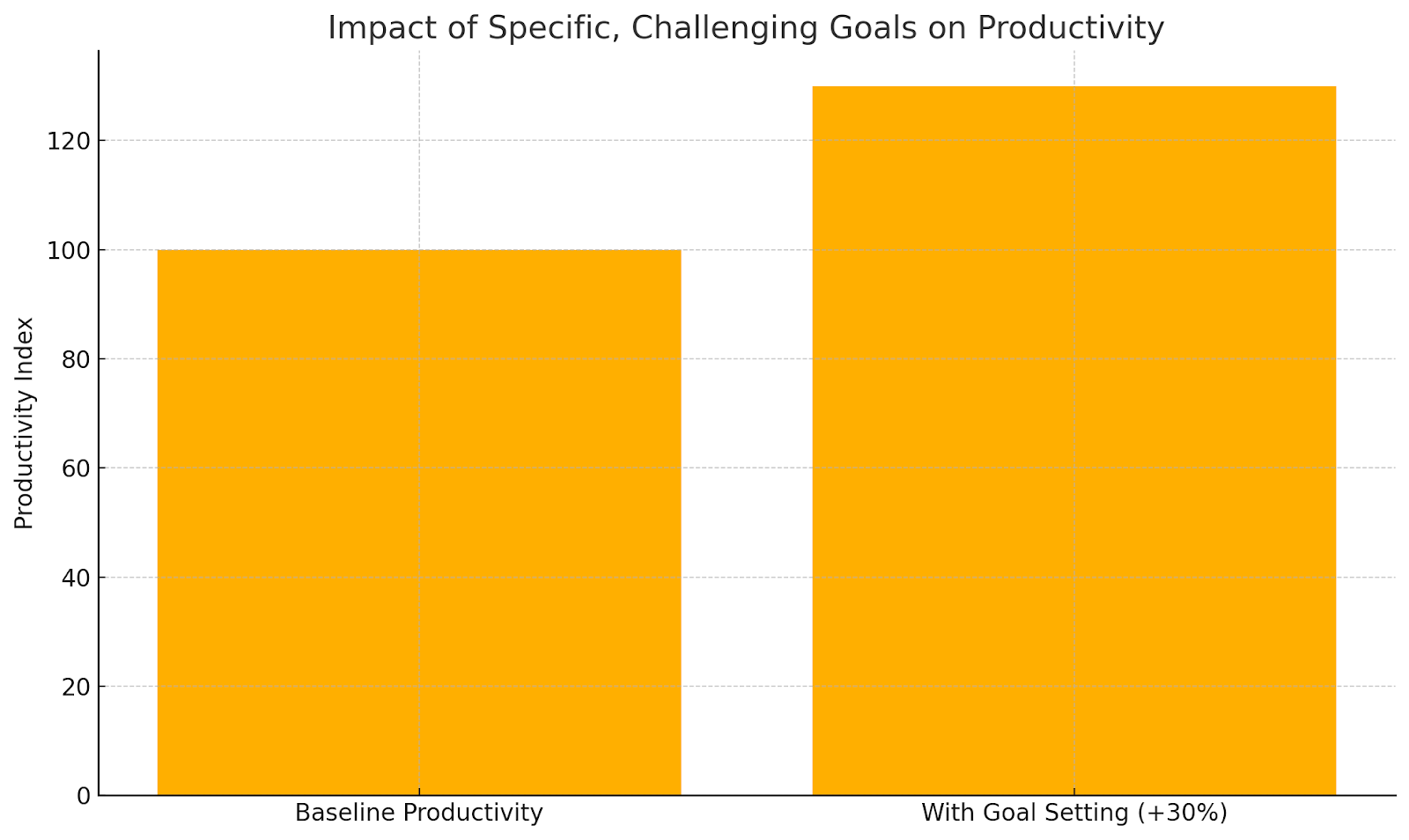
In fact, studies show that setting a specific, challenging goal can boost employee productivity by up to 30%.

gamer's producitivity

MagicTask makes it effortless with gamification.

Every task you finish adds points/tokens to your dashboard, and hitting a new high score unlocks fresh themes and animations.

That friendly, self-directed competition keeps you engaged, focused, and continually leveling up your performance. 

After you’ve stoked that competitive fire, the next step is total clarity on your objective

3. Always Know What You’re Working Toward

In a game, you're never confused about your next move; it's right there on your mission list —defeat the final boss, capture the flag, or rescue the princess.

That clarity is your roadmap to success. 

At work, vague directives like “Work on deck” leave you without direction or urgency.

Here’s how to apply a gamer’s clarity to your daily tasks:

Let’s say you have to work on the Q2 Growth Report. But you don’t know where to start.

Using the gaming theory, you break it down:

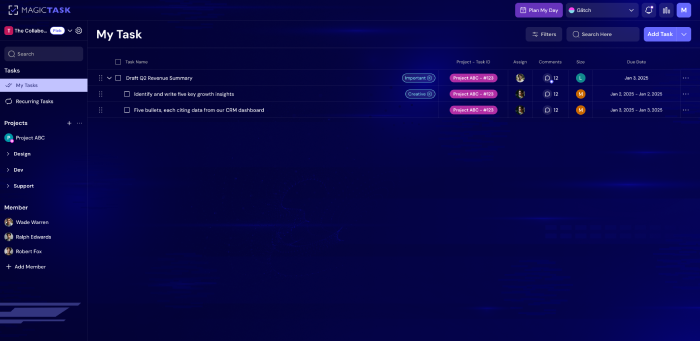
  • Mission Title: Draft Q2 Revenue Summary
  • Objective: Identify and write five key growth insights
  • Success Criteria: Five bullets, each citing data from our CRM dashboard
  • Deadline: Complete by Jan 3, 2025

This is how it will look in MagicTask:

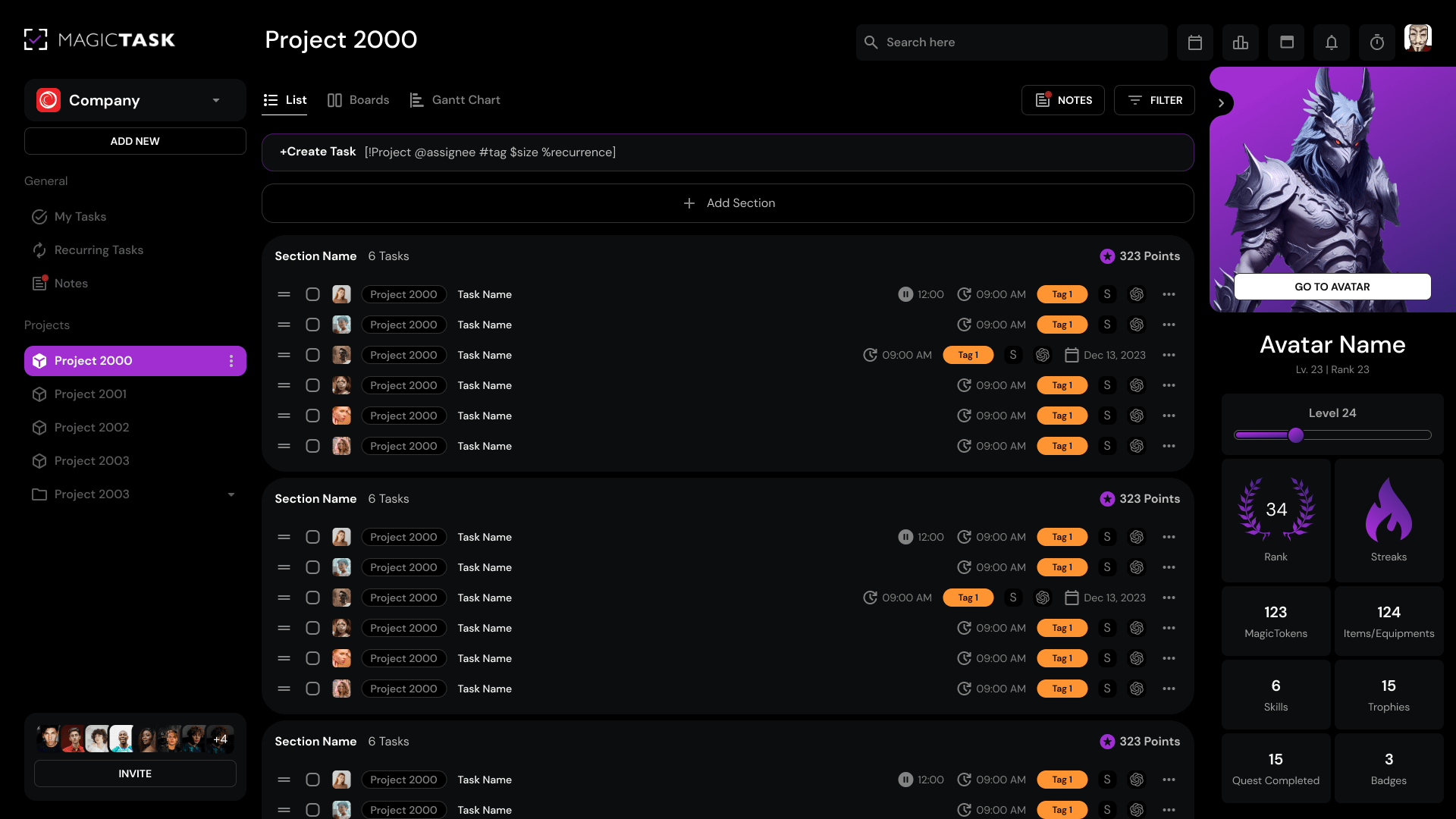
MT my tasks

By spelling out exactly what “winning” looks like, you eliminate confusion and prime yourself for action.

With your mission crystal clear, the real magic happens when you can actually see yourself making headway.

4. Progress Is Always Visible

One of the smartest moves game designers make is to give you a running score when XP bars fill up, levels unlock, and progress rings animate.

Every time you land a hit on an enemy or solve a puzzle, you immediately see how much closer you are to the next milestone.

That real-time feedback loop releases dopamine, keeps your focus sharp, and makes you want to chase the successive win.

At work, by contrast, our “wins” often vanish into thin air.

You might spend an hour drafting a report, but the effort feels invisible unless you consciously note your progress, and motivation stalls.

Without clear checkpoints or a visual gauge of how far you’ve come, it’s all too easy to lose momentum and wonder, “Did I move the needle today?”

Here’s how to bring visible progress into your work:

1. Break projects into tracked milestones.

Instead of “Finish annual report,” carve out “Complete executive summary,” “Design four data charts,” and “Polish conclusion.”

Mark each one off as you go so you watch your project bar climb.

2. Use a visual progress bar

In tools like MagicTask, every completed task fills your personal XP bar and increments your level.

You see the colour advance, the percentage tick up, and sometimes even a confetti burst—simple cues that cement the feeling of forward motion.

3. Leverage habit-tracker templates

A daily checklist or habit-tracker app can show you streaks and completion rates. Crossing off “Research competitor benchmarks” five days in a row becomes a streak you don’t want to break.

4. Celebrate micro-milestones

After every batch of three or four tasks, pause for a quick win. Stretch, grab a coffee, and unlock your new MagicTask theme.

Those small rituals punctuate your day with clear “you did it” moments.

When progress is tangible, your brain rewards you, and you stay engaged. That’s the secret behind why games hook you in, and why bringing that same visibility to your work can transform dragging through tasks into a series of small, satisfying victories.

5. Rewards Keep You Hooked

Small wins fuel big habits. In games, you don’t have to slay the final boss to feel accomplished.

A simple badge unlock or “level up” notification gives your brain a quick hit of satisfaction. At work, however, finishing that slide deck or sending essential emails often earns nothing more than a quiet sigh.

That’s why you need to engineer your micro-celebrations. After you complete a discrete piece of work, take a moment to acknowledge it.

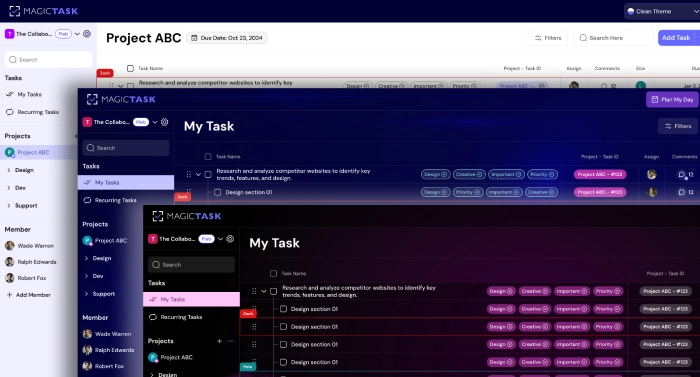
Switch your MagicTask theme to something fresh, stand up and take a small walk, even if it is only inside the office, and have a cookie.

MT themes switch

Those few seconds of recognition mimic the dopamine jolt you get in gaming and keep your motivation ticking upward.

Over days and weeks, these tiny rituals add up, transforming routine chores into an ongoing series of victories you look forward to.

6. You Always Know What’s Next

After you earn that reward, games don’t leave you hanging—they immediately queue up your next mission.

One moment you’re basking in victory, the next you’re charging toward the next objective, momentum unbroken.

At work, you often wrap up a task and find yourself staring at a blank slate—“What should I tackle now?”

That uncertainty interrupts your flow and makes it easier to get pulled into email or unrelated research.

Always define your next step before you wrap up to avoid that gap.

You already have your tasks in the MagicTask backlog with the task size assigned.

Once you’re done with one task, you can pull another one into the “My Focus” section and start working on that. 

7. There’s a Natural Flow Between Easy and Hard Tasks

Before you charge straight into your most challenging projects, give your brain the chance to warm up.

Just like a pro gamer breezes through early levels to build confidence (and rack up a few easy wins), you can prime your focus by layering “warm-up” tasks before tackling the heavy hitters.

Many of us dive headfirst into demanding work, like writing a white paper, building a financial model, or redesigning a website, only to stall out under the mental weight.

However, our cognitive resources are finite, and confronting “level 100” tasks cold can trigger avoidance and burnout.

Why it matters

  • Cognitive Priming: Completing simple tasks first frees up mental bandwidth. Each quick win floods your brain with dopamine, sharpening attention and making it easier to shift into deep work.
  • Momentum Building: Those first few boxes you check establish a rhythm. You’re no longer starting from zero but building on real, visible progress.
  • Reduced Resistance: Warm-up tasks feel “easy enough” that your limbic system doesn’t hijack you with fear or boredom when the real challenge arrives.

How to put it into practice:

1. Identify your “Level 1” tasks. Quickly scan your to-do list and pick three items that take no more than 10 minutes each.

2. Sequence deliberately. Tackle those mini-tasks first thing—whether that’s morning email triage, calendar confirmations, or file organization.

3. Track each victory. As you finish each warm-up task in MagicTask, check them off and watch your points tally climb.

4. Move up to “Level 5.” By the time you reach your core project—be it drafting a report or coding a new feature—you’ve already got momentum on your side, and mental friction is massively reduced.

By structuring your day as a smooth progression from quick wins to meaningful challenges, you transform intimidating work into a flow of achievable steps.

You’ll find that what once felt like climbing to the top of a mountain now resembles a series of small treks, each one building the confidence and focus you need to summit the next.

8. External Distractions Are Designed Out

Focus is your most precious resource.

Research finds that a single distraction can cost you 23 minutes of regained concentration.

Games are engineered to keep every alert, every notification, and every distraction at bay until you’re ready to pause.

In World of Warcraft, your chat window hides by default in raid encounters.

In Doom Eternal, the game goes full-screen with no pop-ups to distract your eye from the demon horde. This design is a built-in shield for your brain’s fragile focus.

Contrast that with a typical workday.

Slack blinks, your inbox pings, your screen fills with calendar reminders—and just like that, your mental context splinters into a dozen fragments.

Every interruption forces your brain to unload and reload your working memory, leaving you piecing together the thread of your task bit by bit.

How to protect your focus:

  • Silence non-urgent alerts. Configure “Do Not Disturb” or “Focus Assist” on your devices, and pause notifications in Slack, Teams, or your email client.
  • Go full-screen on your task. In MagicTask, collapse extras so only your current task is visible—no sidebars, no menus, just the work you chose to tackle now.
  • Create a quiet workspace. Use noise-cancelling headphones or soft background sound to block office chatter. If possible, close your office door or put up a “Please Do Not Disturb” sign.
  • Audit your biggest disruptors. Track which apps or alerts interrupt you most over a week, and turn off or limit the worst offenders.

Proactively removing external distractions gives your brain the uninterrupted stretches it needs to work efficiently and with less stress.

9. Time Pressure Creates Energy

With distractions out of the way, you need to give your work a deadline that means something.

In gaming, a ticking clock turns a routine quest into an adrenaline spike—without that pressure, most tasks simply drift on indefinitely. You need to create that sense of urgency in your work. 

Under moderate stress, your brain releases just enough adrenaline to sharpen focus and accelerate decision-making.

This is the Yerkes–Dodson law in action.

A clear time limit—say, 20 minutes to draft an email—hits that sweet spot, turning vague “someday” tasks into urgent targets your mind can tackle.

You’re no longer debating whether to open that spreadsheet; you’re in a sprint to get it done before the buzzer. This curbs the tendency for work to expand to fill available time. 

One marketing manager I know starts every day with a 30-minute sprint to outline her campaign brief—no Slack, no side research, just pure focus.

The result?

She often finishes early enough to refine her ideas, rather than grinding through the morning and still struggling with her to-do list. That small time-boxed win fuels both momentum and confidence.

How to Set Your Time-Boxed Challenges

  1. Choose a single task (e.g., draft the project summary).
  2. Decide on a strict but realistic timer, such as 15, 25, or 45 minutes, depending on the complexity.
  3. Eliminate distractions and focus on the task at hand.
  4. Sprint until the timer chimes, then take a short break.

By turning open-ended work into high-intensity sprints, you harness the same rush gamers feel in the final seconds of a match—only here, every buzzer marks real progress on your goals.

10. You Get Better the More You Repeat

By now, you’ve seen how deadlines light a fire under your focus. The final piece of the puzzle is Repetition.

In video games, mastering a boss fight or perfecting a speed run only happens through repetition.

Each attempt teaches you enemy patterns, improves your reflexes, and boosts your confidence that next time you’ll succeed.

At work, we often shy away from repeating the same process. We rewrite similar emails from scratch, rebuild comparable slide decks, or reinvent our weekly reports. Each “first draft” feels like starting a new game level, slowing us down and undermining our growing expertise.

How to Apply The Gamer’s Perfection Hack:

1. Identify High-Value Routines. Pinpoint the daily or weekly tasks that recur, like status updates, project kickoffs, and client proposals.

2. Standardize Your Approach. Create templates, checklists, or “playbooks” for each routine. By codifying your process, you remove decision fatigue and free mental bandwidth for creative tweaks.

3. Schedule Practice Sessions. Block out time—just as you would for a Pomodoro sprint—to run through your routine, even when it’s not urgent. Regular rehearsal builds muscle memory.

4. Measure and Iterate. After each cycle, note what worked and what can be improved. Over time, shaving off even a minute or two per task translates to hours regained each week.

When you embrace repetition, you’re not just working harder—you’re working smarter.

Each replay is skill-building that compounds, making you faster, more accurate, and more confident.

Use this same principle in MagicTask by setting recurring tasks and templates, so every task of your workday becomes an opportunity for mastery.

Final Thought

By now, you’ve seen how games teach us to plan our next move, celebrate every win, and adjust our strategy on the fly. Imagine bringing that same sense of clarity, reward, and momentum to your workday. You don’t need more discipline, you just need a better system.

MagicTask makes it possible:

  • Earn points for every task you complete. Instant feedback that fuels your momentum.
  • Climb leaderboards. Friendly competition—against yourself and your team—keeps you reaching higher.
  • Unlock and level up themes. Fresh visuals reward consistent effort and keep your interface inspiring.
  • Organize with clarity and flow. A clean, distraction-free workspace that zeroes in on what truly matters.

So go ahead, give your to-do list a redesign.

Sign up for MagicTask, drag your first task into “My Focus,” and watch that little win light up your day.

Because real productivity isn’t about willpower—it’s about creating a system that plays to your brain’s wiring. Try MagicTask free today and turn your daily grind into a winning game.

The Real Reason You Procrastinate – And How to Start Getting Things Done

The real reason you procrastinate

You glance at your to‑do list and feel your heartbeat spike. But instead of completing tasks and checking them off the list, you say, “Maybe later”.

Does that sound familiar?

If that scenario hits home, you’re experiencing the classic tug‑of‑war between your limbic system’s craving for instant comfort and your prefrontal cortex’s push for long‑term progress.

And you’re far from alone.

Studies show that 20–25% of adults classify themselves as chronic procrastinators, meaning millions of us face the same feeling.

So let's try understanding the real, science-backed reasons why we procrastinate and discuss strategies to get unstuck.

So, let’s get started. 

The Real Reason You Procrastinate

Before we get to the reason why we procrastinate, let’s get something clear. Procrastination isn’t a sign of laziness or a lack of willpower, but an emotional avoidance strategy. 

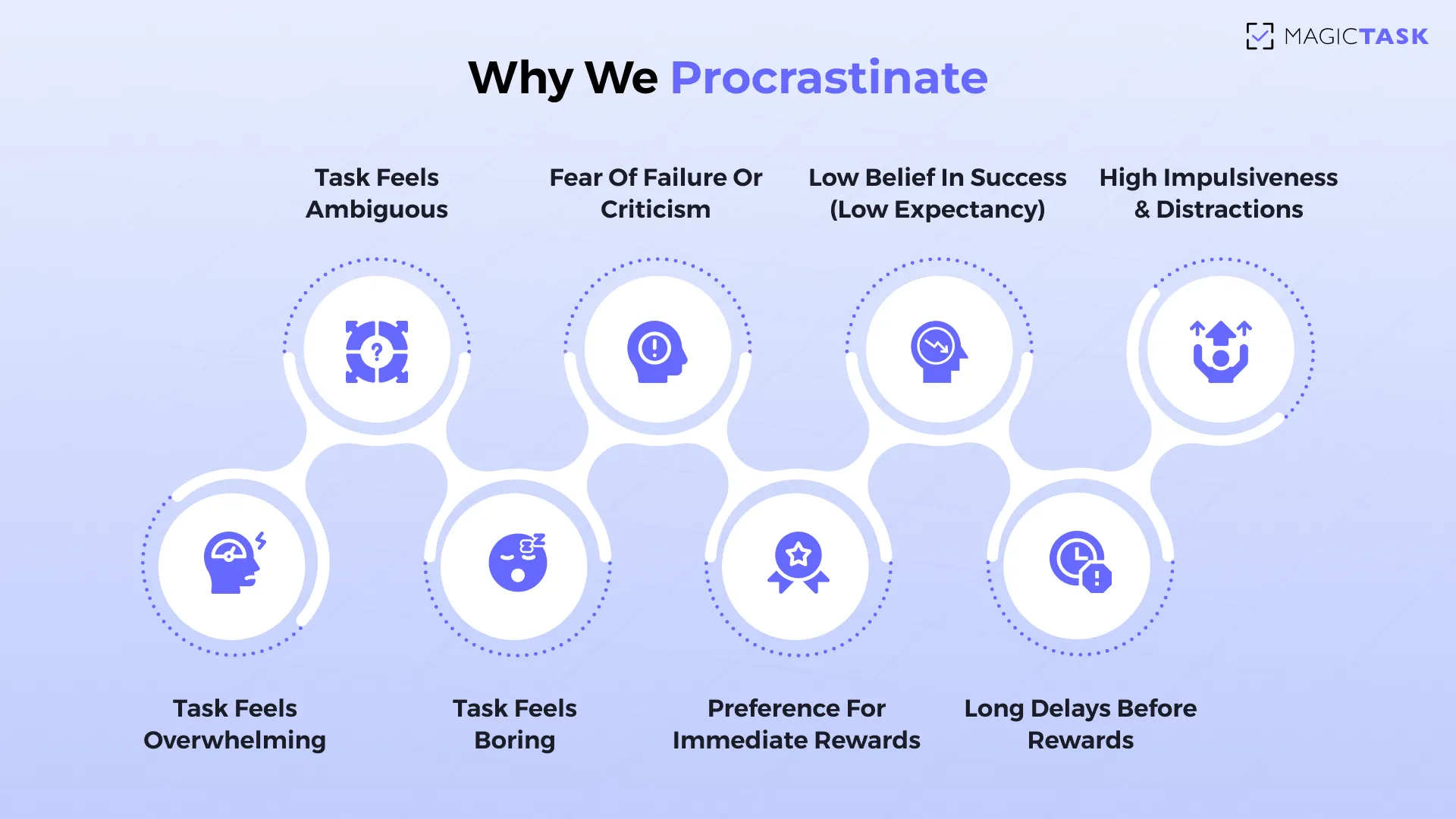
It kicks in whenever a task feels:

  • Overwhelming, when you’re staring at a blank page, wondering where even to begin
  • Ambiguous, when vague instructions leave you unsure what “update the report” actually means
  • Boring, when repetitive data entry makes you question why you bothered
  • Threatening, when the fear of failure or criticism stops you in your tracks

When you’re feeling all these feelings, your brain is torn between listening to the limbic system and the prefrontal cortex.

That’s what leads to the reasons for procrastination. 

Why we procrastinate

Limbic Hijack

When your brain senses a task as uncomfortable, your threat‑detector (the amygdala) kicks into high gear.

This “limbic hijack” floods your system with stress hormones and a craving for relief, and suddenly, the closest source of comfort, like social media, snacks, or busy work, feels far more appealing than the real work at hand.

While your emotional center screams “avoid,” the prefrontal cortex—the part of your brain that plans, reasons, and wills itself forward—takes a back seat.

Scrolling through your feed or reorganizing your desktop triggers small hits of dopamine and reinforces avoidance, so every time you try to focus, your brain nudges you back toward the “easier” reward.

But it is only half the story; our brain’s reward system also tilts the scales toward bias.

Dopamine & Delay Discounting

Your midbrain dopamine neurons respond to any hint of reward, especially when it’s right in front of you.

Neuroscientists have shown that these neurons light up not only when you actually receive a treat, but even when you expect one, turning anticipation itself into a tiny hit of pleasure. 

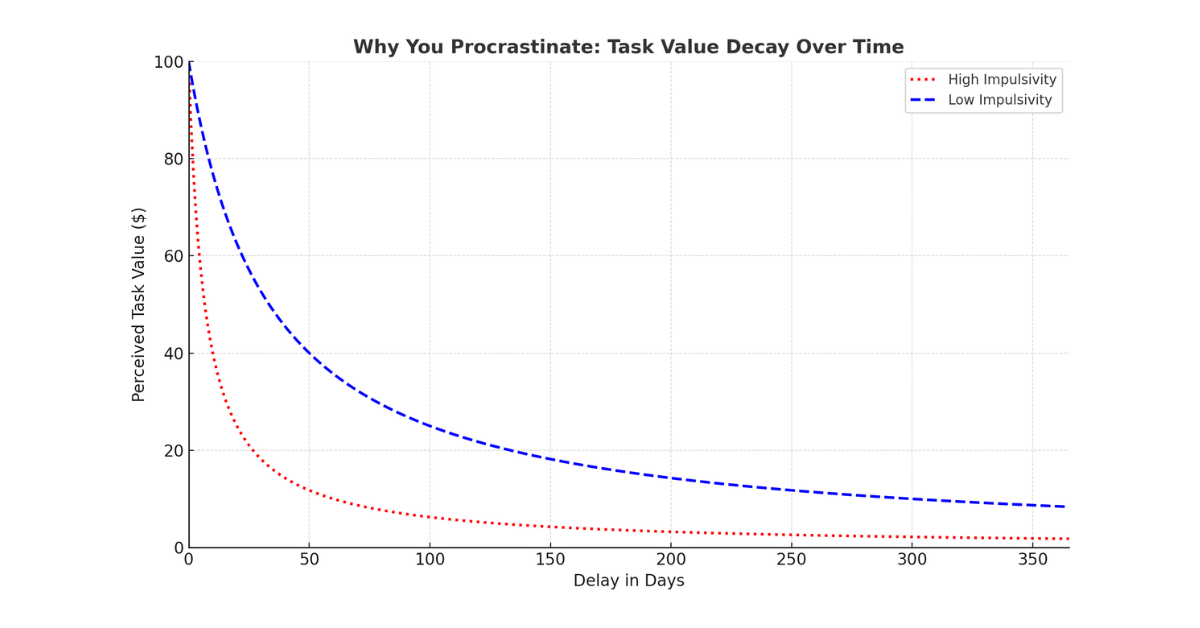
But the farther away a reward lies, the smaller that dopamine surge becomes.

This “delay discounting” means your brain devalues tomorrow’s big achievement in favor of today’s quick payoff.

Dopamine & Delay Discounting

In practice, this is why you’ll find yourself breezing through a five‑minute email response while balking at a two‑hour market analysis that won’t pay off until next quarter. 

Temporal Motivation Theory

While dopamine surges and delay discounting show us what happens in the brain when we procrastinate, Temporal Motivation Theory (TMT) explains why certain tasks get sidelined and others tackled head‑on.

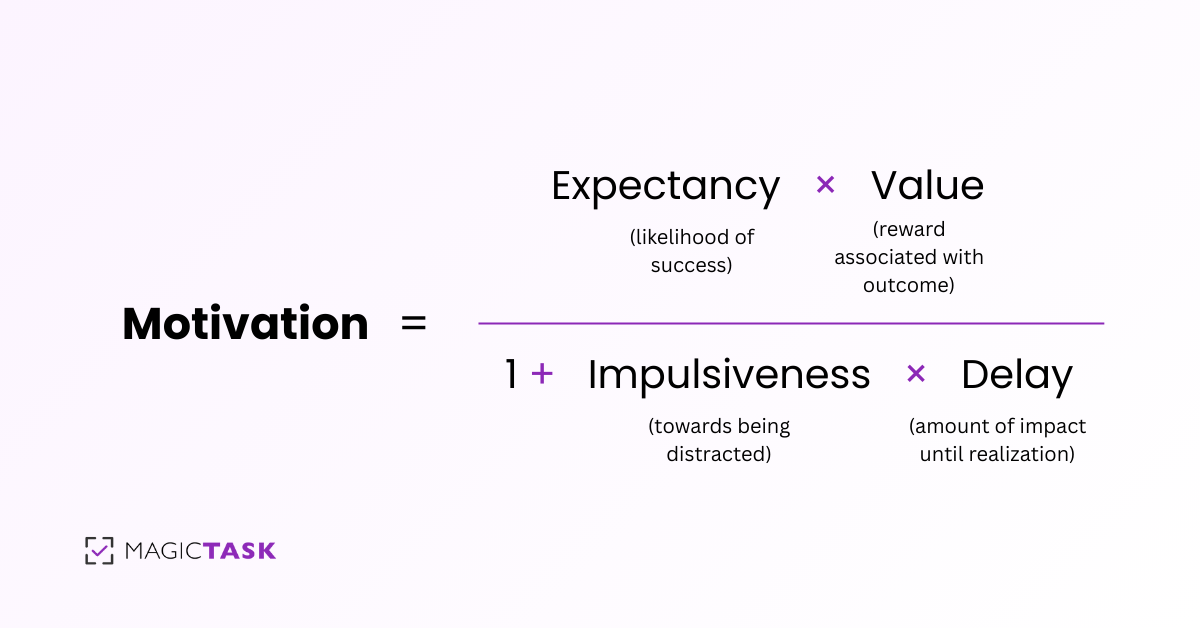
Developed by Piers Steel and Cornelius König, TMT distills motivation into a simple equation:

Motivation = (Expectancy × Value) / (1 + Impulsiveness × Delay)

Where, 

  • Expectancy is your belief that you can succeed.
  • Value is how rewarding you perceive the outcome to be.
  • Delay is the time until the reward arrives.
  • Impulsiveness reflects how much immediate comforts tempt you.

Temporal Motivation Theory

Imagine you have two tasks: writing next month’s annual report (high value, valuable to your career, but due in four weeks) versus drafting a five‑sentence email reply (low value, due immediately).

TMT predicts you’ll gravitate toward the email because the delay is minimal and impulsiveness drives you toward that quick win, even though the report may be far more critical.

What does it mean for procrastination?

  • Long delays and low expectancy crush motivation.
  • High‑value tasks still languish if they feel distant or too complex.
  • People with higher impulsiveness give in to distractions more easily.

By understanding TMT, you realize procrastination isn’t a moral failing, but a predictable outcome of our brain’s time‑sensitive calculus.

And once you know the formula, you can hack it and watch motivation take over.

Breaking free from procrastination means interrupting the cycle before it tightens its grip.

Procrastination Is a Cycle — Here’s What It’s Doing to You

When you delay, you’re not just pushing a task off your plate. You’re stacking stress on top of stress.

Did you know that the average person spends nearly 55 days a year — that’s almost two months — delaying essential tasks.

Over time, the habit loop of avoidance starts to erode your ability to accomplish things.

Here’s precisely what happens: 

  • Mental load buildup: Each postponement makes the task feel more daunting, so it becomes even harder to start next time.
  • Lower self‑trust: You miss commitments, and that chips away at your confidence in your follow‑through.
  • Missed deadlines and opportunities: Trying to wait until the last minute often means you miss the window to deliver your best work or even deliver at all.
  • Increased stress and guilt: Anxiety grows as due dates loom, and guilt sets in the moment you realize how much you’ve fallen behind.
  • Declining performance: You try to keep up, but rushed efforts lead to avoidable errors, reinforcing the belief that “I work better under pressure,” which only fuels more delay.

Let’s take the example of a product manager I worked with. By putting off stakeholder updates until the day before presentations, she repeatedly found herself scrambling for accurate data, burning out her team, and watching decision‑makers grow frustrated.

What began as a few skipped emails turned into a habit loop that threatened her credibility and her project’s success.

Breaking free means interrupting this cycle before it tightens its grip, which brings us to the five proven ways to break free from the procrastination cycle. 

Five Quick Ways to Start Getting Things Done

Now that you’ve seen how delaying just one task can snowball into missed deadlines, stress, and eroded confidence, it’s time to shift gears from “maybe later” to “done now.”

1. Break Tasks into Micro-Steps

When you face a project that feels enormous—say, “Finish the Q3 marketing presentation”—your brain balks.

That single directive demands dozens of decisions all at once, such as which slides you need, what data to include, and which design to choose. It’s no wonder we freeze or detour into something else, thinking that the task is abstract.

The antidote is to carve out the very first slice of the work.

Instead of “Finish presentation,” you might define your opening move as “Draft three talking points for the introduction.”

That tiny commitment takes less than two minutes and fits squarely within your brain’s comfort zone. You’re no longer wrestling the whole elephant. You’re merely petting its ear.

That one small win triggers a dopamine release, clears mental bandwidth, and gives you the confidence to tackle the next micro‑step.

You can use tools like MagicTask to find the starting point.

In MagicTask, each micro-step is its own item, sized “S, M, L, or XL”, so you can visualize exactly where to begin depending on the task size. Drag that smallest task into your “My Focus” lane, complete it, and feel the forward pull of genuine progress. 

Task sizes in MagicTask

That initial win wakes your momentum, so why stop there? Turn every small task into a “do it now” move.

2. Use the Two-Minute Rule

A general rule of thumb to avoid procrastination is to stop adding things to your to-do list.

If a task can be done in under two minutes, do it immediately.

The Two-Minute Rule is rooted in cognitive load theory. 

Your brain is juggling dozens of open loops, like emails to send, forms to fill out, and quick replies. Each one adds mental friction.

Every time you defer a tiny task, it lingers in your working memory and steals precious attention from the work that matters.

By knocking out those under‑two‑minute actions on the spot, you declutter your mind and free up bandwidth for deeper work.

For example, instead of letting that notification about confirming your team’s lunch order sit unread, you tap “yes” right away. That single click clears a mental nag and delivers a minor dopamine hit that reinforces “action = relief.” 

As Nelson Mandela says, “It always seems impossible until it’s done.”  You just have to put your mind to it. 

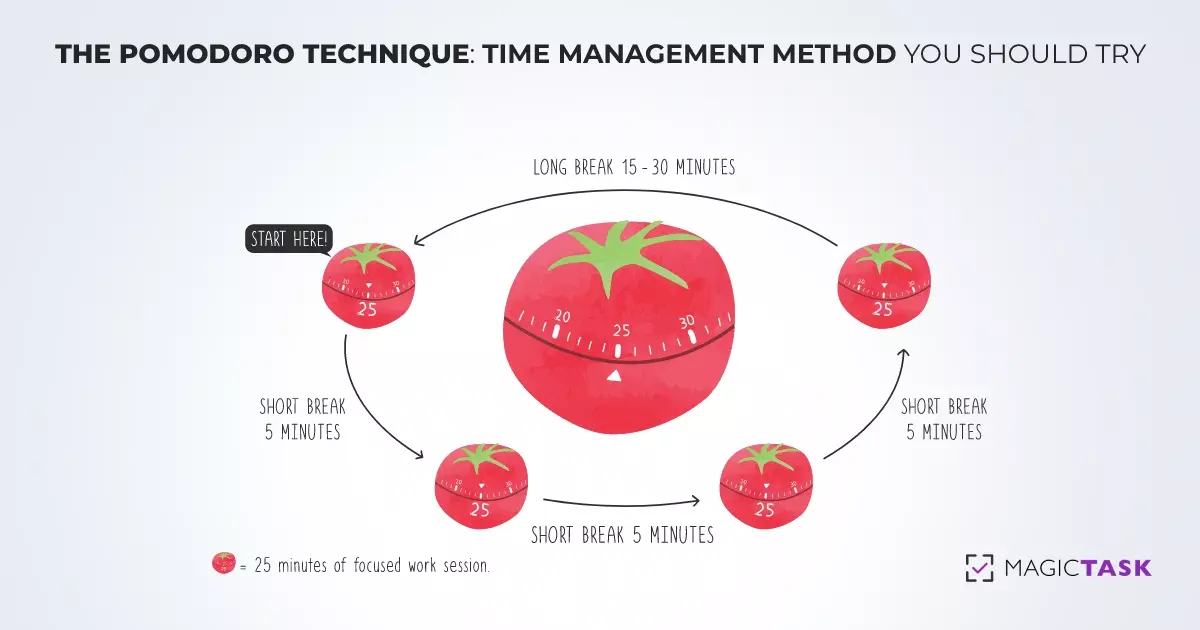
3. Try the Pomodoro Technique

Now, that was about the small tasks, but what about when the bigger tasks stall you? That’s where the Pomodoro Technique steps in.

By breaking your day into bite‑sized sprints, it tricks your brain into sustained focus and permits you to rest before fatigue can set in. 

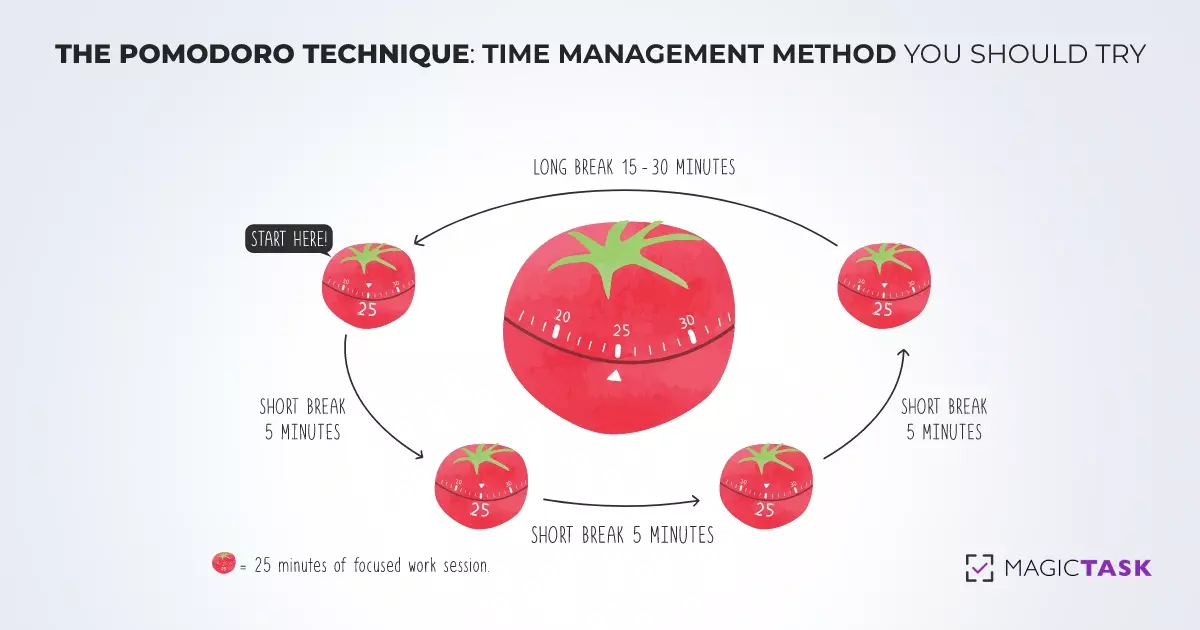
Here’s how it works: 

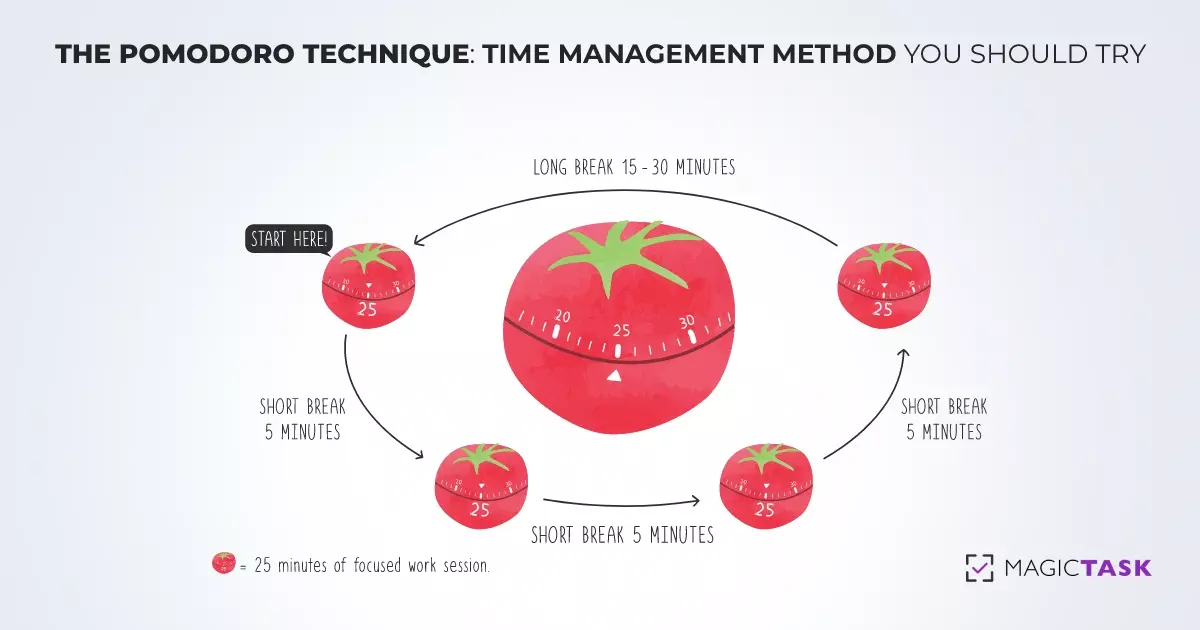
  • 25‑Minute Focus Sprint: Work on one straightforward, specific task—no email, no social media, no side quests. That finite window feels less intimidating than “work until you’re done.”
  • 5‑Minute Recharge: Step away to stretch, hydrate, or simply glance out the window. This brief pause helps reset your mental energy and maintain peak performance.
  • Repeat & Recover: After four Pomodoros, take a longer break (15–30 minutes). This deeper rest replenishes your willpower and wards off burnout.

The Pomodoro Technique clicks because it lowers the barrier to starting a task. Telling yourself you only need to work for 25 minutes makes even your most dreaded tasks feel manageable.

Each completed sprint delivers a mini‑victory that builds unstoppable momentum. That surge is powerful, but to keep it rolling, begin each Pomodoro with an action so easy it barely registers as work.

4. Start with a Low-Resistance Action

Sometimes the most challenging part is simply getting started.

When you stare at a blank page or an empty spreadsheet, your brain sees a vast expanse of unknowns—and it won’t step into that territory without a compelling reason.

That’s where a low‑resistance action can be helpful. 

You choose the single smallest, least threatening step you can imagine, like opening the file and typing one sentence. That way, you drastically reduce the “activation energy” your brain demands before it gets to work.

Psychologist Bluma Zeigarnik first observed in the 1920s that we often obsess over unfinished tasks and feel a psychological itch until they are completed.

That itch is your brain craving closure. When you give it a nibble—a one‑sentence start or a single chart in a deck—you satisfy the initial craving and spark the momentum that carries you forward.

Over time, these tiny openings break the procrastination loop and train your mind to expect progress.

5. Don’t Aim for Perfect — Aim for Progress

Perfectionism often disguises itself as thoroughness, yet it can be just as paralyzing as procrastination.

When every decision hinges on achieving an ideal outcome, projects linger in limbo—drafts never leave your desk, deadlines slip, and the promise of feedback remains unrealized.

A more productive path begins by embracing “progress over perfection.” 

Start each new deliverable with a strict time‑boxed draft session—say, 20 minutes of uninterrupted writing or planning—during which you produce a complete, if rough, version without stopping to edit.

As soon as that timer rings, mark the task as “done” and share it with colleagues or stakeholders. 

Their early feedback will direct your next steps, allowing you to refine the substance rather than tinkering endlessly with the form.

When you shift the focus from flawless first drafts to iterative improvement, you maintain forward momentum, capitalize on timely input, and transform perfectionism from an obstacle into a structured element of your workflow.

But you can’t always do it all by yourself. You need the right tools to get started and keep pushing, so you never look back at procrastination. 

How MagicTask Makes It Easier to Get Things Done

MagicTask helps you reduce the excuses your brain uses to avoid starting and replace them with genuine incentives to move forward.

Here’s how its gamification feature tackles each procrastination head-on:

1. Points & XP for Task Completion

Without clear feedback, even finished tasks can feel invisible.

MagicTask awards points and XP the moment you check something off, providing that immediate sense of accomplishment your brain craves.

Over time, watching your XP accumulate turns progress into a visible trajectory, so you never lose sight of how far you’ve come.

2. Level‑Up Themes & Animations

As you keep progressing, you unlock new themes and animations.

MagicTask injects a dose of novelty into routine chores. Each level‑up refreshes your interface, reminding you that consistent effort leads to tangible rewards.

3. Workspace & Global Leaderboards

You can see the gamified leaderboard spotlight both your personal bests and your standing within the team, creating friendly accountability and a transparent measure of success.

Seeing your name climb higher inspires you—and your colleagues—to keep moving forward.

4. Clean, Minimal Interface

MagicTask boasts a clean interface that strips away non‑essentials so that on launch, you see only your current focus. No distractions, no detours—just a clear path to your successive win.

MagicTask gives you the tools to win today, but building lasting consistency takes a broader playbook to help you every step of the way.

Want More Ways to Stay Consistent?

Level up your long‑term productivity with our eBook, Become the GOAT of Productivity. This is a research‑backed playbook designed to turn momentum into habit. It provides:

  • Advanced Mindset Tools: Techniques to rewire your habits and cultivate a growth‑oriented outlook.
  • Proven Systems: Ready‑to‑use frameworks for prioritization, goal‑setting, and decision‑making that remove the guesswork.
  • Daily Planning Techniques: Customizable templates and rituals—like morning success routines and weekly reviews—to keep you on track without burning out.

By combining MagicTask’s immediate rewards with the eBook’s strategic depth, you’ll not only crush today’s tasks but also build the habits that keep you at peak performance—day after day, quarter after quarter.

Conclusion

Procrastination is a habit that affects almost everyone at some point. But how you handle it will define your success. Your brain is wired to seek comfort before effort.

So, procrastination isn’t a moral failing; it’s an emotional shortcut. But the good news is that you can outsmart it with low‑resistance wins. 

By now, you know that:

  • Procrastination is driven by emotion, not laziness
  • You can prime your brain for action with micro‑steps
  • Small actions, repeated consistently, compound into significant progress

So here’s your next step: open MagicTask, choose one small task—maybe something you’d usually put off—move it into your Focus lane, and mark it done. That single checkmark will trigger the very momentum you need to tackle the next.

Know that momentum is built, not found. Start where you are—and let progress pull you forward.


How to Manage a Heavy Workload While Staying Focused and Motivated

manage heavy workload

Managing a heavy workload can feel like a full-time job in itself. Between back-to-back meetings, constant emails, and a growing list of priorities, it’s easy to lose focus, and even easier to lose motivation.

But even in the busiest seasons, it’s possible to take control of your time, your energy, and how you tackle each day, rather than just scrambling to keep up.

In this article, you’ll find practical strategies to help you manage a demanding workload, stay organized under pressure, and keep your motivation steady, even when the pace doesn’t slow down.

Let's start!

Why a Heavy Workload Leads to Stress and Burnout

But before we dive into our tested techniques, let’s first examine why an endless to-do list and constant distractions drain your energy and cause burnout.

1. Mental Overload Slows You Down

When your work plate is overflowing, your brain struggles to keep up. Cognitive overload makes it challenging to prioritize tasks, which often leads to procrastination.

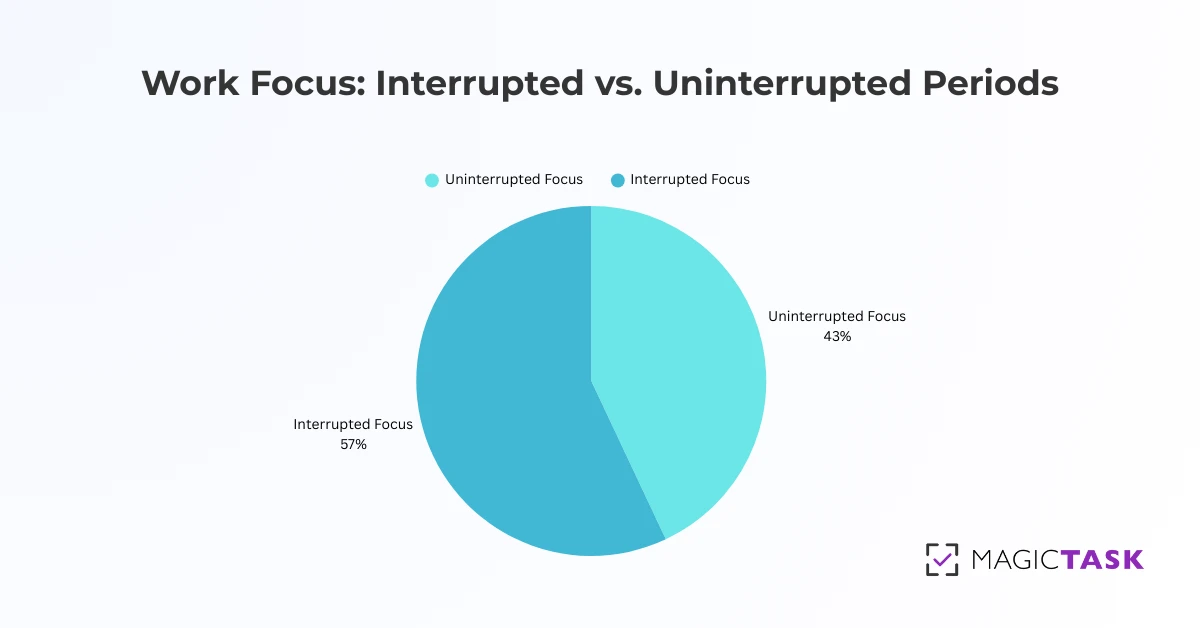
Research shows that over half of our focused periods are cut short by distractions, 57%.

Extended work sessions frequently derail even in collaborative environments due to constant disruptions. And while you might eventually pick your work back up the same day, you've already bounced between multiple unrelated tasks by then.

Focus at work

This frequent task-switching silently erodes your focus, undermining your productivity.

From a psychological standpoint, constant distractions overload the part of your brain that handles decision-making and prioritizing.

When your attention is constantly being pulled in different directions, even simple tasks can suddenly seem overwhelming, and that natural dopamine burst, your brain’s reward for a job well done, is significantly diminished.

Without a clear, uninterrupted focus, productivity slows, and you end up postponing decisions simply because your mind is overburdened.

2. Focus Slips, and Progress Stalls

When focus slips, it’s not just your output that suffers; it’s your momentum.

You start a task, get interrupted, try to pick it back up, and before long, you’re stuck in a loop of half-finished work. That feeling of always being busy but never actually finishing anything creates frustration and fatigue.

Even brief distractions can steal large chunks of your day. One small interruption can cost you up to 30 minutes of productive time. Multiply that across a workday, and it's easy to see how progress slows to a crawl, not because you're not working, but because you're never fully locked in.

3. Lack of Progress Feels Demotivating

When your to-do list is overflowing, it’s easy to feel like you’re working nonstop but not actually getting anywhere.

Take a sales manager, for example, juggling meetings, fine-tuning strategies, chasing leads, and handling reports. It’s a nonstop effort.

But without clear signs of progress, like steady revenue growth or team milestones, all that work starts to feel invisible.

And when progress feels invisible, motivation takes a hit. Even if you're chasing small wins, it’s hard to stay driven when nothing feels like it’s adding up.

4. Productivity Tools Can Feel Overwhelming

The tools designed to help you stay productive can sometimes end up doing the opposite.

With endless settings to adjust, features to learn, and dashboards to customize, you might find yourself spending more time setting things up than actually getting things done.

Instead of simplifying your workflow, these tools can become just another task on your list. And when the systems meant to save time start eating it up, the result is more frustration, not more focus.

💡 Key takeaway: You don’t just need to work harder—you need to work smarter.

Now that we’ve unpacked the problem, let’s look at what you can actually do about it.

Proven Techniques to Manage a Heavy Workload

You don’t need more hours in the day — you just need the right approach.

Here are some tried-and-true methods to help you stay sharp, organized, and on top of what matters most.

1. The Eisenhower Matrix: Prioritize Tasks Effectively

When your task list starts looking more like a scroll, it’s easy to treat everything like it’s equally urgent.

But not all of them need your attention. 

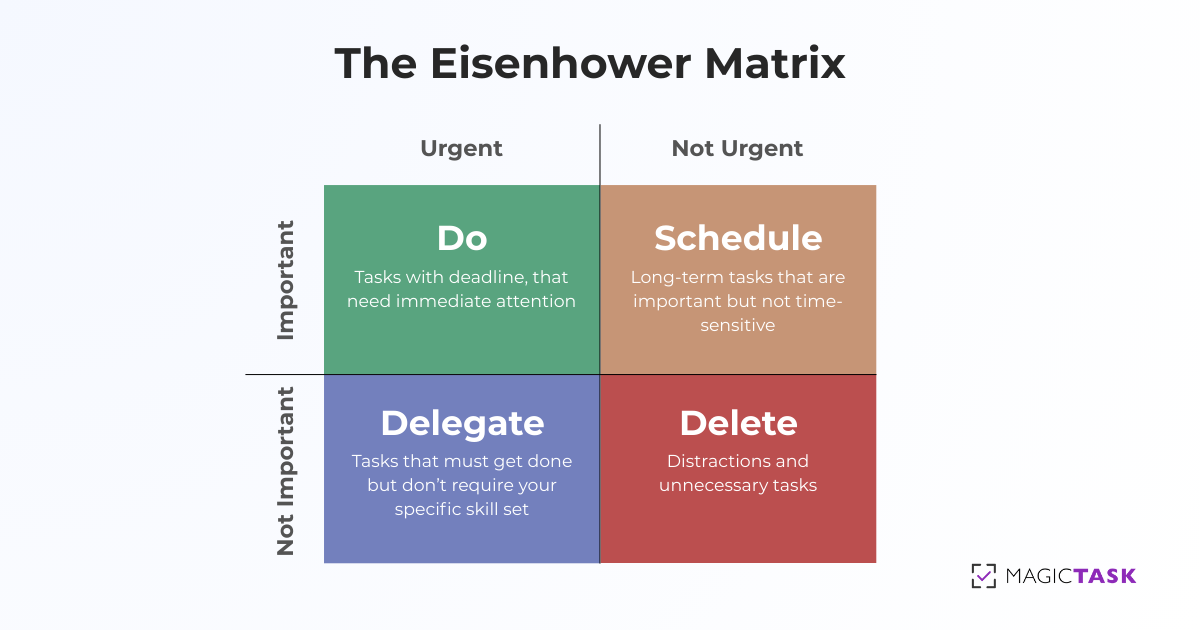
The Eisenhower Matrix is a simple task prioritization framework that helps you sort tasks by urgency and importance so you can focus on what matters most, not just what shouts the loudest.

Here’s how it works:

  • Urgent & Important: These are critical, deadline-driven tasks that have a real impact. They deserve your immediate attention.
  • Important, Not Urgent: Strategic work, long-term planning, and relationship-building fall here. They don’t scream for attention, but they’re essential.
  • Urgent, Not Important: These tasks might feel pressing, but don’t require your expertise. Pass them on to someone with a better grasp of the task when possible.
  • Neither Urgent nor Important: If a task isn’t time-sensitive or valuable, it’s clutter. Clear it out to reclaim your focus.

The Eisenhower Matrix

Let’s say you start your Monday with this chaotic list:

  • Finalize the client proposal due today
  • Respond to Slack messages
  • Plan next quarter’s marketing strategy
  • Review performance reports
  • Attend a meeting that could’ve been an email
  • Book a dentist appointment
  • Organize your Google Drive
  • Handle a last-minute request from your boss
  • Schedule 1:1s with your team
  • Scroll LinkedIn (again)

Now, let’s sort those into the matrix:

Category Urgent Not Urgent
Important
  • Finalize client proposal due today
  • Handle last-minute requests from the boss
  • Plan next quarter’s marketing strategy
  • Review performance reports
  • Schedule 1:1s with your team
  • Book a dentist appointment
Not Important
  • Respond to Slack messages
  • Scroll LinkedIn
  • Attend a meeting that could’ve been an email
  • Organize your Google Drive

The Eisenhower Matrix helps you get out of reaction mode. Instead of jumping from one “urgent” task to the next, you’ll lead your day with intention. And giving high-impact work the time it deserves.

Quick tip: Start your morning by sorting your top priorities into each category. You’ll be surprised how quickly clarity follows.

2. The Pomodoro Technique: Stay Focused with Timed Work Sessions

Are you staring at your screen, half-working, half-scrolling, and fully stressed?

The Pomodoro technique can help.

It’s a simple time management method that uses short bursts of focused work followed by regular breaks to keep your mind fresh and your motivation high.

Here’s how it works:

  1. Pick a task you want to tackle.
  2. Set a timer for 25 minutes (this is one “Pomodoro”).
  3. Work on that task and only that task until the timer rings.
  4. Take a 5-minute break—walk, stretch, breathe, and don’t doom scroll.
  5. After 4 Pomodoros, take a longer break (15–30 minutes).

This cycle helps maintain your concentration and prevents burnout over the long haul.

**Pomodoro technique**

For example, if you're in the middle of preparing a report, you set your timer for 25 minutes and work solely on the report, resisting the urge to check emails or browse social media.

Once your session ends, you step away, perhaps stretching or grabbing a coffee, and then return to the task with renewed focus. 

When you consistently apply this method, you transform a chaotic workday into a series of manageable sprints, each building on the last and moving you steadily toward your larger goals.

3. Task Batching: Minimize Task Switching

There's another strategy to maximize your productivity even further, known as Task Batching. It is about giving your brain permission to settle down and focus on one type of task at a time.

Instead of letting your to-do list turn into a constant game of "what’s next?"—which forces your mind to switch gears repeatedly—you group similar tasks into dedicated time blocks.

Here’s the idea in plain terms: if you block off an hour to answer emails, you're not constantly tearing your attention away when another task nudges for attention. That way, your mind stays locked in, and you breeze through that batch with fewer disruptions. 

Task batching

Completing a batch of similar tasks gives you a continuous, satisfying sense of accomplishment that propels you to the next challenge.

As Dr. Sahar Yousef, a cognitive neuroscientist at UC Berkeley, says, “The human brain works best when focusing on one thing at a time. We have a certain amount of cognitive capacity and a certain amount of attention.”

It reminds us that our mental energy is precious and finite. If we constantly scatter our focus, we risk diluting our efforts on tasks that do not matter. This brings us to another powerful strategy for managing our workload.

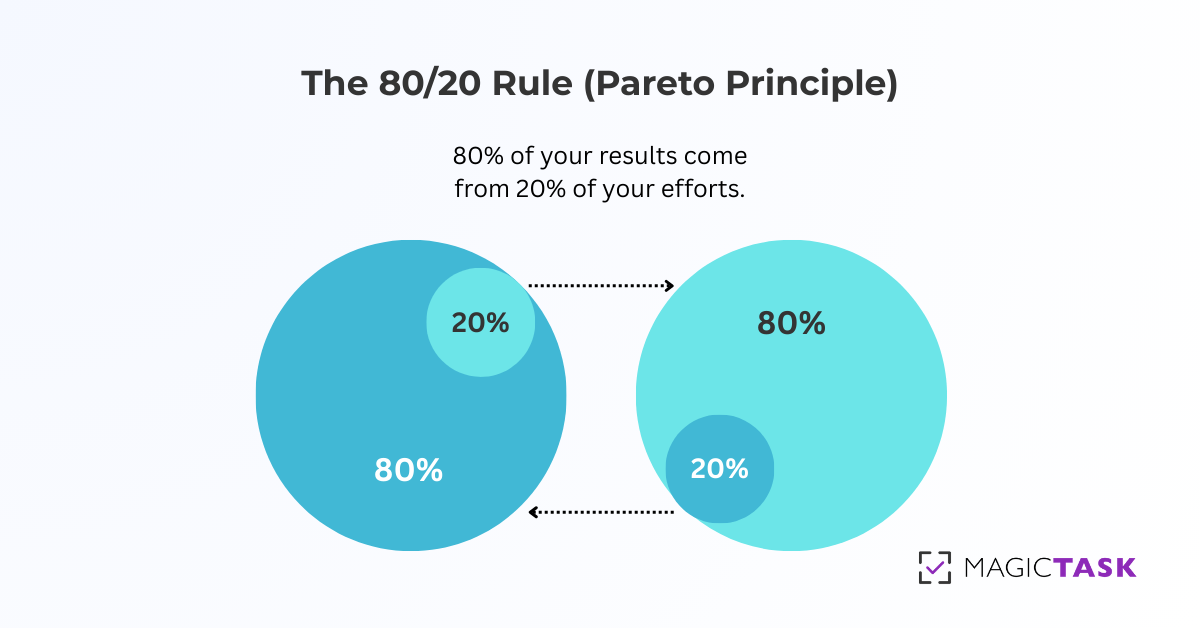
4. The 80/20 Rule (Pareto Principle): Focus on High-Impact Work

The 80/20 Rule, also known as the Pareto Principle, is built on a profound idea: 80% of your results come from just 20% of your efforts.

Applying this to your work involves identifying the few critical tasks that will have the most significant impact.

Think about everything on your to-do list. Many of those items might feel important, but not all of them will drive your success in the same way.

80 20 Rule

Here’s how you can apply the 80/20 Rule:

Step #1: Review Your Tasks:

Look at your to-do list. Which tasks will directly impact your goals? Which ones feel busy but aren’t moving the needle? Be honest about the value each task brings.

Step #2: Classify Tasks by Impact

Once you've identified your high-impact tasks, prioritize them. These are the ones that deserve the most attention and effort.

Step #3: Focus on High-Impact Activities

Give your most important tasks your full focus. Avoid getting distracted by tasks that might be easy but don’t contribute much to your larger objectives.

Step #4: Delegate or Eliminate Low-Impact Tasks

Delegate or eliminate tasks that don’t require your direct involvement. Your time is valuable, and low-impact tasks should not monopolize it.

Step #5: Measure and Adjust

Review your progress regularly. Is your focus on high-impact tasks yielding the results you want? If not, adjust and refine your approach. 

The beauty of the 80/20 Rule is its simplicity. Instead of focusing on doing more, it encourages doing less, but better. But even with fewer, more impactful tasks, time is still your most precious resource.

That brings us to the following proven technique. 

5. Time Blocking: Schedule Your Day for Maximum Productivity

Time blocking is one of the most effective techniques for managing a heavy workload.

It’s exactly what it sounds like—dedicating specific blocks of time to focused work. Instead of trying to fit tasks into your day as they come, you create a schedule in advance that ensures your most important tasks get the attention they deserve.

With clear boundaries for when and how long you’ll work on each task, you eliminate the mental load of deciding what to do next. This approach also encourages deep work, which leads to higher-quality results in less time.

How to Time Block?

1. Assess Your Tasks

Before blocking time, assess the tasks you need to accomplish. Break them down by priority, urgency, and complexity. Recognizing how much focus and energy each task requires will help you allocate appropriate time slots.

2. Create Time Blocks

Start by allocating time for your most important and demanding tasks. These are the activities that need uninterrupted focus.

For example:

  • 9:00 AM – 11:00 AM: Write the project proposal
  • 11:00 AM – 12:00 PM: Respond to emails
  • 12:00 PM – 1:00 PM: Lunch break
  • 1:00 PM – 3:00 PM: Research new business trends
  • 3:00 PM – 4:00 PM: Prepare client presentation

3. Be Specific with Your Blocks

It’s tempting just to say, “Work on the project proposal for two hours,” but the more specific you are, the better.

Define what you will accomplish during each block. For example, “Complete introduction and first draft of the proposal” gives you a concrete goal.

4. Schedule Breaks

It’s crucial to schedule breaks in between time blocks to avoid burnout. A 5-10 minute break every hour is a good practice.

The Pomodoro Technique is a successful method that you can integrate with time blocking.

5. Use a Calendar or Planner

Whether it’s a physical planner, Google Calendar, or a task management app, find a tool that works to organize your time. A clear view of your day will keep you accountable and help you stay on track.

6. Stick to Your Schedule

The key to time blocking is commitment. Try to stick to the blocks you’ve set, even if you get distracted. If something urgent pops up, move it to the next available time slot.

If you’re feeling scattered by your heavy workload, try time blocking. It might just be what you need to streamline your work and boost productivity. However, having the proper technique is only part of the equation. The tools you use matter, too.

How MagicTask Helps You Manage Your Workload and Stay Motivated

If the proven techniques mentioned above help you organize your workload, MagicTask helps you stay on top of it.

Here's how it turns structure into real momentum. 

1. Prioritize Work with Task Sizing

One of MagicTask’s most powerful features is its simple "Task Sizing" system. Every time you create a new task, you assign it a size — S, M, L, or XL — based on its complexity and how much time it will take.

Task sizing

This helps you quickly sort through your workload and spot what needs your attention first. Instead of staring at a messy to-do list, you get a clear, structured view of what’s ahead. When you're ready to focus, just drag your top priority into the "My Focus" section and lock in.

Each completed task moves you forward in a visible way. That sense of progress, even in small steps, creates momentum, and that momentum is what keeps you motivated through busy days.

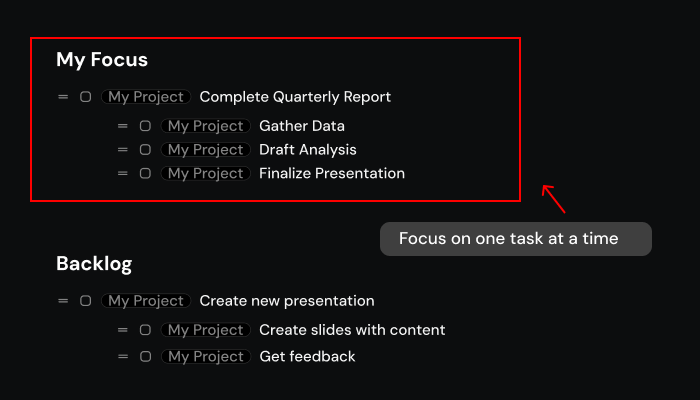
2. Stay Focused on One Task at a Time

Ever spent more time setting up your digital workspace than actually using it? Tools like Notion or Asana are packed with features, but all that flexibility can turn into a distraction. Instead of helping you focus, you end up lost in dashboards and settings.

MagicTask takes a different approach. It’s built to keep you locked in on what really matters — the task in front of you. No clutter, no endless tweaking. Just one clean, focused space where you can do your work without the usual noise.

Focus on one task at a time

When you open MagicTask, you’re not staring at a maze of tabs, charts, or distractions. You see, the one thing you’ve chosen to work on — and that’s it.

This simplicity gives your brain room to focus. No decisions to make about what to tackle next, no wasted energy jumping between priorities. You just get to work.

By cutting out the extras, MagicTask helps you get into a flow state faster and stay there longer. That’s the kind of focus most tools promise, but few actually deliver.

3. See Your Progress and Stay Motivated

Now that you're focused on one task at a time, the next step is seeing that focus pay off.  

Let’s say you’re compiling an annual performance report. As you work through gathering data, analyzing trends, and drafting insights, each task you complete earns you points. With MagicTask, these points accumulate, helping you level up and unlock new themes and animations.

Meanwhile, a dynamic leaderboard tracks your progress, not just as a personal record but also in comparison to your colleagues. This visual display of achievement and healthy competition reinforces every win, driving you to tackle the next section of the report with renewed energy.

In short, when every small task becomes a measurable victory, it keeps your motivation and focus sharp.

4. Work Feels Rewarding, Not Draining

With your progress now visible, you can feel the fireworks in your brain, a burst of dopamine celebrating each success.

rewards

MagicTask taps into that power by making task completion something you can see and feel. Every finished task rewards you, just like a game would. These rewards don’t just disappear into a scoreboard; they serve as milestones on your journey, giving you a clear sense of progress. 

As you level up, you unlock new game-like themes, celebrating your achievements in real time. It's not about distracting you with bells and whistles; it's about creating a system where your hard work is immediately recognized and reinvigorates your drive.

Gamification turns the workday into a collection of small wins. And you already know the power of small wins – they boost your productivity by as much as 28%.

Conclusion

At the end of it all, your goal is to manage a heavy workload with a motivated spirit. With the right system, you can stay productive without sacrificing your motivation.

When you structure your work, minimize distractions, and celebrate every small win, you unlock a sustained energy and focus cycle. These proven techniques pave the way to transform chaos into clarity. 
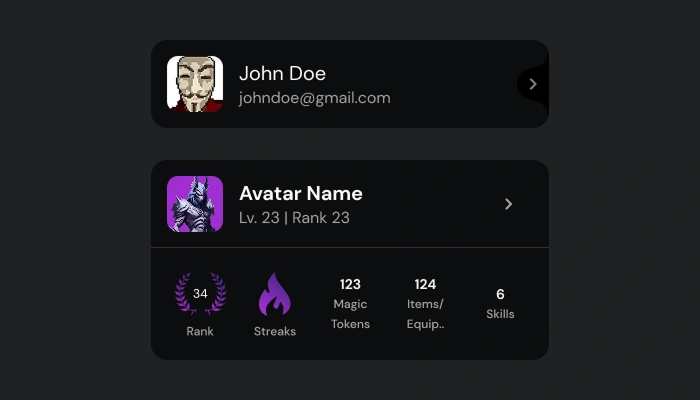
Are you ready to make work engaging instead of exhausting?

Try MagicTask today and experience how an innovative, gamified approach can turn even the busiest day into a series of rewarding wins.

The Progress Hack – How Small Wins Can Keep You Motivated and Make Work Fun

The progress hack

Ever feel like you're working hard but not really getting anywhere? It's usually not the amount of work that's the problem. It's the quiet frustration of not seeing progress that slowly wears you down.

When it feels like you're just ticking boxes all day with nothing to show for it, it's easy to lose steam.

But what if you could actually see your progress? Like, really feel it, one small win at a time?

According to research published in the Harvard Business Review, tracking small, everyday achievements is the single most effective way to boost motivation at work. Even tiny wins can spark a sense of momentum and keep you moving forward.

And that’s where the Progress Hack (as I like to call it) comes in. It’s a simple way to turn small wins into momentum that actually keeps you going.

In this blog, I will show you how to put it into practice so you can stay focused, get more done, and enjoy the process.

Let's start.

The Science of Small Wins: Why Progress Fuels Motivation

Before diving into how to apply the Progress Hack, let’s take a closer look at why these small wins pack such a powerful punch. Understanding the science behind it can help you tap into motivation that actually lasts.

The Dopamine Rush

Our brains are wired to celebrate achievement, big or small. At the center of that celebration is dopamine, a feel-good chemical your brain releases every time you complete something that feels rewarding.

It doesn’t have to be a major milestone. Research shows that even modest wins like crossing off a task on your to-do list can trigger a dopamine boost. These midbrain neurons aren’t picky; they respond to any moment that signals progress.

The Dopamine Rush

That quick hit of dopamine acts like a quiet internal “Nice job, keep going!” It’s why finishing a task, however minor, feels satisfying.

It’s also why you might obsessively check things off a neatly organized task list or feel a little rush after leveling up in a game.

Take something simple: say you knock out a short report in ten minutes. Your brain registers that win and drops a little dose of dopamine, just enough to push you toward the next task.

Over time, those tiny wins stack up, creating a cycle of positive reinforcement that keeps your motivation alive.

And that’s how momentum begins to build.

Incremental Wins: The Building Blocks of Success

Long projects with no visible milestones can feel endless, draining your focus and making it hard to stay engaged. In contrast, a system highlighting even the smallest steps helps create structure, clarity, and motivation.

Let’s look at how this shift plays out:

Aspect Traditional Work With Small Wins
Attention Focus gets scattered without clear, short-term goals. Each mini-win keeps your attention anchored.
Emotion Sporadic feedback leaves you feeling disconnected. Frequent wins lift your mood and energy.
Progress Vague milestones make success hard to measure. Visible progress builds momentum and drive.

Each small win acts like a stepping stone. Together, they form a path that leads to your bigger goals and makes the journey feel achievable and rewarding.

As leadership expert John C. Maxwell says, “Small disciplines repeated with consistency every day lead to great achievements.”

Next, let’s explore how to turn this idea into something practical you can use every day.

How to Use the "Progress Hack" to Stay Motivated Every Day

Now that we’ve looked at why small wins matter, let me show you how to actually use the Progress Hack in your day-to-day work. It’s all about turning regular tasks into simple, trackable steps that keep you moving forward without burning out.

1. Break Work Into Mini-Wins

A thoughtful way to use the "Progress Hack" is to break down a big project into manageable steps.

For instance, you might break a marketing project into steps like drafting a campaign strategy, creating ad copy, setting up the campaign on a specific platform, and then setting up the report for monitoring. Each of these mini-wins gives you a boost of motivation and makes progress visible.

MagicTask makes this approach easy.

Task sizes in MT

You start by adding all your tasks to the Backlog, then assigning each a size—S, M, L, or XL—based on how you perceive the task in terms of effort, complexity, or urgency.

Just to be clear, these sizes aren't tied to exact time limits. The example below is simply to give you a general idea of how the sizing can work. You can define what each size means for you. What feels like a "Small" task to one person might be a "Medium" for someone else, and that’s totally fine.

Task Size Task Estimated Effort
S (Small) Send a follow-up email 5 to 15 minutes
M (Medium) Draft a brief project update 30 minutes to 1 hour
L (Large) Prepare a detailed presentation 1 to 2 hours
XL (Extra Large) Develop a comprehensive marketing strategy Half a day to a full day

When you drag a task from your Backlog into the "My Focus" section and complete it, you earn points and see your progress instantly. You instantly get your dose of dopamine to move on to the next task. 

2. Track Your Progress Like a Game

When you are playing a video game, you see clear progress. Your level-ups, achievements, and rankings keep you hooked.

Now, apply that same concept to your work. You win when every task is completed, and you look behind to see a pile of work already completed.

With MagicTask, each task you complete earns points based on its size. These points help you level up, and your progress is displayed on leaderboards within your workspace and globally. 

When you start tracking your progress like a game, even routine work feels more rewarding. Each completed task becomes a small win that keeps you moving. And while the points and levels are fun, it’s the sense of momentum that really makes the difference.

3. Healthy Competition Promotes Motivation

According to research, social motivation, especially competition, can significantly enhance attention and memory.

When you see how your achievements stack up against those of your peers or your own past performance, it pushes you to hone your focus and strive for continuous improvement.

In an environment where colleagues naturally compare notes and celebrate each other’s successes, every small win becomes a chance to compete in a friendly, uplifting way.

You might notice that when someone earns recognition for a sharp insight or a quick turnaround, it not only boosts their morale but also inspires you to push a little harder. This sort of healthy rivalry opens up a world of opportunities for more wins and constant progress.

MagicTask is designed to fuel both external and internal challenges. It lets you see how you measure up against your colleagues and encourages you to beat your previous best on the gamified leaderboard. 

3. Unlock Rewards and New Experiences as You Progress

Once you get into a rhythm, even small accomplishments can start to feel rewarding. And when you add in the element of surprise—new features, visuals, or sounds—progress becomes something you actually look forward to.

MagicTask builds on this by giving you fresh animations, sounds, and themes as you complete tasks and level up. These little changes keep your workspace feeling new, giving your routine just enough variety to stay interesting.

It’s a reminder that success isn’t about one big moment. It’s built through consistent action, one task at a time. And when your progress looks and feels rewarding, it's easier to keep going.

4. Shift Your Mindset: Redefine What Progress Looks Like

To stay motivated long term, you have to move beyond checking boxes. Progress isn’t just about completed tasks—it’s also about how you’re growing through them.

Rewards and motivation

Here are four overlooked forms of progress you can start tracking today:

  • Efficiency Gains
    Did you complete a task faster or with less effort than before? That’s a sign of growth, even if the task was small.
  • Improved Focus
    Were you less distracted today? Did you stay in flow longer? These wins often go unnoticed but directly impact performance.
  • Better Decision-Making
    If you made a clearer choice or solved a problem with less back-and-forth, that’s real improvement in how you think and work.
  • Emotional Awareness
    Noticing when you're overwhelmed or recognizing when you need a break is part of building long-term resilience and self-leadership.

By shifting your focus to include these less visible forms of progress, you give yourself more reasons to stay motivated, even on days when your task list feels ordinary.

MagicTask supports this mindset by giving you a visible trail of your progress. Each task completed is reflected in subtle theme changes, showing that growth isn’t just about doing more, but becoming better as you go.

Turning Gamification into a Daily Habit

You don’t need bursts of motivation to keep going—you need systems that make progress part of your daily routine. That’s where gamification really shines.

When you start your day with a clear focus, a few manageable challenges, and a way to track your wins, work becomes easier to step into. You’re not waiting for inspiration. You’re building momentum by design.

Here are three simple ways to turn gamification into a habit:

  • Start with One Win
    Kick off each day with a task you know you can complete quickly. That early win gives you a small push of energy to tackle what’s next.
  • Track Your Streaks
    Whether it's a string of focused work sessions or a few days of consistent task completion, streaks help build a rhythm you won’t want to break.
  • Reward Yourself with Milestones
    Don’t wait for the end of a project to celebrate. Set mini-milestones and attach small rewards to them—whether it's switching to a new theme in MagicTask or just stepping away for a well-earned break.

Gamification isn’t just a productivity trick—it’s a way to stay engaged with your goals every single day. And when progress feels good, showing up gets easier.

Start Your Progress Hack with MagicTask

If you’re ready to make work feel more rewarding, MagicTask is built to help you do exactly that.

From customizable task sizing to real-time progress tracking, gamified rewards, and dynamic themes—everything is designed to keep you focused, motivated, and moving forward.

Try MagicTask today and turn your workflow into a series of wins you can actually feel.

Multitasking Kills Productivity – Here’s How to Work Smarter

Multitasking Kills Productivity

Many people believe that handling multiple tasks at once makes them more productive. Maybe you do, too.

Do you ever find yourself constantly hopping between emails, meetings, and tasks, yet nothing seems to get done? It turns out that the very act of multitasking—switching from one task to another—can slash your productivity by up to 40%

So, what’s the best way to break free from the cycle of procrastination and finally get things done?

Instead of falling into the multitasking trap, let’s explore how to work efficiently without falling into the multitasking trap.

Why Multitasking Is Hurting Your Productivity

Before we get to smarter strategies, let’s pull back the curtain on the hidden toll multitasking takes. 

1. Task-Switching Slows You Down

When you multitask, you usually switch between different tasks without taking a break.

It might seem harmless, but even a split-second distraction can cost you dearly when it comes to complex tasks.

Let’s say you have to complete a detailed financial report at the end of the day, along with a few other tasks.

Now, every time you switch gears to look at an email or a pop-up notification, you risk overlooking a critical piece of data. That fleeting half-second loss might seem trivial, yet over the course of the day, it can add up to costly mistakes and missed deadlines. 

You need to understand that your brain takes time to reorient itself every time you switch tasks, creating mental lag.

In fact, a study discovered that after an interruption, it takes an average of 23 minutes and 15 seconds to regain focus on a task. By focusing on one task at a time, you cut out that extra lag and boost your overall efficiency.

Task-Switching Slows You Down

But there's more at stake than just speed. The illusion of being busy comes at a greater cost.

2. More Mistakes, Less Focus

Your divided attention means you're more likely to overlook details and make mistakes. Multitasking hijacks your brain power.

According to research, multitasking can lower IQ by 15 points—the cognitive equivalent of pulling an all-nighter. 

So, instead of having a clear, laser-sharp focus, your mind is spread too thin, and errors start to creep in.

This not only forces you to backtrack and rework what you've done, but it also drains your energy and hampers progress. 

Even if you sidestep mistakes by narrowing your focus, the toll of constant task-switching doesn't stop there.

Multitasking Means More Mistakes, Less Focus

3. Increased Mental Fatigue

Imagine spending your morning drafting a report, only to be interrupted by a flood of emails and an unexpected phone call that forces you to jump to a different project. 

Each time your brain has to hit the “reset” button, it drains your energy—like a phone battery that never quite reaches full charge.

And it’s not just your focus that takes a hit.

Multitasking has been found to spike cortisol levels, flooding your system with stress hormones that leave you mentally drained and inching closer to burnout.

By the end of the day, despite checking off countless tasks, you're left exhausted, unfocused, and wondering where your productivity went.

And what about the quality of work you managed to complete while multitasking? Is it good enough to make it to the top desk?

Multitasking Increases Mental Fatigue

4. Surface-Level Work Instead of Deep Focus

When you're constantly bouncing between tasks, you're not diving deep—you’re just skimming the surface.

Instead of fully engaging with a project, your attention is fragmented, and the work looks rushed and incomplete.

You lack the depth and insight that come from focused effort. 

And when there’s surface-level focus, you cannot always remember every detail of every task. Your brain barely has time to file away essential details. 

5. Poor Memory Retention

Research shows that your brain loses some precious information whenever you switch tasks—it's like letting your best ideas slip through your fingers.

Constant switching erodes your memory, so when you need those key insights the most, they might be nowhere to be found in the back of your brain. 

The logic is quite simple: when you focus on one task at a time, you reduce mistakes, boost your performance, and create work of a quality that stands out.

Deep focus leads to better, faster results that deserve a spot at the top of the desk.

As Gary Keller once said, “When you are trying to do two things at once, you either can’t or won’t do either well.”

Multitaskign leads to poor memory

So, how can you overcome these obstacles and work smarter without multitasking? 

How to Work Smarter Instead of Multitasking

Let's explore practical strategies for harnessing laser-sharp focus and your full productivity potential.

1. Use Task Batching to Stay Focused

One of the most effective strategies is task batching. This means grouping similar tasks together and handling them in dedicated time blocks.

Consider this practical example:

Instead of interrupting your workflow by checking emails every few minutes, allocate a specific period solely for that purpose.

For example, you might decide to spend the first 30 minutes of your afternoon solely clearing your inbox rather than juggling emails throughout the day.

Then, group tasks like scheduling meetings, filing documents, or processing invoices into one continuous block later in the day.

Finally, dedicate uninterrupted time blocks for deep work—whether it’s brainstorming, drafting reports, or designing presentations—when you’re least likely to be disturbed. 

The key is to prioritize your tasks according to their emergency and address them individually. 

How to avoid multitasking

2. Prioritize One Task at a Time

Instead of jumping between tasks, complete one fully before moving on. A practical way to implement this is by using prioritization methods like the Eisenhower Matrix or the ABCD method.

The Eisenhower Matrix divides your tasks into four categories:

1. Urgent and Important: Tasks that demand immediate action.

Example: Responding to a client’s urgent request due in a few hours or fixing a critical bug in your software. 

2. Important, Not Urgent: Tasks that contribute to your long-term goals but don’t require immediate attention.

Example: Planning a strategic initiative for the next quarter or working on professional development. These tasks are vital but can be scheduled for later so you can give them your undivided attention when the time is right.

3. Urgent, Not Important: Tasks that seem pressing but may not significantly impact your objectives.

Example: Handling routine administrative emails or scheduling minor meetings. They require action but can often be delegated or done quickly without deep focus.

4. Neither Urgent nor Important: These distractions can be minimized or eliminated.

Example: Browsing social media or checking non-essential notifications. Recognizing these helps you avoid wasting time on activities that don't add value.

The Eisenhower Matrix

By sorting tasks into these quadrants, you can quickly identify which items require immediate focus and effort and which can wait.

The ABCD method takes a slightly different approach by ranking tasks based on priority levels:

  • A tasks: Must be done today—they’re your top priority.
  • B tasks: Should be done soon, but are not as critical as A tasks.
  • C tasks: Nice to do if time permits.
  • D tasks: Delegate or drop these if they don’t contribute much to your goals.

This simple ranking system guides you to start with the most crucial tasks, ensuring that less important activities don’t dilute your attention.

If you’re clear on your task prioritization, you must dive deep into the task. 

3. Try the Pomodoro Technique for Deep Work

The Pomodoro Technique is your kick to stay focused. This method breaks your day into focused 25-minute bursts of deep work—followed by a short break to catch your breath.

It’s like having a mini race against the clock, where each sprint propels you closer to your goals without letting distractions catch up.

It is your daily dose of productivity adrenaline. Instead of getting lost in endless hours of half-hearted effort, you commit to a solid focus block and recharge before diving back in. 

The Pomodoro Technique

With each Pomodoro session, you're giving your mind a chance to refresh to keep your creative juices flowing. Embrace these short, intense bursts, and watch your work transform into achievable victories.

According to reports, using the Pomodoro Technique for repetitive tasks is very effective. 

Once you've mastered those focused 25-minute sprints, the next challenge is keeping the chaos at bay.

4. Reduce Distractions and Interruptions

Every buzz and every ping is a thief, stealing your precious focus. Instead of letting your attention scatter with every interruption, set some ground rules. Tell your team, "I'm in the zone; please hold off until I'm done." 

Turn off non-essential notifications and carve out a space where the clamor fades away. The real breakthrough comes when you create a quiet corner for your thoughts in a world that never stops talking.

That’s when you enter a flow state—where ideas flourish and work gets done. It’s about protecting your creative energy so you can make something truly remarkable. 

All that’s left to do is bring order to the chaos.

5. Use a Task Management System to Stay Organized

When tasks pile up, it's easy to feel overwhelmed and slip into multitasking, which only deepens the clutter. Instead, a structured system gives you a clear plan.

Take a product launch, for example.

Instead of scribbling tasks on sticky notes and juggling them in your head, you break the project into clear, prioritized steps: market research, concept development, prototype creation, testing, and finally, launch.

A sound system lets you see these steps, track your progress, and hold you accountable without overloading your brain.

This way, you know exactly what needs to be done next and can celebrate each completed task. 

How MagicTask Helps Eliminate Multitasking and Improve Productivity

Now that we've explored how cutting through distractions and focusing on one task at a time can transform your workday, it’s time to implement these strategies.

MagicTask helps you stay focused and improve your productivity. Here’s how:

1. Focus on One Task at a Time with a Gamified System

With MagicTask, you can clear the clutter from your mind by dumping all your tasks into one central "Backlog."

Once you add all your tasks, you assign each one a size—S, M, L, or XL—based on its complexity, deadline, or due date. This simple classification helps you understand the scope of each task at a glance.

MT tasks UI

When it’s time to work, you drag and drop the task that’s due today—or the one that really needs your attention—into your "My Focus" section. At that moment, you focus solely on that task.

All other tasks remain in the Backlog, out of sight and out of mind, until you're done. Only when you complete and check off the focused task do you return to the Backlog to pick your next priority.

This process creates a distraction-free environment where you can give your full attention to the task at hand. By isolating each task in the "My Focus" zone, MagicTask helps you make genuine progress and rewards you for a job well done.  

2. Earn Points and Level Up for Task Completion

Every time you finish a task, you earn points. This system offers simple, measurable proof that you're making progress.

It reinforces the habit of focusing on one task at a time instead of bouncing between incomplete work. As your points accumulate, you level up and unlock new animations and themes that make your progress visible and engaging. 

The beauty of this approach is its clarity. You know precisely what you’ve accomplished, and every completed task pushes you closer to a new level. It’s a tangible way to see progress and stay motivated, ensuring that every effort counts.
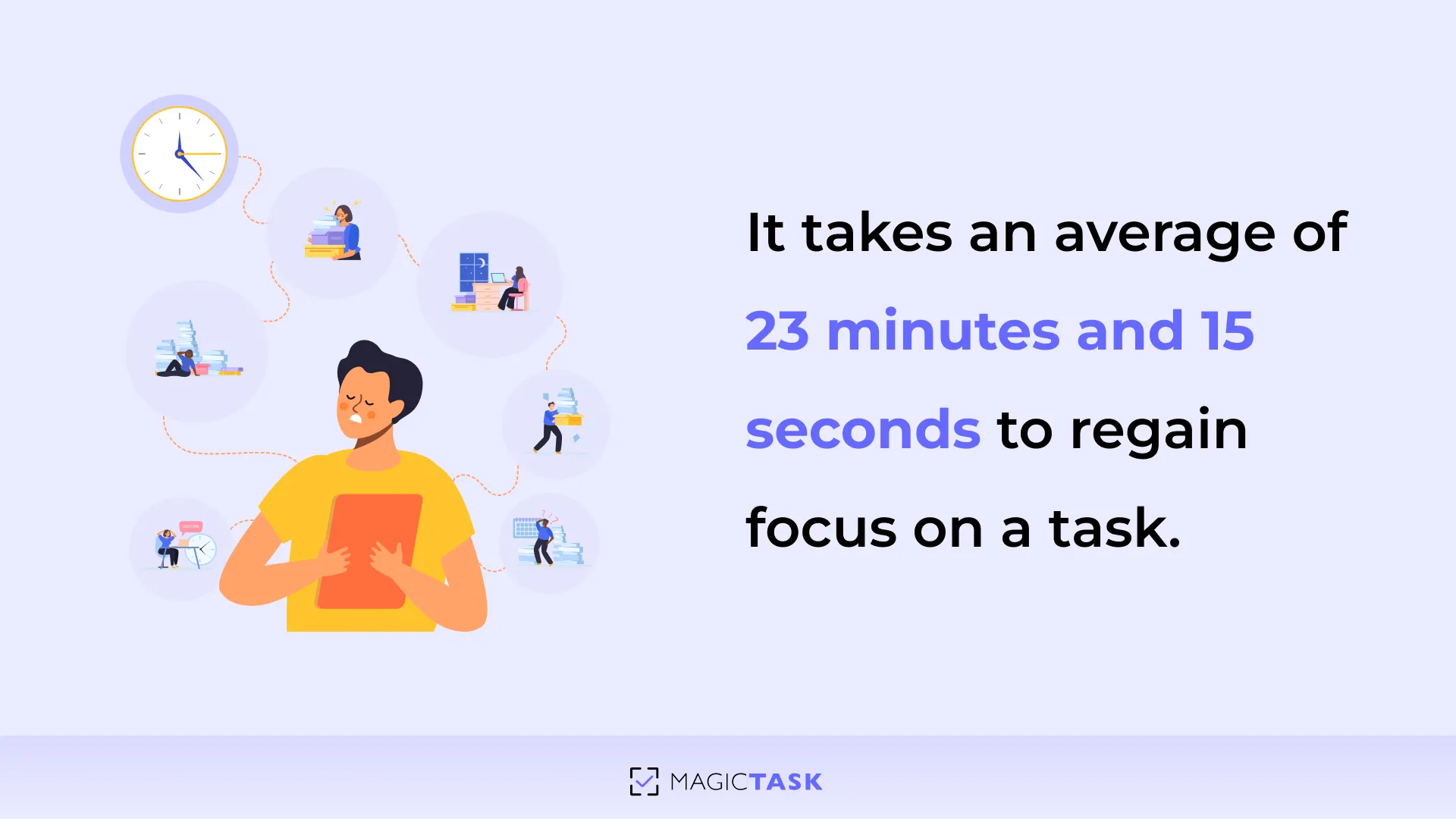
3. No More Clutter – A Clean and Intuitive Task Management Experience

While tracking your wins is crucial, keeping your workspace free of distractions is just as important.

If you have ever worked with Asana or Notion, you must have noticed that layers of features and endless data pages become overwhelming. Instead of helping with task management, these platforms draw your precious time into customization. 

MagicTask takes a different approach. Its clean, intuitive design ensures that you see only what matters—your tasks and priorities—without the extra clutter.

This smooth experience reduces the urge to multitask and keeps your focus exactly where it should be. With MagicTask, every minute is dedicated to progress, not wrestling with confusing interfaces. 

4. Stay Motivated with Progress Tracking and Leaderboards

With the clutter out of the way, MagicTask takes it further by celebrating every win. With its built-in progress tracking and leaderboards, you can see exactly how much you've accomplished and how close you are to your next milestone. 

Instead of your progress disappearing into the background, it's displayed front and center—giving you an instant snapshot of how far you've come. This clarity turns every completed task into a motivational milestone that keeps you moving forward.

With leaderboards that track individual and team performance, MagicTask injects a healthy dose of competition into your day. Watching your name climb the ranks against colleagues or even on a global scale fuels that drive to excel, one focused task at a time.

Every point earned, every level up, and every badge unlocked is a reminder that your focused efforts are paying off. You don’t need to complete all things at once. Just the ones that count. 

Conclusion: Work Smarter, Not Harder

It's clear that multitasking is a constant shuffle from one task to another—a pattern that slows you down, reduces quality, and drains energy.

The more thoughtful way forward is simple: zero in on one task at a time, prioritize what truly matters, and let your work speak for itself.

By eliminating the urge to switch between tasks, you'll find that you not only achieve faster, better results but also enjoy a calmer, more satisfying workday.

Are you ready to leave the chaos behind? It's time to ditch the myth of multitasking and embrace a focused, efficient way of working with MagicTask

How to Work Like a Gamer: Turning Productivity into an Addictive Game

how to work like a gamer

Have you wondered why the same person who dreads endless emails can lose themselves in a video game for hours?

The answer is quite simple. Because games are fun, challenging, and downright rewarding. On the other hand, work often feels like a chore. In fact, only 15% of employees are truly engaged at work, which is hardly a reflection of a productive workforce.

But what if work could feel like a game? What if you could turn your daily tasks into quests, complete with rewards and that addictive sense of progress?

In this post, we’ll show you how to work like a gamer—so work stops feeling like a grind and starts feeling like a game worth winning.

Let's start.

Why Games Are So Addictive (And Work Isn’t)?

To understand why games captivate us while work is just “work,” let's take a quick look at a classic study with mice.

One group gets a piece of cheese handed to them on a silver platter, while another has to solve a puzzle to earn the same treat. The puzzle-solving mice experience a powerful dopamine surge—the very chemical that fuels our drive for achievement.

The other group will never feel the urge to solve a puzzle to get cheese because they know it will be handed to them no matter what. 

This isn’t just a fun anecdote. It reveals why our brains crave rewards after work and why so many workplaces feel unrewarding by comparison.

That’s the real difference: games give us what work often doesn’t.

Let’s break down what makes games so engaging and where work often falls short.

1. Instant Rewards

Instant Rewards

When you’re playing games, every action is instantly celebrated, whether it’s earning experience points, leveling up, or collecting loot. 

Imagine this in a work setting: picture yourself submitting a report, then waiting days or even weeks for a simple nod of approval from management.

Instead of the immediate burst of feedback you’d get in a game, you’re left in limbo, wondering if your effort was even noticed.

But instant gratification isn’t the only thing games do right. They also make sure you always know where you stand.

2. Clear Progression

Clear Progression

Games make progress obvious—whether it’s a level-up, a progress bar, or a completed mission, you always know exactly where you stand. That constant feedback keeps you motivated and moving forward.

Now, compare that to a typical work project. You might have deadlines for concept approval, prototyping, and testing, but without clear checkpoints in between, it can all blur together.

One minute you're deep in creative work, the next, you're blindsided by a deadline. Without defined milestones, it's hard to know how far you’ve come or how much is left.

That’s why structure matters. Clear progress keeps you focused, on track, and actually excited to reach the next stage.

3. Just the Right Challenge

Just the Right Challenge

Games hit the sweet spot by balancing difficulty with your skill level. They’re not so easy that you get bored, nor so hard that you feel defeated. This balance keeps you engaged and eager to tackle the next challenge.

Now, think about your workday. Are your tasks pushing you just enough to stay focused and interested? Or are you drowning in data, emails, and meetings that feel either mindless or totally unmanageable?

The key is finding that middle ground. Whether you're tackling a big project, managing a team, or launching something new, the work should stretch your skills without sending you into stress mode.

If it constantly feels like too much or too little, it might be time to rethink how you structure your workload.

4. Fun & Competition

Fun & Competition

Know that feeling you get when you’re on the leaderboard, leaving all the other competitors to weep at your victory? That’s precisely the feeling that games give you. They tap into your natural desire for competition and recognition. It’s a constant, friendly push to be better than you were yesterday.

It should be the same for work. Healthy competition can motivate you to perform just a tad better than the other person beside your desk.

A recent survey shows that 63% of workers believe competition has made them more productive. With deadlines looming, that visual achievement display spurs everyone to work with greater focus and accuracy. 

The best part of games is that failure isn’t the end of the road.

5. No Fear of Failure

No Fear of Failure

In the gaming world, failing is just another step toward mastery. The safety net of being able to try again without real-world consequences removes the fear of failure and encourages experimentation.

That’s precisely why gamification works.

Most people will choose a system that rewards effort, tracks progress, and makes work feel engaging rather than just another obligation. 

How to Make Work Feel Like a Game?

So, how do you bring that same sense of progress, challenge, and reward into your workday?

It all starts with the right tool. Something that replaces dull task trackers with a system that actually makes you want to get things done.

1. Find a Gamified Task Management System

A great game runs on a great engine. And when it comes to productivity, your task management system is that engine.

Traditional to-do lists may help you stay organized, but they rarely inspire action. They’re static, uninspiring, and easy to ignore. What you need instead is a tool that turns every task into something you actually want to complete.

That’s where gamified task management comes in.

MagicTask - gamified task management tool

These systems bring game-like mechanics into your daily workflow. Here’s what that looks like:

  • Instant Feedback when you complete a task, giving you a quick sense of progress and momentum.
  • Clear goals or tasks view, tasks broken into achievable steps so you always know what’s next.
  • Built-in Motivation through rewards, visuals, and unlockable elements/features that keep things feeling fresh.
  • Friendly Competition using leaderboards or point systems to encourage consistent effort and team-wide focus.

With tools like MagicTask, every click feels like progress, every milestone is acknowledged, and your workload becomes more than just a list—it becomes a game you’re excited to play.

2. Set Mini-Challenges for Yourself

Rather than viewing big projects as an insurmountable mountain, see them as a series of smaller, exciting challenges that build momentum with every step.

Instead of staring down a never-ending to-do list, break your work into mini-challenges with clear targets. 

For example, if you have a significant report to write, set a mini-challenge to finish the research section by Tuesday, draft the outline by Wednesday, and complete the first full draft by Friday. Each mini-challenge becomes a win on its own.

MagicTask makes this approach easy.

You can add a main task—say, “Complete Quarterly Report”—and then break it down into subtasks like “Gather Data,” “Draft Analysis,” and “Finalize Presentation.” 

![Set mini challenges](/images/set-mini-challenges-for-yourself .webp)

Each subtask can have its due date. This way, every tick off your list becomes a mini celebration, keeping you motivated throughout the day.

3. Turn Tasks into Quests

Why simply 'write a report' when you can declare, 'Complete mission: Q4 Growth Report'?

It's a slight shift in language that transforms a mundane task into an epic quest. 

MagicTask fuels this mindset shift by letting you rename your tasks and infuse them with purpose. Every time you complete a mission, the platform rewards you with vibrant themes and playful animations.

It’s like little nods that say, “You did that, and it matters.” It’s like unlocking a new level in a game, where the journey becomes the reward. 

4. Track Your Wins Like Achievements

Every completed task should feel like a small win, not just another checkbox ticked off.

With MagicTask, those wins are celebrated visually, giving you the same kind of recognition you’d get from unlocking an achievement in a game.

Here’s how that might look in action:

  • Inbox Zero Victory: Clear out your inbox, and you’re rewarded with a quick, celebratory animation that marks your focus and momentum.
  • Project Triumph: Finish a major project and earn enough points to unlock a new feature or theme. It’s a visual reminder of real progress.
  • Mini-Challenge Milestone: Even the small stuff matters. Complete a tiny task and get a satisfying pop-up to keep your energy going.

MagicTask makes sure every win counts and reminds you that each completed task is a step toward mastering your day.

5. Make Failure Feel Like a Respawn, Not a Game Over

Picture yourself immersed in your favorite game. You lose a level—bam! But instead of quitting, you hit "respawn." You regroup, adjust your strategy, and dive back in better than before.

That’s the magic of gaming. Failure isn’t the end. It’s just part of the path to mastery.

Now imagine if your work operated the same way. What if a missed deadline or a rough draft wasn’t a setback but just a signal to recalibrate and try again?

With MagicTask, it’s easy to iterate and improve. You can revisit tasks, adjust timelines, and stay flexible without losing momentum. The system is built to support learning and forward movement—not punishment for missteps.

Every stumble becomes a step forward. Just like in a game, you don’t lose—you learn. And that mindset shift turns every misfire into momentum for your next big win.

Conclusion: Work Smarter, Not Harder (Like a Gamer!)

Are you ready to break free from the grind? MagicTask turns your workday into a high-stakes adventure, keeping you on your game.

With MagicTask, every task becomes a win. Each deadline transforms into a clear milestone; every setback is just another opportunity to level up. Instead of waiting for distant approvals, you'll celebrate instant victories. 

Try MagicTask today and experience how work can become an exciting, rewarding journey.

Why Do Remote Employees Feel Disengaged? (And How to Fix It)

remote employee disengagement

Ever feel like your remote team is only half present—cameras off, minimal interaction, and a general sense of “just going through the motions”? 

You’re not alone. 

According to a recent Gallup report, more than 50% of remote employees say they struggle to feel connected to their company’s mission and vision. 

If you’re leading a remote team, that number can sting even more. When your colleagues are scattered across different couches, time zones, and sweatpants, it’s easy to slip into a “going through the motions” routine.

But it doesn’t have to be this way. 

In the next few minutes, I’ll walk through the reasons why remote employees sometimes feel adrift—and, more importantly, how you can help them rediscover that spark of motivation.

Let’s dive in.

Why Do Remote Employees Feel Disengaged?

You can always roll out more meetings, add fancy new tools, or put new policies in place—but if you don’t address the real reasons people feel cut off, you’re only putting a band-aid on a deeper issue. 

When you truly understand what’s causing remote disengagement, you can create a culture where employees feel excited to log on daily.

Here are the most common reasons why remote employees feel disengaged:

why do remote employees feel disengaged

1. Lack of Social Interaction

Humans are wired for connection. In a traditional office, those connections happen naturally through quick chats by the coffee machine, spontaneous brainstorming sessions, or just a shared laugh over an inside joke. These small, everyday moments build trust, spark creativity, and strengthen a sense of belonging.

But in a remote setting, these interactions don’t happen organically. Without them, employees can start to feel like faceless names on a screen—disconnected from their colleagues and, over time, disengaged from their work. When people feel invisible, their motivation fades, collaboration suffers, and they may start questioning their place within the company.

2. Slow or Cumbersome Systems

Technology is supposed to make work easier, not more frustrating. But nothing kills momentum faster than a slow-loading tool, a cluttered system, or a never-ending series of clicks just to update a simple task. Instead of getting things done, employees waste time wrestling with software that should be helping them.

When every small action feels like a chore, motivation disappears. Work stops feeling like a place to create and problem-solve—it turns into a daily grind of navigating roadblocks. Over time, that frustration adds up, making even the best employees feel stuck and disengaged.

3. Unclear Expectations & Goals

When remote employees aren’t given clear objectives, they’re left wondering what to prioritize. Without clear direction, tasks start to feel arbitrary, and employees may spend time on work that ultimately doesn’t move the needle.

Take this example—a marketing manager tells the team to “increase engagement” on social media but doesn’t specify which platforms to focus on, which metrics define success, or what kind of content works best.

Some team members focus on likes, others on comments, while a few try boosting follower count. The result? Scattered efforts, misalignment, and frustration as no one knows if they’re actually making progress.

4. Overwhelming or Boring Task Management

No one signs up for a job just to check boxes, but that’s exactly what most task management tools turn work into—rigid, repetitive, and uninspiring. Instead of feeling like they’re contributing to something meaningful, employees get bogged down in endless lists, complicated workflows, and overly structured processes.

When every task feels like just another step in an assembly line, motivation fades. Employees start working for the sake of finishing rather than finding purpose in what they do. Over time, this mechanical approach drains creativity, stifles innovation, and makes work feel more like a chore than a challenge.

5. No Immediate Recognition or Feedback

In an office, recognition happens naturally—a quick “nice job” in passing, a nod of approval, or a spontaneous round of applause after a successful presentation. These little moments add up, making employees feel valued and seen.

In a remote setting, those moments disappear. When great work goes unnoticed, silence starts to feel like invisibility. Employees begin to wonder if their contributions even matter. Without consistent feedback, motivation erodes, and engagement slips away, not because employees don’t care, but because they feel like no one else does.

6. Zoom Fatigue & Screen Overload

At first, video calls seemed like the perfect solution for remote work—face-to-face interaction, seamless collaboration, and a way to stay connected. But now? They’ve become exhausting.

Back-to-back meetings leave employees drained before they even start their real work. Staring at tiny squares for hours on end feels isolating, not engaging.

And when every discussion, no matter how minor, turns into a scheduled call, productivity takes a hit. Instead of bringing teams together, excessive meetings are pulling them away from meaningful, focused work.

7. Lack of Fun or Team Bonding Activities

A great team isn’t just a group of people working toward a goal—it’s a group of people who enjoy working together. In an office, that bond forms naturally through casual chats, inside jokes, and spontaneous “Hey, what do you think about this?” moments.

In a remote world, those interactions don’t just happen—they have to be created. Without them, work becomes purely transactional. Conversations stay strictly work-related, and personal connections fade.

Over time, the team starts feeling less like a team and more like a collection of individuals just doing their jobs.

How to Fix Remote Employee Disengagement?

Now that we understand why remote employees feel disconnected, let’s explore practical steps you can take to re-engage your remote team.

The goal is to create an environment where employees feel connected, valued, and empowered—no matter where they are.

1. Foster a Strong Virtual Culture

Building a strong virtual culture is about creating a space where everyone feels seen and heard.

Start by making time for authentic conversations. Consider dedicating the first 10 minutes of your weekly team call to a casual check-in. Set up virtual coffee breaks or create informal Slack channels for non-work discussions.

These micro-interactions can rebuild the sense of belonging that remote work often lacks.

Ask questions like, “What’s something good that happened this week?” or “What’s one challenge you’re facing right now?”

This isn’t just small talk; it’s about human connection. When people know that their struggles and successes matter, they’re more likely to open up and collaborate. It might even be as simple as encouraging a daily “good morning” in your team chat where everyone shares a quick personal update.

fixing remote employee disengagement

2. Use Gamification to Make Work Engaging

Remote work can feel like running on a treadmill—you’re moving but not moving forward. But gamification flips the script.

Here’s what leaders can do to make work fun: 

  • Visualize Progress: Allow employees to see their progress through badges, milestones, or leveling up as tasks are completed.
  • Foster Friendly Competition: Establish a leaderboard or friendly challenges that reward initiative and proactive behavior.
  • Deliver Instant Feedback: Make sure that achievements are recognized immediately, reinforcing momentum and boosting morale.
  • Transform Routine Tasks: Incorporate game elements to turn everyday tasks into engaging challenges that motivate employees to take ownership.

3. Provide Real-Time Recognition

Real-time recognition is about making sure that when someone does a great job, it's acknowledged right away. Instead of waiting for the weekly roundup or the annual review, capture the moment as it happens. 

Here’s how you can do it:

  • Make recognition a habit. Public shoutouts, quick check-ins, and immediate feedback should be part of the daily workflow—not an afterthought.
  • Turn progress into something tangible. Tools like MagicTask make momentum visible, so employees don’t feel like they’re working in a void.
  • Celebrate effort, not just outcomes. Recognizing initiative, problem-solving, and creative thinking reinforces proactive behavior before the results even show up.

People do their best work when they know it matters. Try to appreciate the small wins rather than only big accomplishments. 

4. Clarify Roles & Goals

Clarify roles and goals so your team isn’t left guessing what’s expected. When remote employees don’t know their specific responsibilities or how their work fits into the bigger picture, it creates confusion and can drain motivation. 

As a leader, you can:

  • Set Measurable Objectives. Instead of asking for a vague improvement, specify a clear target, such as “Increase newsletter open rates by 15% over the next quarter.”
  • Break Down Larger Goals. Divide big projects into smaller, actionable tasks. For instance, if the goal is to increase user sign-ups, outline steps like optimizing the landing page, creating targeted ad campaigns, and scheduling weekly performance reviews.
  • Maintain Open Communication. Schedule regular check-ins to discuss progress, address questions, and adjust targets if necessary. This ongoing dialogue ensures everyone understands their role and how their work contributes to the overall objective.

5. Reduce Meeting Overload

If you’ve ever sat through a call where nothing gets done, you know how draining it can be. Instead, try swapping some of those calls for a quick email or a shared document update. 

For instance, instead of scheduling a 30-minute meeting to discuss weekly progress, ask your team to jot down their updates in a shared space. This not only cuts down on the number of meetings but also gives everyone the freedom to work uninterrupted.

It’s about being intentional. Look at your calendar and ask, “Is this meeting really necessary?” If the answer isn’t a clear yes, consider whether there’s a faster, less disruptive way to communicate. 

6. Use Lightweight & Engaging Productivity Tools

You don’t need a behemoth system with endless features that only slow everyone down. Instead, opt for tools that are intuitive and simple to use—ones that feel more like an assistant than another task to manage.

Try switching to a platform that offers quick task updates and clear visuals of progress without overwhelming your team with too many options.

When tools are designed to be engaging, it’s easier for your team to stay focused on their work rather than wrestling with the software. The right tool should feel like a natural extension of your workflow, helping you keep things moving without adding extra hassle.

How MagicTask Helps Remote Teams Stay Engaged?

We know you're juggling a lot: project timelines, team morale, and the constant pressure to deliver exceptional results.

You understand that a happy, engaged team is a productive team, and you're searching for tools that reflect that understanding.

And let's be honest, some task management tools feel like they're designed to waste your time.

Seriously, who has time to wait five minutes for a page to load?

That's where MagicTask comes in.

MagicTask was built during the pandemic to help remote employees make work fun and exciting. Unlike other complex task management systems with a bit of a learning curve, MagicTask helps you get started almost immediately.

But it's not just about speed. It's about fun, too.

how magictask help keep employee engaged

Here’s how MagicTask uses gamification to transform everyday tasks into rewarding moments that build genuine connections:

  • Gamification Magic: MagicTask adds a layer of gamification to your daily task management. It smartly transforms routine work into a series of little wins.
  • Built-in Leaderboard: You have a built-in leaderboard that rewards you for moving things along. You compete with others using the MagicTask system, and as you finish more tasks, you move up in the leaderboard.
  • Fostering Camaraderie: It’s not about turning work into a competition for the sake of it—it's about fostering that same kind of camaraderie you’d get when you play a favorite video game with friends. 
  • Real Connections Through Gaming: Shared challenges can spark genuine bonds—just imagine your team reconnecting over friendly competition, where every completed task feels like teaming up with a trusted friend.

Conclusion

Tackling remote disengagement starts with understanding why employees feel disconnected. Small changes can make a big impact, especially when work feels engaging and rewarding.

MagicTask helps bring that sense of challenge and motivation back. It’s fast, simple, and designed to make everyday tasks more rewarding. Sign up for MagicTask now and see how a more engaging workflow can transform your team’s energy and productivity.

How to Build a Proactive Team (& the Tools That Help)

build proactive team

Ever feel like your team is stuck in reactive mode, always waiting for direction instead of taking initiative?

As a leader, it’s frustrating to chase updates, approve every decision, and feel like progress stalls without your input. The difference between a team that moves forward and one that doesn’t often comes down to one thing: proactivity.

When employees take ownership of their work, things just flow. Projects move forward, problems get solved, and you’re not constantly stepping in to keep things on track.

But proactivity isn’t about pushing people to work harder. It’s about building a culture where ownership and accountability come naturally.

In this blog, you’ll learn how to make that shift, plus the best tools to help your team take initiative with confidence.

Why Teams Struggle with Proactivity (& How Leaders Contribute to the Problem)

Let's first understand why teams struggle with proactivity.

Before building a proactive team, you must understand why so many employees hesitate to take the initiative.

Too often, teams wait for instructions instead of acting independently. It’s easy to assume they lack initiative, but the truth is that leaders usually shape this behavior without realizing it.

Think about it. A well-meaning manager reviews every detail, double-checks work, and steps in to fix mistakes. Over time, the team stops making decisions because they’ve learned it’s safer to wait for approval. What started as quality control has turned into hesitation.

Here are five key reasons teams struggle with proactivity. And in many cases, leadership habits are a big part of the problem.

Why Teams Struggle with Proactivity

1. Lack of Clear Goals & Ownership

Proactive teams need clarity. If employees aren’t sure what success looks like, they hesitate. Broad goals like “we need to improve sales” or “let’s boost engagement” leave too much room for interpretation.
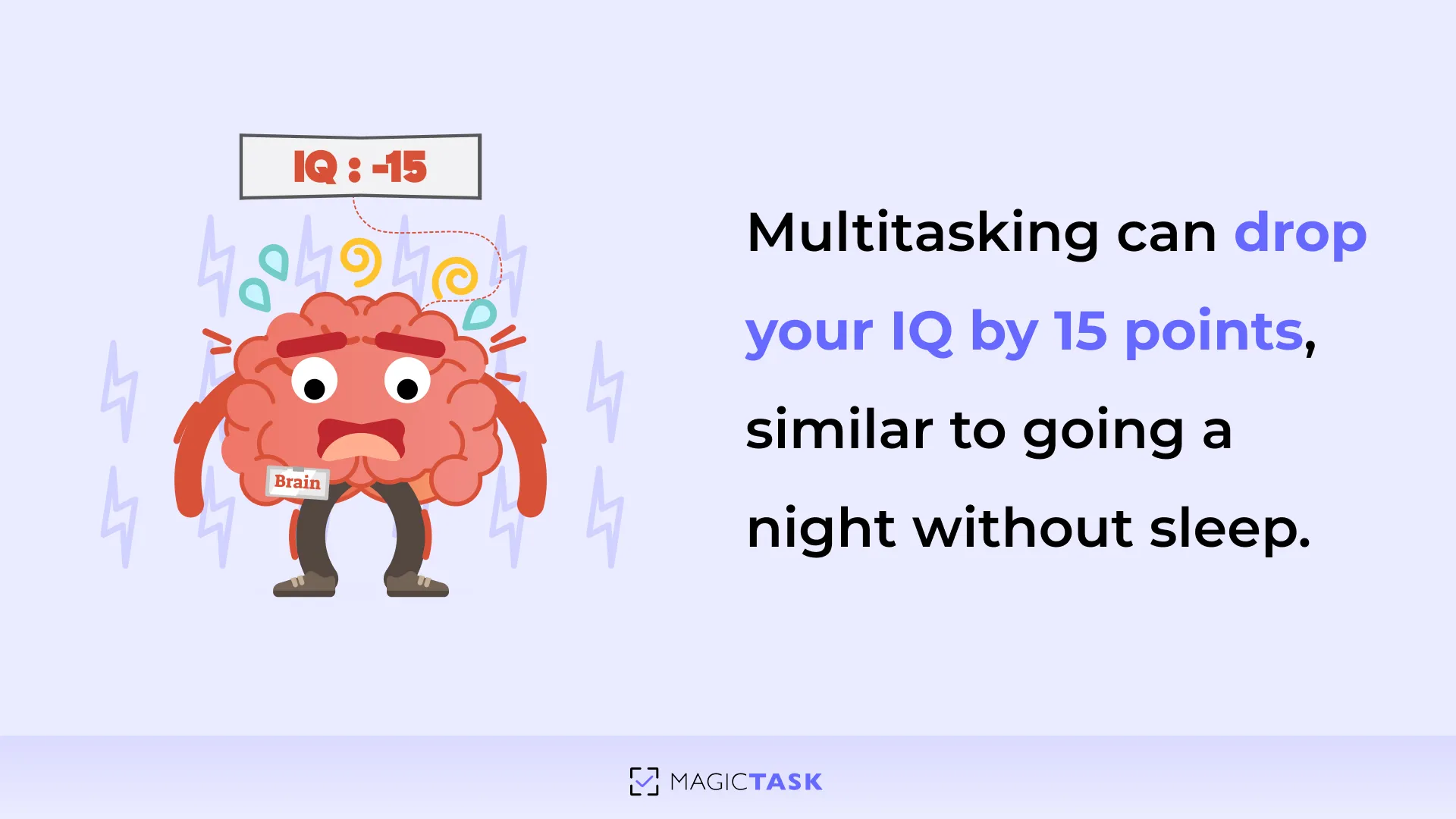
Without clear direction and ownership, tasks get passed around, and everyone assumes someone else will take charge—but no one does.

The Fix: Define success with clear, measurable goals and assign ownership. Instead of saying “increase engagement,” set a specific target: “Raise team engagement scores by 10% next quarter by implementing weekly check-ins and peer recognition programs.”

When employees know exactly what they’re responsible for and what the goal is, they’re far more likely to take the initiative.

2. Fear of Making Mistakes

Proactivity thrives in an environment where employees feel safe to take risks. Without psychological safety, teams become overly cautious. They second-guess decisions, avoid experimenting, and focus more on avoiding mistakes than making progress. When missteps lead to blame or punishment, innovation stalls, and employees stick to what feels safe.

Research backs this up. Google’s Project Aristotle, a study analyzing over 180 teams, found that psychological safety is the most important factor in team success. Employees need to trust that taking initiative won’t backfire.

The Fix: Foster a culture where learning matters more than perfection. Make it clear that mistakes are part of growth. Reward initiative—even when the outcome isn’t perfect. When employees know they won’t be reprimanded for trying, they’ll be more willing to step up.

3. A Reactive Work Culture

Some workplaces thrive on chaos, where the loudest voice wins. The people who swoop in at the last minute to "save the day" are seen as heroes.

But when leadership rewards firefighting, teams quickly learn that preventing problems doesn’t get noticed. Instead of anticipating and planning ahead, they wait for things to break—because that’s what earns recognition.

The Fix: Shift the focus from reactive to proactive achievements. Recognize and reward employees who prevent issues before they happen. Create a monthly “Forward Thinker” spotlight or offer small bonuses and professional development opportunities for those who identify and fix bottlenecks early. Publicly acknowledging proactive problem-solvers in meetings or newsletters encourages others to do the same.

4. Over-reliance on Meetings & Status Updates

If your team is constantly in meetings, when do they actually get work done? A workplace that leans too heavily on check-ins, approvals, and status updates slows progress and creates unnecessary bottlenecks. Instead of making decisions, employees spend their time reporting on work that hasn’t even happened yet.

The Fix: Cut unnecessary meetings and empower employees to make decisions without waiting for approval. Before scheduling a meeting, ask yourself:

  • Can this update be shared via email or a project tool?
  • Does everyone on the invite list truly need to be there?
  • What specific outcome or decision do we need from this meeting?

Trimming down meetings gives teams the time and autonomy to focus on actual work rather than just talking about it.

Platforms like MagicTask help by improving accountability so teams stay aligned without constant check-ins.

5. Leaders Unknowingly Create Dependency Loops

Many leaders unintentionally train their teams to be dependent instead of proactive. By micromanaging, stepping in too quickly to solve problems, or requiring approval for every little decision, they create a cycle where employees stop taking initiative. Over time, they learn that waiting for direction is safer than acting on their own.

The Fix: Shift from control to guidance. Instead of giving immediate answers when an employee is stuck, ask guiding questions like “What approaches have you considered?” or “What would you do if I weren’t available?”

This encourages problem-solving and builds confidence. The more employees practice independent decision-making, the more ownership they take over their work.

Studies show that employees with a proactive mindset tend to perform better and advance faster in their careers. Those actively seeking improvements, anticipating challenges, and taking initiative consistently receive higher performance evaluations. (Source)

Now that we’ve looked at the common roadblocks and how to fix them, let’s explore what leaders can do to make proactivity a natural part of the team’s culture.

Key Leadership Strategies to Build a Proactive Team

Building a proactive team starts with intentional leadership. You see, every team has “proactive potential,” and it’s your job to bring that out in your employees.

Key Leadership Strategies to Build a Proactive Team

Here's how to do that:

1. Set a Culture of Proactive Ownership

Proactivity starts with a mindset shift. If employees see decisions and problem-solving as "someone else’s job," they’ll default to waiting for instructions. True ownership happens when individuals feel responsible not just for tasks, but for outcomes.

  • Make Ownership Non-Negotiable: Assign each project or initiative to a single owner who’s accountable for driving it forward. 
  • Convey Impact: Show how each role connects to larger business goals. When people see the direct impact of their work, they’re more motivated to anticipate needs and solve problems.
  • Encourage Solution-Based Thinking: Train employees to bring potential solutions, not just problems. This small shift pushes them to think proactively rather than waiting for answers.

2. Set SMART, Outcome-Driven Goals

Proactivity flourishes in clarity. Use SMART goals (Specific, Measurable, Achievable, Relevant, Time-bound) to define success. Here's how:
  • Specific: Clearly state what needs to be achieved and who’s responsible.
  • Measurable: Include numbers or milestones (e.g., “Increase Net Promoter Score by 10 points”).
  • Achievable: Challenge the team but keep it realistic.
  • Relevant: Align objectives with broader business priorities so each person sees the bigger picture.
  • Time-bound: Attach a deadline to foster urgency and focus.

Here's a quick comparison between a vague goal and a SMART goal:

  • Vague Goal: “Improve customer satisfaction.”
  • SMART Goal: “Increase our online customer satisfaction rating from 4.0 to 4.5 by the end of Q2 by speeding up response times and offering personalized follow-ups.”

Clear goals give employees direction and autonomy to step up without micromanagement.

Remember this rule:

Autonomy + Accountability = High Performance

Give employees the freedom to make decisions within their scope, but hold them responsible for results.

If there’s too much autonomy and no accountability, tasks get deprioritized, and progress stalls. On the other hand, too much accountability with no autonomy makes employees feel micromanaged, and initiative dies.

The sweet spot is to empower employees with decision-making authority while making expectations crystal clear.

Tools like MagicTask make this easier by providing transparency, tracking progress, and ensuring that accountability doesn’t turn into micromanagement.

3. Improve Task & Project Visibility Without Micromanaging

Visibility can be a double-edged sword. Too much tracking feels suffocating, and too little allows priorities to slip.

  • Define What Matters: Not every task requires detailed updates. Focus on major deliverables and milestones rather than everyday to-do items.
  • Automate Progress Tracking: Use tools that provide real-time visibility and asynchronous updates, like MagicTask, to keep everyone informed without constant status meetings.
  • Shift from Status Updates to Accountability: Instead of asking “What’s done?” ask “What’s next?” This encourages forward-thinking and ownership rather than just reporting.

4. Encourage Proactive Problem-Solving

The fastest way to kill proactivity is to answer every question the moment it’s asked. When employees know that you’ll always have the solution, they stop looking for answers themselves. That’s how dependency loops form. Teams that can’t move forward without a leader’s constant input.

Instead of giving immediate answers, flip the script. The next time someone brings you a problem, ask guiding questions: “What do you think?”  or “What have you tried so far?”

This forces them to brainstorm solutions before seeking approval. Over time, your team will develop their own problem-solving reflex.

But culture alone isn’t enough. You need a strong framework. Encourage teams to break problems into steps: define the issue, propose solutions, and recommend a course of action.

When problem-solving becomes the expectation, leaders move from being the fixers to being the guides. And that’s when real proactivity begins.

5. Reduce Decision Bottlenecks

Every stalled project, missed deadline, and frustrated team often traces back to one issue—decisions are stuck at the top. When employees aren’t sure what they can decide on their own, they hesitate. Instead of moving forward, they wait. And wait. And wait.

Leaders who want a proactive team must create clarity around decision-making by adopting the Trust-Delegate-Verify model:

  • Trust your team to make sound decisions without constant oversight.
  • Delegate authority clearly—define which decisions employees can make independently.
  • Verify results after the fact rather than controlling each step.

The real challenge? Knowing when to step in and when to step back. If you’re solving problems your team should be handling, you’re slowing everything down. That’s why using a Decision Authority Framework ensures decisions are made at the right level:

  • Level 1: Team members decide independently and inform the group.
  • Level 2: Team members consult others, then decide.
  • Level 3: Requires leadership approval (e.g., budget changes, major strategic shifts).

When employees know their decision-making boundaries, they don’t wait for permission but act confidently. The result? Faster execution, fewer bottlenecks, and a team that runs smoothly without everything needing to go through leadership.

6. Walk the Talk

If you want a proactive team, start by being proactive yourself. Teams mirror their leaders in most ways. If you’re stuck in old ways, hesitant to try new approaches, or quick to dismiss ideas, don’t expect your team to step up with innovation or initiative.

Create a culture where experimenting is encouraged, and discussions are welcomed.

Say yes more often—at least long enough to ask, “How could this work?” instead of “Why won’t this work?” The more you embrace curiosity and forward-thinking, the more your team will too.

The Best Tools to Drive Proactive Team Behavior

Even the most engaged teams can slip into reactive habits if they don’t have the right systems to keep tasks visible, streamline updates, and encourage ownership.

Fortunately, a range of tools exists to help you cement a culture of proactivity by making work more transparent, organized, and (yes) even fun.

Below are a few categories to consider and how each can bolster proactive team behavior.

1. Task Management & Visibility

Clarity is key to proactivity. A good task management tool should make it easy to see who’s doing what, when it’s due, and how it ties to larger goals.
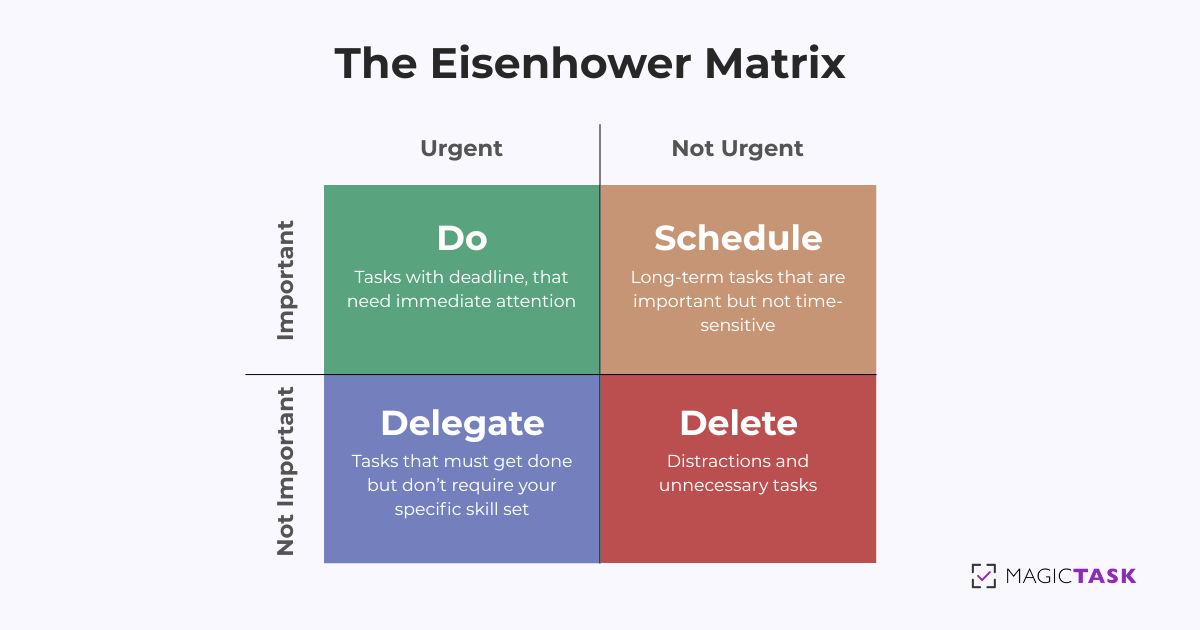
Below is a quick comparison of three popular task management options. Each has its own strengths and weaknesses, so it’s essential to consider your team’s specific needs.

Tool Pros Cons
MagicTask
  • Gamification features boost engagement and motivation
  • Transparency and real-time visibility into individual and team tasks
  • Easy-to-use, most straightforward task management system
  • Simple task management features and new features are getting added every month
Asana
  • Robust project views (timelines, calendars) for complex workflows
  • Intuitive interface once you learn the basics
  • Overwhelming for smaller teams
ClickUp
  • Highly customizable for various use cases (task lists, wikis, etc.)
  • Broad feature set covers multiple project management styles
  • Steep learning curve due to many features

Ultimately, the best tool depends on your team’s size, culture, and project requirements. 

If you need a fun, game-inspired way to keep people engaged, MagicTask’s gamification can deliver that extra motivational spark.

Asana’s view options, like timelines and calendars, make it a solid fit for more complex or large-scale projects.

ClickUp stands out for its versatility and customization but may feel overwhelming for teams new to project management software.

2. Automated Reporting: Reduce Manual Updates

Constant status updates can slow teams down. Tools like Slack Workflows automate reporting so employees can focus on execution rather than repeating the same updates in endless check-ins. 

But combined with MagicTask’s transparent task tracking, teams get a real-time view of progress without the need for constant follow-ups.

3. AI-Powered Productivity Assistants: Smarter Workflows

Imagine having a personal assistant that organizes your day, tells you what to focus on next, and makes sure nothing falls through the cracks. That’s what AI-powered tools like Reclaim.ai and Motion do. 

If your team struggles with prioritization, Reclaim.ai can automatically reorder tasks and find free calendar blocks, ensuring important work gets done first. Motion goes a step further by scheduling tasks around existing calendar events, giving you a real-time blueprint of your day.
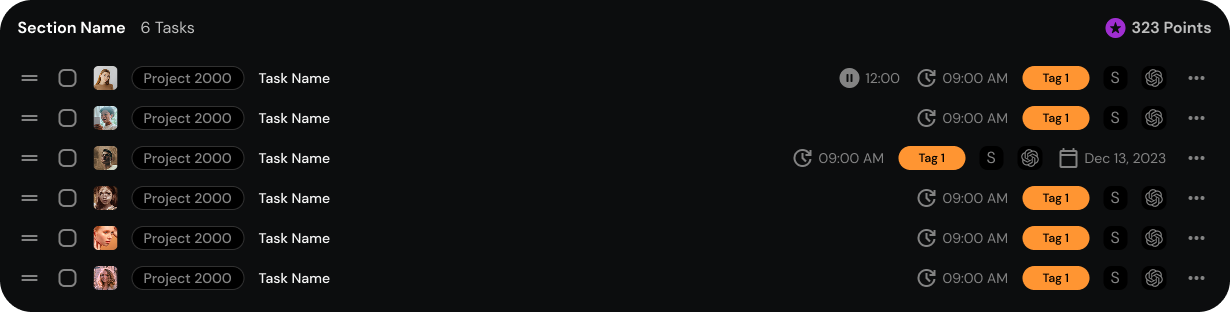
However, even the smartest assistant needs a solid foundation. Pair AI tools with a clearly defined task system, like MagicTask or any other project management platform, to help them accurately prioritize and manage your team’s workload.
How to Know If Your Team Is Becoming More Proactive

Proactivity is about working smarter. And like any good habit, it’s built through small, consistent changes that compound over time.

How to Know If Your Team Is Becoming More Proactive

So, how do you know if your team is shifting from reactive to proactive? Look for these leading indicators:

  • Fewer last-minute escalations: Problems get solved early, not when they’re on fire.
  • More decisions made at the right level: Employees act without needing constant approval.
  • Less dependency on leadership: Teams troubleshoot issues before they reach your desk.
  • Clear ownership of tasks: Work moves forward without bottlenecks or hesitation.

The key to sustaining proactivity is tracking it, not through micromanagement but through systems that reinforce ownership.

MagicTask helps teams measure accountability and initiative, keeping progress visible without unnecessary oversight. It gives your team the clarity, accountability, and autonomy they need to take action before problems arise.

No more chasing updates. No more last-minute scrambles. No more waiting for permission. Just a team that moves fast, thinks ahead, and gets things done.

Ready to build a truly proactive team? Sign up for MagicTask today.