
A task management tool won’t do your work for you, but it can make the work easier to see, share and keep track of. Instead of tasks scattered across emails, chats and sticky notes, everything lives in one place where you and your team can see what’s next.
Here are 10 advantages of using one, and what each looks like in practice.
1. Manage All Your Tasks in One Place
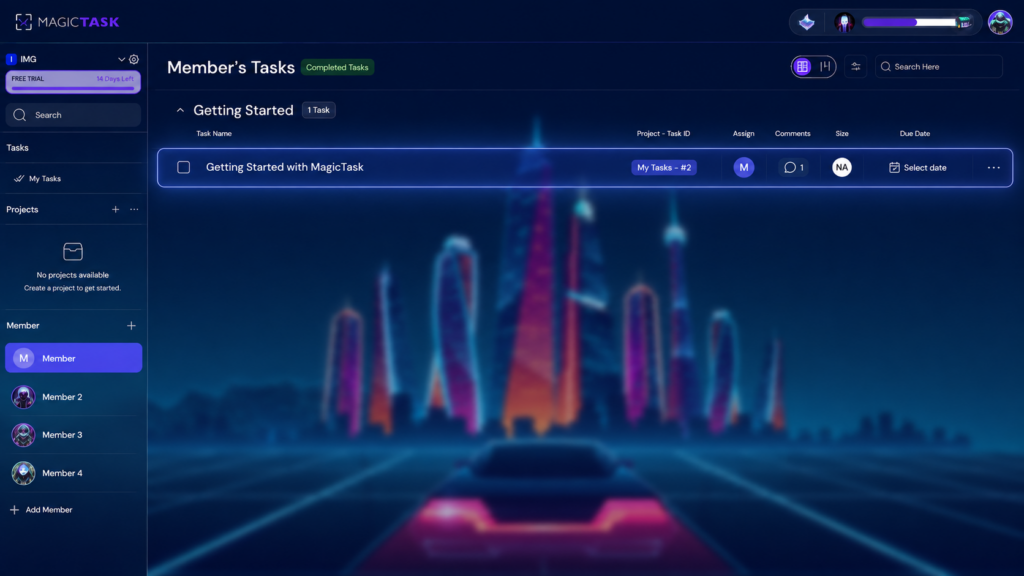
Task management tools serve as a comprehensive dashboard for all your task-related needs, so you can see everything on your plate at once. With every task on a single platform, it’s much easier to spot overlapping work before two people end up doing the same thing.
This proves immensely beneficial for organizations where multiple team members collaborate on a shared project. Additionally, it aids individuals in maintaining an organized workflow and prevents them from being swamped by their extensive to-do lists.
Consider this scenario, you're a project manager, orchestrating the development of a novel software system. A task management tool serves as your command center, laying out every task that demands completion and its corresponding status in clear view.
This visibility empowers you to strategically allocate resources and keep the project moving in the right direction.
2. Clarity on Task Ownership
Utilizing a task management tool provides clear visibility into the ownership of each task. This promotes the accurate assignment of tasks to appropriate individuals, enhancing everyone's understanding of their responsibilities. And when every task has a named owner, it’s much harder for work to slip through the cracks.
Here's a practical illustration of this benefit: Imagine a company is facing a setback with product shipping delays. With a task management system, they can promptly identify pending tasks and their corresponding owners. That makes it easier to see where things are stuck and who to talk to.
3. Helps You Stay Organized and On Track

Task management tools greatly facilitate organization and progress tracking. Their biggest value is keeping deadlines and assignments visible, so it’s easier to stay on top of them.
Many also send reminders or notifications to you or your team, so important tasks are less likely to be forgotten.
Moreover, many of these tools foster collaboration, with capabilities to effortlessly share tasks and vital information with colleagues. This keeps everyone working from the same information.
4. Less Mental Clutter
When your tasks live only in your head, you spend energy just trying to remember them. Putting them into a tool frees up that space. You can see what’s due, what’s done and who’s handling what, without keeping a running list in your mind.
Big projects also feel more approachable when they’re broken into smaller tasks. Ticking those off, one by one, gives you a clear sense of progress, which helps when motivation dips.
5. Keeps You Accountable to Yourself and Your Team
Task management tools bolster accountability in multiple ways. Primarily, by tracking tasks and deadlines, they enable you to stay abreast of your obligations. The integrated reminder and notification systems further augment this by keeping you informed about impending tasks and their due dates.
Moreover, the ability to share task information cultivates a sense of collective responsibility, making you more accountable to your team or organization.
Consider a scenario where you're using a task management tool to manage your work commitments. Suppose you have a task due on Friday; a reminder earlier in the week gives you time to finish it before the deadline.
Similarly, these tools promote accountability within a team. If you're part of a project team, task management tools can keep everyone updated on deadlines and progress, fostering a transparent work environment. When everyone can see the plan, it’s easier for each person to own their part of it.
6. Set Priorities and Achieve Goals
Task management tools undoubtedly assist in setting priorities and achieving goals. However, it's crucial to remember that these tools are not a universal remedy – they won't suddenly turn you into a productivity powerhouse. Instead, they should be viewed as a significant component of your toolkit, designed to help you become more organized and efficient.
When it comes to setting priorities, task and project management tools offer multiple advantages. First and foremost, they provide a comprehensive view of all pending tasks, thereby enabling you to identify the most critical ones.
Secondly, these tools allow you to assign due dates and reminders to each task, significantly reducing the risk of overlooking or delaying crucial tasks.
Lastly, they offer a means to monitor your progress on each task, giving you valuable insights into whether you're on track to achieve your goals or if adjustments need to be made. Used consistently, that makes your goals easier to work toward.
7. Spend Less Time on Status Updates
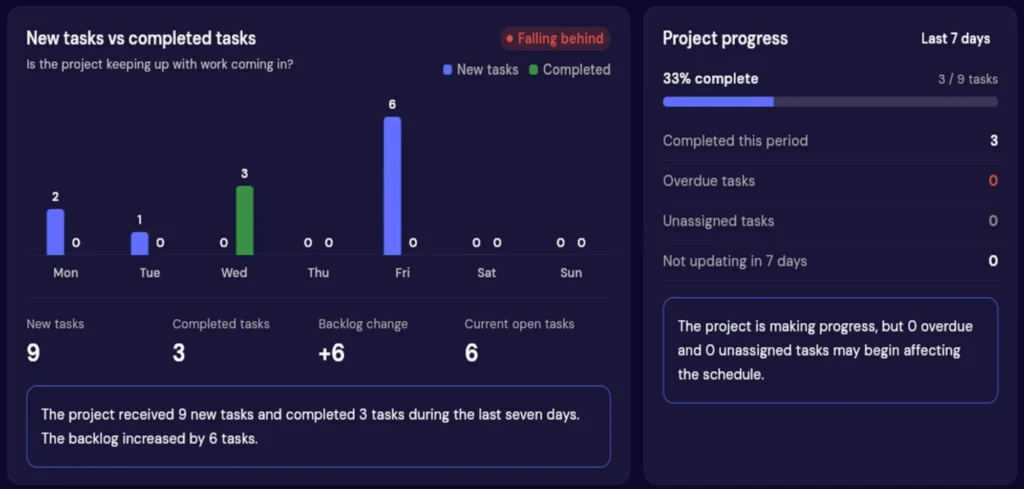
A lot of the workday goes into asking where things stand. Who’s working on this? Is it done yet? What’s blocking it? When tasks, owners and progress are all in one tool, anyone can check for themselves.
That means fewer check-in emails and shorter status meetings. Managers get a view of the whole project, and team members can get on with the work instead of reporting on it.
Also Read: Productivity Management 101: What is It and What It Can Do for You?
8. Facilitates Better Time Management

A to-do list tells you what needs doing. It doesn’t tell you when you’ll do it. Many task management tools now let you plan that too, by setting due dates, estimating effort and blocking out time in your calendar for specific tasks.
Seeing your week laid out this way makes it easier to spot when you’ve taken on too much, and to move things around before a deadline gets tight.
9. Task Delegation
Delegating works best when nothing gets lost in the handover. In a task management tool, you can assign a task to someone along with the details, files and due date they need, and add comments as the work moves along.
For managers, that makes it easier to hand work off with confidence and follow progress without micromanaging. For the person picking it up, everything they need is in one place. For more on this, see our guide on how to delegate tasks effectively.
10. Helps You Stay Focused
It’s hard to focus when you’re not sure what to work on next. A task management tool gives you one place to look. Open it, see what’s due, and pick the next thing.
It also helps to capture new tasks the moment they come up, then go back to what you were doing. The idea is safely stored, and you can deal with it later instead of switching tasks right away.
Try MagicTask – The Gamified Task Management System
Those are 10 advantages of using a task management tool. If you’d also like your work to be a bit more fun, take a look at MagicTask.
MagicTask is a task and project management tool with a game built in. You get projects, due dates, task sizes, Board and List views, Time Blocking and Analytics. As you use it, you move through Realms and Dungeons toward chests with avatars to collect, and you earn badges along the way. Learn more about gamification in task management.