
Change Realm Skip to main content

Epic Battle of the Task Titans: MagicTask V3 vs. Habitica

MagicTask vs Habitica

Welcome to an epic duel of productivity tools — MagicTask V3 versus Habitica. If you're a hardcore gamer, you're likely no stranger to the realm of gamified productivity, where quests and experience points replace to-dos and checkmarks. In this comprehensive review, we'll dive deep into the characteristics of these two platforms, comparing their features, user interfaces, customization options, gamification strategies, and more. We'll explore each application from the standpoint of a hardcore gamer, assessing how well they blend gaming elements with productivity tools. So, whether you're a fan of MagicTask, an advocate for Habitica, or a neutral party looking for the best tool to level up your productivity, this guide will provide valuable insights. So grab your shield, draw your sword, and let's embark on this journey together.

Understanding Gamified Productivity

Gamified productivity revolves around transforming tedious tasks and objectives into engaging, game-like experiences. The aim is to harness the elements that make games enjoyable and apply them to everyday tasks to make them more appealing. It's about turning chores into quests, tasks into battles, and responsibilities into challenges. The excitement of achieving high scores or leveling up can act as a powerful motivation tool, making the daunting tasks more manageable. For hardcore gamers, gamified productivity tools bring the fun of gaming into everyday life, making productivity not just a goal but an enjoyable journey. They create a seamless fusion of work and play, adding an extra layer of interactivity and engagement to the otherwise mundane task management process. The gamified productivity applications MagicTask V3 and Habitica both aim to make the path to productivity more entertaining. However, their approach to gamification and how they integrate it into their systems varies, which is what we'll explore in this guide.

Meet the Contenders

MagicTask V3 and Habitica are the two main characters in our productivity game showdown. MagicTask V3, the latest iteration of the MagicTask platform, is a task management application with a twist. It takes the world of productivity and infuses it with enchanting RPG elements, creating a unique blend of work and play. From dynamic themes to interactive animations, MagicTask V3 transforms your task list into an epic quest.

On the other hand, Habitica, formerly HabitRPG, is a productivity application that literally turns your life into a game. With its pixel art aesthetic, you get to create an avatar, complete quests, and earn experience points by performing tasks and building positive habits. It also offers a social aspect, allowing you to collaborate with others on tasks or to challenge your friends.

While both applications aim to gamify productivity, they each have their unique styles and approaches. Their strengths and weaknesses lie in different areas, which we'll explore in the following sections. Whether you're a solo player or a team player, a fan of RPGs or strategy games, one of these tools may cater better to your gaming and productivity style.

User Interface: MagicTask V3
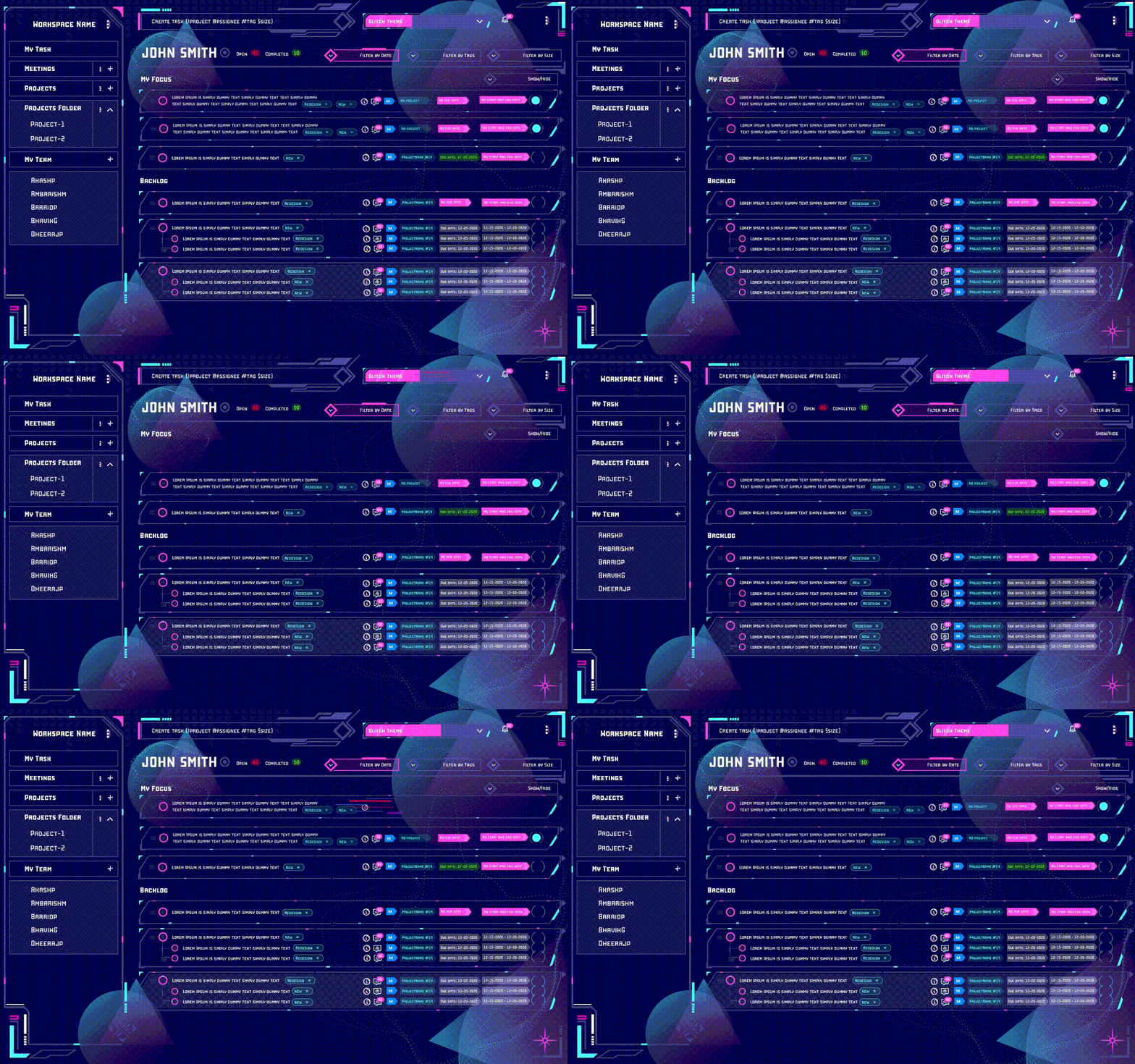
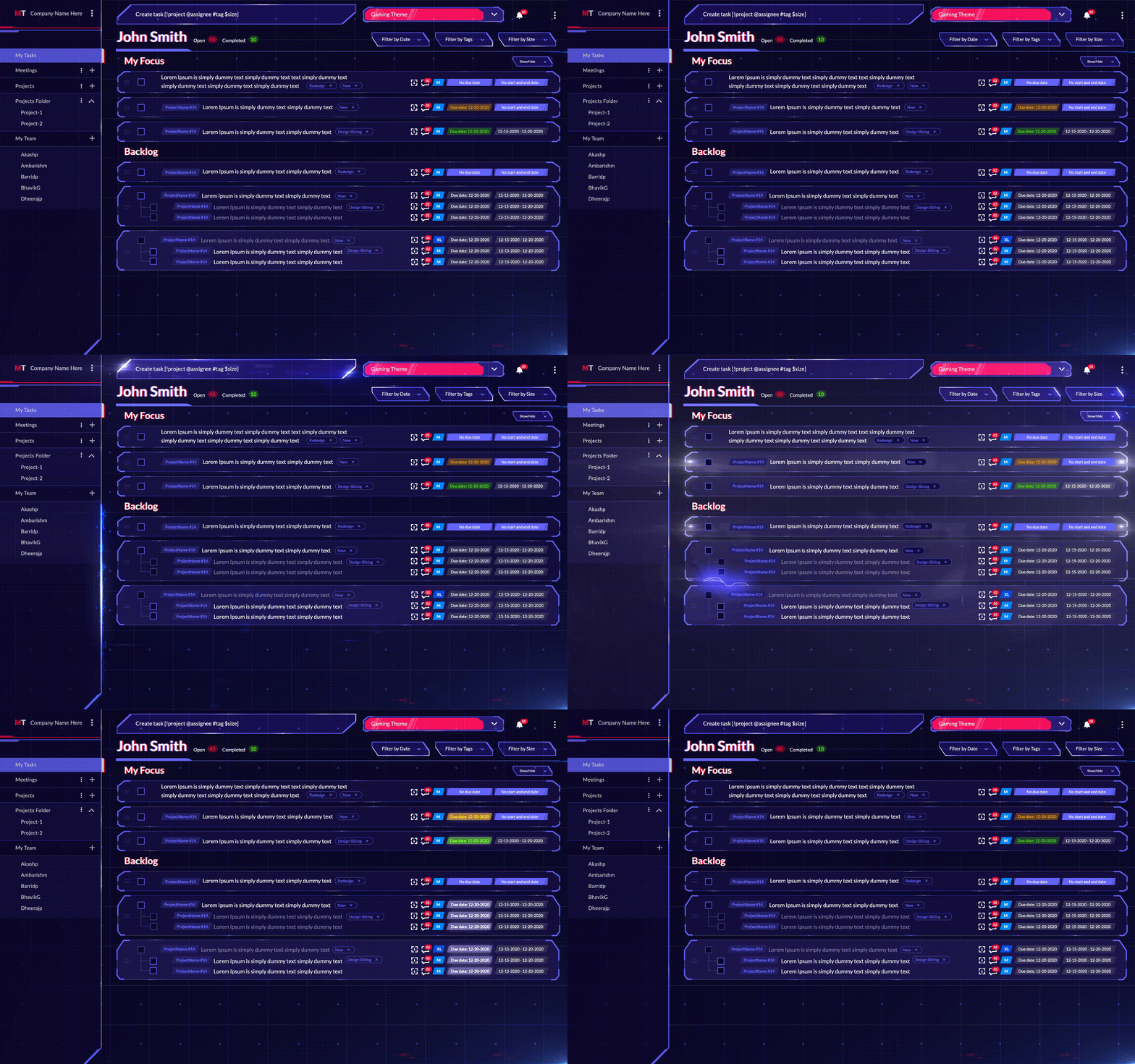
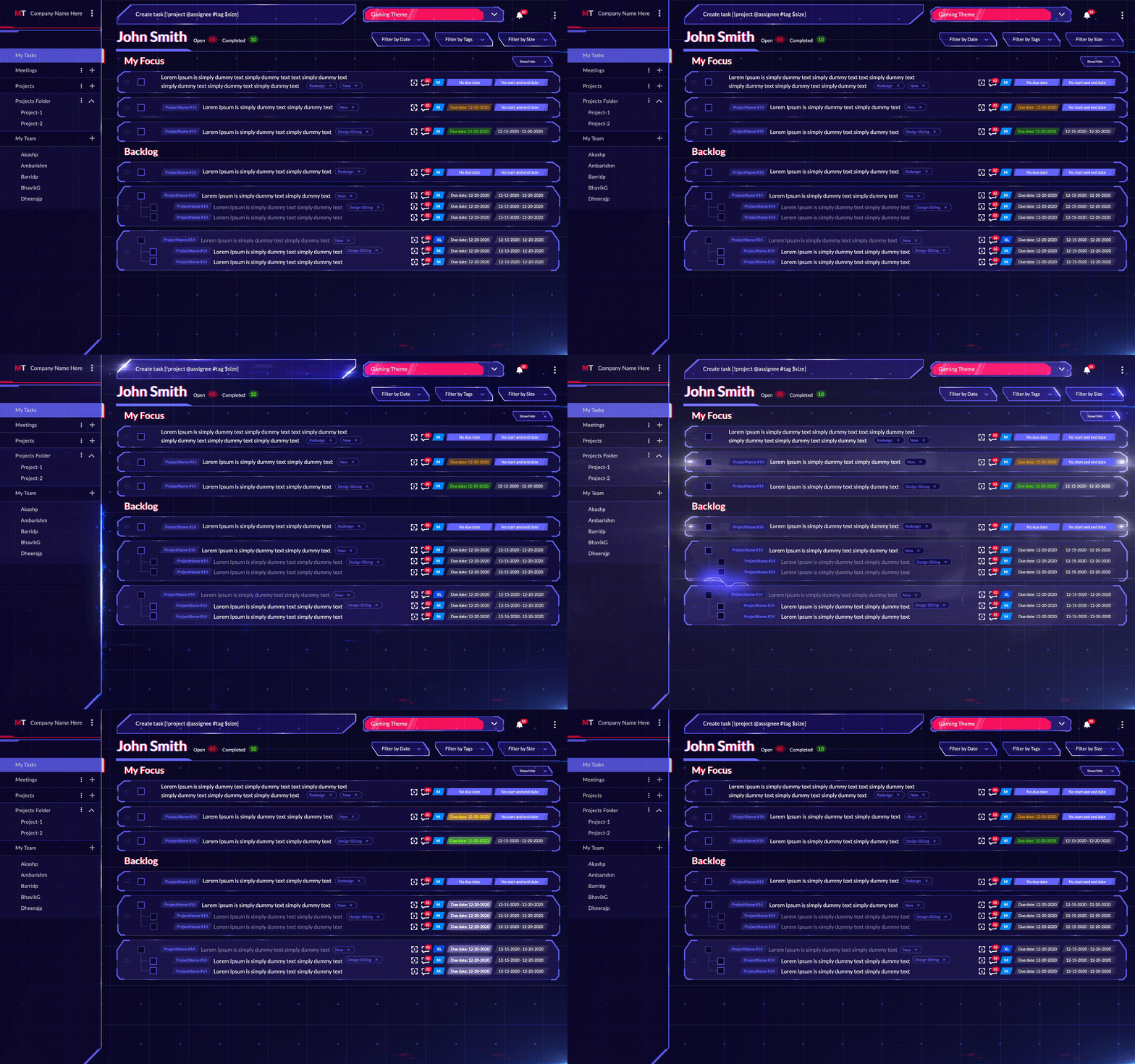
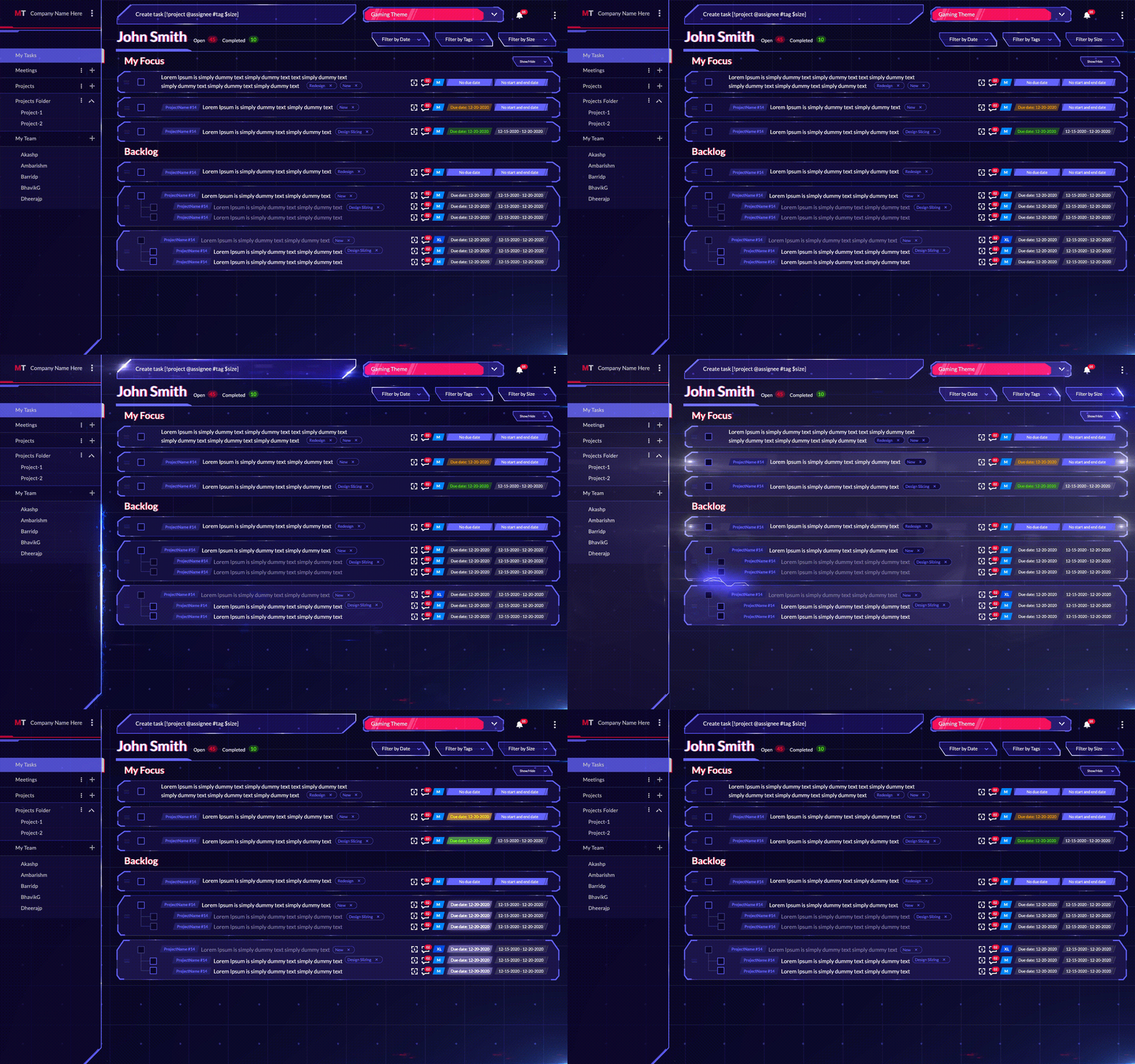
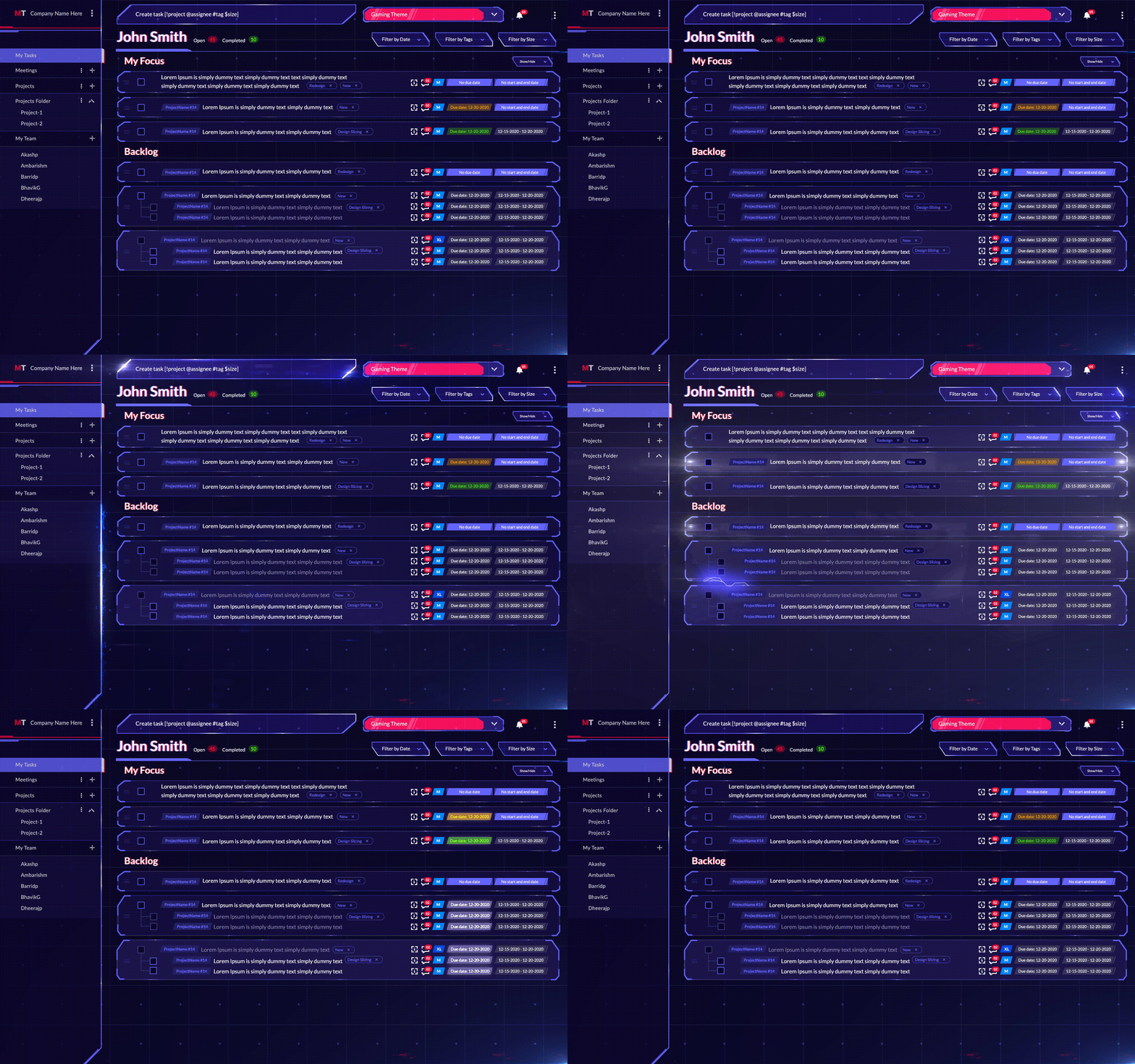
MagicTask Glitch Theme Interface

Upon first opening MagicTask V3, hardcore gamers will feel an immediate sense of familiarity. The user interface draws inspiration from various gaming genres, cleverly merging them into a unique productivity platform. The dark mode interface is reminiscent of modern RPGs, imbuing the workspace with a sleek, professional feel, while the colorful progress bars and reward pop-ups echo mobile gaming’s vibrant visuals.

A standout feature of MagicTask V3's UI is the dynamic theme system. The app's look and feel change as users switch between themes, transforming the workspace from a hacker's terminal to an interstellar cockpit or a medieval wizard's library. The interactivity is taken a step further with the integration of Rive animations. Each theme is not just a static visual experience; it’s a dynamic and interactive realm, making task completion feel like an actual game achievement.

Navigation within the app is straightforward and intuitive, drawing on common gaming interface conventions. Users navigate through tasks and projects as easily as they would through game levels and inventory systems. The system's simplicity allows users to focus on their tasks, while the gaming-influenced design adds an element of fun, keeping users engaged and entertained as they work through their to-do lists.

MagicTask V3's UI masterfully bridges the gap between gaming and productivity, serving as a powerful tool for task management while retaining the thrill and enjoyment of a gaming experience.

User Interface: Habitica
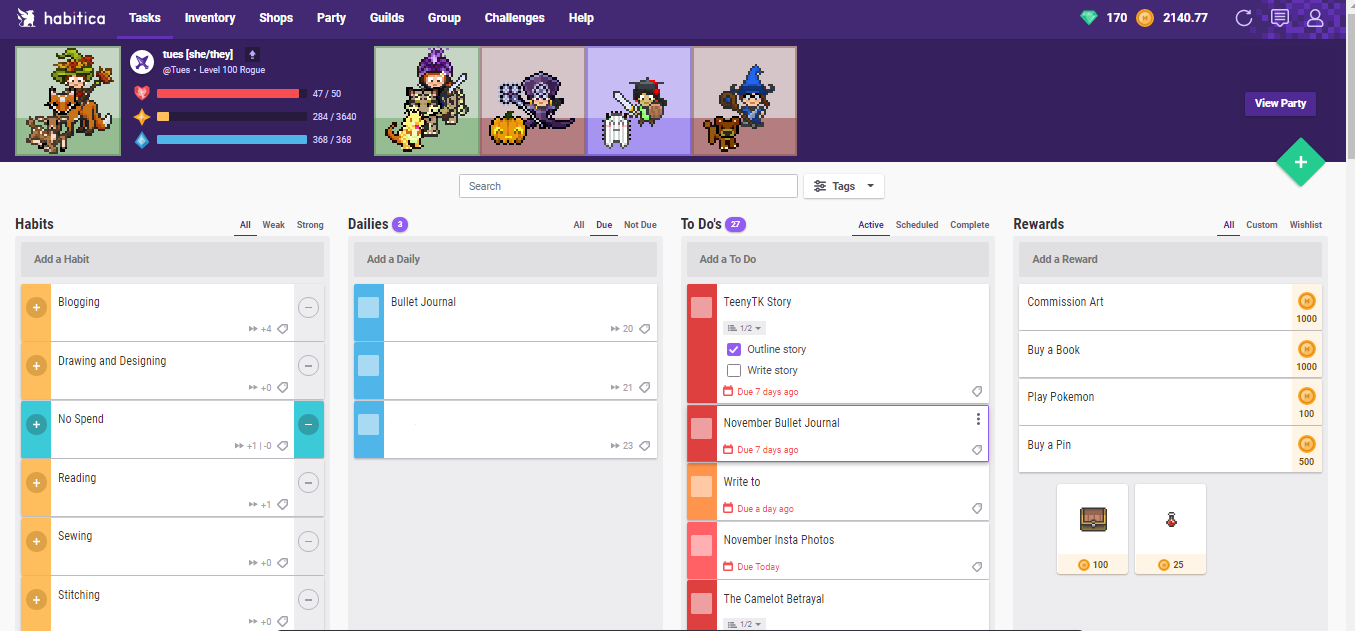
Habitica’s user interface takes a different route, embracing a charming pixel art aesthetic that brings nostalgia for the classic RPGs. The game-like elements are immediately apparent, with the user's avatar, stats, and equipment occupying a significant portion of the interface, emphasizing the RPG elements of the platform.

The interface is divided into four main sections: Habits, Dailies, To-Dos, and Rewards, each with its unique functions. Habits can be positive or negative, dailies are tasks to be completed daily, To-Dos are one-off tasks, and Rewards are treats users can purchase with the gold they earn. Each completed task provides immediate visual feedback in the form of HP, XP, and gold, reinforcing the feeling of gaming accomplishment.

The interface's visual charm is engaging, but the overall design can seem a bit cluttered, especially to those unaccustomed to RPGs. The application has a lot of features, and while it's exciting to explore them, it can also be overwhelming. However, for hardcore gamers who are familiar with RPGs, Habitica's UI will likely feel like a fun and nostalgic trip back to the classics.

Comparing the two, MagicTask V3's interface is more modern and immersive, while Habitica offers a more classic and game-centric UI. The choice between the two ultimately depends on your personal preference.

Customization: MagicTask V3

In the realm of MagicTask V3, customization is king. The platform understands the importance of personalization in gaming and applies it effectively in its productivity system. Each user can tailor their experience, creating a productivity landscape that resonates with their interests and style.

To begin with, MagicTask V3 offers a diverse range of themes. Each theme not only changes the app's aesthetics but also brings unique animations and interactive elements, enhancing the user's engagement. For instance, the MCARS theme, inspired by science fiction, could feature a futuristic heads-up display (HUD) that changes based on your productivity levels. On the other hand, the Glitch theme simulates digital distortions and code artifacts that react to your actions, offering a distinctive digital hacker ambiance.

Moreover, you can customize the task priority levels, allowing you to strategize your task completion in a way that aligns with your personal work habits. You can even customize the rewards you get from completing tasks, aligning your productivity incentives with your personal preferences.

However, the most impressive customization feature is perhaps the ability to design and animate your avatar using Rive, which adds a distinct personal touch to the platform. As you progress, your avatar will evolve, visually reflecting your growth and productivity.

Customization: Habitica

Habitica also offers a good deal of customization, particularly in terms of avatars. You can choose your avatar's appearance and buy equipment and pets using in-game gold earned from completing tasks. The wide array of options encourages users to keep up with their tasks to unlock more customization items.

You can also customize your task list, although the options are not as diverse as MagicTask V3. Habitica allows you to create and categorize tasks under Habits, Dailies, To-Dos, and Rewards. The customization mainly focuses on setting task frequency and difficulty, aligning the rewards you receive with the effort put in.

Moreover, Habitica offers a unique feature called "Custom Rewards," where you can treat yourself with real-life rewards in exchange for the gold you earn, thus creating a personal incentive system.

When it comes to customization, both platforms offer different strengths. While MagicTask V3 focuses on immersive personalization with themes and avatars, Habitica emphasizes character growth and personal incentives. The choice would come down to what type of customization you prefer in your productivity journey.

Social Interactions: MagicTask V3

MagicTask V3 doesn't shy away from the social aspect of gaming. It understands that in today's connected world, camaraderie and social engagement can be powerful motivators. To this end, MagicTask has incorporated a variety of social interaction features.

Firstly, MagicTask V3 introduces Clans, a feature allowing users to form teams or guilds. The members can collaborate on tasks, turning mundane chores into a group challenge. Clans can compete against each other in productivity battles, with leaderboards showcasing the most effective teams.

The chat functionality allows you to communicate with your clan members, discuss strategies, share productivity tips, or simply engage in casual conversation. This not only facilitates cooperation and coordination but also builds a sense of community.

Lastly, MagicTask V3 provides the option to share your progress and achievements publicly. Seeing other users’ accomplishments can provide a motivational boost and foster a healthy sense of competition.

Social Interactions: Habitica

Habitica also values the social component of gaming and integrates it well within the productivity system. Users can join parties with friends or guilds with people having similar interests. This creates a support network where users can encourage each other and share tips.

Moreover, Habitica takes things up a notch with its boss battle system. When in a party, completing real-life tasks contributes to damage against a monster that the party is currently battling. However, missed daily tasks will result in the monster dealing damage to the entire party. This mechanic promotes accountability and encourages team members to stay on track with their tasks.

Habitica's community is quite active, with members engaging in various discussions ranging from productivity strategies to casual chats. It's an excellent platform for anyone looking for a social productivity tool.

In essence, both MagicTask V3 and Habitica excel in fostering social interactions, albeit in different ways. While MagicTask focuses on competition and collaboration through clans and leaderboards, Habitica emphasizes shared responsibility and cooperation through its party system and boss battles.

The Role of Sound: MagicTask V3

The team behind MagicTask V3 understands that immersion is key to a true gaming experience. And that immersion isn't just about graphics and animations. Sound plays a crucial role too. With its transition to the Rive animation tool, MagicTask V3 has significantly upgraded its ability to integrate sound effects into its platform, thereby enriching the user experience.

When you complete a task, a satisfying sound effect rings out. If you level up a theme, an uplifting jingle plays. These audio cues not only provide immediate feedback but also serve to enhance the feeling of accomplishment, making task completion all the more gratifying.

Furthermore, each theme in MagicTask V3 could potentially have its own unique set of sound effects, mirroring its visual style and further adding to its distinct character. The sound, in harmony with the visual aesthetics, could create an immersive atmosphere that makes the task management experience genuinely engaging.

The Role of Sound: Habitica

On the other hand, Habitica keeps things relatively simple on the sound front. The platform uses subtle sound effects to signal task completion and other significant events. When you tick off a task, Habitica plays a satisfying sound effect to indicate your progress. Similarly, leveling up triggers a triumphant jingle, offering an auditory reward for your efforts.

While Habitica's sound effects might not be as varied or theme-specific as those in MagicTask V3, they still serve a crucial purpose. They offer immediate feedback and help reinforce the connection between real-life productivity and in-game progression, thereby keeping users engaged and motivated.

Thus, while MagicTask V3 takes a more elaborate approach with theme-specific sound design, Habitica maintains a simpler but equally effective use of sound as a feedback mechanism. Both approaches underscore the importance of sound in enhancing the user experience.

Building Habits: MagicTask V3

One of MagicTask V3's prime focuses is to facilitate habit formation in a gamified, engaging manner. It understands that productivity isn't just about ticking off individual tasks, but about building sustainable, beneficial habits.

In the realm of MagicTask V3, the more frequently you complete tasks, the more points you accumulate. These points don't just represent one-off achievements, but the formation of a habit. The RPG-inspired leveling-up system further emphasizes this point. Each level-up signifies not just a numerical increase, but a behavioral shift toward consistent productivity.

And it's not just about work habits. MagicTask V3 allows you to incorporate any type of habit you wish to develop, be it fitness-related, learning a new skill, or personal development. This holistic approach ensures that you aren't just productive at work, but in all aspects of life.

Building Habits: Habitica

Building habits is at the heart of Habitica. The platform takes a highly structured approach to habit formation, dividing tasks into three categories: Habits, Dailies, and To-Dos. Each category serves a unique purpose in your habit-building journey.

'Habits' are tasks that you can do multiple times a day, like drinking water or avoiding junk food. 'Dailies' are tasks that you should complete once each day, like working out or studying a language. 'To-Dos' are one-time tasks or projects, like cleaning the house or finishing a report.

Each time you complete a task, your in-game character gains experience and gold. However, if you miss a daily task, your character loses health. This RPG-like mechanic reinforces the importance of maintaining good habits and avoiding bad ones. By directly tying real-life habits to in-game rewards and penalties, Habitica creates a strong motivation to develop and maintain healthy habits.
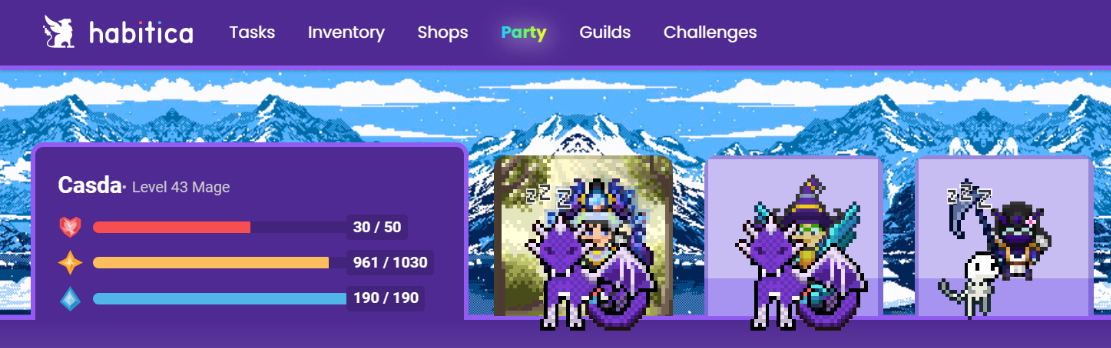
Habitica Gold

Interactions and Community: MagicTask V3

In MagicTask V3, interactions and community-building are integral parts of the gaming experience. By adding multiplayer features, MagicTask V3 encourages users to invite friends, family, or co-workers to join the journey of productivity.

MagicTask V3 offers various ways to collaborate with others, including shared projects and tasks, which boost team productivity and promote a cooperative gaming environment. You can level up together, exchange tips and strategies, and most importantly, turn productivity into a shared adventure.

A strong emphasis is also placed on fostering a positive community within the platform. MagicTask V3 features chat and messaging functionalities, leaderboards, and achievements that can be shared among the community. These features, coupled with the gaming aspect, create a lively, collaborative space where productivity becomes a team sport.

Interactions and Community: Habitica

Much like MagicTask V3, Habitica also thrives on interaction and community-building. It boasts a rich social system with a multitude of ways to interact with other players. You can form parties with friends, or join guilds to meet like-minded individuals. Parties can take on quests together, reinforcing the idea of collaborative productivity.

One unique feature of Habitica is the ability to engage in boss battles as a group. When you and your party members complete tasks, you deal damage to the boss. But if you miss a daily task, the boss retaliates, damaging not just you, but all the members of your party. This mechanic encourages accountability and consistency, as your actions have direct consequences for your team.

Habitica also offers an array of social spaces, like the Tavern, where you can take a break, chat with other players, and share your achievements. This community-centered approach turns the platform into more than just a productivity tool; it's a social hub for productivity-minded individuals.

The Future of MagicTask V3

MagicTask V3 stands on the horizon of productivity gaming with a vision of continual innovation and advancement. The introduction of Rive animations, interactivity, and enhanced gamification elements is just the beginning.

The roadmap for MagicTask V3 reveals a series of intriguing updates. A proposed feature is the addition of artificial intelligence to aid in task optimization, drawing from game AI logic to help users find the most efficient pathways to complete their tasks. This AI companion could provide tips, reminders, and even challenges to keep users engaged and motivated.

The future also holds more immersive gaming experiences. MagicTask plans to introduce new game-inspired themes with a greater level of detail and interactivity. An exciting vision is the implementation of adaptive soundtracks and sound effects that respond to the user's productivity levels and actions, enhancing the immersion and emotional connection to the game.

Lastly, MagicTask V3 is looking to grow its community through the addition of more multiplayer elements. Future updates might include guilds, player-versus-player productivity battles, and collaborative projects, adding a social layer to the productivity journey.

The Future of Habitica

Looking at Habitica's journey, the platform has consistently strived for improvement and innovation, always keeping its users' needs at the forefront. The future of Habitica is likely to continue this trajectory.

The Habitica team has shown interest in integrating more sophisticated RPG elements, like deeper storylines and varied quests. There's also talk of improving the avatar customization options, allowing users to express their creativity more freely.

Community enhancements are also on the table, with plans to improve the guild system and further develop the social aspect of Habitica. The developers have expressed interest in expanding the concept of shared tasks and boss battles, introducing new mechanics that foster teamwork and accountability.

Like MagicTask V3, Habitica is exploring the use of AI for personal productivity. They are looking at implementing an intelligent system that provides personalized task recommendations and productivity advice based on user behavior.

While both platforms have different approaches, their visions align in creating more engaging, rewarding, and efficient productivity tools. As they evolve, we can expect an even more exciting battle for the crown of productivity gaming.

The Verdict: MagicTask V3 or Habitica

Both MagicTask V3 and Habitica have their unique strengths, and the choice between the two largely comes down to individual preference. Each one has the potential to deliver significant benefits to its user base, and both have demonstrated a commitment to innovation and continual improvement.

For hardcore gamers who are interested in productivity apps that lean heavily into gaming aesthetics, mechanics, and narratives, Habitica might be the more appealing choice. Its extensive RPG elements, vibrant pixel art, and immersive world-building create a uniquely captivating experience.

On the other hand, MagicTask V3’s focus on high-quality animations and a slick, modern design might be more appealing to gamers who appreciate sleek aesthetics. With its transition to Rive and its focus on real-time animation and interactivity, MagicTask V3 offers a visually striking experience. The blend of productivity tools and gaming elements is seamless and intuitive, providing an innovative approach to task management.

Moreover, the customization options in MagicTask V3 are extensive, allowing users to tweak their interfaces to match their preferences and productivity styles. With the planned addition of AI for task optimization, MagicTask V3 also promises an element of personalization that goes beyond the usual to-do list app.

In conclusion, there's no one-size-fits-all answer. The best productivity tool for you depends on your personal taste, needs, and the gaming elements that appeal to you most.

Final Thoughts

Gaming and productivity, two seemingly disparate worlds, have merged to create a compelling domain that transforms task management from a chore to an exciting journey. Both MagicTask V3 and Habitica stand as pioneers in this field, pushing boundaries and reshaping how we perceive and engage with productivity tools.

As a hardcore gamer, I can see the allure of both platforms. The RPG elements, guild system, pixelated aesthetics of Habitica, and the sleek animations, interactivity, and customization features of MagicTask V3 each have their unique charm. It's a testament to the creativity and innovation of these platforms that they manage to make task management, a typically dull and dreary activity, something to look forward to.

The exciting part is that this is only the beginning. As these platforms continue to grow and evolve, who knows what fascinating innovations we will see in the future? As we eagerly anticipate the next updates and features, one thing is certain: the world of productivity gaming has a bright and exciting future.
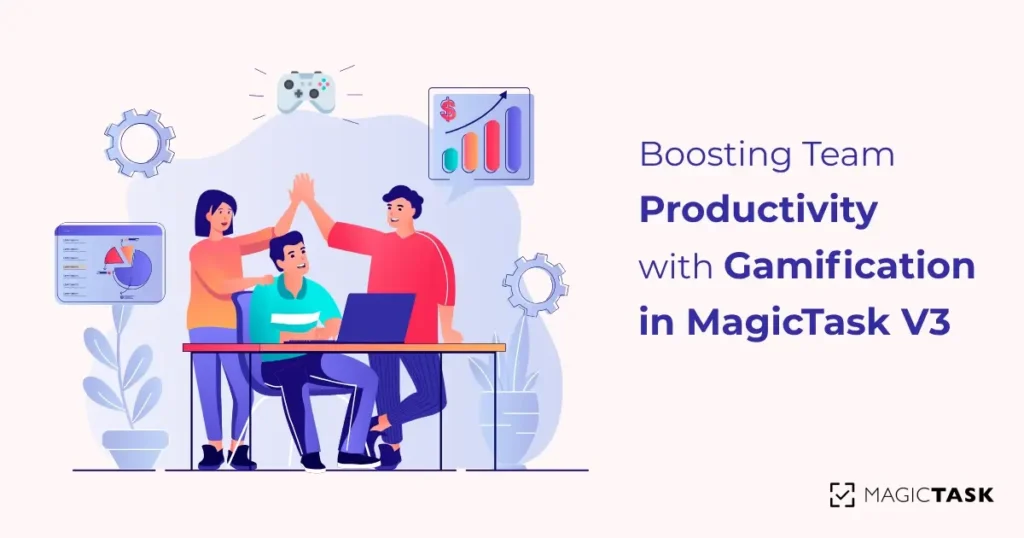
Boosting Team Productivity with Gamification: An Introduction to MagicTask V3

Boosting Team Productivity with MagicTask V3 Gamification

From the perspective of a hardcore gamer, productivity can often feel like a bland quest; missing the thrill of combat, the joy of exploration, and the satisfaction of leveling up. But what if we can take these adrenaline-pumping elements from the gaming world and blend them into our real-world tasks and productivity? This is exactly what MagicTask V3 does, transforming our work into an exhilarating gaming experience.

In essence, MagicTask V3 is an advanced project management software that gamifies your work processes. It creates an immersive gaming environment, applying the addictive dynamics of games to promote team productivity. Let's embark on this epic quest and discover how MagicTask V3 can level up your team's productivity.

The User: Crafting Your Ultimate Game Character

As an avid gamer, you know the exhilarating feeling when you start a new game, and it's time to craft your character. It's a defining moment where you carve your identity in the digital realm. MagicTask V3 borrows this electrifying essence with its 'User' object. This isn't just some standard profile creation; it's akin to forging your RPG protagonist in a realm of productivity.

Your avatar, your digital self, is more than just a static image. It's like your custom-crafted character, decked out in epic gear, boasting an impressive array of stats in a AAA RPG title. Your avatar in MagicTask V3 reflects your professional prowess, marking your territory in this world. These stats, like in any RPG game, symbolize your work efficiency and areas of expertise.

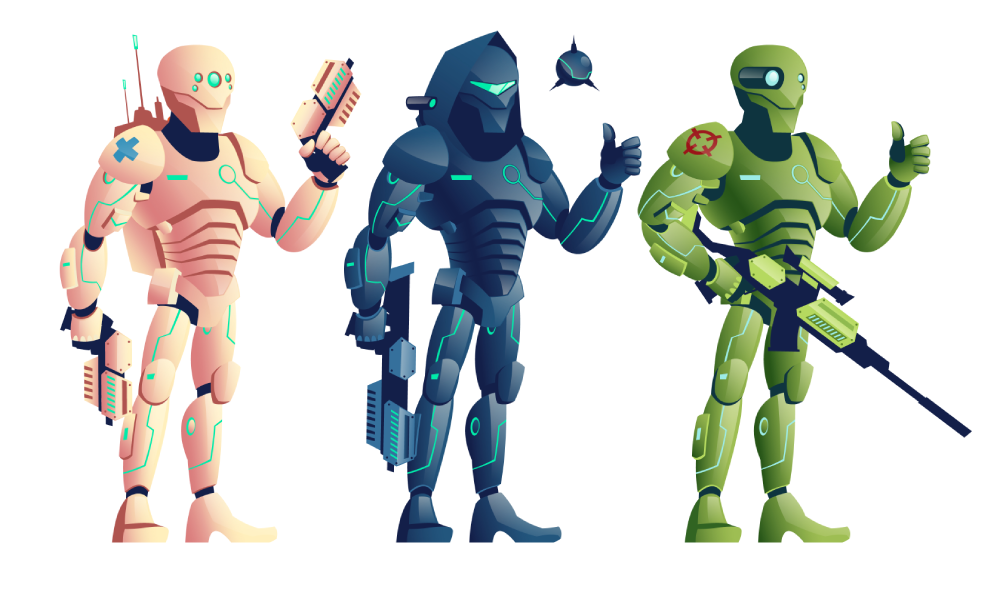
Gaming Avatar

As you venture forth, battling workplace dragons and completing task quests, you amass experience points. This isn't a gimmick; it's as real as the XP points you grind for in the late-night gaming sessions. Every level you gain signifies not just the progress of your avatar, but your professional growth, your dedication, and an indomitable spirit to overcome challenges. It's as fulfilling as finally leveling up after an intense boss fight in your favorite RPG.

And what is a game without its coveted achievements? Trophies in MagicTask V3 are your badges of honor, your epic loot after a challenging raid. They stand as a testament to your commitment, collaboration, and creativity in the face of daunting projects. This treasure hunt for trophies becomes a meta-game on its own – a thrilling pursuit that keeps you motivated, pushing you to learn and grow continuously.

MagicTask V3 lets you turn your work life into an immersive RPG experience. Every task becomes a quest, every project a dungeon to be conquered. So, ready to gear up, fellow gamer? Let's level up our productivity game!

The Power of Community: Workspace / Clan / Guild

You know that moment in your favorite MMORPG when you finally join a guild? That awesome sense of belonging, being part of something bigger, fighting together with your comrades to conquer epic quests? That's precisely what the 'Workspace / Clan / Guild' object in MagicTask V3 is all about.

You're not just a lone adventurer in MagicTask V3. No, you are part of a clan, a band of professionals who combine their individual strengths to vanquish productivity dragons and topple daunting task towers. This object isn't merely a shared digital workspace. It's a hallowed guild hall, a virtual headquarters, where every strategic decision is made, every victory celebrated, and every setback turned into a learning opportunity.

In MagicTask V3, your 'Guild' is where collaboration and creativity blossom into incredible productivity feats. It's not about running solo quests; it's about partaking in epic raids with your team, pooling in collective wisdom, basking in shared victories, and standing united in the face of monstrous projects. The power of a guild in an MMORPG and the Workspace / Clan / Guild in MagicTask V3 are remarkably similar, offering a robust team experience that you, as a gamer, know and love.

The 'Users in Workspace / Clan / Guild' object takes this camaraderie even further. Picture your favorite guild in that top MMORPG. It's filled with a diverse group of characters, each possessing unique skills and contributing to the guild's success. MagicTask V3 creates a similar setting, pooling together a dynamic mix of professionals, each with their unique work skills, who work cohesively towards common project objectives. It's like conducting a raid in an MMO, with each guild member playing a critical role in the ultimate victory.

MagicTask V3 turns the task of project management into a cooperative adventure, where every workspace is your guild, every user a guild member, and every project a guild quest. So, are you ready to embark on this adventure with your guildmates, fellow gamers? Let's rally our banners and march toward unprecedented productivity!

The Inventory: Gear Up for Success

Game Inventory

Who doesn't love a good loot drop in a game, right? That exhilarating rush when you see that epic piece of gear or valuable consumable item pop into your inventory after a challenging boss fight. Well, guess what? MagicTask V3 brings that same level of excitement to your work-life. It's time to swap out grinding mobs for slaying tasks, and watch as the rewards come pouring in!

In MagicTask V3, every task completed, every goal achieved, is your boss fight. And what do you get after winning? Loot, of course! You're rewarded with MagicTokens. Now, these aren't just some abstract points or boring tally marks. No, MagicTokens are your hard-earned currency. They're the gold coins you'd gather in an RPG, the spoils of your hard-fought victories.

But what's the point of gold if you can't spend it, right? This is where the 'Equipment', 'MagicToken', and 'Items/Consumable' objects come into play. These are your virtual inventory, your spoils of war. The Equipment object is akin to your gear in an RPG – the better the equipment, the better your performance. Each piece of equipment in MagicTask V3, earned through MagicTokens, represents tools and resources that help boost your productivity and efficiency.

The MagicToken object functions like an RPG's in-game shop where you trade your earned currency for powerful upgrades and items. Lastly, the Items/Consumable object fills the role of those vital potions and scrolls that give you an extra edge in critical moments of your quests. In MagicTask V3, these items could be anything that gives a boost to your workflow or offers a short-term advantage in managing your tasks.

What's brilliant about this system is that it's not just a fun gimmick. It taps into the very core of what makes games engaging: the constant cycle of challenges, rewards, and progression. The thrill of earning MagicTokens and the satisfaction of spending them on upgrades and items fuels your motivation. It pushes you to commit, to strive for that next big achievement, to keep leveling up. Your work is no longer a mundane chore. It's an epic quest filled with adventure, growth, and, of course, epic loot!

So, fellow gamer, ready to gear up and dive into your next productivity raid? The dungeons of work await!

Quests and Missions: Projects and Tasks

Every gamer knows the thrill of accepting a new quest. That moment when you get to explore new areas, face new challenges, and of course, rack up experience points and loot. MagicTask V3 captures this adventurous spirit and injects it right into your work-life with the 'Project' and 'Task' objects.

Picture this: each Project is your epic quest line, your main storyline if you will, full of daring challenges and promising rewards. It's the grand adventure that drives you forward, the overarching objective that compels you to dive headfirst into the game world. Within each Project, you'll find a series of Tasks. These are your quest objectives, the crucial steps you need to complete to inch closer to that climactic finale. Every time you complete a Task, you're not just ticking off a checkbox; you're progressing in your adventure, bringing the final victory within your reach.

And what's an RPG without daily quests? You know, those little tasks that keep you on your toes and make sure you're always doing something productive. That's where 'Recurring Tasks' come in. They're the daily quests of your work-life, the routine tasks that provide a steady stream of productivity. Need to respond to emails every day? That's a recurring task. Have a standing weekly meeting? That's another one.

Like daily quests in your favorite games, these Recurring Tasks offer a stable structure amidst the excitement of your Project quests. They ensure that amidst the highs and lows of your epic quests, your daily productivity remains consistent. Plus, they're an excellent source of steady MagicTokens. Just like how daily quests in games often provide a reliable income of gold or resources, completing your Recurring Tasks ensures a constant inflow of MagicTokens for your inventory.

So fellow adventurers, ready to embark on your next quest? Whether it's a grand project or a simple daily task, MagicTask V3 makes sure that every bit of your work-life is an exciting mission waiting to be conquered. Grab your gear, muster your courage, and let's dive right into the thrilling world of productivity quests!

Also Read: Power Up Your Productivity with MagicTask V2's Themes

Competitive Edge: The Leaderboard

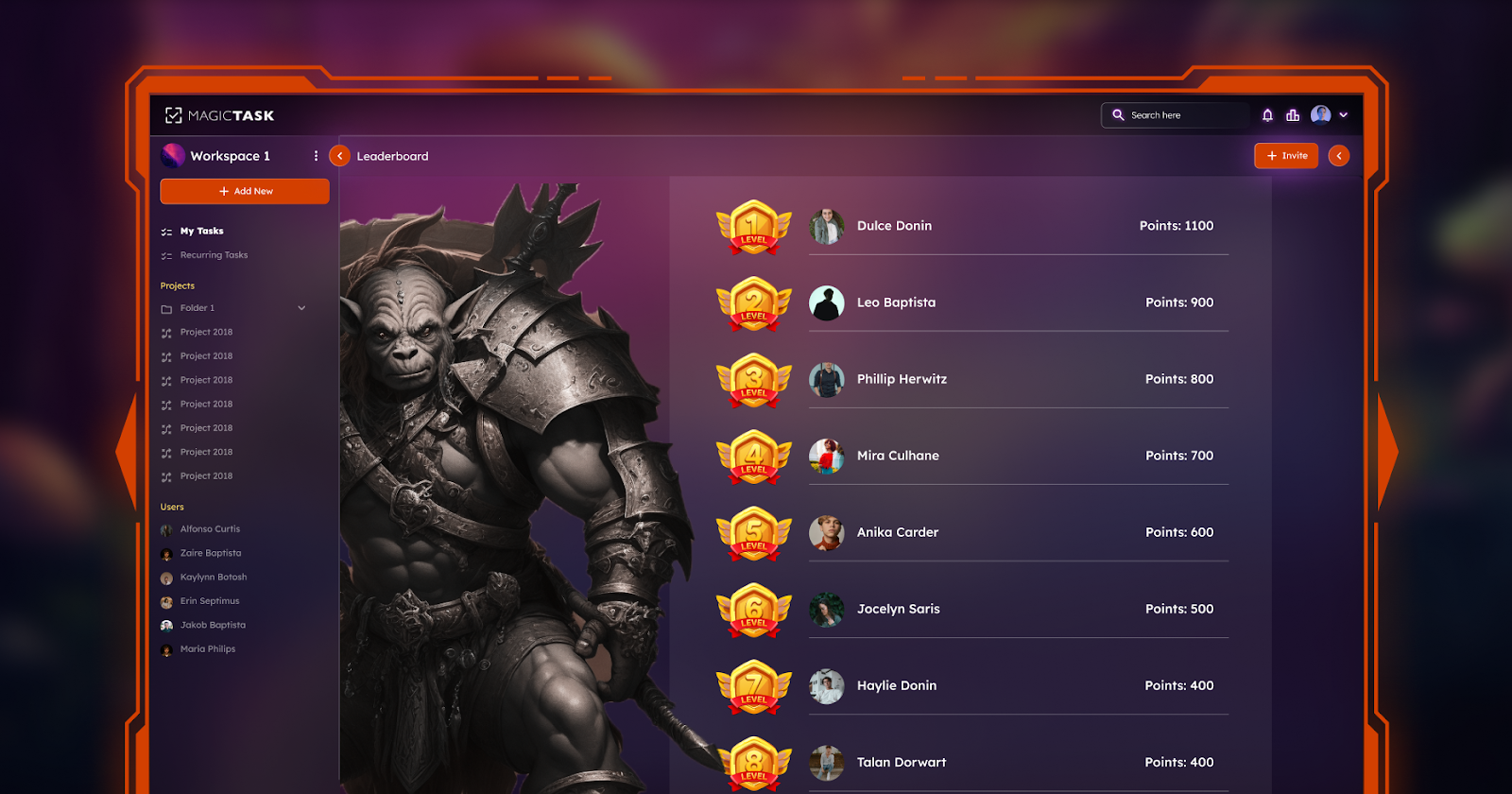
leaderboard

To all hardcore gamers out there, we know the thrills of competition. The adrenaline rush when you inch ahead of your opponents in a nerve-racking race or the sense of accomplishment when your name shines at the top of the leaderboard. These moments make our gaming experiences unforgettable. That's why MagicTask V3 brings the thrill of competition into your work-life through the 'Leaderboard'.

Think of Leaderboard as your own personal PvP (Player versus Player) arena in the realm of productivity. Just as you'd vie for the top spot in a deathmatch or aim to outscore others in a battle royale, the Leaderboard in MagicTask V3 offers a platform for friendly competition among users.

Each task you complete, each project you handle, and each trophy you earn contributes to your rank on the Leaderboard. It's a thrilling game of numbers that reflects your work efficiency, dedication, and productivity prowess. Whether it's the race to top the Leaderboard, the ambition to outshine your peers, or the personal goal to improve your own rank, the thrill of competition keeps you motivated, productive, and engaged.

But it's not just about rivalry. The Leaderboard also fosters a sense of community and camaraderie. It pushes everyone to bring their A-game, thereby creating a positive and productive work environment. You're not just competing against each other; you're inspiring each other to achieve more.

So gear up, champions of productivity. The race to the top is on! Embrace the challenges, conquer your tasks, and let your name shine on the MagicTask V3 Leaderboard. Remember, in this game of productivity, every task completed, every quest conquered, and every MagicToken earned gets you one step closer to the top. Bring your best game on, and let's conquer the Leaderboard together!

Surprises and Secrets: Easter Eggs

Alright, fellow gamers, we know what sets our hearts racing – those elusive Easter eggs. Those hidden gems scattered across the gaming universe reward our curiosity and exploration. The thrill of hunting for secrets, the joy of discovering hidden features, and the satisfaction of unveiling bonuses – it's all part of the game. Now, imagine bringing this exciting dynamic to your workspace. That's exactly what MagicTask V3 does with its 'Easter Eggs' object.

'Easter Eggs' in MagicTask V3 are akin to those secret paths, hidden characters, or bonus levels in video games. They bring an element of fun and mystery to the otherwise predictable world of work. Stumbling upon an Easter Egg can result in various rewards – maybe extra MagicTokens, an exclusive trophy, or even a hidden feature that boosts your productivity in an unexpected way.

As you navigate through your work quests, you'll find these hidden gems tucked away. They are MagicTask V3's way of adding a touch of surprise and excitement to your daily grind. Just as you'd meticulously explore every corner of a dungeon or parse through every line of NPC dialogue for hints, you'll find yourself looking forward to unearthing these Easter Eggs in your workspace.

But remember, fellow adventurers, the joy of Easter Eggs isn't just in the rewards. It's about the journey of discovery. It's about that spark of curiosity that drives us to explore the unexplored, to question the ordinary, and to find joy in the unexpected. It's this gaming spirit that the 'Easter Eggs' object embodies.

So, embark on your work-life adventure with MagicTask V3. Hunt for those Easter Eggs. Embrace the thrill of the unexpected, and bring a dash of gaming fun to your productivity quest. After all, who said work can't be fun? Let's gamify the grind together with MagicTask V3!

Nourishing Growth: Skill Development and Title Elevation

As any hardcore gamer will tell you, there's nothing more satisfying than seeing your in-game character grow stronger, become more skilled, and rise through the ranks. It's about that moment when your fledgling mage becomes an Archmage, or your rookie soldier transforms into a decorated general. It's the heart of our gaming experience – the constant striving for growth, improvement, and recognition. Now, what if you could bring this same dynamic into your work environment? MagicTask V3 does just that, with its unique 'Skill' and 'Title' objects.

Think about it: each completed task, each project handled, and each challenge overcome is a battle won. And with each victory, your 'Skill' object grows. You're not just ticking off a task or wrapping up a project. You're honing your skills, you're leveling up your abilities, and you're strengthening your professional profile. Whether it's time management, creative thinking, problem-solving, or teamwork, your skills in MagicTask V3 mirror your real-world abilities. You see tangible proof of your growth and progress, just like your game character acquiring new abilities or spells.

But what's a level-up without a new title, right? That's where the 'Title' object steps in. Just as an epic boss victory might earn your character the title of 'Dragon Slayer' in an RPG, your professional achievements in MagicTask V3 earn you distinct titles. Imagine being recognized as a 'Project Maestro' for your exceptional project management skills, or dubbed a 'Deadline Slayer' for your consistent record of meeting timelines. These titles are more than just fancy names. They're a testament to your achievements, a mark of your capabilities, and a badge of honor that spurs you on to greater heights.

So gear up, fellow adventurers. In the realm of MagicTask V3, every task is a mission, every project a quest, every skill a power-up, and every title recognition of your heroics. It's more than just gamifying productivity. It's about evolving, improving, and celebrating your professional journey in the true spirit of gaming. Let's level up our work game with MagicTask V3!

Time Management: The Pomodoro Timer

Pomodoro Technique

Ask any seasoned gamer about the key to defeating a complex dungeon or surviving a grueling raid, and they'll probably say one thing: time management. It's about knowing when to push forward, when to fall back, when to use that healing potion, or when to let lose that powerful cooldown skill. It's about optimizing your actions to maximize output. Now, imagine if you could harness that strategy to boost your productivity at work. Sounds awesome, right? Well, MagicTask V3 has already got you covered with the 'Pomodoro Timer' object.

The Pomodoro Timer takes inspiration from one of the most time-honored techniques of time management – the Pomodoro Technique. Much like a timed challenge or a race against the clock in a video game, the Pomodoro Timer sets you a task to complete within a fixed time slot – usually 25 minutes, followed by a well-earned 5-minute break. You then repeat this cycle, turning your workday into a series of 'sprints' interspersed with regular rest periods.

You could view it as a game mechanic that encourages efficient resource management. Instead of mana or stamina in an RPG, you're managing your most precious resource: time. It pushes you to concentrate, to stay focused, to give your best within the set time limits. Then, it rewards you with a short break to relax, refresh, and recharge – just like a well-timed pause in a gaming session to inventory check, strategize, or simply admire the in-game scenery.

Moreover, the Pomodoro Timer is a great way to keep burnout at bay. It acknowledges that continuous grinding, whether in gaming or at work, can lead to exhaustion. By encouraging regular breaks, it ensures you're maintaining a healthy balance between work and rest. It's not just about being productive; it's about being smartly productive.

So, whether you're battling hordes of email, taming the wild lands of your to-do list, or charting the treacherous terrains of complex projects, remember to set your Pomodoro Timer. It's your trusted companion on this adventurous journey through the productivity realms of MagicTask V3. Work like a gamer, with strategy, focus, and well-timed breaks. Because in the game of productivity, every second counts. Game on!

On the Horizon: Future Events and Planning

Ask any seasoned MMORPG player about their strategies, and they'd tell you that anticipating future events, knowing when to join a raid, or preparing for that limited-time quest is a significant part of their gameplay. It's about looking ahead, about knowing what's on the horizon and prepping for it. Now, imagine carrying that level of foresight and preparedness into your work-life. Sounds like a dream, right? Well, MagicTask V3 is here to turn that dream into a reality with its 'User Calendar' and 'Event' objects.

Think of the User Calendar as your in-game event planner, your pocket oracle, and your personal prophecy scroll. It presents a clear overview of your upcoming tasks, appointments, deadlines, and milestones. It's like having a quest log, a raid schedule, and an event tracker all rolled into one. The User Calendar shows you the bigger picture, allowing you to strategize, prioritize, and allocate your resources accordingly.

The 'Event' object is the specific quest or mission on your horizon. It could be a crucial project deadline, a team brainstorming session, or even a well-deserved holiday. These events are the key points in your work-life narrative, the boss fights of your productivity journey, and the milestones that define your path. By having these events highlighted in your calendar, you're ensuring that you're always prepared for them and that you've allocated enough time and energy to tackle them head-on.

However, the beauty of MagicTask V3's planning tools isn't just about what's ahead. It's also about reflecting on what's been accomplished. Like an in-game journal chronicling your epic victories and hard-learned lessons, your User Calendar stands as a testament to your growth and progression, showcasing your completed tasks, achieved objectives, and conquered deadlines.

So, as you journey through the realms of productivity, remember to keep an eye on your User Calendar. It's your roadmap to success, your guide through the murky waters of work-life chaos, your loyal scout pointing out future events. Equip it, use it, and let it steer your course. Because in the immersive MMORPG that is MagicTask V3, success is a game of strategy, foresight, and timely action. Prepare like a pro, work like a gamer, and watch as your productivity levels soar to new heights. Ready for the next quest? Let's roll!

Keeping Score: User Analytics

User Analytics Dashboard

Every gamer worth their salt knows the power of stats. It's how we measure growth, how we evaluate our strengths and weaknesses, and how we decide our battle strategy. We'd spend hours poring over character stats, comparing weapon attributes, or calculating skill cooldowns. Why? Because knowledge is power, and in the realm of gaming, that knowledge often comes in the form of numbers.

Now, wouldn't it be great if we had such a feature for our work-life? Well, MagicTask V3 has got us covered with the 'User Analytics' object. Picture it as your personal HUD (Heads-Up Display), revealing your productivity stats in real-time. It's like having a detailed character stat sheet but for your work life.

The User Analytics panel in MagicTask V3 goes beyond just showing you how many tasks you've completed or how many projects you've handled. It delves deeper, providing insights into your work patterns, your peak productive hours, the time taken per task, and your efficiency in meeting deadlines.

Are you a rogue, striking off tasks with swift efficiency, or more of a paladin, meticulously strategizing every project to ensure optimal success? Maybe you're a night owl, conquering tasks in the tranquil solitude of the late hours, or perhaps an early bird, charging into the workday with the first light. Your User Analytics panel reveals it all.

But what good are these numbers if they don't help us grow? That's where the true power of the 'User Analytics' object shines. It's not just a scorekeeper; it's a coach, a mentor. It identifies your areas of improvement, offers suggestions on how to enhance your productivity, and helps you set realistic, achievable targets. It guides you in strategizing your workflow, optimizing your performance, and even balancing your work-life equation.

Whether it's about tweaking your work schedule, focusing on specific skills, or learning to prioritize tasks more effectively, the insights derived from your User Analytics are invaluable in enhancing your productivity game.

So, embrace the wisdom of your User Analytics panel. Allow it to guide you, to shape you into a productivity champion. After all, in the immersive realm of MagicTask V3, growth isn't just about leveling up; it's about understanding your gameplay, honing your strategies, and continuously refining your skills. In this game, we don't just work; we evolve. And with User Analytics as your guide, you're all set to embark on this thrilling journey of evolution. Ready, player one? Game on!

The Endgame: Achieving Productivity

With MagicTask V3, every task is an adventure, every project a quest, and every achievement a treasure. The real beauty of this platform lies in its ability to make work engaging and rewarding. As you navigate through the various challenges, collaborating with your guild, and growing your skills, you'll find that productivity isn't a chore—it's an exhilarating game.

From leveling up your character to achieving high scores on the leaderboard, from finding Easter eggs to earning unique titles, every aspect of MagicTask V3 is crafted to enhance your productivity journey.

In this game of work-life balance, you're not just a player—you're the hero of your own epic saga. So gear up, venture forth, and let MagicTask V3 turn your work life into an adventure you look forward to every day.

So whether you are an ardent gamer or a hardworking professional seeking some fun in your routine, MagicTask V3 has a place for you. It is where productivity meets fun, where work becomes play. It's time to embrace this new game of productivity and redefine the way we work. Unleash the gamer within you in the professional world with MagicTask V3!

And that, my fellow adventurers, is the power of gamifying productivity. It's not just about getting things done—it's about enjoying the journey along the way. In the realm of MagicTask V3, productivity is the game, and we're all here to play.

Managing Projects and Delegating Tasks Efficiently with MagicTask

Why is delegating tasks important

Effective project management and task delegation are crucial aspects of ensuring a project's success.

A properly managed project keeps team members on track, ensures resources are used efficiently, and helps achieve the project goals within the set timeline.

One of the main aspects of project management is delegating tasks to the team members.

In this article, we’ll be talking about exactly that – delegating tasks. We'll be discussing what it means, and its importance. We'll also discuss a couple of best practices to effectively delegate tasks.

What Does Delegating Mean?

Delegating, in simple terms, means assigning someone to do a part of your work. In project management, this means dividing the entire project into tasks and assigning them to one or more team members.

Every organization will have people with diverse skill sets and experience. And they'll all be working on unique projects. They will have their own requirements, deliverables, and delivery dates. And they all will need different sets of resources.

The role of a project manager is to deliver the project on time and up to specifications. And by using all the resources available – both human and others.

And a key part of this is delegating the tasks.

When delegating a task, the ownership of the task goes to the person to whom it was assigned. But from an organizational or client perspective, it still remains with the project manager.

This means that ultimately the manager is responsible for completing the project. Maybe the assigned person had to deal with a personal emergency. Or maybe they were pulled into other tasks. Either way, it is the responsibility of the manager to ensure that the work is delivered.

For instance, consider a content manager charged with posting weekly articles on the organization’s blog. They may have a team of content writers, graphic designers, and other marketing professionals.

Maybe the writer took a leave of absence. Or they didn't have the expertise to do it. Either way, the manager has to assign the work to someone else and ensure that the articles are posted on time.

While it sounds simple enough in principle, in practice, delegating tasks can be complicated. Delegation is a lot more complicated than simply putting a task and sticking a name and date on it.

Project managers have to consider team members' availability, dependencies with other tasks, and other factors. They may even have to consider the project timeline as well as client feedback before delegating.

Why is Delegating Tasks Important?

Delegating tasks confers many benefits for the organization, the manager, and their team members. Here are a few of them.

1. Better resource utilization

This is one of the more obvious benefits of delegating tasks. Effective delegation ensures that the team members are all contributing to the project and that nobody is sitting idle. If you’re not delegating tasks, the limited talent in your organization may be overworked and not available for other projects.

Another aspect of this is that every time a person switches from one task to another, productivity goes down. And if a single person is handling all the tasks, the productivity will go down significantly. By putting different people on a project, the team can carry out multiple tasks at the same time. And the project can be completed faster.

2. Improving the team’s skills

Improve team skills

Without adequate work, the skills of your team members are bound to atrophy. But instead, if you delegate some of your work to them, they can learn and practice more skills.

For example, imagine an HR manager delegates one of their tasks – preparing the payroll – to one of their teammates. The teammate will get to learn that additional skill on the job.

Or imagine a project manager asking an assistant to conduct a meeting. The assistant will learn how to take a team through an agenda, follow up on the progress of a project, and become a better leader.

By delegating tasks, you’ll be offering your team the chance to learn more and grow professionally.

3. Improved morale

Anyone who has ever worked for a micromanager knows that it is one of the most demoralizing feelings. But by delegating, you’re trusting your team and their skills to get the task done well and on time. It tells them that you’re willing to teach them and that there’s an opportunity to grow by working with you.

Too many tasks can make your team feel like they’re being overworked. But effective delegation assures your team that you’re there to support them if they face any difficulty. This will certainly improve morale among your teammates and colleagues.

Delegating tasks will create a culture of supporting each other and helping your teammates grow in your organization.

4. Gives you time to focus on more important tasks

Trying to do everything by yourself is setting yourself to fail in everything. By delegating tasks, you’ll have more time to focus on important tasks and look at the bigger picture.

Imagine you’re tasked with leading a large construction project. You'll have to ensure that you have all the resources, that every stage is completed on time, and that everyone is aware of their roles. You simply cannot afford to spend your time picking the interior decor for every room. And you cannot oversee the procurement of individual construction equipment.

Focus on important tasks

Delegating the simpler tasks and letting people do what they’re good at lets you do what you’re good at. It helps you ensure the project is on the right track and that the team members are completing their tasks on time. And it will give you time to overcome any roadblocks on the way.

5. Creates a better team

A team that delegates effectively better understands each others’ skills and talents. If someone has a doubt or gets stuck with a problem, they’ll know who to approach and how to best use each other’s talents. They’ll be able to quickly troubleshoot problems and finish their projects easily.

Delegation offers team members an opportunity to grow, it helps them polish and showcases their skills. Team members will also learn to trust and communicate well with each other. They’ll start to believe in themselves and the capabilities of their teammates.

6. Makes sure nobody is overworked

Without effective delegation, the team may face unrealistic deadlines and too much workload. Individuals may have to face multiple tasks of equal priority at the same time. Too much pressure can also lower the work quality, resulting in reworks and delays.

When the team has more time to do their tasks, the quality of their output will improve. They’ll also have more time to come up with ideas that improve how they work or that will benefit the organization.

7. Prevents knowledge gaps

Organizational knowledge is one of the most valuable assets of the company. It is not easy to document, nor is it easy to transfer. So if a single person handles a lot of different tasks, the entire stack of knowledge is with them. And if they leave the organization or are not available for a period of time, there’s no one else to replace them or perform the tasks they were handling.

This creates a knowledge gap. But by delegating the tasks to many people, everyone knows what has to be done and how it can be done. And the loss of a single individual therefore won’t create a huge knowledge gap.

How to Delegate Tasks Like a Pro?

Effectively and efficiently delegating tasks is an acquired skill. It takes a while to figure out how to coordinate with all the parties, plan projects, and make sure it sticks to the timeline. But here are a couple of pointers to get you started.

Step #1. Make sure that the assigned person has all the information they need

This may seem obvious, but in many organizations, a lot of time is wasted because of this. When the responsible person doesn't have all the information, it creates a lot of back-and-forths.

When delegating a task to someone, make sure that they are clear on the deliverables and that they know how to perform the task. Ensure that they have all the information, tools, and other resources they’ll need for the task.

Working on deliverable

For example, imagine you’re assigning someone to develop the UI for a mobile app. They’ll need to know what kind of app it is, and the platform it will be launched on. They'll also have to know the target audience, the branding guidelines, and the app's features.

It might also be a good idea to ensure they know who to get in touch with for more information.

The exact nature of information needed will vary with tasks, but there can never be too much information.

Step #2. Follow up

When delegating a task, it's important that you follow up on it regularly. The assigned personnel may be stuck somewhere, may have other tasks, or may take a couple of days off. By following up, you can be sure that the task is completed and the deliverables are ready on time.

Step #3. Prioritize the tasks

In an organization, everyone will have their own set of tasks to finish, possibly across multiple projects. By setting different levels of priorities, they’ll know which tasks deserve more attention or resources and which they can take slowly.

Step #4. Always set dates to complete

Due dates help your teammates to gauge their own workload and prioritize the different tasks in their work schedule. And it ensures that the project timelines are met.

While deciding the due dates, make sure that the assigned person has enough time to complete the task. It may be a good idea to discuss with them to figure out how much time they’d need before setting the dates.

In case of any sudden work with a short deadline, make sure your teammate is informed about prioritizing the new task. And adjust the deadlines for the rest of the tasks.

Step #5. Use a task management tool

MagicTask dashboard

Task management tools like MagicTask can streamline how you delegate tasks to your colleagues. task management tool gives you a complete view of all the tasks you’ve delegated and makes sure that the project is on track. It will help you assign tasks, set priorities, and deadlines, and let you know if there are any delays or roadblocks.

You can easily check who is available and who is busy on your team and assign tasks accordingly. It will also help you easily coordinate with your team. They can quickly find all the tasks they have to finish along with all the information they need, their importance, as well as the due dates.

Delegate Tasks and Assign Projects with MagicTask

MagicTask is a powerful project/task management tool that can power your workflow and enhance your productivity. It is available as a SaaS solution and can be accessed through your web browser or phone (Android, iPhone).

Check it out now for free at magictask.io

How to Prioritize Your Tasks With The Eisenhower Matrix Method

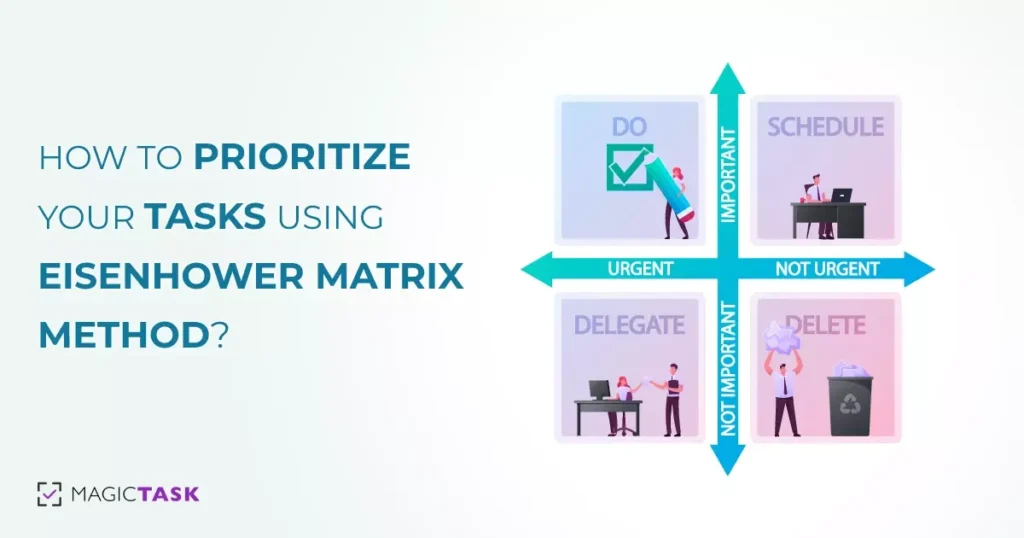
Eisenhower Matrix Method

Most of us often prioritize our tasks or assignments based on what exerts the most pressure on our heads. It could be pressure from our managers, family, or pending bills. Even if we may not do it, we at least want to get rid of or finish our most stressful tasks first.

Most people don't have a systematic approach to prioritizing their tasks; when there's no time to finish our tasks, we may end up doing the most effortless task or the one that stresses us the most, even if we have other important tasks.

What if we have well-defined rules that will help us prioritize better? That's what the Eisenhower Matrix is all about. This article explores the Eisenhower Matrix, how it works, and how you can prioritize your tasks using the method.

What is the Eisenhower Matrix?

The Eisenhower Matrix is named after its inventor Dwight D. Eisenhower, the 34th President of the USA. Eisenhower is one of the most decorated individuals in the US, having served two terms as President and becoming one of the five Five-star Generals in the US army.

Having served in these roles and often having to make quick high-stakes decisions, Eisenhower is one of the few individuals qualified to help others become more productive.

Even though Eisenhower developed the technique, author Stephen Covey made it popular through his book 'The seven habits of highly effective people.'

The technique can help people prioritize their tasks and help accomplish their goals with the least effort. It is also known as Urgent-Important Matrix, the Priority Matrix, and the Eisenhower Priority Matrix, among others.

As we mentioned in the beginning, people often prioritize tasks based on difficulty and deadlines without considering the rewards or results or how they may help them reach their goals in the long run. Besides, the general population finds it very difficult to prioritize tasks with limited time.

This makes us feel busy and create the illusion of productivity. While we may feel like we need more space for more tasks and appear to be occupied all the time, we may not be reaching our goals or ambitions. In the long run, it may seem as if our energy is spread all over the place.

Eisenhower Matrix can help you rectify this situation. It makes us consider a task's importance and urgency and then decide how and when we'll take them. With the matrix, we can divide our tasks quickly and help us determine which ones to take on next.

The Eisenhower Matrix will be a powerful tool for individuals wearing many hats and facing a large pile of tasks daily.

What Are the Four Quadrants of the Eisenhower Matrix Method?

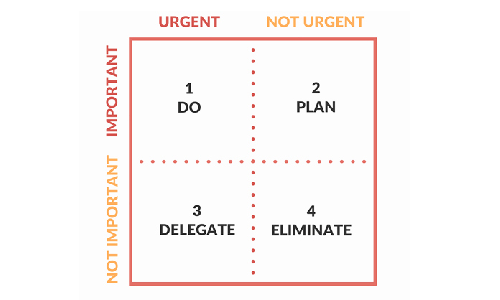
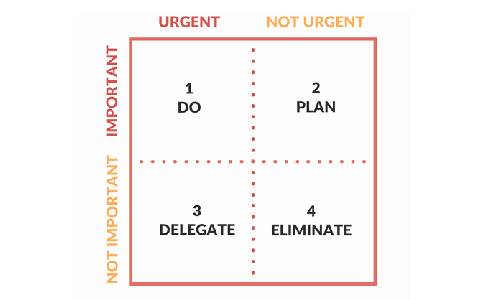
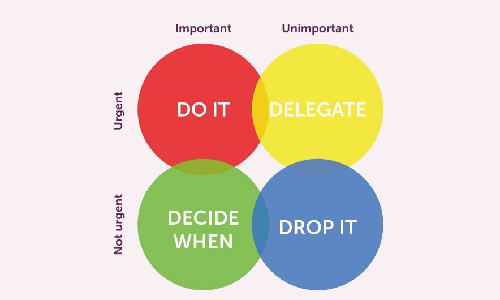
The Eisenhower Matrix comprises four quadrants where you add your tasks based on their urgency and importance. To implement the matrix, you must understand these quadrants and how they are made.

How do you come up with the Eisenhower Matrix?

The Eisenhower Matrix is a four-by-four matrix, each defined by how important and how urgent they are. To create the matrix, draw a four-by-four matrix and mark the columns as critical and not urgent. Mark the top row as essential and the bottom one as not necessary.

Here urgent refers to how quickly you need to do a task. Critical tasks are time sensitive, and you can't delay or reschedule them for another time. For instance, if you have to make a budget proposal for your department, it usually comes with a deadline.

But getting an aquarium for your office can probably wait. Of course, urgency is relative; if a deadline is two months later for a task that will take you a day or less, it may not necessarily be urgent.

Defining a task as necessary or not is based on how aligned a task is with your goals. If a task won't help you reach your goals or won't build towards it, it's not essential. For instance, interviewing potential candidates will be vital if you're building a digital marketing team, but redecorating your office may not be.

The importance of tasks is often the part most individuals fail to consider when prioritizing them. By taking this factor into account, you can better direct your energy.

1. Do

This is the first quadrant in the Eisenhower matrix and is dedicated to urgent and essential tasks.

Add them to this quadrant when you go through your pending task and come across time-sensitive tasks that will help you reach your long-term goals. For example, if you're growing your business and the deadline for filing your taxes is approaching, put the task in the quadrant.

When you first start using this matrix, it may be tempting to add all of your pending tasks here; at a glance, everything may appear urgent and important to you. But once you have set clear goals, prioritizing will become easier.

When you start, evaluate your tasks and decide if you can put them off for another day and if it matters to you. If you're preparing the matrix for just a day, ensure you can do all the tasks in this quadrant on the same day. If not, reevaluate your list and move what can be rescheduled and what is less important.

2. Schedule/Plan

This is the second quadrant in the Eisenhower matrix and is for important tasks that are not urgent.

For example, if you have to buy your partner an anniversary present but the anniversary is months away, you can probably schedule it for a later date.

The tasks you decide to put into this quadrant depend on how long you make the matrix. If you're making it for a day, you can put every important task that you don't have to do today in this quadrant. But if you're making it for the week, ensure that these tasks won't have a short deadline by the end of the week.

Of course, if you let tasks pile up in this quadrant, you may be procrastinating. These tasks may move into the first quadrant if you put them off for too long.

It may be all right if you don't do your laundry today, but by the end of the week, you may have to buy new clothes.

When you put tasks into this quadrant, try to set a definite date to finish them.

3. Delegate

'Delegate' is the third quadrant in the Eisenhower matrix for urgent but unimportant tasks.

To add a task to this list, you need to understand what urgent and important mean in the context of the Eisenhower matrix. Here, urgent means something that has to be done quickly and has the same meaning as in other contexts. Important tasks must be aligned with your personal goals, and you must attend to them personally.

For instance, attending a business meeting may be important for you, but you don't have to book the tickets yourself. Similarly, you may have to choose a present for your loved ones for their birthdays, but you don't necessarily have to buy them yourself.

This quadrant is to help you manage your tasks more efficiently. If you're not used to delegating, learning this may take a while. But once you do, you'll become more efficient at managing tasks, and you can handle more simultaneously.

4. Delete/Eliminate

This may appear to be the harshest quadrant at a glance and is for tasks that are neither important nor urgent.

Let's face it; we spend a lot of time on tasks that don't require our urgent attention or help us reach our goals. But they occupy our minds and distract us from our goals.

For instance, watching a new show on Netflix is not an urgent or important task for most people. But if we keep trying to make the time or space for them, it will take our focus from more important or urgent tasks.

This doesn't mean that we shouldn't do these tasks or that it's not worth our time. Going on a short vacation may not be an urgent or important task. This doesn't mean you should never do it.

When you add a task to this quadrant, it just means you can do them whenever. You don't have to allocate specific time for these tasks, which can be postponed almost indefinitely.

How Do You Use Eisenhower Matrix for Effective Time Management?

Here are the steps to use the Eisenhower matrix and manage your time effectively

1. List down all of the tasks you have to do

List of Tasks

To get a clear picture of what you want to focus on, you must first list your tasks. This can be anything — doing your laundry, evaluating your employees, buying food, or getting new furniture for your home office. If you want to do them, add them to the list.

This step may appear trivial, and you may want to jump into the matrix and add your tasks directly. It may not be the best approach, and you may have to do that sometimes, but this step will help give you more clarity.

2. Create your scales of urgency and importance and attach them to the different tasks

In the Eisenhower matrix, urgency and importance are binary. So you can classify your tasks just as those. But if you have many tasks and don't know which are urgent and important, you can use your scales of urgency and importance. You can mark the tasks as urgent on a scale of one to ten. And right next to it, keep its importance on a similar scale.

You can, of course, mark them as simply urgent or important by simplifying your rankings.

Either way, it's best to mark the urgency first and then the importance.

3. Add the tasks to the different quadrants in the matrix

Once you know if a task is important or urgent, add them to the matrix. Add the important and time-sensitive tasks to the first quadrant. If you can schedule the important tasks for another day, add them to the second quadrant and if the tasks don't need your personal attention, add them to the third.

Move the tasks that aren't important or urgent to the last quadrant.

4. Execute the quadrants

Assign specific dates to the tasks in the second quadrant and add them to your calendar. Get someone else to take care of the tasks in the third quadrant. Forget about the tasks in the fourth quadrant and start tackling the tasks in the first quadrant.

5. Adjust the matrix regularly

Priorities and deadlines shift with time, and you must adjust the matrix accordingly. If you've set the matrix for just the day, look at the tasks the next day and see if anything has changed. If you're planning for a week, adjust the matrix at the end of the week.

Prioritize Your Tasks Effectively With MagicTask

MagicTask is a powerful task and project management tool that can help you prioritize and tackle your tasks efficiently.

The platform has a 'My Focus' section for important tasks requiring immediate attention. For the tasks that you can schedule, you can set due dates, and for the tasks that you have to delegate, you can assign them to someone directly through the app.

The app also lets you set priority and size for your tasks to give you a clear picture of your pending tasks.

How to Create Your Perfect Daily Schedule Using MagicTask

Create Daily Schedule With MagicTask

To achieve our long-term plans and goals, we need to plan the daily tasks that help us reach there. We can rarely reach our dreams and ambitions without executing a well-defined time-bound plan. The tasks that we perform daily and the small achievements we make every day determine how we'll reach there.

This is where a proper daily schedule becomes useful. Most successful CEOs, entrepreneurs, and business executives regularly rely on detailed daily schedules.

With MagicTask, you can also create your daily schedules easily and reach your goals and achieve your vision.

What is Daily Schedule?

A daily schedule is a way of planning your tasks for the day and the time you've allocated. In straightforward terms, you can consider it a timetable for a given day.

A typical daily schedule lists all the activities the person plans to do on a given day in the order they're planning to do. Users may also add additional notes alongside the tasks to help them complete them. For instance, they may add a grocery list if shopping is on their daily schedule. They may add their contact information next to the task if they're supposed to call or meet someone.

While it is similar to a to-do list, a daily schedule is a bit more complex. A to-do list lists down all the tasks as a reminder. Making a daily schedule involves a bit more planning and includes tasks just for one day. The daily schedule is also time-bound. Unlike a to-do list, users take more time to create their daily schedule. They consider their projects, personal and professional lives, long-term plans and goals, and other aspects.

The Importance of A Daily Schedule

Here's why you should use a daily schedule to manage your tasks:

A daily schedule helps you reach your long-term goals.

Goals

Without a well-defined daily schedule, you'd be picking tasks at random to do. With this approach, you may keep putting away or forget tasks that help you with your long-term goals. You may remember to publish an article or evaluate your employees but forget to work on the business plan for the next few years.

A daily schedule forces you to think of your plans and ambitions daily and ensure you include tasks that help you reach there.

It ensures you complete the essential tasks for the day.

Suppose you keep choosing what to do next throughout the day; it's very likely that you may forget to do a couple of them. Some may be irrelevant or something you can put off for another day, but eventually, you may miss out on something important. It could be working on an article that you had to submit the day before or picking up the cake for your kid's birthday party.

With a proper daily schedule with clear priorities, you can be sure you will complete all necessary tasks.

A daily schedule can ensure you have enough energy throughout the day.

Planning a daily schedule is about more than just completing all the tasks in a day. It's also about ensuring you get enough breaks and are in the most productive state. Without a daily schedule, you may run behind on tasks all day without a clear idea of how much you have to do.

With a daily schedule, you know how much you have left to do and how much time each of the tasks will take. With this, you can decide if you need to increase the pace or slow down and take a break.

A daily schedule can keep you healthy in the long run.

A daily schedule helps reduce your stress throughout your work life. You won't be running around trying to finish your tasks before the end of the day. Nor will you be worried about delays or missing deadlines.

Another aspect of this is that your biological clock will align with your waking hours with a regular schedule. This will give you better sleep at night and more energy during the day.

A daily schedule reduces your cognitive load.

A daily schedule reduces the number of daily decisions you have to make. While creating a daily schedule, you'd be calculating the time you have and how much each of your tasks will take. You won't have to worry about missing deadlines or keep juggling your to-do list in your head. After you finish a task, you don't have to calculate and figure out which task you need to do.

It will help you focus on the task instead of getting distracted by the rest of your assignments.

A daily schedule helps you better manage your time.

Time Management

'Failing to plan is planning to fail' – the saying is very much true for an average day. Without a solid plan, you may spend more time on something trivial, leaving you less time for the rest. There's also the chance that you will start doing something and remember that you missed out on an important task. Then you switch to that, dropping whatever you were doing in the first place. These unnecessary back-and-forths will waste your time and let you do less in a day.

A daily schedule gives you a clear plan and priorities, which helps you avoid distractions and move on smoothly with your day.

Creating and working with a daily schedule helps you understand yourself better.

A daily schedule helps you plan your day well, but it also enables you to track how much you have achieved. It can help you understand how much time a task took you. This approach can help you know your skills and abilities better over time.

A daily schedule can help you create more accurate plans and schedules in the long run. It can help you accurately estimate the time you may take for a task and ensure you're not overloaded.

A daily schedule can motivate you to finish your tasks.

A daily schedule builds commitment; when you add a new task, you're telling yourself that you'd complete it. This motivates you to complete your tasks for the day. Seeing all of your planned tasks completed will encourage you to do so the next day.

Creating a daily schedule gives you a big picture of your tasks and projects.

Creating daily schedules forces you to look at all your projects and plans. It makes you look at the status of every large and long-term project you have and make sure you're on track.

7 Steps to Create A Daily Schedule With MagicTask

MagicTask is a powerful task and project management solution that can help you go through your tasks quickly and efficiently. Here's how you can create a daily schedule within MagicTask.

MagicTask Dashboard

1. Create a task for everything you have to do

Whenever you have something to do, open MagicTask and add them as a task. The Getting Things Done method may be an excellent approach to do this. Add every random thought in your head as a task when you're just getting started. Then go back through the whole list and plan them out. Describe each of the tasks and add them in MagicTask. If you have references for these tasks or any other information you want to add, put it as a comment or a description.

For instance, add their name and contact information if you have to call someone. If you're planning to write an article, add the brief and references.

If you have a large task, for instance, building a mobile app, add the steps as subtasks.

2. Add deadlines and due dates to the tasks

Once you have the tasks on MagicTask, consider all of its aspects and add deadlines and due dates. MagicTask lets you add start and end dates as well as due dates to each of the tasks.

These factors, while seemingly simple, helps you figure out what to add to your daily schedule. You can glance through all the tasks in the app and figure out which ones are late, which ones are pending, and which ones you need to do asap.

3. Add labels to the tasks as necessary

MagicTask lets you add labels to your tasks. Users can add labels as they see fit; for instance, if they have a task related to their personal life, they can add a label saying so.

Users can also use these labels to mark the status of the tasks. As with all of its other features, MagicTask lets people use it the way they want instead of forcing them to a specific method or approach.

Labels help users better understand their tasks at hand from a single glance.

4. Mark the size of the task

This is another tool in MagicTask with which users can quickly get a picture of their pending tasks. Users can mark their tasks as 'S,' 'M,' 'L,' and 'XL,' and the app will display them right next to them. Once again, how users use this depends on their approach. You can use it as the time it may take to complete a task or how difficult it is.

5. Identify and mark recurring tasks

It could be conducting your employee evaluation or calculating the salaries – recurring tasks help you automate MagicTask. Like any other task, you can add descriptions and labels and mark their size for recurring tasks as well. MagicTask will add the due date automatically and remind you when they're up.

6. Add the tasks for the day to the My Focus list

In MagicTask, the 'My Focus' list essentially acts as your daily schedule. When you create a new task, it gets automatically added to the 'Backlog.' Every morning, before you start, go through your list and add the task for the day to the 'My Focus' list. The list is just another place to keep the tasks that need your immediate attention.

7. Once completed, move on to the next task

Once you finish a task, mark the task as complete. Just click the check box on the left side of the task, and MagicTask will move it to the list of completed tasks.

Create Your Perfect Daily Schedule With MagicTask

MagicTask is your ideal application for building daily schedules. The app is decked out with features that let users quickly prioritize tasks. The app helps them quickly understand what needs immediate attention. It reduces cognitive load for users and simplifies daily schedules.

A Gamer’s Guide to Improving Time Management

Time Management Guide by Gamer

As a gamer, you know that time management is important. After all, you need to be able to juggle different tasks and responsibilities in order to progress in the game. But what you also probably realize is that time management is also important in real life.

Just as you need to manage your time wisely to succeed in a video game, you need to do the same to achieve your life goals.

Well, that's why we have written this gamer's time management guide.

Read on to learn more.

What You Should Know About Time Management?

Games can teach us a few key things about time management. First, it is important to be aware of how you spend your time.

Just as you wouldn’t want to waste time in a game by doing something that doesn't advance your progress, you don’t want to waste time in real life by doing something that isn't productive.

It is important to be mindful of how you spend your time and to make sure that you are using it to help you achieve your goals.

Second, games can teach us the importance of planning ahead. In many games, it is important to plan your moves in advance in order to succeed. The same is true in life. If you want to achieve something, you need to have a plan and a strategy for how you are going to achieve it. Without a plan, it will be more challenging to achieve your goals.

Gamer

Third, games can teach us the importance of being persistent. You may face setbacks and roadblocks in a game, but if you are persistent, you will eventually overcome them and succeed. The same is true in life. If you encounter obstacles, don’t give up. Keep working towards your goals, and eventually, you will achieve them.

Time management is an important skill that we can learn from games. By being aware of how we spend our time, planning ahead, and being persistent, we can achieve our goals in both games and in life.

Why is Time Management An Important Skill for Gamers?

There are a number of reasons why time management is an important skill for gamers. Perhaps the most obvious reason is that it can help you to avoid spending too much time playing games, which can lead to neglecting other vital aspects of your life.

Games can be highly addictive, and many gamers find it hard to control how much time they spend playing. If you find yourself in this situation, time management can help you to take control and ensure that you're not spending too much time gaming and missing out on other significant things in your life.

Another reason why time management is essential for gamers is that it can help improve your performance in games.

Wisely managing your time can help you ensure you're spending enough time practicing and honing your skills. This, in turn, can help you perform better when it comes to playing games, whether online or offline.

Finally, time management is essential for gamers because it can help reduce stress levels. Suppose you find yourself getting tense and stressed while gaming. It's likely that this is impacting your performance.

Learning to manage your time can help you avoid getting too stressed, making gaming more enjoyable and improving your overall performance.

9 Time Management Tips for Gamers

Now let's dive into some practical, real-world time management tips, which are enlisted below:

1. Set goals

Set Goals

There are a number of things to keep in mind when trying to manage gaming and work. First, it is crucial to set realistic goals. If your goals are too lofty, you will likely become frustrated and give up. 

One way to set reasonable goals is to break them down into smaller steps. For instance, if you want to spend more time playing games, you might set a goal to play for one hour every day. This can be a more manageable goal and will help you stay on track. Additionally, it is important to be organized. If you have a set schedule for work and gaming, you will be less likely to get sidetracked. 

2. Learn to Prioritize

When it comes to managing work and gaming, it is crucial to prioritize. Gaming should be a lower priority than work, especially if there are deadlines to meet. However, that does not mean that gaming should be ignored altogether.

Finding a balance between work and gaming is possible by scheduling gaming sessions for specific times and ensuring that other commitments do not interfere.

3. Use Tools To Your Advantage

It's almost funny how many gamers, people who make using a piece of software their passion, don't utilize it as much as they could.

Are you having trouble organizing your time? Are you constantly losing your notes, falling behind, or simply not sure what your next objective is? Well, you should check out a task management tool like MagicTask.

MagicTask Gaming Theme

MagicTask is a gamified task management platform that quickly helps you organize your tasks and chores. What makes it stand out is its substantial utilization of gamification.

It also has a “Theme Marketplace” that contains unique themes to add an extra layer of creativity and fun while managing your personal or professional daily tasks.

As you use the gamified version of this system, you receive points and unlock new levels, and with each new level, you get rewarded with a new experience within MagicTask.

Some of the benefits of using gamified task management tools include:

  • Increased motivation: Gamified task management apps often feature rewards systems that can help you stay motivated.
  • Improved focus: The game-like interface can help you stay focused on your tasks.
  • Better time management: By using a gamified task management app, you’ll be able to track your time and progress better.

4. Create a Schedule

The first step to better time management is creating a schedule. This will help you keep track of your time and make sure that you are using it wisely. Sit down and list all the things you need to do in a day, including gaming, schoolwork, chores, and socializing. Then, figure out how much time you realistically have for each activity.

Once you have a list of activities and a time estimate for each, you can start creating your schedule. Begin by blocking out time for the things that are most important to you, such as schoolwork and gaming. Then, fill in the rest of your day with other activities as needed. Make sure to leave some free time in your schedule so that you can relax and enjoy yourself.

5. Take Breaks

As a gamer, you know how significant it is to stay focused and concentrated while you're playing. But what you may not realize is that taking regular breaks can actually help improve your gaming performance.

Here's why: when you're focused on something for an extended period of time, your brain gets tired and starts to lose concentration. By taking a break, you're giving your brain a chance to rest and recharge so that when you come back to gaming, you'll be able to focus better.

In addition, taking breaks can help prevent burnout. If you're playing games for hours on end without any break, you're more likely to get frustrated and give up. But if you take a few minutes now and then to step away from the game, you'll come back feeling refreshed and ready to keep going.

And here’s the thing – you can apply for all other aspects of your life, including work and school.

So next time you're preparing for a long gaming session, make sure to take regular breaks. Your brain will thank you for it!

6. Start Small

One of the most important things to remember when it comes to time management is that it's important to start small. You don't have to make huge changes all at once in order to see a difference. In fact, trying to do too much too quickly can often lead to burnout and frustration.

Instead, focus on making small changes that you can stick to over time. For example, if you want to improve your productivity, start by setting a goal to spend 20 minutes each day working on a task without distractions. Once you've mastered that, you can gradually increase the amount of time you spend working on that task.

It's also essential to be realistic with your goals. If you're not used to working for long periods of time, don't expect to be able to do so overnight. Start with manageable goals and increase them gradually over time.

So, if you're used to playing a game for five hours every day, don't go crazy and lower that to two. Start with four and a half hours, then just four, then three and a half…

7. Get Enough Sleep

Girl Taking Nap

While there's nothing wrong with enjoying your favorite pastime, it's important to ensure you're still getting enough sleep. Sleep is essential for both your physical and mental health and gamers who don't get enough sleep are at risk for a number of problems.

For starters, lack of sleep can lead to decreased concentration and focus. This can make it challenging to perform well in-game and may even lead to you making more mistakes.

Sleep deprivation can also cause irritability and mood swings, making gaming sessions less enjoyable for you and your teammates.

So, how much sleep do gamers need? Most experts recommend that adults sleep seven to eight hours per night. However, some gamers may need more or less, depending on their individual sleep needs.

If you find that you're struggling to get enough sleep, you can do a few things to make it easier. First, try to establish a regular sleep schedule and stick to it as much as possible.

It can also be helpful to create a relaxing bedtime routine that will help you wind down after a long day of gaming. Finally, make sure to keep your bedroom dark and quiet to promote better sleep.

8. Avoid Distractions

One of the best ways to avoid distractions while gaming and working is to create a specific work or gaming space for yourself. This can be a designated area or a specific room in your home. Make sure that the area is free of clutter and other potential distractions, such as televisions or radios.

If possible, try to eliminate other sources of noise as well, such as fans or air conditioners. You should also make sure that you have all the necessary supplies and equipment within easy reach.

Of course, there will inevitably be times when distractions pop up. When this happens, try to stay focused on your task at hand and resist the urge to give in to the distraction.

9. Don’t be Afraid to Ask For Help

It can be tough to know where to start when it comes to managing gaming and work. If you're feeling overwhelmed, don't be afraid to ask for help from your friends or family. They may be able to give you some great advice on how to balance the two.

You can also reach out to professionals who specialize in this area. They can help you create a plan that works for you and your lifestyle.

Conclusion

And that's it for our gamer's guide to improving time management. We hope it has been informative and helpful.

Just remember that while it can be challenging to manage gaming and work, it is possible. By setting goals, being organized, and avoiding distractions, you can find a balance that works for you.

Remember to be realistic with your expectations and don't be afraid to ask for help when needed. With a little effort, you can successfully juggle both gaming and work.

9 Effective Ways to Prioritize Your Work and Get Things Done

How to Prioritize Your Work

When it comes to getting things done, many people find themselves struggling to stay focused and motivated.

It can be tough to know how to prioritize your work and get the most important tasks done first. And once you finally do start working on something, it's easy to get sidetracked and lose focus.

If you're having trouble getting things done, don't worry – you're not alone. In fact, studies have shown that up to 20% of people consider themselves "chronically disorganized."

The good news is that you can use plenty of strategies to better manage your time and focus on your work. Here are nine practical ways you can learn to prioritize better.

1. Figure Out What's Important With The Eisenhower Power Matrix

The Eisenhower Power Matrix is a simple yet effective tool for time management and prioritization. Developed by President Dwight D. Eisenhower, the matrix helps you focus on your work by identifying which tasks are urgent and which are not quickly.

It contains four different quadrants that help you differentiate between the urgency of tasks. These four quadrants are classified as follows:

Quadrant 1: Do

In this quadrant, you will list down all the tasks that are urgent and important. These tasks should be given first priority.

Quadrant 2: Plan/Schedule

In this quadrant, you will list down all the tasks that are not urgent but important. so you can plan/schedule such tasks.

Quadrant 3: Delegate

In this quadrant, you will list down all the tasks that are urgent but not important. so you can delegate such tasks to other members of the team.

Quadrant 4: Eliminate

In this quadrant, you will list down all the tasks that are neither urgent nor important. so these should be given last priority.

Eisenhower Power Matrix

The Eisenhower Power Matrix is a great way to identify which tasks are the most important and need to be given priority. By taking the time to classify your tasks, you can ensure that you're spending your time on the things that matter most.

2. Use The MoSCoW Method To Prioritize Better

The MoSCoW Method is a prioritization technique that can be used to help you prioritize your tasks. It is often used in project management and can be applied to both individual tasks and larger projects.

The acronym “MoSCoW” stands for “Must have, Should have, Could have, Won’t have.” This reflects the order of priority, of how you should prioritize your work, with “Must have” being the most important and “Won’t have” being the least important.

To use the MoSCoW Method, list out all of the tasks that need to be done and then assign each one to a category. “Must have” tasks are the most important and should be given priority. “Should have” tasks are less important but still need to be done at some point. “Could have” tasks are optional and can be done if there is time. “Won’t have” tasks can be safely ignored.

Here is an example of how the MoSCoW Method could be used to prioritize a list of tasks:

  • Write a blog post (Must have)
  • Create social media posts (Should have)
  • Design a new website (Could have)
  • Attend a networking event (Won’t have)

As you can see, the “Must have” task is given priority, while the “Won’t have” task can be safely ignored.

3. Eat the Frog and Do The Hardest Thing First

Eat The Frog Principle

Have you ever heard of the "eat the frog principle"? It's a simple concept that can help you get much more done. Here's how to prioritize your work using this method:

Basically, you just need to start your day by tackling the most difficult or time-consuming task on your list. That way, you'll get it out of the way, and the rest of your day will be a breeze in comparison.

For example, let's say you need to write a report for work. You could start your day by spending an hour or two getting it done instead of procrastinating and doing it at the last minute. Then, the rest of your tasks will seem much easier in comparison.

Or, let's say you need to clean your house. You could start by cleaning the bathroom, which is usually the most dreaded task. Once that's done, the rest of the house will seem like a piece of cake.

The eat the frog principle can be applied to any task, whether big or small. So next time you're feeling overwhelmed, try tackling your most challenging task first. You might be surprised at how much more you can get done.

4. Use the 80/20 Pareto Principle Rule and Make Life Easier

The Pareto principle, also known as the 80/20 rule, is a business guideline that suggests that 80% of outcomes come from 20% of inputs. In other words, most results in any given situation are generated by a small minority of causes.

This principle can be applied to many different areas of business, including task prioritization. When you have a long to-do list, it can be overwhelming to know where to start. The Pareto principle can help you prioritize your tasks by identifying which 20% of activities will generate the most results.

For example, let's say you're a salesperson who is trying to increase your sales figures. You might have a list of tasks that includes making cold calls, attending networking events, and creating social media posts.

Applying the Pareto principle, you would prioritize making cold calls over attending networking events or creating social media posts because cold calling is likely to generate more sales (i.e., it's a more effective use of your time).

5. Simplify Difficult Projects with The ABCDE Method

The ABCDE method is a way of thinking about and approaching problems that can be used in many different situations. It stands for:

  • A – Assess the situation
  • B – Brainstorm possible solutions
  • C – Consider the consequences of each solution
  • D – Decide on the best solution
  • E – Execute the solution

Let's look at each step in more detail:

A – Assess the situation

The first step in learning how to prioritize your work through this system is to take a step back and assess the situation. What is the problem? What are the potential causes of the problem? What are the potential consequences of the problem?

B – Brainstorm possible solutions

Once you understand the problem well, it's time to brainstorm some possible solutions. There is no wrong answer at this stage, so let your creativity flow!

C – Consider the consequences of each solution

Once you have a list of possible solutions, it's essential to consider the potential consequences of each one. What are the risks and rewards associated with each solution?

D – Decide on the best solution

After considering all of the potential consequences, it's time to decide on the best solution. Which solution has the most favorable risk/reward ratio?

E – Execute the solution

The final step is to execute the solution. This may involve taking action yourself or delegating the task to someone else.

6. The 4Ds Of Time Management to Master Your Time

The 4D’s of Time Management

The 4Ds of time management is a tool that can help you categorize tasks in order to prioritize them. The 4Ds stand for:

  • Do it now
  • Delegate it
  • Defer it
  • Drop it

Do It Now: These are tasks that must be done immediately and cannot be delegated or put off. An example of a task that falls into this category would be if your child is sick and you need to stay home from work to take care of them.

Delegate It: These are tasks that can be given to someone else to handle. An example of a task that falls into this category would be if you need to get your car washed, but you can have someone else do it for you.

Defer It: These are tasks that can be put off until a later time. An example of a task that falls into this category would be if you need to buy a new shirt, but it is not urgent.

Drop It: These are tasks that are not important and can be eliminated from your to-do list. An example of a task that falls into this category is if you need to write a thank-you note, but it is unnecessary.

7. Time Multiplication Strategy and Get More Done In Less Time

When it comes to getting things done and trying to prioritize your work better, we all have the same amount of time in a day. But some people seem to get a lot more done than others. How do they do it?

The answer is simple: they use a time multiplication strategy.

What is a time multiplication strategy? It's a way of looking at the time that allows you to get more done in less time.

Here's how it works:

  • Instead of thinking of time as a linear concept (e.g., I have X amount of time to do this), think of it as something that can be multiplied.
  • For every task you need to do, ask yourself how you can break it down into smaller steps.
  • You're multiplying your time and increasing your productivity by breaking down a task into smaller steps.
  • Start with the essential tasks and work your way down to the less important ones.
  • Remember to take breaks in between tasks to avoid burnout.

By using a time multiplication strategy, you can get more done in less time and increase your productivity.

8. Do The Most Difficult Tasks When You're Most Productive

When Person is Most Productive

It turns out that there is a lot of science behind productivity, and when you understand how your body and mind work best, you can start to make some serious progress in your day-to-day life and prioritize your work better.

The most productive hours of the day are generally the early morning hours when you first wake up. This is because your mind is fresh and rested, and you have the energy to tackle whatever comes your way.

If you're not a morning person, don't worry – there are still ways to make the most of your day. be sure to focus on your important tasks around the times when you know you'll be at your best.

So, next time you're feeling stuck, remember that understanding your most productive hours can help you get ahead. Use these hours to your advantage, and you'll be amazed at what you can accomplish.

9. The Ivy Lee Method To Feel Accomplished Every Day

Developed by Ivy Lee, in the early 20th century, this is a very popular system.

Here's how it works:

  • At the end of each day, write down the six most important things you need to do tomorrow.
  • Number them in order of importance.
  • When you start your day tomorrow, work on the first task on your list. Once that's done, move on to the second task, and so on.
  • If you don't finish all six tasks, don't worry. Just carry over the unfinished ones to the next day.

The Ivy Lee Method is a great way to prioritize your work and tasks because it forces you to think about what's most important. And, by starting with the most important task, you're more likely to get things done and feel accomplished at the end of the day.

Get Things Done With MagicTask

Now, we are not done yet. These nine tips are a fantastic way to help you get your priorities in order. But, one last thing you can try is using MagicTask.

MagicTask is a task management tool that uses gamification to make work easier and more fun. On one level, you have a clean and simple interface that helps you manage your own work and the work of your team.

On the other level, it's almost like playing an RPG. As you use the app, you gain points. You can use these points to unlock new features of the themes that enhance your experience with a variety of gamification effects.

The New Animation Era: Transitioning from Lottie to Rive for MagicTask V3

The New Animation Era

Greetings, fellow MagicTask warriors! Those of you who have previously joined us on this grand productivity quest know that we're not just about facilitating work, but about transmuting ordinary task management into an epic quest of productivity. Our platform is designed to infuse your workspace with elements that make work not only manageable but engaging, rewarding, and yes, even magical.

We've embarked on many an adventure together in the past. One such voyage involved us delving deep into the immersive world of MagicTask V2's themes. These themes, each exuding a unique personality and presenting unique challenges, served as steadfast companions on your productivity quest. They transformed your workspace into a magical land where each task completion signified a quest accomplished, mirroring your achievements in the realm of work.

However, as thrilling as our past adventures have been, today, we find ourselves on the brink of an entirely new era. An epoch marked by a paradigm shift in our animation system that will not just enhance but redefine your MagicTask experience. With bated breath, we stand at the precipice of this change, as we prepare to soar into an uncharted territory that promises to elevate your interactive experience to dizzying new heights.

As we transition from Lottie to Rive, we promise to make your productivity journey more visually captivating and interactive. We aim to transform your workspace into an extraordinary realm that is not just efficient but exciting, that inspires you to be your most productive self, and transforms your perception of work. Because, at MagicTask, we firmly believe that work, when done right, should not just be rewarding but fun.

So strap in, MagicTask warriors, as we gear up to embark on this thrilling new adventure. 

The Gameplay Mechanics: Lottie and Rive

Before we venture forth on this new quest, let's take a moment to reminisce about the world we've known until now. Lottie, our trusty companion in the realm of animations, has been a stalwart ally. Lottie, akin to a reliable steed in an epic fantasy saga, has been by our side throughout our journey, providing a robust library for Android, iOS, Web, and Windows that renders After Effects animations in real-time.

Lottie has faithfully served us, bringing vibrancy and life to our themes, converting our workspace into a dynamic realm. It took the static elements of our themes and breathed life into them, turning your workspace into a living, breathing entity. Its ability to use animations as easily as static images made it an integral part of the MagicTask family. With Lottie, our themes and animations were not just pictures or designs; they were dynamic characters that played significant roles in your productivity journey.

However, as we bid adieu to our old friend, we prepare to embrace a powerful new ally: Rive. Our journey henceforth takes us into unexplored territories with this dynamic and versatile tool. Imagine Rive as a magical artifact of prodigious power – a tool that transcends the realms of design, animation, and integration.

Rive, with its real-time interactive design capabilities, promises to be a game-changer. It’s not just an animation tool; it’s a grandmaster of the craft that lets designers and developers breathe life into their designs like never before. Rive's capabilities extend beyond crafting beautiful animations; it lets us integrate these dynamic elements seamlessly into MagicTask, enhancing your interactive experience to a whole new level.

With Rive, we’re not just creating animations; we’re crafting immersive experiences. Each design element and animation will no longer be a passive feature but an active participant in your productivity journey. Our themes will evolve from being static landscapes to dynamic worlds, teeming with life and interaction. And all of this is made possible by the magical prowess of Rive.

As we embark on this new journey, we look forward to the enchanting new world that Rive promises to unlock for us. The journey ahead is thrilling, unexplored, and filled with limitless potential. And as always, we're eager for you to join us on this grand new adventure.

The Game Changer: Why Rive?

Why the transition, you might ask? Think of it as an essential quest in the expansive MMORPG that is MagicTask. As any seasoned gamer will tell you, gameplay strategy is not static – it involves continuously upgrading your gear, learning new skills, and adapting your tactics to conquer higher levels. Much like an epic gaming narrative, our journey at MagicTask is guided by a constant pursuit of excellence. Switching from Lottie to Rive is our latest strategic move, one that promises to redefine our gameplay.

The first strategic advantage that Rive brings is its unparalleled interactivity. Much like the finest RPGs, where player choices and actions weave the story, Rive enables our platform to become a dynamic, responsive entity. Rive’s animation capabilities are not confined to simple playback; they allow our animations to interact with you, the player, in real-time.

Picture this: with Rive, each swipe, tap, or click can influence the animation. It's as if each MagicTask user has a unique magic touch, capable of altering the animation's behavior. Your journey becomes even more immersive, personalized, and responsive. And this is only the tip of the iceberg; Rive's interactivity allows us to dream bigger and aim for an even more engaging and dynamic user experience in the future.
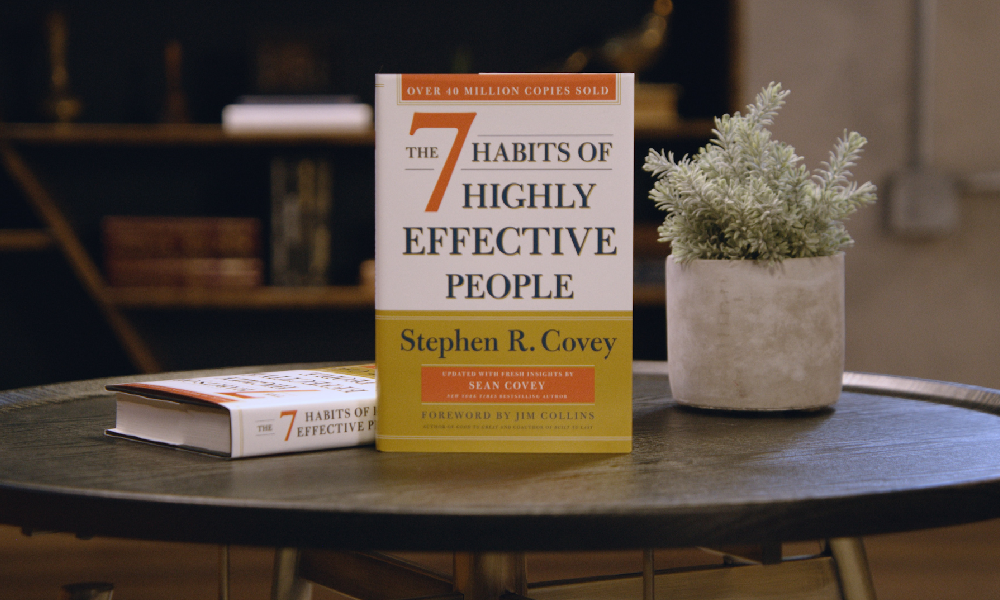
The second ace up Rive’s sleeve is its efficiency. As with any epic quest, a nimble, agile protagonist can navigate challenges more effectively than one bogged down by heavy gear. The same principle applies to app performance. Rive helps us create smaller and more efficient animation files, which means MagicTask becomes more responsive, lightweight, and swift, without compromising the quality of the animations.

The result? A seamless, lag-free user experience that parallels the exhilarating feeling of a perfectly executed combo move in a fast-paced action game. Rive ensures that MagicTask stays quick on its feet, ready to deliver a stellar performance regardless of the challenges that lay ahead.

With these strategic advantages in play, it becomes clear why we're making the switch. It's not merely a change of tools; it's an upgrade, a level-up in our game. Our mission is to ensure that every moment you spend with MagicTask feels like a well-crafted gaming experience. And with Rive, we're one step closer to realizing that goal.

Stay tuned, fellow warriors, for the upcoming adventures are bound to be more thrilling than ever. With Rive by our side, the future of MagicTask is promising, filled with exciting battles, epic quests, and unexplored territories. And we're excited for you to join us on this grand adventure!

Allies in the Field: Duolingo and Rive

In the grand arena of digital experiences, we stand among esteemed allies who have also unlocked the power of Rive to level up their user experience. One shining example in this league of extraordinary applications is Duolingo.

Duolingo has transformed the often daunting task of learning a new language into a compelling quest, filled with engaging characters, milestones, and rewards. This language-learning platform has leveraged Rive's capabilities to create dynamic, interactive animations that charm learners and bolster their motivation.

Much like how a detailed and immersive game world can captivate gamers for hours, Duolingo's use of Rive holds the attention of learners, helping them stay engaged and enjoy the learning process.

An excellent showcase of Rive's power in Duolingo is their charismatic mascot, Duo the Owl. Thanks to Rive, Duo isn't merely an icon; it's a lively, interactive companion that moves and reacts in real-time as users navigate the app. Duo cheers when you reach a milestone, motivates you to stay on track, and even exhibits a wide array of emotions, mirroring your language learning journey.

These animated interactions breathe life into the user experience, making Duo more than just a mascot. To millions of Duolingo users, Duo is a friend, a cheerleader, and sometimes, a gentle but firm reminder to keep going.

The success story of Duolingo and Rive stands as an inspiring testament to the transformative potential of Rive. It's a glimpse into what we can achieve when we combine compelling interactive design with effective learning or productivity strategies.

At MagicTask, we're ready to embrace this potent combination. With Rive, we aim to craft a similarly engaging, immersive, and, most importantly, personalized experience for our users. As we venture forward, we are excited about the possibilities Rive opens up for us, in bringing a new depth of interactivity and responsiveness to our platform.

Just as Duolingo has reinvented language learning, we're eager to push the boundaries of what a task management tool can be. With Rive, we're gearing up to take the MagicTask experience to a whole new level of engagement and productivity. So, strap on your adventurer's gear and prepare for a whole new quest with MagicTask!

A New Chapter: MagicTask V3 and Rive

As we turn the page to MagicTask V3, we're stepping into a new era of interactive design, powered by the capabilities of Rive.

This transition is not just an upgrade, but a game-changer, transforming the way you experience MagicTask. You're not merely an observer of beautiful themes; you're an active participant in a dynamic, interactive realm that reacts to your progress.

With Rive, the MagicTask themes evolve from being merely visually distinct to becoming living, responsive worlds. Imagine, as you journey through your tasks, watching your Theme Bar not just fill up but animate in real-time in response to your actions. It's like watching your health bar in a game, mirroring your victories and setbacks, keeping you engaged in the quest.

Our unique, game-inspired themes are set to level up in this new era. The digital distortions and code artifacts of the Glitch theme could become dynamic, responding to your interactions. In the MCARS theme, the futuristic HUD could evolve based on your productivity levels, reflecting your progress like a spaceship's control panel adjusting to the pilot's commands.

For Gaming theme lovers, expect the RPG elements and console-inspired designs to spring to life with animations that react in real-time, transforming your task management into a truly immersive gaming experience.

The impact of Rive extends beyond the themes; it infuses dynamism and interactivity into every element of MagicTask. Be it the to-do lists, tasks, or progress bars, each element could come alive with unique animations that bring the feeling of participating in an interactive quest to every corner of your workspace.

This move to Rive aligns with our guiding star of continuous innovation and user-focused design. By harnessing the latest advancements in animation technology, we're ensuring that MagicTask remains at the cutting edge, leading the pack and setting trends in the digital productivity sphere.

Beyond the visual enchantment, the leap to Rive also broadens our horizons in integrating sound effects into our platform. The idea is to create a multi-sensory experience that keeps you captivated and engaged. Imagine a triumphant fanfare playing when you level up a theme or a satisfying 'ka-ching' echoing when you check off a task. These multisensory feedback cues amplify the sense of achievement and make the productivity journey more delightful and rewarding.

As we step into the exciting landscape of MagicTask V3, we carry with us the collective wisdom of our past experiences, feedback from our loyal users, and a relentless drive to redefine productivity. With Rive, we’re ready to take the immersive MagicTask experience to a new horizon, turning productivity into an interactive, rewarding, and magical quest. Are you ready to embark on this epic adventure with us? Let the new chapter of MagicTask begin!

Towards the Future: Beyond the Transition

While this transition is significant, it's just one of many steps we're taking in our relentless pursuit of excellence. We believe that productivity should be rewarding, meaningful, and even fun, and we're committed to turning this vision into a reality.

Remember, at MagicTask, every task you complete isn't just a mundane item checked off a list – it's a step forward in an epic journey, a battle won, and a level up in your personal productivity game. We're here to make that journey as magical as possible.

So, buckle up, fellow MagicTask warriors. The transition from Lottie to Rive is just the beginning. As we march into this new era of animation, we're excited to explore the countless possibilities that lie ahead. We're thrilled to have you with us on this journey, and we can't wait to see where it leads us.

Here’s to the new animation era and to all the magic it holds! Stay tuned for more updates on MagicTask V3, and as always, let the adventure continue!

Books to Bytes: How Bestselling Productivity Principles Shaped MagicTask V3

How Productivity Principles Shaped MagicTask V3

Embarking on the adventure of game development, a hardcore gamer understands better than anyone the importance of being thoroughly immersed, driven by a purpose, and rewarded for their commitment. Gaming is not just a pastime; it's an art of strategic planning, laser focus, and crucial decision-making skills, wrapped in an exhilarating journey that captures the imagination. As we developed MagicTask V3, we took these powerful attributes, deeply embedded in the gamer's psyche, and married them with world-renowned productivity principles.

Fueled by the hardcore gamer's love for victory, the thrill of leveling up, and the rewarding sense of accomplishment, we crafted MagicTask V3 as a powerful productivity tool that truly resonates with the gamer's spirit. It's not merely a utility to check off to-do lists, but a robust platform where tasks morph into quests, completed projects signify epic wins, and the journey to enhanced productivity becomes a rewarding game in itself.

A few books stand out as beacons, guiding us on this journey of merging the worlds of productivity and gaming. The principles they share served as the foundational pillars in our quest to create a productivity tool that speaks the gamer's language, resonating with their desire for challenge, mastery, and, of course, the sweet taste of victory.

Cal Newport's 'Deep Work': Rules for Focused Success in a Distracted World

Deep Work Book Cover

Cal Newport, in his seminal book 'Deep Work', lays out an intriguing premise: in an increasingly distracted world, the ability to focus without distraction on a cognitively demanding task is a rare and valuable skill. Newport champions the idea of 'Deep Work', a state of flow where one immerses oneself in a task, eliminating all distractions to achieve high-quality and high-quantity output.

Newport presents compelling arguments for the power of deep work and how it can lead to significant improvements in productivity, creativity, and skill development. He outlines practical methods for individuals to create their own deep work routines, advocating for strict boundaries to guard against the onslaught of distractions. Newport's philosophy resonates with the concept of 'flow' in gaming, where players reach a state of heightened focus and full involvement in the game.

When crafting MagicTask V3, Newport's principles significantly influenced our approach. To design a tool that champions productivity, we first had to live the philosophy. Our team blocked out dedicated 4-6 hour deep work sessions each day, where our sole focus was conceptualizing, discussing, and building MagicTask V3. The rest of the world fell away as we delved into the challenge of creating an innovative productivity tool, allowing us to experience firsthand the transformative power of deep work.

This immersive process directly influenced the features of MagicTask V3. We incorporated deep work sessions into the platform to empower users to schedule dedicated, distraction-free periods for their tasks. The application prompts users to silence notifications and close extraneous tabs, fostering an environment conducive to deep work. The goal is to assist users in achieving a gamer's level of flow in their productivity quests, leading to substantial improvements in output quality and task completion speed. This focused environment also encourages the development of skills and the mastery of tasks – a vital part of leveling up in the game of productivity.

By drawing on the wisdom of Cal Newport's 'Deep Work', we believe we've taken a significant step towards revolutionizing productivity. We're excited to see how users leverage these deep work sessions to enhance their productivity and conquer their daily quests.

Stephen Covey's '7 Habits of Highly Effective People': Unleashing the Power of Productivity Habits

7 Habits of Highly Effective People Book Cover

Stephen Covey's groundbreaking work '7 Habits of Highly Effective People' has become an indispensable guide for millions around the globe aspiring to personal and professional effectiveness. The '7 Habits' offers an integrated, holistic approach to life that balances personal and professional effectiveness, transforming the way one thinks about achieving success. The habits—being proactive, beginning with the end in mind, putting first things first, thinking win-win, seeking first to understand then to be understood, synergizing, and sharpening the saw—provide a timeless blueprint for personal effectiveness.

In the realm of gaming, habits are crucial. Gamers develop routines and strategies, optimize play styles, and even manage game resources—habits that directly contribute to their gaming success. A truly epic gaming session is a symphony of well-honed habits, perfectly timed clicks, and a deep understanding of game mechanics. We realized that the same principle could be applied to productivity.

When we set out to build MagicTask V3, we saw an opportunity to bring the wisdom of Covey's habits into our object map. We wanted to create a productivity tool that didn't just help users manage tasks, but also aided them in developing habits that boost efficiency, effectiveness, and ultimately success.

For example, the 'begin with the end in mind' habit inspired us to incorporate goal-setting features. Users can define their goals, break them down into manageable tasks, and visualize their journey toward the end goal. The 'put first things first' habit has been materialized through a prioritization system that allows users to identify their most important tasks and focus their efforts accordingly.

We have integrated features that encourage communication and collaboration, reflecting the 'think win-win' and 'synergize' habits. As in any multiplayer gaming environment, MagicTask V3 fosters a sense of community, promoting cooperative problem-solving and shared victories. And lastly, the habit of 'sharpening the saw' reminds us to take care of our well-being, which has been reflected in MagicTask V3 through reminders to take breaks, celebrate accomplishments, and maintain a healthy work-life balance.

By incorporating Covey's timeless habits into MagicTask V3, we have designed a tool that fosters not just task management, but a holistic approach to personal and professional effectiveness. As you navigate your productivity quests with MagicTask V3, we believe these habits will become as second nature as your gaming routines, leveling up your effectiveness both in the game and in life.

David Allen's 'Getting Things Done (GTD)': Leveling Up Stress-Free Productivity

Getting Things Done Book Cover

'Getting Things Done (GTD)' by David Allen is replete with valuable insights, and some of the quotes from the book profoundly shaped our approach to designing MagicTask V3:

"One of the best tricks for enhancing your productivity is having organizing tools you love to use."

This quote immediately reminds us of the thrill of discovering a new powerful weapon or tool in a video game that perfectly suits our play style. In the world of productivity, MagicTask V3 is designed to be that tool – one that is not only efficient but also enjoyable to use. The tool offers a user experience that mirrors the captivating dynamics of a video game, transforming mundane tasks into an engaging journey.

"A great hammer does not make a great carpenter, but a great carpenter will always want to have a great hammer."

Just as a seasoned gamer knows the importance of their in-game equipment, a productive individual understands the value of a reliable productivity tool. A great tool doesn't create productivity, but it can enhance and streamline the process. That's why MagicTask V3 is designed to be more than just an ordinary task manager – it’s the hammer a great carpenter would love to wield, providing robust features to help you achieve your productivity goals with precision and efficiency.

"Once you know what to put on the lists and how to use them, the medium really doesn't matter. Just go for simplicity, speed, and fun."

Gaming is about strategy and skill, but it's also about accessibility and enjoyment. MagicTask V3 takes this to heart by offering a platform that is straightforward, fast, and enjoyable. We've stripped away unnecessary complexity and clutter, focusing on providing a clean, intuitive interface. Yet, like a well-designed game, it offers depth and richness that become apparent as you delve into it, making the act of checking off tasks both simple and satisfying.

"You will resist the whole process of capturing information if your reference systems are not fast, functional, and fun."

The thrill of gaming isn't just about achieving the end goal; it's also about the journey – the quests, the challenges, the encounters. Similarly, MagicTask V3 ensures the journey of productivity isn't bogged down by slow, difficult-to-use systems. It’s designed to make capturing, organizing, and completing tasks a swift, effortless process, turning what could be a mundane task into a quest that you're eager to embark on and complete.

With MagicTask V3, we've aimed to create a productivity tool that takes a leaf out of the gamer's book, making task management not just an obligation, but an adventure.
Also Read: GTD 101: The Complete Guide to Getting Things Done

"Harnessing the Power of Incremental Growth: Atomic Habits and MagicTask V3"

Atomic Habits Book Cover

James Clear's 'Atomic Habits' is a powerhouse of wisdom about the small habits that make a big difference over time. Several quotes from the book became guiding lights as we developed MagicTask V3:

"The task of building a good habit is like cultivating a delicate flower one day at a time."

In the gaming world, it's the grind – the daily effort to level up, improve skills, and progress in the game – that ultimately leads to triumph. In a similar vein, MagicTask V3 encourages users to cultivate productive habits daily, turning them into powerful allies over time. Just as a gamer nurtures their avatar, MagicTask V3 helps users nurture their habits, facilitating steady, meaningful growth towards their productivity goals.

"When you automate as much of your life as possible, you can spend your effort on the tasks machines cannot yet do."

Like the ease of setting up an auto-battle or automatic resource gathering in a game, MagicTask V3 includes features to automate routine tasks and reminders. By removing the need to remember and manually input recurring tasks, we free up cognitive resources for more complex, creative tasks – the ones that require a human touch. It's about leveraging technology to assist you, not burden you, much like using gaming macros or AI companions.

"When you can't win by being better, you can win by being different."

Every gamer knows that sometimes, it's not about having the best gear or the highest level; it's about using your unique skills and strategies to outsmart the competition. Similarly, MagicTask V3 distinguishes itself from traditional task management tools by turning productivity into an engaging, game-like experience. It doesn't aim to be just a better version of existing productivity tools; it strives to offer a different, more immersive approach to productivity, bringing the excitement and satisfaction of gaming achievements to everyday tasks.

In creating MagicTask V3, we have embraced the philosophy of 'Atomic Habits' – that small, consistent actions compound over time. Each feature is designed to support the daily cultivation of productivity, turning task completion into a satisfying part of your journey, just like a well-played game.

Conclusion: Power Up Your Productivity with MagicTask V3

As a hardcore gamer, I can testify that the thrill of unlocking a new level or defeating a boss isn't derived solely from the action itself, but from the cumulative hours of skill honing, strategic planning, and unwavering focus. It's a testament to the power of choice, the joy of mastering a challenge, and the richness of being part of an engaging world.

In the realm of productivity, the same principles hold true. Building better habits, focusing deeply, making effective choices, and staying organized – are the cornerstones of personal productivity. Yet, many productivity tools fall short of promoting these principles, reducing task management to a mundane, uninspiring exercise.

But with MagicTask V3, that's all about to change.

Incorporating the wisdom of these renowned productivity books, MagicTask V3 has been designed to be more than just a task manager. It's a productivity powerhouse, one that brings the thrilling elements of gaming into the often tedious world of task completion. It encourages the development of effective habits, promotes deep, focused work, and offers the tools for effective task organization. Above all, it aims to make the process fast, functional, and fun.

Just like any legendary game, the true measure of MagicTask V3 isn't in its cutting-edge design or features, but in the meaningful, rewarding experiences it provides to the user. By translating proven productivity principles into engaging gaming mechanics, we believe we've created a tool that can genuinely help people level up their productivity game.

So, whether you're an executive managing a team, a freelancer juggling multiple projects, or a student trying to stay on top of your workload, MagicTask V3 is ready to be your co-op partner on the quest for greater productivity. Let the game of goals, rules, and rewards begin!

10 Advantages of Task Management Tools that Can’t be Ignored

Task Management Tools Advantages

Discover the game-changing advantages of task management tools that are impossible to ignore. In this article, we unveil the transformative power of these tools and how they can revolutionize the way you work.

Are you looking to boost productivity, streamline workflows, and stay organized? Task management tools have got you covered. From enhancing collaboration to providing real-time visibility into project progress, these tools offer a multitude of benefits.

Join us as we explore the top 10 advantages of task management tools, ranging from improved efficiency and enhanced communication to better task prioritization and seamless integration with other applications.

Don't miss out on the opportunity to supercharge your productivity and take your work to new heights. Get ready to unlock the potential of task management tools and experience a whole new level of efficiency and success. Let's dive in!

1. Manage All Your Tasks in One Place

MagicTask Dashboard

Task management tools serve as a comprehensive dashboard for all your task-related needs, simplifying prioritization. By consolidating all tasks within a single, accessible platform, it eliminates any chance of overlapping duties or duplication of effort.

This proves immensely beneficial for organizations where multiple team members collaborate on a shared project. Additionally, it aids individuals in maintaining an organized workflow and prevents them from being swamped by their extensive to-do lists.

Consider this scenario, you're a project manager, orchestrating the development of a novel software system. A task management tool serves as your command center, laying out every task that demands completion and its corresponding status in clear view.

This visibility empowers you to strategically allocate resources and steer the project seamlessly toward its destination.

2. Clarity on Task Ownership

Utilizing a task management tool provides clear visibility into the ownership of each task. This promotes the accurate assignment of tasks to appropriate individuals, enhancing everyone's understanding of their responsibilities. Furthermore, it guarantees that no task goes unnoticed or unattended by assigning each task a specific owner.

Here's a practical illustration of this benefit: Imagine a company is facing a setback with product shipping delays. With a task management system, they can promptly identify pending tasks and their corresponding owners. This ability ensures no tasks are overlooked and enables the company to swiftly rectify its operations.

3. Helps You Stay Organized and On Track

Task Organization

Task management tools greatly facilitate organization and progress tracking. Their paramount utility lies in their ability to manage deadlines and assignments effectively, ensuring no deadlines are missed or tasks overlooked.

These systems commonly integrate features that enable setting reminders for yourself or team members, preventing crucial tasks from being neglected.

Moreover, many of these tools foster collaboration, with capabilities to effortlessly share tasks and vital information with colleagues. This streamlined exchange promotes organizational efficiency and keeps everyone on the path to success.

4. Reduces Stress and Anxiety Levels

The mental health benefits of task management tools are often overlooked, but they can significantly alleviate stress and anxiety. By providing a lucid overview of tasks, deadlines, and assignees, these tools prevent work overload and miscommunication.

These tools fuel a sense of achievement by facilitating progress tracking and visibly marking completed tasks. This not only boosts morale but also instills a sense of security, assuring you that no task is being overlooked.

Many users find that these systems foster better organization and reduce stress levels. For instance, if you are swamped with work and feel daunted, these tools allow you to break the workload into smaller, manageable tasks.

By explicitly outlining what needs to be done and when these tools mitigate the fear of forgetting tasks or letting them slip away unnoticed. Witnessing your progress laid out clearly can significantly aid in maintaining motivation and staying on course.

5. Keeps You Accountable to Yourself and Your Team

Task management tools bolster accountability in multiple ways. Primarily, by tracking tasks and deadlines, they enable you to stay abreast of your obligations. The integrated reminder and notification systems further augment this by keeping you informed about impending tasks and their due dates.

Moreover, the ability to share task information cultivates a sense of collective responsibility, making you more accountable to your team or organization. Hence, these tools serve as invaluable aids in enhancing personal and team accountability.

Consider a scenario where you're using a task management tool to manage your work commitments. Suppose you have a task due on Friday; the tool can remind you on Wednesday and Thursday, ensuring you remember your obligation and complete the task in a timely manner.

Similarly, these tools promote accountability within a team. If you're part of a project team, task management tools can keep everyone updated on deadlines and progress, fostering a transparent work environment. Such openness ensures that every member is accountable for their contribution to the project.

6. Set Priorities and Achieve Goals

Task management tools undoubtedly assist in setting priorities and achieving goals. However, it's crucial to remember that these tools are not a universal remedy – they won't suddenly turn you into a productivity powerhouse. Instead, they should be viewed as a significant component of your toolkit, designed to help you become more organized and efficient.

When it comes to setting priorities, task and project management tools offer multiple advantages. First and foremost, they provide a comprehensive view of all pending tasks, thereby enabling you to identify the most critical ones.

Secondly, these tools allow you to assign due dates and reminders to each task, significantly reducing the risk of overlooking or delaying crucial tasks.

Lastly, they offer a means to monitor your progress on each task, giving you valuable insights into whether you're on track to achieve your goals or if adjustments need to be made. Therefore, task management tools are a powerful ally in your journey toward greater productivity and goal attainment.

7. Boosts Productivity

The task management tool is designed to help users be more productive and creative. The tool can provide a variety of features and tools that allow users to manage their tasks more effectively. In addition, the tool can also offer tips and tricks on how to be more productive and creative in general.

There are a number of benefits that task and project management tools can offer users. One of the essential benefits is that it can help users manage their time more effectively. This is because the tool can provide users with a variety of features and tools that allow them to track their time, set deadlines, and see how much time they have left to complete a task. 

In addition, the system can also help users to manage their resources more effectively. Because the tool can provide users with a variety of features and tools that allow them to track their resources, set limits on how much they can use, and see how much they have left to complete a task. Finally, the tool can also help users be more productive and creative.

Also Read: Productivity Management 101: What is It and What It Can Do for You?

8. Facilitates Better Time Management

Better Time Management

Task and project management systems can help you keep track of your time and ensure that you are using it effectively. By tracking your tasks, you can see where you are spending the most time and identify areas where you could be more efficient.

This can help you to make better use of your time and get more done in less time. In addition, task and project management tools can help you to set priorities and deadlines and to manage your workload more effectively. Using task management tools can improve your time management skills and get more done in less time.

9. Task Delegation

One of the best ways to learn how to delegate better is to use a task management tool. This type of tool can help you keep track of your tasks and prioritize them so that you can get more done in less time.

This tool can be very helpful in real-life situations as well. For example, if you are a team manager, you can use task and project management tools to delegate tasks to your employees.

This will help them stay organized and track their work. If you are a student, you can use this tool to keep track of assignments and due dates. This can help you stay on top of your work and get it done promptly. Ultimately, these tools can help you to be more productive in your work and life.

10. Helps to Stay Focused and Avoid Distractions

If you're like most people, you probably have a to-do list that's a mile long. And if you're like most people, you also have a hard time staying focused and avoiding distractions. That's where this tool comes in.

Task and project management tools help you stay organized by keeping track of your to-do list and reminding you of what needs to be done.

It also helps you stay focused by allowing you to set priorities and deadlines. And if you're working on a team, a task management tool can help you keep everyone on track by sharing tasks and assigning them to specific people.

Try MagicTask – The Gamified Task Management System

Well, that's a quick and easy guide on the 10 advantages of task management tools. Now, if you want to go the extra mile and make things fun, we suggest you check out MagicTask.

It is a gamified task and project management system that makes work feel like play. It gives you all the advantages of a regular task management system, but its theme marketplace and gamification features really make it stand out.