How to Keep Your Team on Track Without Micromanaging? Key Strategies Explained

How to Keep Your Team on Track Without Micromanaging

Keeping your team on track without resorting to micromanagement requires a delicate balance. As a leader, you must build trust in your team, encourage open communication, and give them the freedom to make strategic decisions.

As Harvard Business Review points out, micromanagement often leads to frustrated leaders and disengaged employees.

For leaders, the real challenge is holding everyone accountable without dampening productivity or morale. Many managers believe maintaining tight control can lead to success. However, too much oversight can stifle productivity and weaken team cohesion.

So, how do you stay on top of teams without constantly checking in?

Let's see.

Why Leaders Struggle to Let Go of Micromanagement

Micromanagement is a management style where leaders check in so frequently that employees feel restricted and unable to perform at their best. A micromanaging supervisor meddles in every aspect of a project, insists on regular status updates, and ultimately causes subpar results.

So why do leaders find it difficult to step back?

Fear of Failure and Accountability Gaps

The tendency to micromanage often comes from fear of failure. Leaders worry that if they don’t stay heavily involved, tasks won’t meet their standards. This fear grows when there is no clear ownership within the team.

When accountability is lacking, managers feel the need to step in and fill these gaps. However, this lack of trust can prevent the team from growing, making them dependent on constant oversight instead of developing autonomy.

The Struggle Between Visibility and Control

Another reason leaders find it hard to let go is the confusion between visibility and control. It’s important to monitor progress and keep projects on track, but too much oversight can hinder creativity and problem-solving.

This creates the productivity paradox—where excessive supervision, meant to improve efficiency, actually slows down execution by increasing bottlenecks and limiting team initiative.

How to Keep Your Teams on Track without Micromanaging?

Now that we understand the downsides of micromanagement let’s explore expert-backed strategies to keep teams on track, boost productivity, and foster a culture of accountability.

1. Transparency in Task Management

When teams lack clarity on their tasks, miscommunication becomes inevitable. A well-structured system with clear accountability and streamlined processes is essential because overly complex manuals or scattered instructions only add to the confusion.

Micromanagement becomes unnecessary when employees:

  • Clearly understand their roles and expectations
  • Have a solid grasp of the project’s objectives and deliverables
  • Are aware of deadlines and responsibilities

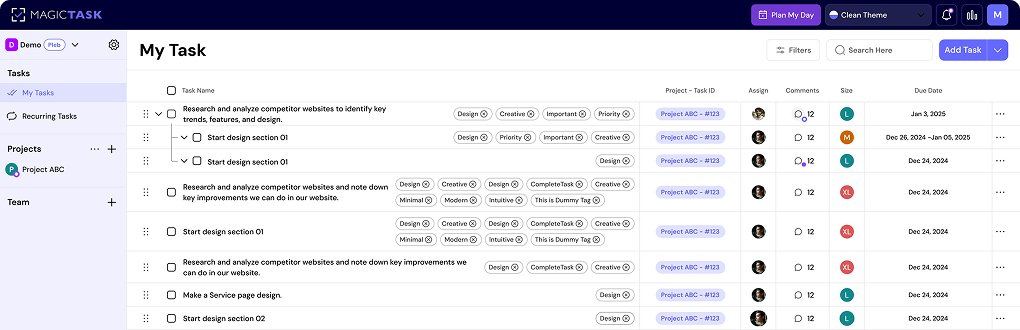
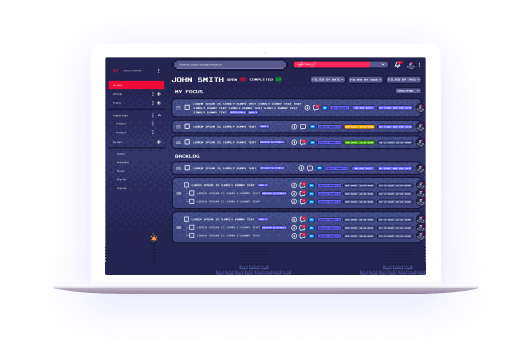
One way to ensure transparency without constant oversight is by using efficient project management tools. This is where MagicTask comes in. Managers or even individual employees can use its "Commenting" feature to add context or additional details to specific tasks. This ensures that everyone, including team members and leaders, has access to the necessary information, creating overall transparency and reducing the need for excessive follow-ups.
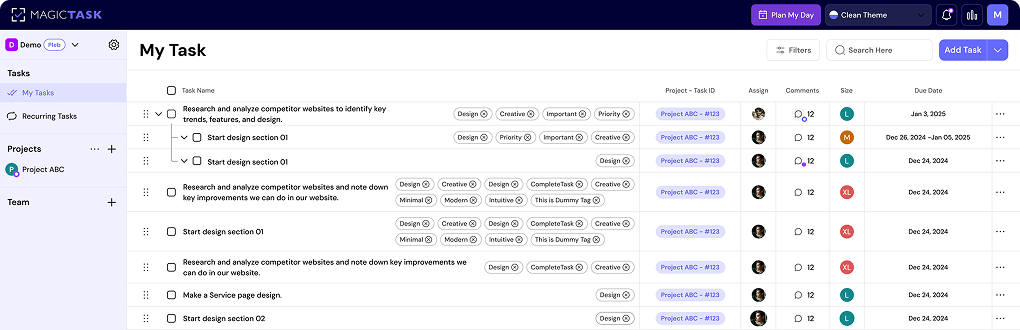
MagicTask

2. Set SMART Goals to Drive Accountability

One of the most effective ways to keep teams on track without micromanaging is by setting clear, structured goals. When employees understand exactly what they need to achieve and why it matters, they require less oversight and can take ownership of their work.

A proven method for setting clear objectives is the SMART framework, which ensures goals are:

  • Specific – Clearly defined with no ambiguity
  • Measurable – Quantifiable so progress can be tracked
  • Achievable – Realistic given the resources and constraints
  • Relevant – Aligned with broader business objectives
  • Time-bound – Set within a defined timeframe

To make this approach even more effective, consider adding one more element: Strengths. Aligning goals with employees' core strengths enhances motivation and productivity.

For example, if your goal is to increase revenue through innovative marketing, and your marketing team thrives on creativity, here’s how a SMART+S goal might look:

  • Specific: Increase quarterly revenue from our e-commerce store.
  • Measurable: Achieve a 20% rise in sales revenue compared to last quarter.
  • Achievable: Focus on partnerships and invest in targeted marketing campaigns.
  • Relevant: Increased revenue will allow reinvestment in product development and overall business growth.
  • Time-bound: Achieve a 20% increase within the next three months.
  • Strengths: Leverage the marketing team’s creativity by organizing an innovation-focused design sprint.

By setting SMART+S goals, you provide clear direction without micromanaging. Employees know what success looks like, can measure their own progress, and feel empowered to work independently—reducing the need for constant check-ins.

3. Role Clarity & Accountability Structures

Setting clear goals is essential, but even the best goals can fall apart without defined roles and ownership.

When employees know what is expected of them, they work confidently and require less oversight. However, when roles are ambiguous, confusion arises, leading managers to step in too often—resulting in micromanagement.

How Role Clarity Reduces the Need for Micromanagement

A well-defined structure ensures that every team member understands their responsibilities, reducing overlap, miscommunication, and the risk of tasks slipping through the cracks. When ownership is clear, employees feel a stronger sense of purpose and direction, leading to better productivity and higher engagement.

Building an Accountability System Without Micromanaging

Instead of constant check-ins, leaders should implement systems that naturally encourage accountability, such as:

  • Regular check-ins with a purpose – Focus on progress and roadblocks, not just status updates.
  • Performance metrics – Clear, measurable indicators of success that allow employees to track their own progress.
  • Feedback loops – Constructive feedback that empowers employees to improve rather than feel monitored.

With these structures in place, teams can stay on track without the need for excessive oversight. Employees take ownership of their work, while leaders gain confidence that projects are progressing as planned.

4. The 70/30 Rule: Balancing Autonomy and Leadership

Many leaders want to empower their teams but hesitate to give full autonomy. The fear is understandable—what if employees diverge too much? How will they make decisions? How do you ensure resources are allocated properly without losing control?

The key is to establish clear boundaries that provide structure while still allowing flexibility. This is where the 70/30 Rule comes in:

  • Give your team 70% autonomy to make decisions, innovate, and take ownership of their work.
  • Step in for the remaining **30%**—focusing on critical areas that require leadership oversight, such as strategic direction, risk management, and major course corrections.

By following this approach, leaders can maintain alignment without micromanaging, ensuring employees have the freedom to perform while still keeping projects on track.

5. Encourage an Atmosphere of Honesty And Trust.

Teams thrive when there is mutual trust between leaders and employees. However, if micromanagement has been the norm, team members may hesitate to make decisions without seeking approval first.

As a leader, it’s important to gradually shift control back to your team and foster a culture where they feel confident taking ownership.

Start by delegating small decisions and reinforcing that you trust their judgment. At the same time, set clear expectations so they understand when to proceed independently and when to seek input.

Avoid the temptation to stay overly involved in daily operations. A simple step is to request not being tagged in every chat or CC’d on every email, signaling that you trust them to handle tasks without constant oversight.

By creating an environment where employees feel empowered yet supported, you encourage accountability without micromanagement.

6. Use the Right Project Management Tools

The right project management tools help teams stay aligned, maintain transparency, and take ownership of their work—without the need for micromanagement. A well-structured tool ensures that tasks, deadlines, and responsibilities are clearly defined, reducing confusion and unnecessary check-ins.

Platforms like MagicTask provide a visual roadmap, allowing teams to track progress, set priorities, and manage dependencies in one place. This streamlined approach minimizes miscommunication and enables leaders to monitor workflows without constant oversight.

Beyond organization, accountability should be built into the tool itself. MagicTask incorporates gamification features, such as leaderboards, to encourage employees to stay engaged and proactive in updating their tasks.

Pete Peranzo, co-founder of Imaginovation, shared the impact of using MagicTask in their organization:
"Upon deploying MagicTask, we observed a staggering 400% increase in adoption rates. While Jira managed 6,000 tickets from December 2017 to July 2020, MagicTask handled an impressive 30,000 tickets between January 2020 and February 2022."

Choosing the right project management tool isn’t just about organization—it’s about empowering teams to work independently while giving leaders visibility without micromanaging.

How to Ensure Progress Without Constant Check-Ins

Now, the next step is to ensure progress using the right tools and strategies we discussed. Let’s take a look at how to do this effectively.

1. Use the Right Tracking & Reporting Methods

Even with the best project management system, it’s important to have task-tracking and reporting features. These help you stay on top of your team’s progress and get clear performance insights through dashboards without the need for constant check-ins.

With MagicTask, leaders can easily see project updates, task completions, and team performance in one place. Its reporting features provide the clarity managers need, so they can stay informed without personally checking in on every employee.

By using the right tracking tools, you create a transparent and stress-free workflow where teams stay focused and leaders have visibility without disrupting progress.

2. Foster a Culture of Self-Accountability

A team that takes ownership of its work doesn’t need constant monitoring. Employees who feel responsible for their tasks are more likely to stay on track, meet deadlines, and solve problems independently.

To encourage self-accountability, leaders should set clear expectations, provide visibility into progress, and ensure that employees have the tools to manage their work effectively. Instead of stepping in frequently, managers can create an environment where employees take initiative and track their performance.

A tool like MagicTask supports this by offering a "My Tasks" or "Projects" view, where employees can see their tasks, prioritize work, scope out the size, and stay organized without relying on constant direction.

This built-in transparency helps teams stay accountable without the need for excessive follow-ups, leading to a more self-sufficient and motivated workforce.

3. Delegation Done Right: Giving Teams Responsibility & Authority

Delegation isn’t just about assigning tasks—it’s about giving teams both responsibility and the freedom to make decisions. When done effectively, it prevents bottlenecks, fosters independence, and reduces the need for constant oversight. However, when delegation lacks clarity, it can lead to confusion and micromanagement.

A key principle of effective delegation is the "What, Not How" rule. Instead of dictating every step, leaders should define clear goals and let employees figure out the best way to accomplish them. This builds trust and allows teams to work with more autonomy.

To implement a strong delegation framework, leaders should:

  • Define clear goals – Ensure teams understand objectives, priorities, and success criteria.
  • Use non-intrusive progress tracking – Check in periodically without disrupting workflow.
  • Empower decision-making – Give employees the flexibility to solve problems on their own.

MagicTask makes delegation seamless by allowing leaders to create high-level tasks, while employees can break them down into subtasks, add relevant details in comments, and prioritize their work accordingly. This structured yet flexible approach gives teams the freedom to manage their workload effectively while ensuring overall project alignment.

4. Managing Low Performers Without Resorting to Micromanagement

Low performance can be frustrating for leaders, but excessive oversight won’t fix the root cause. It only creates dependency. When employees become too reliant on managers for direction, they struggle to grow, and leaders end up overworked.

If an employee isn’t meeting expectations, start by identifying the real issue. Is it a lack of clarity? Insufficient training? A motivation problem? Without understanding the cause, adding more supervision will only make things worse.

Addressing Performance Issues Constructively

Rather than assuming an employee is disengaged, have an open conversation to uncover what’s holding them back. Many managers avoid these discussions because they fear conflict, but coaching opportunities.

Instead of stepping in constantly, provide the right level of guidance and resources to help them succeed. With clear communication, goal alignment, and a culture of accountability, low performers can improve without micromanagement.

Conclusion

Micromanagement is a lose-lose situation—it overwhelms managers, demotivates employees, and slows down progress. Instead of driving better results, it often creates more problems than it solves.

Applying the strategies covered in this guide lets you keep your team on track, foster accountability, and ensure progress without constant oversight. The right tools, such as MagicTask, help streamline delegation, task tracking, and reporting—allowing leaders to stay informed without micromanaging.

Ready to transform the way you manage your team? Sign up for MagicTask today and experience a more efficient, transparent, and stress-free work environment.


Creating A Culture of Accountability: A Practical Guide for Leaders

Creating A Culture of Accountability

Accountability isn’t just a corporate buzzword. It’s the foundation of a high-performing team. But the problem is you can’t force accountability. You can’t simply demand it. It has to be built into your company’s culture, starting with leadership and extending to every team member.

Real accountability happens when employees take ownership, not because they’re being watched, but because they genuinely care about their work and how it impacts the organization.

That’s when you know you’ve built something special.

But how do you get there? How do you create a culture where accountability is not just expected but embraced?

In this guide, we’ll break down what a culture of accountability really means, why it’s essential, and how you, as a leader, can cultivate it within your team.

What is a Culture of Accountability?

So, what is a culture of accountability? Is being "responsible" and "accountable" not the same thing?

Let's start with the basics.

Understanding Accountability

At its core, accountability means taking responsibility for one’s actions and outcomes. In the workplace, this translates to employees understanding their roles, owning their work, and being answerable for good and bad results.

Culture of Accountability

A culture of accountability is more than just individuals being responsible for their tasks. It’s about creating an environment where:

  • Commitments are taken seriously: If someone says they’ll deliver, the team knows they will.
  • Mistakes are learning opportunities: Instead of pointing fingers, people ask, “What can we do better next time?”
  • Trust is strong: Employees feel empowered to make decisions, knowing they’ll be supported.

A culture of accountability in the workplace is one in which each person does their part and acknowledges that all employees may contribute to the organization's overall success. It is about accepting responsibility for your task and taking initiative.

This may sound a lot like "responsibility," right? Well, not really, and here's why.

Responsibility vs. Accountability

A lot of leaders mix up responsibility and accountability. Here’s a simple way to think about it:

  • Responsibility is about being assigned a task.
  • Accountability is about owning the outcome.

For example, a junior software engineer in the organization might be responsible for writing code, but if that code doesn’t meet quality standards or causes project delays, the accountability for that still lies with them.

Why Accountability Matters in the Workplace

Why Accountability Matters

A strong culture of accountability isn’t just about keeping people on task. It shapes the entire work environment, influencing team morale and productivity. It also impacts the overall business success.

When accountability is ingrained in your company’s culture, employees feel a sense of ownership over their work. This, in turn, leads to higher performance, better communication, and stronger team dynamics.

Here's why building a culture of accountability matters:

1. Improves Performance

When employees know they’re accountable for their work, they step up their game. They take deadlines seriously, pay attention to detail, track progress carefully, and consistently put in their best effort.

No one wants to be the weak link on a high-performing team.

Accountability also minimizes the need for constant supervision. Instead of managers spending time chasing updates or correcting mistakes, teams proactively manage their own work. This leads to on-time project completion, higher-quality results, and a more self-sufficient team.

2. Trust Becomes the Norm

Trust is the foundation of any great workplace, and accountability strengthens it.

When employees consistently follow through on commitments, it creates a work environment where colleagues can rely on each other. There’s no second-guessing whether someone will deliver on their tasks because accountability is a given.

On the flip side, a lack of accountability can breed frustration. When some team members don’t pull their weight while others pick up the slack, resentment naturally builds.

Over time, this reduces trust between team members and creates a toxic work culture. Therefore, setting clear accountability expectations can prevent this and ensure everyone contributes fairly.

3. Communication Improves

Accountability encourages open, honest communication.

When team members take ownership of their work, they’re more likely to:

    • Provide regular updates on their progress.
    • Speak up when challenges arise instead of staying silent.
    • Ask for help or feedback without fear of looking incompetent.

This level of transparency keeps projects on track and prevents misalignment between teams. Instead of last-minute surprises, issues are addressed early, and everyone stays on the same page.

4. Employees Feel More Engaged

Lack of accountability creates a culture of disengagement. If employees see that effort doesn’t matter and underperformers aren’t held accountable, then motivation will drop, and team morale will suffer.

On the other hand, accountable employees feel a sense of purpose in their roles. They are naturally more invested in their work when they know their contributions matter and are trusted to make decisions.

This engagement leads to:

  • Higher work satisfaction: Employees take pride in their accomplishments.
  • Greater motivation: They push themselves to exceed expectations.
  • Lower turnover rates: When employees feel valued, they stay longer.

5. Problem-Solving Gets Faster

Accountable employees don’t wait for someone else to fix a problem—they step up. Instead of passing blame or avoiding tough situations, they actively seek solutions.

This means:

  • Roadblocks are addressed early, preventing minor issues from becoming major problems.
  • Decision-making becomes more efficient because employees feel empowered to take action.
  • Teams become more resilient, adapting quickly to unexpected challenges.

By fostering a culture where employees own their mistakes and take initiative, companies create proactive rather than reactive teams—a key advantage in today’s fast-paced business world.

6. Business Goals Stay on Track

A company’s success is ultimately tied to how well its employees execute their responsibilities. When accountability is deeply embedded in the culture, goals aren’t just talked about—they are achieved.

Every department, team, and individual understands:

  • Their role in driving company objectives
  • The expectations set for them
  • How their performance impacts the bigger picture

As a result, business growth becomes more predictable and sustainable. Instead of struggling with missed deadlines, misalignment, or inconsistent performance, leadership can confidently scale operations, knowing they have a reliable, accountable team in place.

How to Create a Culture of Accountability

Now that you know why the culture of accountability is so important, let's take a look at how to build it in your organization.

1. Hire People Who Already Value Accountability

Remember, accountability isn’t something you can force. It has to be in a person’s nature. That’s why hiring the right people is step number one.

When interviewing candidates, ask questions like:

  • “Tell me about a time when you made a mistake. How did you handle it?”
  • “Have you ever challenged a process or system at work? What was the outcome?”

Look for candidates who own their past decisions and actively seek ways to improve. These are the people who will naturally fit into an accountable culture.

2. Trust Your Team, But Verify

Trust is crucial, but blind trust can backfire. A strong leader trusts their team while also ensuring accountability.

Pete Peranzo, co-founder of Imaginovation, says: “Trust is built over time. But if things start slipping, if processes aren’t followed, you need to verify more often. If you keep reminding someone 3–4 times and nothing changes, it’s time to replace them. **Hire slowly, fire quickly.**”

Accountability doesn’t mean endless chances. If someone isn’t following through despite feedback, it might be a sign they’re not the right fit.

3. Set Clear Expectations from Day One

Accountability starts with clarity. If employees don’t know what’s expected of them, how can they be accountable?

  • Define roles and responsibilities clearly.
  • Set measurable goals and deadlines.
  • Make sure everyone understands the why behind their work.

4. Encourage Open Communication (Even When It’s Uncomfortable)

A culture of accountability thrives when employees feel safe speaking up. Encourage them to:

  • Ask questions about unclear expectations.
  • Challenge outdated or inefficient processes.
  • Admit mistakes without fear of blame.

The best employees don’t just follow orders—they think critically and push for improvement.

5. Lead by Example

If leadership isn’t accountable, why should anyone else be?

Michael Georgiou of Imaginovation says – “Sometimes you tell people to do something, but if you’re not doing it yourself, how can you expect them to?”

Accountability has to start at the top. Leaders should be the first to own their mistakes, meet deadlines, and follow through on commitments.

Setting a good example also fosters trust inside your company, which is essential when it comes to holding your team members accountable. Employees who trust their leaders are 24% more inclined to report unethical activities.

6. Recognize and Reward Accountability

Accountability should be celebrated. Publicly recognize employees who consistently take ownership of their work. This can be:

  • A shoutout in a team meeting.
  • A bonus for exceeding expectations.
  • A promotion is when someone consistently steps up.

7. Provide the Right Tools for Accountability

Last but not least. Providing your team with the right tools is one of the most important steps when it comes to building a culture of accountability.

Why?

A strong culture is built on the right habits, and tools can help reinforce those habits.

Some tools you can use for building an accountability culture include:

  • Microsoft Excel or Google Sheets can be used as the simplest task-tracking tool. You can add a list of tasks, add due dates in the next column, assignee, etc, and other details if needed.
  • JIRA / Asana are some popular project management tools. Now, although these are some of the top project management tools in the market, they are pretty complex to use. Managing tasks in these tools is often time-consuming.
  • MagicTask – A simple task management tool that removes clutter and simplifies task management, and infuses accountability in the team. While traditional tools focus on task tracking, MagicTask takes accountability to the next level by making work engaging and motivating.

Instead of feeling like just another management tool, it introduces game-like elements that encourage employees to take ownership naturally.

Here’s how MagicTask helps teams stay accountable:

MagicTask

  • Clear Task Assignments: Everyone knows exactly who is responsible for what. Employees can add their own tasks and assign projects and due dates.
  • Real-Time Progress Tracking: No need to chase updates; everything is transparent.
  • Gamification Elements: By incorporating game-like features, MagicTask motivates team members to stay engaged.
  • Visibility:The platform makes it easy to see who’s responsible for each task, reinforcing team accountability.
  • Feedback Mechanism: Task comments and progress updates create seamless feedback loops.

With MagicTask, accountability isn’t about micromanaging, it’s about engagement. By making task management feel rewarding, teams stay on track because they want to, not because they have to.

Final Thoughts: Accountability is a Culture, Not a Rule

A culture of accountability doesn’t happen overnight. It’s something that must be hired for, modeled, reinforced, and celebrated—not just expected.

For leaders who are passionate about building strong, motivated teams, accountability is the glue that holds everything together. Tools like MagicTask provide a structured and engaging way to foster accountability, making it easier for teams to track responsibilities, collaborate efficiently, and stay motivated.

By integrating MagicTask into daily workflows, organizations can reinforce accountability in a way that feels natural and rewarding—ultimately driving higher performance and team success.

Try MagicTask now.


7 Habitica Alternatives That Are Too Good To Ignore

Habitica Alternatives

We all know that feeling. We're sitting at our desks, staring at a blank computer screen or a daunting task list, and we just can't seem to get started. Maybe we've been working for hours and still haven't made much progress. Or maybe the dreaded afternoon slump has hit us hard.

In moments like these, it's tempting to give up and call it a day. And that's why we wrote this article about productivity tools and Habitica alternatives.

The below seven tools can help you overcome a boring work day, and they can give you some extra motivation to push through a slump.

What is Habitica?

Why start with Habitica? Well, it's a popular and high-quality app, a gamified productivity app, to be more precise. 

Habitica is an app that helps you track your habits, goals, and to-do lists in one place. It's designed to help you stay motivated and on track by gamifying your life and turning your tasks into fun challenges. You can earn points, level up, and unlock rewards as you complete your goals.

Using Habitica, you create your own avatar, just like in an RPG. You set up a list of habits, and then, with every task you complete, you slowly gain XP. As you complete tasks and build habits, you get more freedom to customize your character and join “guilds,” and team up with other players. Just like World of Warcraft, except, you know, productive.

Why Do You Need Habitica Alternative?

Habitica is a great app. However, it might not suit everyone's needs. That's the other reason we wrote this article, in fact. 

Namely, Habitica helps with your habits, but it lacks some other types of functionality. Perhaps you want something simpler and clearer? Maybe you'd prefer an app with a different design and style. Do you want more features, like a function helping you keep an eye on your day-to-day tasks? Or do you want to really just stick to fitness habits?

The Habitica Alternatives presented below might suit your goals and needs better. Some are better at organizing projects and teams. Another app helps with daily Todos and reminders. Read on and figure out, for yourself, what works best for you..

7 Best Habitica Alternatives

Below are the best Habitica alternatives around. Read on, and we are certain you will find something that suits your needs.

1. MagicTask

MagicTask dashboard

Let's start with MagicTask.

MagicTask is a task and project management app that is similar to Habitica in that it gamifies your work. However, there are many important distinctions.

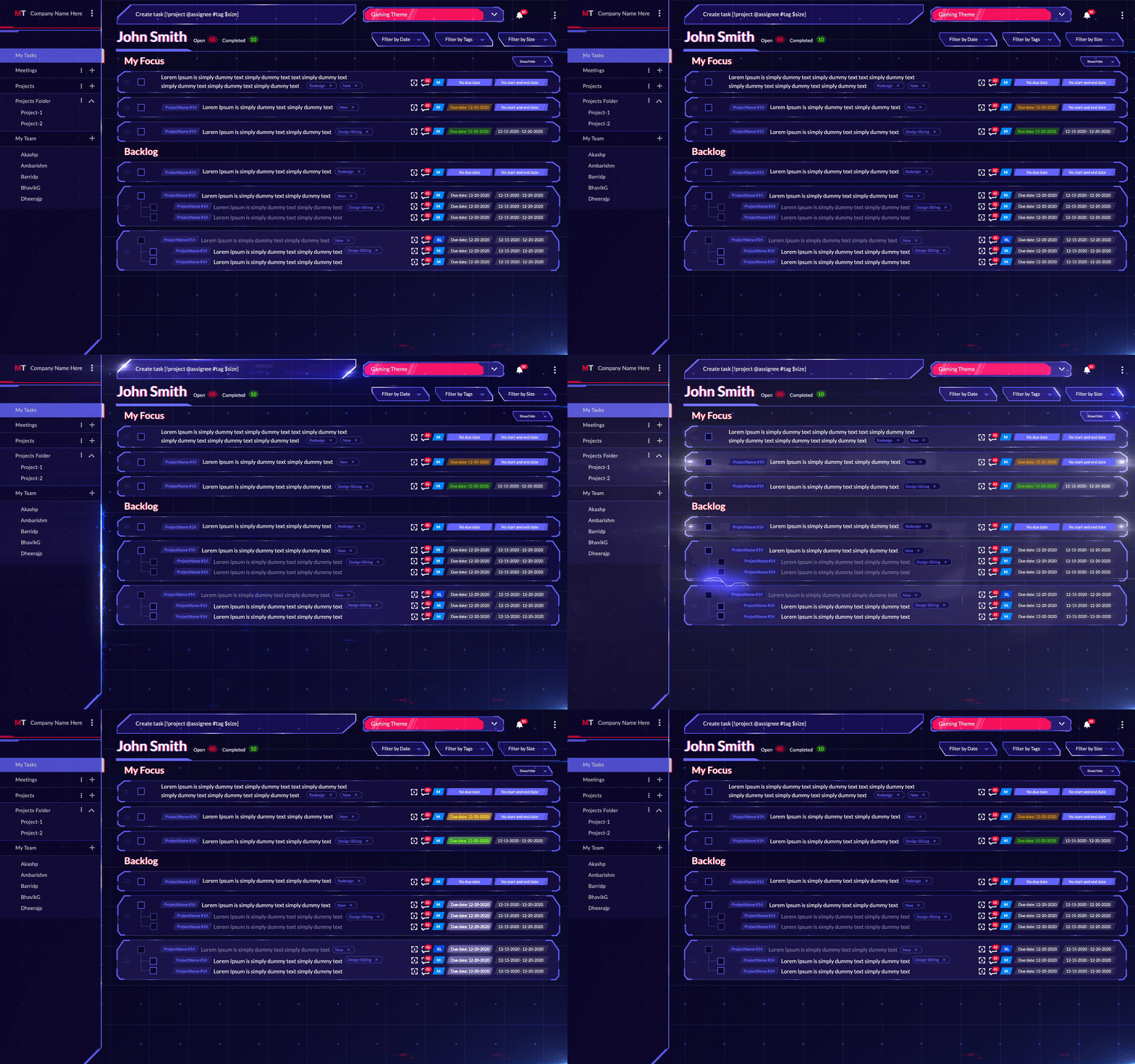
Namely, the more you use the app, the more tasks you complete, and the more points you gather. After a while, when you gather enough points, you get to use those points to unlock new features. There are a variety of themes that can change the look of your interface and add extra features like sound effects and some extra visual flair.

In a sense, its gamification features give you “gear.” This makes it much more fun to use the app, giving you that little extra bit of motivation you just might need. And, if that's not enough, you can take a look at its dedicated leaderboards, where you can see how well you are doing against other teams (and even the people within your own team).

What makes it different from Habitica: Greater focus on task management, assigning tasks, and projects.

Supported Formats: Android, iOS, Web

Best Features:

  • Amazing task management: you can use its sleek interface to create tasks, assign them to other people, and track how everything is going.
  • Excellent for individual and team use: It's great for tracking your goals and habits, but it also does wonders for larger teams. 
  • Theme Marketplace: The platform has a “Theme Marketplace” that contains unique themes to add an extra layer of creativity and fun while managing your personal or professional daily tasks

Pricing:

  • Standard: Free 
  • Themes: Cost anywhere between $0.99 to $9.99 (optional, the app can be used for free without buying new themes)

2. SuperBetter

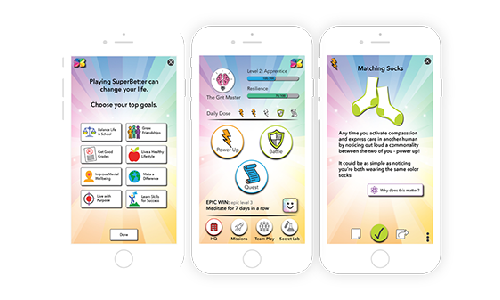
SuperBetter app is a tool that helps people build resilience in the face of stress and adversity. It was created by game designer Jane McGonigal, who used her own experience recovering from a concussion to design a game that would help others recover from setbacks more quickly.

The app has two main components: the quest log and the power-ups. The quest log is a list of challenges that users can complete to increase their resilience. 

Power-ups are actions that users can take to improve their mood and energy levels. Some of the most common power-ups include getting enough sleep, eating healthy foods, and exercising regularly.

SuperBetter is based on the premise that we all have the ability to become stronger and more resilient in the face of adversity. By using the app, users can learn how to better cope with stress and setbacks and ultimately lead happier and healthier lives.

For example, one of the quests in the SuperBetter app is to "make a list of things you're grateful for." This is a great way to increase resilience by focusing on the positive aspects of life. Another quest is to "set a goal for yourself and achieve it." This can help boost confidence and resilience.

SuperBetter Dashboard

What makes it different from Habitica: It lacks the RPG aesthetic present in Habitica, and gives a greater focus on wellness, your mood, and energy levels.

Supported Formats: Android, iOS, Web

Best Features: 

  • The ability to set and track goals: SuperBetter makes it easy to set and track progress towards your goals, so you can stay motivated and on track.
  • The positive reinforcement: SuperBetter gives you regular positive reinforcement in the form of "power-ups" and "boosts" to help keep you going.
  • The support of friends and family: SuperBetter makes it easy to involve your friends and family in your quest to get better, so you can benefit from their support.
  • The sense of community: SuperBetter's online community provides a supportive and friendly environment where you can share your experiences and connect with others who are going through similar challenges.
  • The challenge: SuperBetter is designed to be a challenging and fun way to improve your life, so you can feel a sense of accomplishment and satisfaction as you make progress.

Pricing:

  • Free

3. Fitocracy

The Fitocracy app is designed to make working out more fun and engaging. You earn points, badges, and levels as you progress, which can give you a sense of accomplishment and motivation. Additionally, the app has a ton of great content to help you get started and stay motivated, including workout guides, nutrition tips, and more. You can also join groups and compete against others for extra motivation.

Points in the FItocracy app have a gamified, XP and RPG-like system, similar to MagicTask and Habitica. For every workout you complete, you earn points that can be used to purchase badges and level up. The more workouts you do, the more points you'll accumulate. You can also earn points by completing quests, which are essentially mini challenges designed to help you stay on track.

What makes it different from Habitica: The noticeable difference here is that Fitocracy deals solely with fitness and health, compared to Habitica, which is much broader in scope and habits.

Supported Formats: Android, iOS, Web

Best Features:

  • Track progress easily: Fitocracy allows you to track your progress and see results quickly
  • Great for motivation: The app is highly motivating, with a points system that encourages users to keep going
  • Community: There is a strong community feel on Fitocracy, with people supporting and helping each other to reach their goals
  • Flexibility: The app is extremely flexible, allowing users to customize their workouts to suit their own needs

Pricing:

  • Basic: Free
  • Coaching: 1 dollar per day (you get a coach, custom-built meal and workout plans, and more)

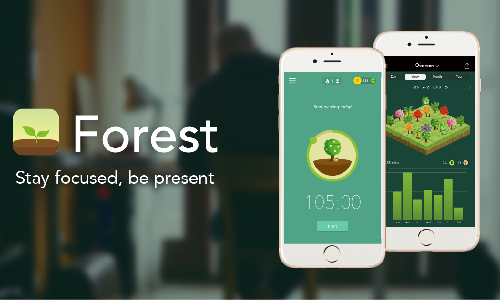
4. Forest App

Next, we have one of the best Habitica free alternatives, the Forest App.

The Forest app is a fun and easy way to increase your productivity. It allows you to set a timer for how long you want to work on a task, rewarding you with points for every minute you stay focused. You can also use the app to track your progress over time and see how much more productive you've become.

Now, here is how it works in practice.

First, you sit down, prepared to work on a task you’ve been avoiding. When you start the app, you plant a seed. If you keep the app going until the timer runs out, congratulations, you've planted a tree!

Over time, that single tree will be joined by an entire forest. The trick here is that you will be more inclined to stick to the timer, and your work, in order to keep the forest growing. Furthermore, if you get distracted and stop using the app, the trees will wither and die, serving as extra motivation.

Forest App

What makes it different from Habitica: It differs from Habitica in that it is very simple, in that you only focus on the timer and forest, foregoing the entire RPG style Habitica has.

Supported Formats: Android, iOS

Best Features:

  • Increased focus: The app's ability to help users stay focused and on task by blocking out distractions is fantastic for anyone who struggles with focus. 
  • Pomodoro and avoiding burnout: The app's "Pomodoro" timer feature is also great for productivity, as it encourages users to work in short, focused bursts with built-in breaks to avoid burnout. 
  • Wonderful aesthetic: The app's "forest" metaphor is clever and visually appealing, making it fun and easy to use. 
  • Ultra Simple: Overall, the app is straightforward and user-friendly, with a clean interface that makes it a pleasure to use.


Pricing:

  • Basic: Android exclusive, free (with ads)
  • Pro Version: $1.99 for iOS, $1.99 to upgrade from basic to Pro for Android 
  • In-App purchases: Vary from $0.99 to $1.99

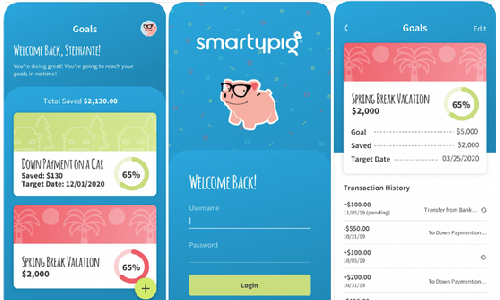
5. Smarty Pig

Next is a finance-centered alternative.

If you're looking for a new and innovative way to save money, the SmartyPig app may be just what you need. This app is designed to help users save money, have fun, and engage while also providing valuable tools and features to make saving easier.

So, how does SmartyPig work? First, users set up a savings goal and decide how much they want to save. They can also set up recurring deposits into their account or make manual deposits as they have extra money. Once the goal is reached, users can choose to withdraw the money, or keep it saved in the account for future goals.

The app also features tools to help users stay on track with their savings goals. For example, users can set up reminders to make deposits, and they can see their progress towards their goals. They can also view tips and advice on how to save money more effectively.

Overall, the SmartyPig app is a great way to save money in a fun and engaging way. It's easy to use and provides users with useful tools and features to make saving easier. If you're looking for a new way to save money, the SmartyPig app is definitely worth checking out.

Smarty Pig

What makes it different from Habitica: It's an app solely focused on finances, helping you save money and, later on, earn money.

Supported Formats: Android, iOS, Web

Best Features:

  • The ability to create and name multiple savings goals. This is great for people who want to save for different purposes, or for those who want to track their progress towards specific targets.
  • The ease with which you can transfer money. This makes it a very flexible tool for managing your finances.
  • The high-interest rate that you earn on your savings. This means that your money will grow faster than it would in a traditional savings account.

Pricing:

  • Free

6. Todoist Karma

The Todoist Karma app is a great way to keep track of your tasks and to-dos. It can be used for work, home, or school. With this app, you can create different projects, add tasks to those projects, set reminders for when you need to complete them, and even share your projects with others. 

What makes it different from Habitica: While Habitica focuses primarily on habits, of all the Habitica alternatives, Todoist Karma is outstanding with its reminders and smaller tasks, being much more straightforward in scope.

Supported Formats: Android, iOS, Web

Best Features:

  • Projects: You can create different projects within the app, which is great for work or school. For example, you can create a project for each class you're taking.
  • Tasks: Within each project, you can add tasks. This is where you'll enter what needs to be done and when it's due.
  • Reminders: You can set reminders for each task, so you'll never forget to complete it.

Pricing:

  • Basic: Free
  • Pro: $4
  • Business: $6

7. Epic Win

Epic Win is an app that helps you get things done. It's a simple, effective way to manage your tasks and get things done.

Epic Win is based on the principle of gamification – using game-like elements to motivate and encourage users to achieve their goals. By turning task management into a game, Epic Win makes it more fun and engaging and helps users to stay motivated and on track.

 What makes it different from Habitica: If you're wondering how it differs from Habitica, for starters, Habitica is more game-like than Epic Win. It uses a "gamification" approach to help you stick to your habits. You earn points for completing tasks, which you can use to level up your character and unlock new features.

Epic Win, on the other hand, takes a more traditional approach to habit tracking. It lets you track your progress over time, set goals, and get reminders to stay on track. It definitely has
gamification elements, and they're just “lighter” compared to Habitica.

Epic Win

Supported Formats: iOS

Best Features:

  • A simple, straightforward interface that makes adding and managing tasks easy
  • A points system that encourages users to complete tasks and rewards them for their progress
  • A leveling system that allows users to track their progress and see how they're doing over time
  • An achievements system that encourages users to set and achieve goals
  • A social element that allows users to share their progress with friends and family and compete with others

Pricing:

  • Basic: $2.99


Conclusion

Habitica is a great app, but it's not the only one out there. In this article, we've listed seven Habitica alternatives that are worth checking out. Every person has their own needs and goals, and certain apps help you accomplish these goals better. 

Some apps, like Fitocracy, focus on fitness. Others help you with finances. MagicTask is amazing for project management, while the Forest App is great if you want the simplest option possible. Each of these apps has its own unique features and benefits, so you're sure to find one that fits your needs. So what are you waiting for?

Start exploring today!

How to to Keep Your Cross-Functional Teams Motivated?

Cross-Functional Team Collaboration

Cross-functional teams are essential in today’s organizations—but here’s the challenge: more than 75% of them fail to meet their objectives.

Your success as a leader depends on keeping these diverse teams motivated and aligned.

Whether your cross-functional teams include developers, marketers, product specialists, or all of the above, one thing remains crucial: keeping operations running smoothly across departments while ensuring everyone is focused on the same big-picture goals.

The good news? With the right tools and strategies, you can transform cross-functional collaboration from a frustrating bottleneck into a real competitive advantage.

In this guide, you’ll find proven tactics to energize your teams, streamline workflows, and foster a culture of seamless collaboration.

Let’s get started.

What is Cross-Functional Collaboration?

what is cross functional collaboration

Cross-functional collaboration happens when people with different skills and roles come together to work toward a shared goal.

Most workers report spending 80% of their time collaborating with cross-functional teams. In other words, the workplace has evolved—from rigid, siloed hierarchies to flexible, dynamic teams that adapt to changing needs.

This shift has been powered by cloud computing, digital tools for remote collaboration, and the rise of project-based work.

Despite their variety, cross-functional teams share some common traits: standardized tools, clear communication frameworks, and team members with well-defined roles.

Together, these traits enable something remarkable: giving team members the autonomy to take initiative and self-organize—a hallmark of successful cross-functional collaboration.

What are the Challenges of Cross-Functional Teams?

Cross-functional teams face significant challenges that can hinder their effectiveness and success. A staggering 75% of cross-functional teams are dysfunctional, failing to meet at least three out of five key performance criteria.

Below are some key challenges that cross-functional teams experience:

1. Too Many Tools, Not Enough Alignment

From my experience, one of the biggest barriers to smooth collaboration is when teams rely on different tools. If marketing uses Asana while development prefers Jira, it creates unnecessary friction. Instead of focusing on the actual work, people waste time translating between systems, duplicating efforts, or figuring out how to stay aligned.

When everyone works within the same toolset, it’s like speaking the same language—it simplifies workflows, reduces confusion, and helps teams focus on delivering results. Standardization isn’t just convenient; it’s critical for success.

2. No Consistency Across Teams

When every department has its own style of working, chaos follows. Mismatched processes and tools lead to fragmented workflows, redundant tasks, and poor project visibility.

It’s like building a house with no blueprint—nothing fits quite right.

3. Communication That Doesn’t Connect

Ever been stuck in endless meetings that solve nothing? You’re not alone—78% of leaders call this "collaboration drag."

Teams struggle with unclear decisions, different jargon, and clashing communication styles. The result? Misunderstandings and a lot of wasted energy.

4. Lack of Trust

Silos aren’t just annoying; they’re damaging. Trust breaks down when teams keep information to themselves or adopt an "us vs. them" mindset.

Without trust, people hesitate to share ideas or ask for help, and collaboration suffers.

5. Red Tape Everywhere

In big organizations, approvals, hierarchies, and endless paperwork can slow even the most straightforward decisions. These bureaucratic barriers leave teams spinning their wheels instead of moving projects forward.

The good news? These challenges aren’t permanent.

By using the right tools and creating clear processes, you can break through these barriers and turn your cross-functional teams into true powerhouses. The payoff is worth it—smoother projects, faster results, and a culture where collaboration thrives.

Best Practices to Enhance Collaboration and Team Motivation

cross-functional team collaboration best practices

Cross-functional teams work best when they have the right support: clutter-free systems, shared tools, and straightforward processes. These are the building blocks that turn disjointed efforts into seamless collaboration.

Whether you’re working with developers, marketers, product specialists—or all of the above—having these fundamentals in place ensures everyone is moving in sync toward the same goals.

Here’s a closer look at the key practices that can help your teams not just function but truly thrive.

1.    Single Platform Approach

When teams share a single platform, everything flows smoothly. With one system for task management, document sharing, communication, and progress tracking, everyone knows exactly where to go for what they need. It’s not just about streamlining workflows—it’s about creating clarity and reducing friction.

Imaginovation, a premium software development company, embraced this concept with MagicTask. MagicTask provides teams with visibility into ongoing work and simplifies collaboration across departments.

Over time, the team at Imaginovation observed that using one consistent system saved time and significantly boosted team efficiency.

It’s proof that collaboration can become second nature with the right platform in place.

2. Documentation Standards

Your documentation system serves as the foundation for frictionless cross-functional collaboration. A well-structured system eliminates the frustrating hours teams waste searching for information or recreating existing documents.

Think of your documentation system as a well-organized library where every team member can quickly find what they need. This looks like creating intuitive folder structures that make sense across departments.

You can set up standardized templates for standard documents like project briefs, status reports, and meeting notes. When every team uses the same formats, you'll see faster document creation and better information comprehension across departments.

 Overall, you want to make information access straightforward and democratic. Your system should allow team members to find critical documents without asking multiple people or wading through complex folder hierarchies.

3. Clear Communication Channels

Establishing clear pathways for information flow is critical. When teams know exactly how and where to communicate, productivity increases by nearly five times.

Start by creating a consistent meeting schedule that keeps teams aligned without causing meeting fatigue. Hold regular cross-functional check-ins at key project milestones and use daily stand-ups for quick updates.

For urgent matters, set up a clear system that everyone understands. For example, use specific email subject tags like "IMMEDIATE ACTION REQUIRED" to flag priority issues. Create dedicated Slack channels for time-sensitive topics, and define clear escalation paths for situations that need immediate attention.

Remember, effective communication isn’t just about having the right tools—it’s about fostering a culture where information flows naturally and effortlessly between teams.

4. Establishing Clear Visibility

For cross-functional teams, visibility is essential. Every team member should have insight into who’s working on what, ensuring tasks are balanced and time is respected. When everyone can see priorities, deadlines, and workloads across departments, it’s easier to stay aligned and avoid bottlenecks.

Transparency helps teams focus on what matters most, adjust quickly when priorities shift, and collaborate more effectively. It’s not about monitoring—it’s about enabling more competent teamwork.

5. Empowerment and Accountability

Successful cross-functional teams thrive when they have the freedom to make decisions within clear frameworks. Empower your teams to take ownership of their work without excessive oversight. This autonomy fosters creativity, boosts motivation, and encourages proactive problem-solving.

At the same time, establish clear accountability by setting measurable expectations and ensuring transparency. Team members should understand how their work contributes to larger goals and feel confident discussing priorities or workloads with their managers.

By balancing empowerment with accountability, you create an environment where natural leaders emerge, innovation flourishes, and results improve. Recognize and celebrate individual contributions to reinforce this culture and inspire others to step up.

6. Celebrating Successes

Don’t forget to celebrate wins—big or small. Recognizing team achievements boosts morale and helps build a stronger collaborative culture.

Whether it’s a simple shoutout in a meeting, a team-wide email, or a celebratory event, taking the time to acknowledge hard work motivates teams to keep pushing forward.

How Can MagicTask Help With Cross-Functional Team Collaboration?

MagicTask transforms cross-functional collaboration with features designed to simplify teamwork and inspire motivation. Here’s how MagicTask empowers your teams to perform at their best:

  • Unified Visibility: MagicTask provides a clear view of ongoing projects and tasks across departments. Teams can track progress in real-time, identify bottlenecks before they escalate, and understand workloads to maintain balance and avoid overburdening anyone.
  • Task Organization: MagicTask streamlines project management by breaking down complex workflows into precise, actionable tasks. Teams can prioritize their work, monitor progress, and meet deadlines without the hassle of juggling multiple tools.
  • Workload Distribution: Visual indicators and resource allocation features make assigning tasks, balancing responsibilities, and monitoring performance easy. MagicTask ensures no team member is overloaded and everyone is contributing effectively.
  • Points-Based Engagement: Encourage participation by rewarding team members with points for key activities—such as completing tasks, adding new team members, and organizing projects. This system turns everyday work into a motivating experience.
  • Gamification Features: Keep teams motivated with engaging elements like achievement badges, performance leaderboards, and regular challenges. These features add a fun, competitive layer that inspires team members to stay focused and productive.

By combining practical functionality with motivational tools, MagicTask transforms cross-functional collaboration into a seamless, engaging, and efficient process. It helps teams overcome challenges, stay aligned, and achieve their goals faster and more confidently.

Final Thoughts

Transforming cross-functional collaboration isn’t just about addressing challenges—it’s about creating a unified, motivated workforce ready to achieve more. MagicTask is designed to simplify this process by providing the tools your teams need to work smarter, stay aligned, and stay motivated.

With features like unified visibility, streamlined task management, and gamification, MagicTask can help your organization achieve seamless collaboration faster.

Ready to empower your teams and see the results for yourself? Try MagicTask today.

Best New Year Resolution Ideas and Action Plan

new year resolution ideas and action plan

Ever fall short of your New Year’s resolution by the end of January? 

You’re not alone.

Many people rely solely on willpower to achieve their resolutions. It’s all about grit, grit, grit.

But they couldn’t be more wrong.

You need a change in mindset, strategies, and tools to turn your New Year’s resolutions into everyday achievements.

But the question is, where do you start?

In this blog post, we’ll explain everything you need to know about achieving your New Year’s Resolutions—from goal-setting techniques to the tools that can help.

Let’s start.

What Are New Year Resolutions?

Let's start with the basics.

New Year’s resolutions are promises you make to yourself at the start of every new year. They are generally focused on making improvements to your lifestyle or career. Imagine them as your personal guide to help navigate through the ups and downs of your self-development journey.

Setting resolutions is a great way to start the new year with a clean slate and purpose. However, these promises are not just random promises. Instead, they are meant to change your life drastically.

Studies have shown that if you set resolutions thoughtfully, you’ll likely achieve them compared to those with just regular goals. And, being more inspired is one of the primary reasons why.

For instance, when you inch closer to your resolutions, you’ll receive more dopamine—a brain chemical behind feelings of motivation and pleasure. With more motivation, you will have added oomph to focus on accomplishing your objectives. This creates a positive cycle for you that keeps making positive change after positive change.

Another reason resolutions work is that they make you honest and humble. You will perform reflective tasks, like writing in a journal or following a strict schedule, that make you think about what works and what doesn’t.

Benefits of Setting Resolutions

If you think New Year’s resolutions are empty promises you make to yourself once a year—think again. When applied correctly, resolutions can be powerful catalysts for personal transformation and growth.

Let’s explore some of the most important benefits.

1. Improved Workplace Performance

Setting work-related goals can sharpen your professional edge. 

For example, refining your public speaking skills might not only enhance your presentations but also open doors to leadership roles. 

Consider using platforms like Toastmasters to practice in a supportive environment or setting quarterly KPIs for specific skills you want to master, such as advanced Excel functions or persuasive writing.

Health-related goals can rejuvenate your energy and focus, improving your workplace performance.

Your commitment to your resolutions can transfer to improved discipline and goal setting in your professional life, helping you meet weekly, monthly, and quarterly objectives.


Simply put: when you experience success with your resolutions, the positive effects will ripple into your workplace.

2. Better Decision Making

Studies show that if you excel at making decisions, you’re likely paid a lot more.

When setting resolutions, you sharpen your ability to make better choices. You establish clear and intentional goals. 

When faced with a conundrum of choices, you’ll align them based on your objectives, asking yourself questions like “Does this support my goals?”. As a result, you’ll become more self-aware and strategic thinking-oriented.

Which are prerequisites for higher salaries—and a higher quality of life.

3. Increased Resilience

Why do you fall down? So you can shake it off and get back up. 

When committing to your resolutions, you’ll encounter this motto more often than you think. This is not a bad thing, though, because achieving your goals develops mental and emotional resilience. 

Every time you face a difficulty and push on, you become tougher. And before long, you’ll find that you’re better able to cope with stress, deal with change, and recover from disappointments—in all areas of your life.

In general, overcoming obstacles while chasing your goals will set you up to take down future obstacles.

4. Greater Self-Awareness

Personal development and self-exploration are connected.

When you work toward your goals, you will create a series of practices that will compel you to be honest and humble.

You will learn more about what you truly want to achieve through documenting activities.

You will discover beliefs and behaviours that you are not aware of that could be obstacles.

You will gain a better understanding of your biological cycles and their changes. You will also become more self-aware, setting more realistic goals and creating better strategies.

5. Improved Time Management

Face it, you have limited time to accomplish your resolutions. 

When you are serious about your resolutions, you start seeing and using your time differently. You’ll learn to prioritize and schedule your work.

You’ll learn to identify and let go of activities that waste your time. Thus, you will greet high-value activities by being able to refuse commitments that do not support your purpose.

What’s not to like about less stress and more productivity?

Keeping these advantages in mind, let’s check out some practical New Year’s resolution ideas you can implement today.

Practical New Year Resolution Ideas

As you read through this list, make sure you choose resolutions that matter to you and align with your values. 

Why? Because the only thing that’s guaranteed is the struggle.

And without having goals you truly resonate with, you won’t have the endurance to persevere through the constant ups and downs.

With that said, let’s dive into 10 practical resolution ideas to start your new year.

1.    Personal Growth Ideas

A good mind is the best investment, one that pays lifetime dividends in terms of personal development.

Resolutions for personal development can include learning something new, becoming more emotionally intelligent, or developing new skills.

Explore these goals if you want a push in self-awareness and confidence to help with everyday challenges.

  • Start journaling daily to boost mental wellness.
  • Use online platforms to learn a new language or skill.
  • Stimulate your imagination by reading at least one full novel a month
  • Meditate twice a day, as soon you wake up and before you sleep
  • Take up a new creative hobby, whether it’s dance, improv theatre or painting
  • Designate 1 hour every week to self-reflect by journalling

2.    Career Development Ideas

The course of your career or future does not rest solely on promotions or salary hikes.

It’s more important to have a career that you find meaningful, and your values inform that. A place where you develop constantly.

  • Consider these resolutions if you want to take control of your career.
  • Revise your CV and online presence every quarter.
  • Build your corporate connections and attend events every month.
  • Assume leadership positions in team projects.
  • Obtain relevant certificates to improve skills.
  • Develop public speaking abilities.
  • Write a five-year career growth plan.

3.    Health and Wellness Ideas

 If your physical well being and mental health are not in place, then what’s the use in chasing goals? In simpler terms, your body and mind are fundamental for everything else you do.

And you shouldn’t settle for quick fixes—instead, focus on long-lasting wellness changes.

Consider these health resolution ideas:

  • Try to exercise for at least 30 minutes five days.
  • Keep a consistent sleeping schedule for better sleep.
  • Eat more whole foods, or reduce processed foods.
  • Regular meditation helps you manage stress.
  • Schedule regular health check-ups.
  • Keep yourself hydrated every day by drinking water.

4.    Financial Health Ideas

Tired of having money be your overriding goal? We get it.

Life isn’t cheap, and in many cases, we don’t have the choice not to have money on our minds.

But money shouldn’t be an end itself. Instead, see it as a vehicle for more life options.

That’s why improving your financial health at the start of the year can pave the way for significant, lasting change.

Try these resolutions to grow your bank account:

  • Set up a savings goal, and try to stick to it monthly.
  • Download applications and software tools to help manage your expenses effectively.
  • Have an emergency fund that has 3 months’ expenses.
  • Keep a budget you can stick to.
  • Put money into your retirement accounts.
  • Get rid of extra expenses.

5.    Lifestyle Change Ideas

When making resolutions, don’t opt for dramatic overhauls. Instead, set yourself up for lasting positive change by aiming for small wins.

That’s the value of lifestyle change resolutions—they focus on gradual improvements that naturally fit into your daily routine.

These resolutions focus on building new daily habits that, in the long run, compound into drastic positive changes.

  • Make decluttering your living space a monthly event.
  • Frequently participate in community activities.
  • Plan weekly family time to promote bonding.
  • Set daily limits to reduce screen time.
  • Practice better time management.
  • Establish and keep nice boundaries.


6.    Environmental Ideas

It’s easy to feel like tackling environmental issues is beyond your control.

The truth is that every sustainable choice, however small, helps make our world more liveable for future generations.

But sustainable choices are about more than helping the planet; they also foster a deeper connection to one's home, community, and the world around one.

Here are some eco-friendly resolution ideas:

  • Join the community clean-up every month.
  • Establish a more sustainable routine. 
  • Establish appropriate recycling systems in your home.
  • Reduce single-use plastic consumption.
  • Support local environmental initiatives.
  • Choose eco-friendly transportation options.


7.    Social Relationships

Making a resolution to build stronger relationships is an investment that impacts everything, from your immune system to your longevity to your mental health.

It’s even more important if you're immersed in the surface-level interactions that reign supreme through technology.

By making resolutions that focus on your social connections, you’ll invest in lasting relationships with family, friends, and community members that will truly enrich your life.

  • Schedule individual hangout time with close friends monthly.
  • Focus on what others say.
  • Find and join social groups that interest you.
  • Regularly check in with old friends.
  • Create family traditions and regular reunions.


8.    Adventure and Comfort Zone Ideas

Looking to expedite your personal development journey?

By setting resolutions that push beyond familiar boundaries, you create new neural pathways that take your personal growth to new heights.

However, the key to setting goals outside your comfort zone isn’t recklessness but building upon your last growth experience.

Explore these resolutions if you want to create a foundation for continued growth.

  • Every month, experiment with a new activity.
  • Take on classes that are new to you.
  • Become a member of adventure groups or clubs.
  • Join community contests and local events.
  • Try an extreme sport or difficult activity.
  • Travel alone to explore new places.

9.    Cultural Exploration Ideas

By setting a resolution of exploring new cultures, you tackle many personal development goals at once—from improving your emotional intelligence to broadening your perspective to making long-lasting personal and professional friendships.

But if you think traveling is the only way to achieve this—think again.

You can set New Year resolutions to learn right in your own community. Whether through food, art, language, or traditions.

  • Travel to different places every three months.
  • Explore various cultural traditions.
  • Go to multicultural festivals or events.
  • Try delicious foreign dishes from local restaurants.
  • Understand the history of the world through documentaries.
  • Take part in cultural exchange programs.

10. Practical Life Skill Ideas

By setting resolutions to learn practical life skills, you reduce your reliance on external services, you become more confident, and you save money.

Whether it's basic home repairs, financial management, or emergency preparedness, these resolutions help create a foundation for independent living.

And in turn, you become not only more self-sufficient but you transform into someone who can produce and help your community.

  • Learn how to do your own oil changes and tire rotation.
  • Grow your own Vegetable garden and maintain it.
  • Learn how to sew and make repairs.
  • Learn to prepare for emergency situations.
  • Domestic and travel emergency kits should be full and maintained.
  • Learn how to create compost and manage soil.

With plentiful ideas to help trigger your 2025 resolutions in mind, let’s explore how you can achieve them by breaking them down into manageable and actionable steps.

Actional Steps to Achieve Resolutions

Let’s be clear: hoping your resolutions come to fruition isn’t a plan or a technique.

A famous poet, journalist, and aviator once said, “A goal without a plan is just a wish.”

Not only is this idea supported by beautiful rhetoric, but studies also show that you’re far more likely to accomplish your goals if you seriously plan with goal-setting techniques.

In this section, we’ll do just that by applying the SMART goals technique to a common New Year’s resolution: “Getting healthier through exercise.”

Let’s begin.

What are SMART Goals?

SMART goals provide a clear framework that transforms resolutions into actionable plans.

When you use it, you create accountability, set expectations, and clarify your direction.

Here’s what SMART stands for:

  • Specific: Define exactly what you want to achieve
  • Measurable: Establish concrete tracking metrics
  • Achievable: Make sure goals are within reach
  • Realistic: Set practical objectives that match your capabilities
  • Time-bound: Create clear deadlines and milestones

Now, let’s see the SMART technique in action.

Transforming Your Resolution into SMART Goals

Original Resolution:

“Regularly exercise and become healthy.”

Step 1. Specific

Break down the general goal so it’s more actionable.

●       For 3 days a week, I will exercise at my local gym.

●       I’ll rotate between lifting weights for 45 minutes and jogging for 15 minutes

●       I’ll explore the use of workout applications to measure my progress.

Step 2. Measurable

Create precise measurements to follow so you can determine your progress.

●       I will finish 12 workouts every month.

●       I will Lift 5% more weight every month.

●       I will monitor my heartbeats during my workouts.

●       I will take body measurements every month.

Step 3. Achievable

Design goals that meet your fitness level.

●       I’ll begin with light weights and increase gradually.

●       I’ll start with 20 minutes, then build up to 50.

●       I’ll take a break day between training sessions.

●       I’ll make sure to add flexibility.

Step 4. Relevant

Link your purpose behind going to the gym to bigger life aims.

●       I’m doing this to boost my energy levels at work so I can be more productive.

●       I want to improve overall health indicators.

●       I want to add strength to daily Activities.

●       I want to prevent myself from relying on future healthcare costs


Step 5. Time-bound

Set specific deadlines and milestones for your exercise resolution.

●       Create a steady workout schedule every month.

●       I’ll increase workout intensity by 25% in month 3.

●       By month 6, I’ll examine and modify initiatives according to my progress.

Using SMART goals, you can turn even the vaguest resolution into a clear, actionable plan with measurable milestones, setting yourself up for meaningful progress.

This way, you’ll set yourself up for everlasting success.

However, planning is only one piece of the goal-setting puzzle. Just as important is using the right tools to take your execution to the next level.

How MagicTask Can Help

MT for new year resolutions

To turn your SMART goals into reality, having the right platform can make all the difference.

Enter MagicTask—through its innovative features and gamified approach, MagicTask transforms your New Year’s resolutions from simple goals into achievable milestones.

If you’re looking to truly streamline your way to meeting your resolutions, here are some of the platform’s features you don’t want to miss:

Task Organization and Planning: Create dedicated project spaces for different resolutions, break down large goals into manageable tasks, and set clear priorities and deadlines.

Progress Monitoring: The platform’s built-in analytics help you monitor achievements, visualize your progress, and adjust strategies based on performance data.

Motivation Through Gamification: Stay engaged with your resolutions by earning points for completing tasks, leveling up to unlock themes, and climbing the leaderboards.

Collaborate With Others: When you need accountability for your resolutions, you canshare goals with accountability partners, share project spaces with groups and overall, develop an interactive support system.

By leveraging these features, MagicTask becomes your task management tool and personal resolution achievement partner, helping you maintain momentum and stay committed to your goals throughout the year.

Final Thoughts

With clear goals, actionable plans, and the MagicTask platform, you can make 2025 your year of meaningful transformation.

However, the journey ahead is far from easy, so to help set you up for success, here are our guide’s most important takeaways:

  • Choose resolutions that genuinely align with your values and long-term vision
  • Break down larger goals into manageable, actionable steps
  • Focus on creating sustainable habits rather than dramatic changes
  • Maintain consistency in your efforts, even when facing challenges
  • Celebrate small victories along your journey
  • Stay flexible and willing to adjust your approach when needed
  • Use tools like MagicTask to track progress and maintain motivation

Looking to make your New Year’s resolutions a reality?

MagicTask turns your resolutions from ambitious goals into achievable milestones.

Our innovative platform combines task management with engaging gaming features, making your journey toward personal transformation both productive and enjoyable.

Sign up now and make 2025 your year of meaningful change.


How to Turn New Year Resolutions into Achievable Goals

Every year, millions of people set New Year’s resolutions with the hope of improving their lives—whether it’s getting fit, advancing in their careers, or picking up new habits.

Yet, studies show that nearly 80% of these resolutions fail by February, leaving many feeling frustrated and discouraged. The problem isn’t a lack of ambition but rather the absence of a clear plan to turn these aspirations into achievable goals.

In this blog, we’ll focus on practical, actionable steps to help you transform your New Year’s resolutions into attainable goals. By breaking them down, prioritizing effectively, and tracking progress, you’ll learn how to create a realistic roadmap to success—and stick to it.

Steps to Turn New Year Resolutions into Achievable Goals

Step 1: Find the Best Task Management Tool

To turn your New Year resolutions into achievable goals, you need a system that organizes tasks and keeps you motivated. Using a reliable task management tool—like MagicTask, Trello, or Todoist—can make the process smooth, structured, and engaging.

Why It Helps

  • Keeps You Accountable: Defined tasks and deadlines ensure you stay on track.
  • Breaks Down Goals: Large, intimidating goals become smaller, manageable steps.
  • Boosts Motivation: Gamified and visual progress tracking makes completing tasks more rewarding.

How to Use a Task Management Tool

1. Choose the Right Tool: Select one that fits your workflow and goals:

  • MagicTask: Gamifies task management to make prioritizing and completing tasks fun.

  • Trello: Visualize tasks using boards and drag them through stages like “To-Do,” “In Progress,” and “Done.”
  • Todoist: Organize tasks with priority levels and recurring deadlines to streamline planning.
  • Asana: Use lists, timelines, and project folders to manage tasks with a clear structure.
  • Notion: Customize task databases with flexible views, such as calendars or checklists.

2. Break Goals into Actionable Tasks: Turn your resolution into smaller, achievable steps.

Example: For the resolution “Start a blog”:

  • Choose a blogging platform (by Jan 5).

  • Write the first blog post draft (by Jan 12).

  • Design the blog layout and publish it (by Jan 20).

3. Set Priorities: Label tasks by priority to focus on the most critical ones first (e.g., high, medium, low).

4. Track Progress: Use visual tools like checklists, project boards, or calendars to monitor your progress. Mark off milestones as you complete them to maintain motivation.

By combining tools like MagicTask, Trello, Todoist, or Asana, you can create a system that works for you. These tools ensure your resolutions are organized, actionable, and motivating—transforming goals into reality, step by step.

Step 2: Mind Dump Everything

Before you can turn your New Year resolutions into achievable goals, you need to clear your mind and get all your ideas out on paper (or screen). This process, known as a mind dump, allows you to capture every thought, task, and idea related to your resolution without worrying about organization or filtering.

How to Mind Dump Effectively

1. Set Up Dedicated Brain-Dumping Sessions

  • Block out 2–4 sessions over the next few days. Each session can last 20–30 minutes.

  • Choose a quiet space where you can focus without distractions.

  • Use tools like notebooks, digital apps (e.g., Notion, Evernote), or simple task management tools to record your thoughts.

2. Write Without Filtering

  • Don’t overthink—simply write down everything that comes to mind related to your resolution.

  • Include big-picture goals, small tasks, ideas, concerns, or even random thoughts. For example:
    • “Write two blog posts every month.”
    • “Sign up for a gym membership.”
    • “Learn meal prepping.”
    • “Research beginner’s yoga videos.”

3. Categorize After the Dump

  • Once you’ve listed everything, group similar tasks into categories like:

    • Actions: Tasks you can directly act on (e.g., “Buy running shoes”).
    • Ideas: Concepts or goals that require refinement (e.g., “Start a fitness journal”).
    • Resources: Things you need to research or learn (e.g., “Look for online writing courses”).

Benefits of Mind Dumping

  • Clears Mental Clutter: By getting everything out of your head, you’ll reduce stress and make room for clearer thinking.
  • Provides a Comprehensive View: You’ll have a clear overview of everything that needs attention—no tasks or ideas get forgotten.
  • Eases Prioritization: Once you’ve captured everything, it’s easier to identify priorities and break tasks into manageable steps.

Step 3: Prioritize Your Goals

Once you’ve brainstormed everything related to your resolutions, the next step is to prioritize. Not all tasks hold the same value or urgency, so it’s important to focus your energy where it counts the most.

By organizing your goals strategically, you can ensure consistent progress while avoiding overwhelm.

How to Prioritize Effectively

1. Use the Eisenhower Matrix

This simple yet powerful framework helps you sort tasks based on urgency and importance:

  • Urgent & Important: Do these tasks immediately.
  • Important but Not Urgent: Schedule these tasks for later.
  • Urgent but Not Important: Delegate or minimize these tasks.
  • Neither Urgent Nor Important: Eliminate or defer these tasks.

Example for “Start a Fitness Routine”:

    • Urgent & Important: Buy gym gear, schedule workouts this week.
    • Important but Not Urgent: Research long-term fitness plans.
    • Urgent but Not Important: Reply to a friend’s question about workout apps.
    • Neither Urgent Nor Important: Organize workout playlist (save this for later).

2. Focus on High-Impact Activities

Not all tasks contribute equally to your goals. Identify the activities that will have the biggest impact and prioritize those first.

  • Example: If your goal is to improve writing skills, high-impact activities might include completing a daily writing challenge or attending a writing workshop. Low-impact activities might be redesigning your writing space.

3. Apply “Eat the Frog” Strategy

Mark Twain’s famous productivity strategy suggests tackling your most difficult or daunting task first. By completing the hardest task early, you’ll feel accomplished and set a productive tone for the day.

  • Example: If your resolution is to learn a new skill, start with the most challenging topic or module instead of procrastinating it.

Tips for Staying Consistent

  • Set Priorities Weekly: Spend 15 minutes at the start of each week reviewing and adjusting your priorities.
  • Limit Daily Focus: Choose 3–5 key tasks to complete each day to prevent burnout.
  • Revisit Goals Often: Periodically check if your priorities still align with your overarching resolution.

By prioritizing tasks using frameworks like the Eisenhower Matrix and focusing on high-impact activities, you’ll create a clear roadmap for progress. Starting with the hardest task ensures momentum and keeps procrastination at bay.

Step 4: Break Goals into Manageable Steps

Big, ambitious goals can feel overwhelming if they aren’t broken down into smaller, actionable steps. By defining clear and specific tasks, you make progress more tangible and easier to achieve, building momentum along the way.

How to Break Goals into Steps

1. Start with the Big Picture

    • Write down your overall goal in its broadest sense.
    • Example: “Get fit in 2024.”

2. Define Smaller, Specific Tasks

    • Transform the broad goal into clear, actionable steps that can be scheduled and tracked.

Example:

      • Broad Goal: “Get fit in 2024.”
    • Smaller Steps:
      • Run 3 times a week for 30 minutes.
      • Strength train twice a week.
      • Drink 8 glasses of water daily.

3. Set Milestones

Divide tasks into short-term (weekly), mid-term (monthly), and long-term (quarterly) milestones to measure progress.

Example for Fitness:

      • Week 1: Complete 2 running sessions.
    • Month 1: Run consistently 3x/week.
    • Quarter 1: Lose 5 pounds or increase running endurance.

4. Make Tasks Measurable and Time-Bound

    • Use deadlines and metrics to ensure clarity.
    • Avoid vague tasks like “Eat healthy.” Instead, specify “Meal prep every Sunday for the week.”

Why Clarity Matters

  • Reduces Overwhelm: Smaller, defined steps make even the largest goals feel manageable.
  • Builds Momentum: Completing a small task gives you a sense of accomplishment, encouraging you to move to the next one.
  • Ensures Focus: Clear tasks eliminate ambiguity and allow you to concentrate on specific actions.

Example in Action

Resolution: “Write a Novel.”

  • Broad Goal: Finish a 50,000-word novel by December.
  • Actionable Steps:
    • Write 500 words daily (starting Jan 1).
    • Research plot structure and outline by Jan 15.
    • Complete the first draft by June 30.
    • Edit one chapter weekly starting July.

Pro Tip

Use task management tools like MagicTask or Asana to organize these smaller steps into projects or folders. Tracking progress visually keeps you motivated and ensures no steps are overlooked.

Breaking down your goals into actionable, specific tasks isn’t just about organization—it’s about creating a roadmap that leads to real, measurable success.

Step 5: Schedule Time for Daily Planning

Effective planning is the cornerstone of turning resolutions into achievable goals. Dedicating a small window of time each day to organize and prioritize your tasks can transform your workflow, helping you stay on track and adapt to unforeseen changes.

How to Plan Daily Effectively

1. Dedicate 15–30 Minutes for Planning

    • Choose a time that works best for you:
      • Evening: Reflect on the day and prepare for tomorrow while your priorities are fresh.
      • Morning: Set your focus before diving into the day’s work.
    • Use this time to review tasks, set priorities, and ensure alignment with your larger goals.

2. Apply Time-Blocking

    • Divide your day into focused intervals for specific tasks or activities.
    • Example:
      • 9:00–10:30 AM: Deep work on Project X.
      • 10:30–11:00 AM: Respond to emails.
      • 2:00–3:00 PM: Exercise or personal goal.

3. Account for Buffer Periods

    • Life is unpredictable, so include buffer times between tasks for unexpected delays or last-minute changes.
    • Example:
      • Schedule 15 minutes after meetings or large tasks to catch up on emails, regroup, or take a breather.

4. Review Progress

    • At the end of each day, evaluate which tasks were completed and adjust the next day’s plan if needed.

Why Daily Planning is Crucial

  • Improves Focus: Knowing exactly what to work on eliminates decision fatigue and distractions.
  • Increases Productivity: Time-blocking ensures every task gets attention, reducing wasted time.
  • Reduces Stress: A well-organized plan provides clarity and control, even on busy days.

Example in Action

Daily Plan for Fitness Goal:

  • 7:00–7:30 AM: Morning run (3 miles).
  • 12:00–12:15 PM: Hydration and meal prep check.
  • 6:00–6:30 PM: Strength training session.

Daily Plan for Writing Goal:

  • 9:00–10:00 AM: Write 500 words.
  • 10:00–10:15 AM: Take a short break.
  • 7:00–7:30 PM: Review and edit draft.

Pro Tip

Use digital calendars or planning apps like Google Calendar, MagicTask, or Notion to set reminders and create a visual layout of your day. This ensures nothing slips through the cracks.

A consistent daily planning habit keeps you organized, proactive, and prepared for anything, turning your resolutions into a series of attainable steps.

Step 6: Build and Maintain Habits

Resolutions become reality when they evolve into daily habits. However, building sustainable routines requires gradual changes and consistent effort. By introducing small, manageable adjustments and leveraging tools like the Pomodoro Technique, you can create habits that stick.

How to Build and Maintain Habits

1. Introduce Changes Gradually

    • Avoid overhauling your schedule overnight. Start small and increase commitment over time.
    • Example: If your resolution is to exercise regularly, begin with 10-minute sessions three times a week before increasing duration or frequency.

2. Leverage the Pomodoro Technique

    • This time-management method helps you stay focused while avoiding burnout:
      • Work for 25 minutes (a Pomodoro).
      • Take a 5-minute break.
      • After 4 Pomodoros, enjoy a longer 15–30-minute break.
    • Example for Writing: Write consistently for 25 minutes, take a short stretch break, and repeat.

3. Anchor New Habits to Existing Routines

    • Pair new habits with established ones to create automatic triggers.
    • Example: If your goal is to read more, make it part of your evening routine after brushing your teeth.

4. Track Progress and Celebrate Wins

    • Use a habit tracker to monitor consistency and visualize your streaks.
    • Celebrate small milestones to maintain motivation.
    • Example: Reward yourself with a favorite treat after completing a 10-day streak of morning workouts.

The Importance of Balance in Habits

  • Consistency Over Perfection: Missing a day doesn’t mean failure. Refocus and start again the next day.
  • Balancing Focus and Breaks: Use structured work intervals, like the Pomodoro Technique, to maintain energy and avoid mental fatigue.

Example in Action

Resolution: “Improve Focus at Work.”

  • Gradual Change: Start with 1 daily Pomodoro session for focused work.
  • Incorporate Habit: Schedule the session after your morning coffee to anchor it in your routine.
  • Progress Tracking: Mark completed Pomodoros on a planner or app to visualize your growth.

Resolution: “Adopt a Healthier Lifestyle.”

  • Gradual Change: Begin by replacing one unhealthy snack with a healthy alternative.
  • Habit Building: Prep healthy snacks while making dinner to integrate it into your existing routine.
  • Balance: Allow yourself a “cheat snack” on weekends to maintain flexibility.

By building habits step by step, you create routines that are not only effective but sustainable. Over time, these habits will compound, turning your resolutions into ingrained practices.

Step 7: Implement the Mindful Micro-Momentum Method (MMMM)

Achieving significant change doesn't always require grand gestures; often, it's the small, consistent actions that lead to lasting transformation. The Mindful Micro-Momentum Method (MMMM) emphasizes breaking down your goals into the tiniest, most manageable tasks and committing to them daily.

How to Apply MMMM

1. Identify Micro-Actions

    • Dissect your overarching goal into the smallest possible steps—actions so simple they seem almost trivial.
    • Example: If your goal is to write a novel, start by writing just one sentence each day.

2. Commit to Daily Practice

    • Perform these micro-actions consistently every day, without exception.
    • This daily commitment builds a habit and creates a sense of accomplishment.

3. Gradually Increase Complexity

    • As these micro-actions become habitual, slowly expand their scope or duration.
    • Example: After a week of writing one sentence daily, increase to writing a paragraph each day.

4. Maintain Mindfulness

    • Stay present and fully engage with each micro-action.
    • Mindfulness enhances the quality of your efforts and reinforces the habit.

Benefits of MMMM

  • Builds Success Momentum: Each small win reinforces your belief in your ability to change, creating a positive feedback loop.
  • Rewires the Brain for Success: Consistent micro-actions can reprogram your brain to expect and strive for success, making larger goals more attainable.
  • Reduces Overwhelm: Focusing on tiny, manageable tasks prevents feelings of being overwhelmed, increasing the likelihood of sustained effort.

Example in Action

Resolution: “Adopt a Healthier Diet.”

  • Micro-Action: Eat one piece of fruit each day.
  • Daily Practice: Commit to this action every day for a week.
  • Gradual Increase: In the following week, add a serving of vegetables to one meal daily.
  • Mindfulness: Pay attention to the flavors and how your body feels after eating these healthy additions.

By focusing on these micro-actions, you create a foundation for lasting change. Over time, these small steps accumulate, leading to significant progress toward your larger goals.

Step 8: Leverage Accountability and Support

Achieving goals is often easier when you’re not doing it alone. Sharing your resolutions with supportive individuals or joining communities with similar aspirations creates a system of accountability and encouragement that keeps you on track.

How to Leverage Accountability and Support

1. Share Your Goals with Trusted Individuals

    • Tell friends, family, or colleagues about your goals. Choose people who are genuinely supportive and can provide encouragement without judgment.
    • Example: If your goal is to lose weight, share your fitness plan with a workout buddy who can motivate you to stick to your schedule.

2. Join a Community with Shared Aspirations

    • Look for local or online groups aligned with your goals. Whether it’s a book club for avid readers, a fitness group, or a professional network, being part of a community fosters shared learning and motivation.
    • Example: Join an online writing group if your goal is to write a book, where members share progress, tips, and feedback.

3. Establish Regular Check-Ins

    • Schedule periodic updates with accountability partners or groups. These check-ins ensure you’re staying consistent and provide opportunities to troubleshoot challenges.
    • Example: Have a weekly progress call with a mentor to discuss what you’ve accomplished and identify areas for improvement.

4. Be Open to Feedback

    • Constructive criticism from others can help refine your approach and improve outcomes. Ensure your accountability partners feel comfortable providing honest input.

Benefits of Accountability

  • Consistency: Knowing others are aware of your goals motivates you to stay committed.
  • Encouragement: Support systems celebrate your wins and help you bounce back from setbacks.
  • Mutual Growth: Groups or partners with similar goals often share insights, resources, and strategies that benefit everyone.

Example in Action

Resolution: “Run a Marathon.”

  • Accountability Partner: Share your training plan with a running buddy or a coach who can monitor your progress.
  • Community Support: Join a local running club or an online forum for marathon training to exchange tips and stay motivated.
  • Check-In Routine: Set bi-weekly runs with your buddy and track performance metrics together.

Leveraging accountability and support creates a network of encouragement, ensuring you stay motivated and on track. The journey becomes more rewarding when you share it with others who inspire and challenge you to succeed.

Step 9: Practice Self-Compassion and Flexibility

Embarking on the journey toward your goals requires not only determination but also kindness toward yourself. Embracing self-compassion and adaptability ensures that you maintain motivation, learn from setbacks, and adjust to life's unpredictable nature.

How to Practice Self-Compassion and Flexibility

1. Acknowledge and Celebrate Small Victories

    • Recognize and appreciate your progress, no matter how minor it may seem. Celebrating these achievements boosts morale and reinforces positive behavior.
    • Example: Treat yourself to a favorite activity after completing a week of consistent workouts.

2. Be Kind to Yourself in Case of Setbacks

    • Understand that setbacks are a natural part of any journey. Instead of self-criticism, approach yourself with empathy and view challenges as learning opportunities.
    • Example: If you miss a planned task, reflect on the reasons without judgment and plan how to overcome similar obstacles in the future.

3. Adjust Goals to Accommodate Life's Unpredictability

    • Life can be unpredictable; being flexible with your goals allows you to adapt without feeling defeated. Modify your plans to fit changing circumstances while keeping your end objectives in sight.
    • Example: If a busy work schedule hinders your daily exercise routine, adjust by incorporating shorter, more intense workouts or rescheduling them to less hectic days.

Benefits of Self-Compassion and Flexibility

  • Sustained Motivation: Celebrating small wins and practicing self-kindness keeps you motivated over the long term.
  • Resilience: Viewing setbacks as learning opportunities builds resilience and reduces the fear of failure.
  • Adaptability: Flexibility in your approach ensures that life's unpredictability doesn't derail your progress.

Example in Action

Resolution: “Learn a New Language.”

  • Celebrate Small Victories: Reward yourself after mastering each new set of vocabulary words.
  • Self-Kindness: If you struggle with pronunciation, remind yourself that making mistakes is a natural part of learning.
  • Flexibility: Adjust your study schedule during particularly busy weeks to shorter, more frequent sessions instead of longer ones.

Practicing self-compassion and flexibility transforms your goal-setting journey into a more forgiving and adaptable process, allowing you to navigate challenges with grace and maintain progress toward your aspirations.

Step 10: Reflect and Adjust Regularly

Reflection is an essential part of achieving any goal. By assessing your progress regularly, you ensure your efforts remain aligned with your objectives and make necessary adjustments to accommodate changing circumstances. This practice keeps your goals relevant and attainable over time.

How to Reflect and Adjust

1. Schedule Monthly Reflection Sessions

    • Dedicate a specific time each month to evaluate your progress. Use a quiet, distraction-free space to think critically about your achievements and challenges.
    • Example: On the last Sunday of each month, review your accomplishments, note any setbacks, and refine your action plan.

2. Ask Key Questions During Reflection

    • What worked well this month?
    • Which tasks or strategies didn’t yield the desired results?
    • Are my current goals still relevant and meaningful?

3. Adapt Goals as Needed

    • Modify your goals based on your reflections. Life evolves, and so should your objectives.
    • Example: If you initially planned to work out five days a week but find it unsustainable, adjust to three days with more intensity.

4. Set Mini Goals for the Next Month

    • Break down your larger resolutions into actionable tasks for the upcoming month.
    • Example: If your goal is to save $5,000 in a year, aim to save $420 in the next month by identifying specific spending cuts.

Benefits of Regular Reflection and Adjustment

  • Ensures Continuous Improvement: Regular check-ins help you refine your approach, boosting your chances of success.
  • Keeps Goals Relevant: Life changes, and periodic adjustments ensure your goals remain aligned with your priorities.
  • Builds Self-Awareness: Reflection deepens your understanding of what motivates or hinders your progress.

Example in Action

Resolution: “Learn Digital Marketing.”

  • Monthly Reflection: Review completed courses, analyze skills gained, and assess knowledge gaps.
  • Adjustments: If video tutorials didn’t work well for you, switch to hands-on workshops or mentorship programs.
  • Mini Goal for Next Month: Write one blog post applying newly learned SEO strategies.

By setting aside time to reflect and adjust regularly, you make goal-setting an evolving process. This approach ensures you stay on track, overcome roadblocks, and keep moving closer to achieving your aspirations.

Conclusion

Turning New Year’s resolutions into achievable goals requires more than just good intentions—it demands structured strategies and consistent effort.

By following steps like breaking down goals, leveraging accountability, and practicing self-compassion, you can transform lofty aspirations into realistic, actionable plans. Each step builds momentum, keeps you motivated, and ensures steady progress.

The journey toward achieving your goals starts with a single action. Whether it’s creating a plan, choosing a task management tool, or simply writing down your ideas, take the first step today.

Commit to your goals, stay flexible, and embrace the process—it’s not just about reaching the destination but growing along the way.

Monotasking Explained: What It Is and How to Master It

monotasking

Feeling overwhelmed with too many tasks and not getting much done?

You’re not alone. In fact, over 50 percent of employees find themselves stuck in the multitasking hamster wheel and realize their productivity isn’t what it could be.

That’s where monotasking comes in—a breath of fresh air for focus and efficiency.

Imagine the clarity and satisfaction of seeing one task through to the end without the constant interruptions of multitasking.

Less distraction, more engaging work and better results—it's no wonder why single-tasking is proven to work for personal productivity and happiness.

And with dedication and a small shift in how you do daily tasks, monotasking can be a part of your daily routine.

Read further as we breakdown what monotasking is, how it truly helps, and how you can master it.

Let’s get started.

What is Monotasking? The Science Behind Monotasking

What is monotasking

Monotasking is focusing on one task at a time. This is different from multitasking, where you try to juggle multiple tasks at once. 

Research shows monotasking can boost productivity because it’s how your brain processes information naturally. The human brain processes tasks sequentially, not simultaneously. 

This means when you focus on one complex task, like reading or problem-solving, the prefrontal cortex performs better. 

Task switching, on the other hand, leaves what’s called “attention residue,” where your focus lingers on the previous task and reduces performance on the current one. 

Cognitive science shows your brain has limited attentional resources, so every time you switch tasks, those resources get depleted faster. You’re using more brain resources like glucose—and as a result, you're left exhausted.

When you monotask, you form deeper neural connections that reduce stress hormones. Your work sessions are calmer and more productive, and you see a boost in how you problem-solve and think creatively. 

As you build your “monotasking muscles,” you’ll see better quality in your work as your attention span increases and decision fatigue decreases over time.

So not only are you more productive with monotasking, but your work sessions are more calm, creative and collected—and this has plenty of trickle-down benefits.

Monotasking Benefits

The proof is in the pudding—monotasking is proven to work with our biology, not against it.

When you monotask your way to completing tasks, you work in alignment with how your brain processes information, you create less stress hormones, and your memory improves

It’s a no-brainer, right?

Let’s explore how single-tasking can have real-world benefits to your personal and professional life.

1. Longer Attention Span

Is our attention span a mere 8 seconds? Falling behind, even, a Goldfish? Although it’s decreasing, the 8-second attention span has been debunked.  

What’s real is that our attention span is dependent on the task we engage in. The more riddled a task is with distractions, the less attention we can pay to it.

So, it’s no surprise that screen tasks are seeing lower and lower attention spans, with some studies estimating our average at 40 seconds.

This is where monotasking prevails. 

By practicing monotasking regularly, you resist the urge to task switch and you retain information better over time.

2. Better Time Management

There just isn’t enough time in a day to accomplish tasks. Let alone a week, a month or a year for bigger projects. 

With monotasking, you’ll become better at time management by prioritizing tasks. 

It’s simple—when you improve your task management, you’ll have more time to do the things you enjoy. 

You’ll focus on the most important things, making you more disciplined and efficient—and that means a much, much better work-life balance.

3. Improved Listening Skills

Listening is critical to just about everything we do—from having healthy relationships to creating quality work.

Studies even show that 70% of employees suffer from poor listening skills.

Misunderstandings, damaged relationships, reduced productivity, lowered morale—the problems caused by poor listening skills are endless.

By single-tasking, you’ll give your full attention when interacting with others. Your listening skills will improve, which will benefit your relationships in just about any setting.

4. Better Workplace Morale

Wondering why you're too tense and stressed at work?

Multi-tasking could be a reason. 

Studies show that dividing your attention among more than one complex task creates fear, sadness, and a more tense work environment.
By monotasking, you’ll experience less mental fatigue and cognitive overload. You’ll have the stamina to be a more positive and empowering force in the workplace.

Monotasking Myths

We’ve all heard a co-worker say this before, “you can get more done if you juggle multiple tasks.”

Think about it: How do extremely productive people like Elon Musk and Richard Branson manage so many big companies?

Well, this is flat-out wrong. 

Studies clearly show that we’re less productive when we task-switch. 

Unfortunately, “getting more done” is just one monotasking myth, among a sea of others. 

Let’s explore more common single-tasking misbeliefs. 

1. Monotasking is Slow and Inefficient

Many people think multitasking is key to getting more done in less time. 

This idea is fuelled by the perception that we’re actually doing more than one task at once.

However, that’s far from reality.

What’s actually taking place is “task-switching”—-meaning we constantly rotate between different tasks, wasting up to 40% of productive time.

So if you think you’re slower with monotasking, think again.

2. You Can Train Your Brain to Multi-task

“I’ll get better at multi-tasking if I just practice more” is a common misbelief.

Scientific research shows your brain can’t process multiple tasks at once without a drop in efficiency—no matter how much you practice.

In reality, if you practice multitasking, all you’re doing is perfecting the sporadic art of switching between tasks, over and over.

Combine that with lower-quality output, and you have a recipe for disaster.

3. Monotaskers are Less Successful

Another myth is that monotaskers are less successful than multitaskers.  

While it sounds impressive to be able to manage multiple tasks at once, research shows otherwise.  

Multitaskers have difficulty learning and recalling information, make more mistakes and are at risk of burnout. So, focusing on one task is likely to lead to better outcomes.

If you think that  “productive gods” like Elon Musk and Richard Branson are multi-tasking their way to uber success—think again. 

They’re known to dedicate long periods of time to specific projects while having a swath of people to rely on.

Practical Tips to Master Monotasking

steps to master monotasking

With monotasking insights to help you be more productive, along with common myths dispelled—now, let’s get into the practical strategies you can use to make monotasking work for you.

You’ll learn how to set up your digital workspace, manage your time, and track your progress—all while staying engaged through proven gamification techniques.

Let’s dive in. 

1. Organize Your Physical Space

If your office setting is filled with physical clutter, you’ll find it challenging to do deep work on a single task. Here are some tips to declutter your physical space for monotasking:

  • Create a clean, minimal desk setup with only the essentials visible.
  • Have a clear desk policy where everything goes back in its box after use.
  • Use physical barriers or room dividers if you’re in a shared space to block out visual distractions.
  • Keep the things you use most often within arm’s reach so you don’t have to move, and separate areas for different activities like focused work, reading or creative tasks.

2. Optimize Your Digital Workspace

You can’t monotask without a tidy digital workspace. No ifs, ands, buts or maybes. 

Here’s how you can start your journey into a new and improved digital workspace that’s built for monotasking:

  • Uninstall never-used desktop shortcuts and close irrelevant browser tabs
  • Create folder and file hierarchy by organizing your files into appropriate folders
  • Reduce context switching by creating a dedicated workspace for each project
  • Configure your notification settings to block out during focused work periods
  • Use browser extensions that block distracting websites during work hours, and consider a second monitor setup with a clear purpose for each screen.
  • Perform a seasonal cleaning of your digital workspace—for example, every 4 months if you are a power user.

How MagicTask Optimizes Your Digital Workspace-

Your digital workspace is the foundation for deep-focused work and MagicTask makes this easy. 

From text shortcuts to full-screen mode, here’s how MagicTask can help:

  • Organize Tasks with Text Shortcuts: When you need to organize your work, you can quickly create and arrange project folders with simple text inputs. This keeps your workflow streamlined and efficient.
  • Dedicated Project Templates: You can use engaging and visually stimulating project templates for repeatable workflows to help you maintain an organized digital workspace.
  • Engaging Elements (Points System and Virtual Rewards): When you’re rewarded for completing tasks, you’ll be motivated to keep your digital space tidy.
  • Clean and Lightweight Interface: This removes the visual noise that fragments attention—no more cluttered screens or overwhelming menus.
  • Full-Screen Mode: Block out visual distractions, like multiple windows and apps, with full-screen mode.

3. Improve Your Time Management

91% of employees say they could benefit from better time management at work.

It’s likely this same group of people aren’t practicing monotasking. 

The connection is clear: Without better time management, your monotasking efforts are to no avail.

Here are some critical time management strategies to make monotasking a reality:

  • Try time blocking, where you dedicate specific time slots to single tasks
  • Use the Pomodoro Technique with 25-minute focused work sessions followed by short breaks. As you get more comfortable, try extending the sessions.
  • Schedule your most challenging tasks during your peak energy hours.
  • Build buffer time between tasks to allow for proper mental transitions.
  • Set realistic deadlines for task completion, and don’t overcommit to multiple projects at once.

How MagicTask Benefits Your Time Management-

MagicTask makes managing your time engaging by combining project management and gamification features in one central platform. 

The platform is designed to help you engage in deep work. Whether it’s the point system rewards, unlocking achievements, or dedicated themes, here’s how MagicTask can keep you focused for longer:

  • Earn Points for Good Time Management: Bigger tasks earn more points, so you’ll tackle the hard projects and break them down into smaller tasks.
  • Unlock Achievements and Level Up: As you complete tasks, you’ll unlock achievements and level up, creating a progression system that encourages good time management habits.
  • Flag Priority Tasks: The priority flagging feature adds another layer of fun, you can visually highlight important tasks and earn bonus points for completing high-priority tasks on time.
  • Custom Project Templates: Dedicated and custom templates save you time and reward you for keeping your processes organized.
  • Think of MagicTask as Building Your Productivity Kingdom: Each task you complete, whether it’s a quick small task or a complex project broken down into subtasks, contributes to your overall progress and unlocks new themes and rewards.

4. Better Focus

Monotasking and better focus go hand-in-hand. 

Without the ability to concentrate for long periods of time, you’ll be prone to cognitive switching costs that keep you from reaching the deep creative state of flow. 

So here are some important focusing tips that will help you on your journey toward monotasking enlightenment:

  • Book your calendar for meeting-free days for focused work
  • Reduce background noise with noise-cancelling headphones
  • Don’t let notifications on your desktop and mobile dictate your day. Turn them off.
  • Keep the day’s main priorities at a minimum. Start with two per day.

How MagicTask Helps You Focus-

Focus sessions turn into an engaging and rewarding experience with MagicTask. 

Through our unique mix of productivity and gamification features, you’ll have an environment and toolset that’s optimized for you to concentrate for longer periods. 

Here are some of the platform’s standout features when it comes to improving your focus:

  • Prioritize Essential Tasks: By creating a dedicated, engaging workspace for different teams, along with flagging important tasks, you can concentrate on what matters most.
  • Get Rewarded For Focusing: As you maintain your focus and complete tasks, you’re rewarded with points and achievements, creating a positive feedback look that encourages sustained attention.
  • Engaging Environment: MagicTask’s virtual world environment, complete with animations, sounds and engaging graphics, acts as a shield against external distractions.
  • Less Like Work, More Like Fun: You can level up, unlock new themes and climb up the leaderboards by completing each task, making you focus on work that feels less like a chore and more like a productive journey.

5. Tracking and Adjusting

If you can’t track and measure, then you can’t improve. Not only is it simple, but tracking and adjusting is critical for monotasking. 

Here are some measuring tips for getting the most out of your single-tasking efforts:

  • Keep a focus journal to note when and why you drift.
  • Document what works and what doesn’t to fine-tune your approach.
  • Set specific, measurable goals for focused work sessions and review regularly.
  • Use time-tracking tools to see how you spend your time and what patterns emerge in your productivity.

MagicTask Takes Your Tracking To New Heights-

Equipped with detailed analytics and roll-up reports, your journey for sustained monotasking will never be easier with MagicTask.

Here’s how the innovative platform can help you track and optimize your previous task performance:

  • Document Status: Comment on each task and project while having the option to upload 10GB file attachments so you can fully record your progress. This keeps your documentation organized for insights.
  • Detailed Analytics: Use the analytics in MagicTask V3 to see team performance, task completion percentages and project timelines.
  • Data Analysis: This shows you where to improve, where to allocate resources and where to mitigate risks
  • Develop Strategies: Once you see the data patterns, decision-making becomes easy, and you can develop monotasking strategies that work.
  • Find Insights: Using the platform’s tracking tools to give you analytics and metrics to improve completion rates, resource allocation and project health

Implementing Monotasking in Daily Life

Improved memory, better relationships, more work/life balance, higher quality work—it’s clear that monotasking’s benefits change lives. 

But, big positive change don’t come easy. 

Making monotasking part of your daily routine is no different. It requires daily practice and perseverance.

However, with the right planning, tools and guidance, you can train to monotask like it’s second nature. 

Here’s how you can start:

Morning Habits

To start monotasking in your daily life, focus on defining specific time blocks for different daily tasks. 

For example, In the morning, dedicate 15 minutes to planning your day. 

Prioritize your tasks and move only 2-3 of them to a focused block to avoid feeling overwhelmed.

  1. Emails: 30 minutes strictly for emails. Respond to urgent messages, and don’t check them outside this window. Magic Task’s full-screen mode can help with this.
  2. Task Planning: Spend a short time planning your tasks using a tool like MagicTask.  Its “focus area” feature will help you prioritize what needs attention now and store the rest for later.

Workday Tips

  • Deep Work Blocks: 90 minutes for main projects. Turn off notifications to keep distractions out. Use tools, like MagicTask, that support this structure and allow you to focus on one task.
  • Task Transition: Finish or reach a natural break point before switching tasks. This will prevent mental fatigue and increase productivity.

Meeting Etiquette

Pre-meeting preparation: Review materials beforehand. During meetings, stay engaged by closing other apps and taking notes by hand, which will prevent mind wandering.

Evening Routine

Make time in the evening to wrap up.  Review what you’ve achieved and update your task list for tomorrow. 

With MagicTask, you can tally your points for the day and week, unlocking new themes as you go.

End the day with a calming activity like meditation so you transition from work to personal time.

By following this routine optimized for monotasking, you can focus and be more productive while reducing stress and making your workflow more efficient.

Tools and Resources for Monotasking

Monotasking isn’t a solo journey, nor can it be achieved on willpower alone. 

You need the right mix of tools and resources to set yourself up for single-tasking success.

From easy-to-use focus timers to project management platforms, these resources can help you optimize for deeper work that creates better outcomes.

MagicTask

Built specifically for monotasking, MagicTask stands out by adding gamification to how you manage projects. 

With its custom themes, points system, and virtual world environments, you can immerse yourself in a unique, engaging world of project management. 

Pomodoro Timers

Pomodoro timers like Focus Keeper help you manage your work sessions by breaking tasks into smaller chunks. You work for 25 minutes and take a 5-minute break. 

This keeps you refreshed and focused.  Another option is Forest, an app where you “grow” virtual trees and turn your concentration into a game.

Time Timers

For distraction-free focus, Time Timer is a great tool. Its visual countdown helps you stay focused, and the simple design supports multiple time-blocking sessions. 

Meanwhile focus apps can block distracting websites, manage notifications and offer custom intervals to fit your needs.

Project Management Tools

Use tools like Notion to organize your space. Task management, database and customizable views will keep your environment clutter-free. 

With these, you can make monotasking more effective than juggling multiple tasks and increase your productivity and happiness in life.

Conclusion

The research doesn’t lie–-monotasking prevails over multitasking in just about every context, from personal health to social life to workplace productivity. 

When you focus on one task at a time, you engage in deeper work and, as a result, complete your tasks with better care and precision.

However, monotasking requires discipline. So to help expedite your journey towards monotasking sainthood, here’s a recap:

  • Monotasking is concentrating on one task at a time. It works because our brains are designed to process tasks sequentially.
  • Monotasking is proven to improve your productivity, listening skills and work/life balance.
  • Multi-tasking is a myth. In reality, what happens is task switching, where you constantly switch between tasks. This depletes your brain resources and induces recovery time every time you switch.
  • Set yourself up for monotasking success by optimizing your digital workspace, improving your focus and your time management, and measuring your progress. Tools like MagicTask are dedicated to this.
  • You can make monotasking part of your daily routine with the right tools, tips and guidance.

Ready to try monotasking out? 

Explore MagicTask, the innovative platform that mixes project management with engaging gaming features like custom graphics, animations and a points rewards system. 

With our platform, designed for monotasking, you’ll start your journey towards better productivity the right way.

One task at a time.


12 Proven Strategies to Improve Collaboration in the Workplace

improve collaboration in workplace

Knowing how to improve collaboration in the workplace is the key to building a productive and successful team. Strong collaboration leads to higher productivity and innovation and creates a more connected and engaged work environment.

However, many teams struggle with common challenges like poor communication, siloed departments, and conflicting priorities. The good news? These obstacles can be overcome with the right strategies in place.

In this guide, we’ll explore proven strategies to help you break down barriers, improve collaboration between teams, and create an environment where everyone works together to achieve their goals.

Whether you’re leading a team or looking to improve how your colleagues work together, these tips will give you the tools you need to succeed.

12 Strategies to Boost Collaboration in the Workplace

Creating a collaborative workplace doesn’t have to be overwhelming. These 12 strategies are designed to address common challenges, inspire teamwork, and help your teams work smarter together. Whether you’re tackling communication gaps or fostering trust, these tips will set your team up for success.

1. Foster a Collaborative Culture

A collaborative culture doesn’t happen overnight—it requires deliberate effort to create an environment where teamwork thrives. At its core, a collaborative culture encourages employees to share ideas openly, work together towards shared goals, and support one another’s success.

Here’s how you can foster such a culture in your workplace:

Key Components of a Collaborative Culture

Aspect Why It Matters
Psychological Safety Employees feel safe to express ideas without fear of judgment or retaliation.
Trust and Respect Teams function better when members trust and respect one another.
Open Communication Clear and transparent communication builds stronger relationships.
Aligned Values A shared mission and values unify teams and foster collaboration.


Practical Steps to Foster a Collaborative Culture

  • Lead by Example: Leaders should model collaborative behavior, such as sharing credit, seeking input, and showing appreciation for team efforts.
  • Encourage Cross-Functional Collaboration: Break down silos by creating opportunities for employees from different departments to work together on projects.
  • Implement Peer Recognition Programs: Celebrate collaborative achievements with peer-nominated awards or team shoutouts during meetings.
  • Provide Collaboration Spaces: Design physical or virtual environments (like brainstorming rooms or collaboration platforms) that encourage teamwork.
  • Host Regular Team Check-Ins: Use brief, structured meetings to align team members on progress, challenges, and goals.

Action Plan

  1. Evaluate Current Culture: Use surveys or focus groups to assess whether employees feel encouraged to collaborate.
  2. Create Collaboration Guidelines: Develop a set of principles for teamwork, such as openness, respect, and shared accountability.
  3. Train Managers: Equip leaders with skills to foster collaboration, such as active listening and conflict resolution.
  4. Monitor Progress: Use key performance indicators (KPIs), like team satisfaction scores or project completion rates, to measure improvements.

By intentionally building a culture that values collaboration, you set the foundation for lasting success. This strategy not only enhances teamwork but also contributes to higher employee morale and innovation across your organization.

2. Implement Clear Communication Channels

Effective collaboration begins with clear communication. Without well-defined channels, messages can get lost, misunderstood, or delayed, leading to confusion and inefficiency. By implementing structured communication channels, teams can ensure that everyone stays informed, aligned, and empowered to contribute effectively.

Why Clear Communication Channels Are Essential

Challenges Without Clear Channels Benefits of Clear Communication
Miscommunication leads to missed deadlines Improved efficiency and timely decision-making.
Duplication of work due to lack of clarity Clear ownership of tasks reduces redundant efforts.
Frustration over missed updates Enhanced trust and collaboration with transparency.


Types of Communication Channels to Consider

a. Synchronous Channels (Real-Time):

    • Video conferencing tools (e.g., Zoom, Microsoft Teams).
    • Instant messaging platforms (e.g., Slack, WhatsApp).
    • In-person meetings or huddles for quick alignment.

b. Asynchronous Channels (Non-Real-Time):

    • Email for formal and detailed communication.
    • Project management tools (e.g., MagicTask, Trello, Asana) to track updates.
    • Recorded videos or written updates for team-wide messages.

Best Practices for Clear Communication Channels

  • Define Communication Protocols: Create guidelines for when and how to use specific channels. For example:
    • Slack for quick updates or questions.
    • Email for formal communications or detailed reports.
  • Centralize Information: Use a shared platform where all team members can access important files, schedules, and updates (e.g., Google Workspace or SharePoint).
  • Leverage Visual Tools: Use visuals like flowcharts or diagrams to communicate complex ideas more effectively.
  • Encourage Regular Updates: Schedule daily stand-ups, weekly check-ins, or monthly reviews to keep everyone aligned.
  • Monitor Noise: Reduce unnecessary communication clutter by discouraging overuse of channels for irrelevant updates.

Action Plan to Improve Communication Channels

  1. Audit Existing Channels: Identify gaps in your current communication methods.
  2. Select the Right Tools: Choose platforms that suit your team’s needs (e.g., instant messaging for quick updates or project management tools for tracking progress).
  3. Train Team Members: Ensure everyone understands how to use the tools effectively.
  4. Create Feedback Loops: Regularly gather feedback on how well the communication channels are working and adjust as needed.

By establishing clear communication channels and protocols, you not only improve workplace collaboration but also create a foundation of trust, transparency, and efficiency. The result? A more aligned and productive team.

3. Define Roles and Responsibilities Clearly

Clear roles and responsibilities are critical for effective collaboration. When everyone understands their specific tasks and how they contribute to the bigger picture, teams can work more efficiently and avoid conflicts or redundancies. This clarity minimizes confusion, ensures accountability, and fosters a stronger sense of purpose among team members.

Steps to Define Roles and Responsibilities

a. Start with a Team Role Assessment:

    • List all tasks or deliverables required for the project or team function.
    • Map out the skills and expertise of team members.

b. Use a Responsibility Assignment Matrix (RACI):

    • Define who is Responsible, Accountable, Consulted, and Informed for each task.
    • Example:
Task Responsible (R) Accountable (A) Consulted (C) Informed (I)
Design Draft Designer Creative Lead Marketing CEO
Project Timeline Project Manager Team Lead Development Team All Stakeholders


c. Align Roles with Goals:

    • Connect each role to team objectives so members understand how their work contributes to the overall success.

d. Document and Communicate Roles:

    • Use a shared document or project management tool to make roles visible and accessible.

e. Regularly Review and Adjust:

    • Reassess roles during milestones or when team dynamics change to ensure continued alignment.

Action Plan for Teams

  • Kickoff Meeting: Host a meeting to outline each member’s role and expectations clearly.
  • Role Cards: Create simple "role cards" that summarize key responsibilities for each position.
  • Feedback Mechanism: Encourage team members to share if they feel overburdened or if responsibilities need adjustment.

By defining roles and responsibilities clearly, you create an environment where each team member understands their value and how their contributions drive success. This strategy reduces inefficiencies, boosts accountability, and allows for smoother collaboration.

4. Encourage Regular Feedback

Feedback is the backbone of effective collaboration. When team members consistently share insights, suggestions, and constructive criticism, they create a continuous improvement cycle. Regular feedback helps identify roadblocks, enhance individual and team performance, and strengthen relationships within the workplace.

Benefits of Regular Feedback

Challenge Without Feedback Benefit of Regular Feedback
Small issues escalate into larger problems Problems are addressed early and resolved.
Employees feel undervalued or overlooked Team members feel heard and appreciated.
Performance stagnates due to lack of guidance Skills and processes improve consistently.


How to Incorporate Feedback Effectively

a. Build a Feedback-Friendly Culture:

    • Foster an environment where feedback is viewed as a tool for growth, not criticism.
    • Lead by example by welcoming feedback from your team.

b. Establish Feedback Mechanisms:

    • One-on-One Meetings: Personalized sessions to address individual performance and goals.
    • Team Debriefs: Group discussions after projects to reflect on successes and areas for improvement.
    • Anonymous Surveys: Encourage honest feedback through tools like Google Forms or SurveyMonkey.

c. Train Team Members on Giving Feedback:

    • Encourage the use of constructive frameworks like the "Start-Stop-Continue" model:
      • Start: Actions the person should begin doing.
      • Stop: Actions that may hinder progress.
      • Continue: Positive behaviors worth maintaining.

d. Act on Feedback:

    • Show that feedback is valued by implementing suggestions where feasible.
    • Communicate how feedback has influenced changes to reinforce trust.

Action Plan to Encourage Feedback

  • Schedule Feedback Sessions: Include structured feedback opportunities in team calendars, such as bi-weekly check-ins or quarterly reviews.
  • Use Technology: Tools like 15Five or Officevibe can facilitate ongoing feedback loops in a digital workspace.
  • Celebrate Growth: Highlight examples where feedback has led to positive outcomes, reinforcing its importance.

Example Feedback Formats

Format Purpose Frequency
One-on-One Meetings Discuss personal development and goals Monthly
Team Retrospectives Reflect on project successes After projects
Anonymous Surveys Gather team-wide feedback Quarterly


By embedding feedback into your team’s culture, you create an adaptable, inclusive, and continuously evolving workplace. This strategy builds trust, fosters personal and team growth, and ensures collaboration is as effective as possible.

5. Provide Collaboration Tools and Technology

Collaboration thrives when teams have access to the right tools. Whether your team is in the office, remote, or hybrid, having effective technology can bridge gaps, enhance communication, and keep everyone on the same page. The key is selecting tools that align with your team’s needs and using them to simplify—not complicate—workflows.

Choosing the Right Tools for Your Team

The market is saturated with collaboration tools, so how do you pick the right ones? Consider these factors:

  • Ease of Use: Tools should be intuitive enough for everyone to adopt without frustration.
  • Integration Capabilities: The tool should integrate seamlessly with existing platforms (e.g., Slack with Google Drive).
  • Team-Specific Needs: For example:
    • Remote teams may prioritize video conferencing (Zoom).
    • Cross-functional teams may need project management software (MagicTask, Trello).
  • Cost vs. Value: Ensure the investment aligns with the tool’s benefits for your team.

Top Collaboration Tools and Their Features

Category Tool Example Features
Communication Slack, Microsoft Teams Instant messaging, file sharing
Project Management MagicTask, Asana Task assignments, progress tracking
Document Collaboration Google Workspace Real-time editing, cloud-based storage
Visual Collaboration Miro, Figma Virtual whiteboards, design collaboration


Implementing Tools Effectively

  1. Start Small: Introduce one or two tools at a time to avoid overwhelming your team.
  2. Provide Training: Host workshops or tutorials to help team members maximize the tool’s potential.
  3. Set Guidelines: Define how and when to use each tool. For example:
    • Use Slack for quick questions and updates.
    • Use Asana for tracking project deadlines.
  4. Monitor Adoption: Review how tools are used and adjust based on team feedback.

Common Pitfalls and How to Avoid Them

  • Overloading Teams with Tools: Too many tools can create confusion. Consolidate wherever possible.
  • Ignoring Feedback: Regularly ask for input to ensure tools meet your team’s needs.
  • Neglecting Updates: Outdated tools can slow workflows; stay on top of version updates and new features.

By investing in tools that streamline communication, task management, and collaboration, you empower your team to focus on what matters most: achieving goals efficiently and effectively.

6. Promote Diversity and Inclusion

Diversity and inclusion are the cornerstones of a truly collaborative workplace. A diverse team brings together unique perspectives, experiences, and problem-solving approaches, while inclusion ensures every team member feels valued and empowered to contribute.

Together, they create an environment where innovation flourishes and collaboration becomes second nature.

How to Foster Diversity and Inclusion in the Workplace

  1. Cultivate Inclusive Leadership:
    • Leaders should model inclusive behavior by listening actively, valuing different viewpoints, and creating a safe space for dialogue.
    • Example: Start meetings by inviting input from quieter team members.
  2. Enhance Recruitment Practices:
    • Broaden your hiring pipeline to include diverse talent pools (e.g., through partnerships with underrepresented groups).
    • Use blind resume screening to reduce unconscious bias.
  3. Celebrate Differences:
    • Host cultural appreciation days or encourage employees to share stories about their backgrounds during team meetings.
    • Example: Highlight cultural holidays with team-wide events or newsletters.
  4. Offer Training and Education:
    • Provide workshops on unconscious bias, cultural sensitivity, and inclusive language.
    • Example: Conduct monthly sessions to build awareness about diversity and inclusion best practices.
  5. Create Equal Opportunities:
    • Develop mentorship programs that connect employees from different backgrounds to leadership opportunities.
    • Regularly assess pay equity and promotion criteria to ensure fairness.

Metrics to Measure Inclusion

Metric How to Track It
Employee Engagement Scores Conduct anonymous surveys to gauge inclusion.
Diversity in Leadership Roles Track the representation of diverse groups.
Retention Rates Across Demographics Compare retention rates among diverse groups.


Action Plan to Promote Diversity and Inclusion

  1. Conduct an Audit: Review current policies and practices to identify gaps in diversity and inclusion.
  2. Set Specific Goals: For example, aim to increase diverse hires by 15% over the next year.
  3. Establish Accountability: Create a committee or appoint leaders responsible for tracking progress.
  4. Celebrate Milestones: Share progress with the team to build momentum and show commitment.

7. Offer Team-Building Activities

Team-building activities are essential for fostering trust, strengthening relationships, and enhancing collaboration among team members. These activities go beyond just fun—they create shared experiences that improve communication, break down barriers, and help teams work better together in the long run.

The Role of Team-Building in Collaboration

Challenge Without Team-Building Benefit of Team-Building
Lack of trust leads to conflicts Builds trust and a sense of camaraderie.
Poor communication slows progress Encourages open dialogue and active listening.
Siloed teams miss opportunities to collaborate Brings people together to solve problems creatively.


Types of Team-Building Activities

  1. Problem-Solving Challenges:
    • Activities like escape rooms, hackathons, or puzzles encourage critical thinking and teamwork.
    • Example: Divide the team into small groups and have them solve a mystery or complete a task under a time limit.
  2. Outdoor Adventures:
    • Hiking, team sports, or obstacle courses build trust and cooperation in a non-work environment.
    • Example: Organize a "team hike and picnic" to encourage casual interactions and connection.
  3. Workplace Games and Simulations:
    • Office trivia, role-playing scenarios, or board games can promote collaboration in a low-pressure setting.
    • Example: Use games like "Two Truths and a Lie" to help team members learn more about each other.
  4. Skill-Sharing Workshops:
    • Team members share a hobby or skill, such as photography, cooking, or coding, to foster appreciation and knowledge sharing.
    • Example: Host a "lunch and learn" where employees can teach their peers something new.

How to Make Team-Building Effective

  • Know Your Team: Choose activities that align with your team’s preferences and comfort levels. Not everyone may enjoy physical activities, so include a mix of options.
  • Focus on Collaboration, Not Competition: Avoid activities that overly emphasize winning, as they can alienate some participants.
  • Set Clear Objectives: Define what you hope to achieve—improved communication, trust-building, or conflict resolution.
  • Incorporate Reflection: After the activity, hold a brief discussion about what worked, what didn’t, and how lessons learned can be applied to work scenarios.

Action Plan for Incorporating Team-Building

  1. Survey Your Team: Collect input on what activities they would enjoy and find meaningful.
  2. Plan Regular Events: Schedule team-building at least quarterly to maintain momentum.
  3. Collaborate on Planning: Involve team members in organizing activities to increase participation and engagement.
  4. Track Outcomes: After each event, evaluate its impact on team morale, communication, and collaboration.

8. Set Shared Goals and Objectives

Shared goals are a unified force within teams, giving members a clear sense of purpose and direction. When everyone understands what they are working toward—and why—it’s easier to align efforts, maintain focus, and foster collaboration. Shared objectives also reduce misunderstandings, minimize duplication of work, and ensure that all team members are moving toward the same outcomes.

Steps to Set Shared Goals

  1. Start with the Big Picture:
    • Define overarching organizational goals and communicate how team objectives support them.
    • Example: If the company’s goal is to increase customer retention, a shared team goal might focus on improving onboarding experiences.
  2. Collaborate on Goal-Setting:
    • Involve team members in creating goals to ensure buy-in and alignment.
    • Example: During a brainstorming session, allow team members to suggest metrics they believe reflect success.
  3. Make Goals SMART:
    • Goals should be:
      • Specific: Clearly define the desired outcome.
      • Measurable: Use metrics to track progress.
      • Achievable: Set realistic expectations.
      • Relevant: Ensure goals align with organizational priorities.
      • Time-bound: Assign deadlines to drive urgency.
  4. Break Goals into Milestones:
    • Divide larger goals into smaller, manageable tasks with clear deadlines.
    • Example: A product launch goal might include milestones like completing market research, finalizing prototypes, and running marketing campaigns.
  5. Review and Adjust Regularly:
    • Hold periodic check-ins to evaluate progress and make adjustments as needed.
    • Example: Use bi-weekly meetings to assess whether the team is on track or if priorities need to shift.

Example of a SMART Goal

Goal SMART Breakdown
Increase customer retention by 15% Specific: Focus on retaining existing customers.
Measurable: Track retention rate increase.
Achievable: Target is based on historical data.
Relevant: Supports the company’s growth strategy.
Time-bound: Achieve by the end of the next quarter.


Best Practices for Aligning Goals

  • Visualize Progress: Use tools like dashboards or progress trackers to keep goals visible.
  • Foster Accountability: Assign clear owners for each goal or milestone.
  • Celebrate Milestones: Acknowledge and reward achievements along the way to maintain motivation.
  • Connect to Individual Roles: Help team members understand how their responsibilities contribute to the bigger picture.

Action Plan for Setting Shared Goals

  1. Host a Goal-Setting Workshop: Dedicate time for the team to collaborate on defining objectives.
  2. Create a Goal Tracker: Use a shared document or software to make progress transparent.
  3. Incorporate Goals into Meetings: Regularly revisit shared goals during team check-ins to maintain focus.
  4. Evaluate Outcomes: After achieving a goal, review what worked, what didn’t, and apply those lessons moving forward.

9. Encourage Knowledge Sharing

When team members share their expertise and insights, it strengthens the organization's collective intelligence. Encouraging knowledge sharing not only improves collaboration but also prevents silos, accelerates problem-solving, and fosters innovation.

How to Foster Knowledge Sharing

  1. Create a Central Knowledge Hub:
    • Use Notion, Confluence, or Google Workspace to store documents, guides, and best practices.
  2. Host Knowledge-Sharing Sessions:
    • Schedule regular "lunch and learn" events where team members present insights or skills.
  3. Implement Mentorship Programs:
    • Pair senior employees with juniors to transfer knowledge and build relationships.
  4. Reward Sharing Behavior:
    • Recognize team members who contribute valuable insights during meetings or in knowledge hubs.

Action Plan

  • Conduct a Knowledge Audit: Identify gaps in documentation or expertise.
  • Leverage Technology: Adopt tools that make knowledge sharing easy and accessible.
  • Encourage Open Dialogue: Create a safe space for team members to share ideas without fear of judgment.

10. Provide Training and Development Opportunities

Teams that invest in learning and development build stronger collaboration skills and perform better overall. By upskilling employees, organizations enable them to communicate effectively, manage conflicts, and work together more cohesively.

Benefits of Training for Collaboration

Skill Developed Impact on Collaboration
Communication Skills Improves clarity, reducing misunderstandings.
Conflict Resolution Techniques Ensures smoother interactions.
Project Management Skills Enhances teamwork and task coordination.


Training Ideas

  1. Soft Skills Workshops:
    • Topics: Active listening, emotional intelligence, or conflict resolution.
  2. Technical Training:
    • Tools like MagicTask or Asana to improve project management.
  3. Team Dynamics Courses:
    • Workshops on effective collaboration techniques or personality assessments like DISC or MBTI.

11. Recognize and Reward Collaborative Efforts

Acknowledging teamwork reinforces the value of collaboration and motivates employees to keep contributing. Recognition can be as simple as a public shoutout or as formal as a team award ceremony.

Ways to Recognize Collaboration

  1. Public Acknowledgment:
    • Highlight contributions during team meetings or in company newsletters.
  2. Tangible Rewards:
    • Gift cards, extra vacation days, or team outings to celebrate milestones.
  3. Team Recognition Platforms:
    • Use tools like Bonusly or Motivosity to allow peer-to-peer recognition.

Action Plan

  • Set a Recognition Schedule: Weekly or monthly acknowledgment of collaborative achievements.
  • Gather Feedback: Ask employees how they prefer to be recognized.
  • Celebrate Together: Ensure recognition feels inclusive by focusing on team efforts.

12. Establish Conflict Resolution Mechanisms

Disagreements are inevitable, but how teams handle conflict can either strengthen or weaken collaboration. Having clear conflict resolution mechanisms ensures issues are addressed constructively and don’t derail teamwork.

Steps to Establish Effective Conflict Resolution

  1. Create Clear Policies:
    • Develop guidelines for addressing conflicts, such as escalating issues to managers when necessary.
  2. Train Teams in Conflict Management:
    • Conduct workshops on mediation, active listening, and empathy.
  3. Encourage Open Communication:
    • Promote a culture where employees feel comfortable voicing concerns early.
  4. Designate Neutral Mediators:
    • Assign HR or team leads as mediators for unresolved disputes.

Conflict Resolution Framework

Step Action
Identify the Issue Allow all parties to share their perspectives.
Focus on the Problem Keep discussions centered on the issue, not personal attacks.
Explore Solutions Brainstorm options that address everyone’s needs.
Agree on a Resolution Ensure all parties commit to the chosen path forward.


Conclusion

Effective collaboration drives productivity, innovation, and stronger teams. By applying these strategies and leveraging tools like MagicTask, you can simplify workflows, enhance communication, and keep your team aligned on shared goals. Start today, and let MagicTask help your team collaborate smarter and achieve more.


15 Time-Management Problems and Their Solutions

time management problems and solutions

Managing time can feel like an uphill battle. Did you know 82% of people don’t use a time management system? It’s no wonder so many of us feel overwhelmed by endless to-do lists and never-ending demands.

But here’s the thing: good time management isn’t about cramming more into your day. It’s about working smarter, creating balance, and focusing on what truly matters.

In this blog, we’ll break down 15 common time-management struggles and share practical, easy-to-apply solutions. Whether you’re trying to keep up with deadlines or carve out time for yourself, these tips will help you take back control of your time—and your life.

Time-Management Problems and Solutions

If you’re struggling with time management, you’re not alone! From endless task lists to procrastination, time management problems can leave you feeling stuck.

Now, let’s take a closer look at what’s holding you back—and how to fix it.

Problem 1: Overwhelming To-Do Lists

Ever looked at your to-do list and felt completely paralyzed? When tasks pile up, it’s easy to lose focus and stress more than getting things done.

Solution?

The key is to simplify. Start by breaking your list into manageable priorities using a system like the Eisenhower Matrix. This approach helps you sort tasks into four categories: urgent and important, important but not urgent, urgent but not necessary, and neither urgent nor essential. You'll feel more in control by tackling the most critical tasks first.

Another tip? Limit yourself to three to five must-do tasks each day. Keeping your list short not only makes it more achievable but also gives you a sense of accomplishment as you check things off. Remember, it’s not about doing everything—it’s about doing the right things.

Problem 2: Procrastination

We’ve all experienced that lingering pull to delay tasks until the last possible moment. Whether it’s because the task feels daunting or you’re distracted by less important activities, procrastination has a sneaky way of derailing your day.

Solution

To combat procrastination, start by breaking large tasks into smaller, manageable pieces. For example, instead of thinking, “I need to finish this entire project,” focus on one specific step, like “Create an outline.” Tackling smaller portions feels less intimidating and helps build momentum.

Pair this with **time-blocking**—schedule uninterrupted chunks of time for focused work, and stick to those slots. Procrastination loses its grip when you take control of how and when you work.

Problem 3: Constant Interruptions

Interruptions can feel relentless—emails, texts, notifications, or even coworkers dropping by for a “quick question.” These constant distractions disrupt your flow and leave you struggling to refocus, stretching simple tasks into drawn-out marathons.

Solution

Establish boundaries to protect your focus time. Let others know when you’re unavailable, or try using visual cues like a “do not disturb” sign or a status indicator on workplace chat apps.

For personal focus, silence notifications, use productivity tools like MagicTask, and also use website blockers or noise-canceling headphones. Scheduling uninterrupted work blocks during your most productive hours can also make a huge difference. This helps you regain control and preserve your mental energy.

Problem 4: Poor Planning

Without a clear plan, it’s easy to spend more time deciding what to do than actually getting things done. Days that start without direction often end with the frustrating feeling of wasted time.

Solution

The key to better planning is preparation. Before the day begins, spend a few minutes the night before organizing your priorities. Identify the most important tasks and slot them into your schedule. Tools like task managers or digital calendars can simplify this process, giving you a clear roadmap.

Approaching your day with a plan improves productivity and reduces the stress of constantly making decisions on the fly.

Problem 5: Multitasking

Multitasking might seem like the ultimate productivity hack, but it’s often the opposite. Splitting your attention between tasks decreases focus and increases the likelihood of mistakes, making everything take longer.

Solution

Switch to single-tasking. Use the Pomodoro Technique, where you work on one task for 25 minutes without interruption, followed by a short break. This approach keeps your attention laser-focused and helps you work more efficiently.

Another strategy is to group similar tasks to avoid context switching. For example, handle all your emails in one go instead of constantly checking throughout the day. This way, you stay in the zone and maintain momentum.

Problem 6: Lack of Clear Goals

It’s hard to feel productive when you’re unsure what you’re working toward. Without clear goals, you risk spending time on tasks that don’t align with your priorities or long-term plans.

Solution

Set clear, actionable goals using the SMART framework—Specific, Measurable, Achievable, Relevant, and Time-bound. This helps ensure your daily tasks are purposeful and aligned with larger objectives.

For example, instead of saying, “I need to work on my presentation,” reframe it as, “Complete the introduction slides by noon today.” When you’re clear about what success looks like, it’s easier to stay focused and motivated.

Problem 7: Underestimating Time Needed for Tasks

Ever start a task thinking it’ll take just 15 minutes, only to find yourself working on it hours later? Underestimating how long tasks are required can throw off your schedule and lead to rushed, incomplete work.

Solution

The best way to fix this is by practicing time-blocking. Allocate specific blocks of time for each task, being realistic about how long they’ll take. Add a 15–20% extra time buffer for unexpected hiccups or delays.

Over time, you’ll better estimate task durations and can plan your days more accurately, leaving less room for frustration and last-minute scrambles.

Problem 8: Not Delegating

Trying to do everything yourself can feel noble, but it’s a fast track to burnout. When you refuse to delegate, you overload yourself and risk slowing down progress for everyone involved.

Solution

Start by identifying tasks that don’t require your specific expertise or attention. Delegate these to team members who are capable of handling them. Use tools like task managers or shared platforms to track progress and ensure accountability.

Delegation isn’t about relinquishing control but working smarter by focusing your energy where it’s needed most.

Problem 9: Ineffective Prioritization

When everything feels equally important, it’s easy to waste time on low-impact tasks while neglecting what truly matters. Ineffective prioritization can leave you busy but not productive.

Solution

Learn to differentiate between genuinely critical tasks and those that can wait. One practical approach is the 80/20 rule (Pareto Principle), which suggests focusing on the 20% of tasks that deliver 80% of your results.

Another helpful strategy is to review your to-do list at the start of each day and highlight your top three priorities. Tackling these first ensures that the most important work gets done even if your day is interrupted.

Problem 10: Perfectionism

Perfectionism might seem like a strength, but it often leads to endless revisions, missed deadlines, and unnecessary stress. The pursuit of perfection can paralyze progress and make simple tasks take far longer than they should.

Solution

Adopt the mindset that “done is better than perfect.” Set realistic standards for your work and stick to them. If you find yourself overanalyzing or constantly tweaking, ask: “Is this additional effort truly adding value?”

Focusing on progress over perfection can help you complete tasks more efficiently without sacrificing quality.

Problem 11: Lack of Energy Management

Even the best time-management strategies won’t work if you’re trying to push through tasks when your energy is low. Many people overlook the importance of managing their energy, not just their time.

Solution

Pay attention to your natural energy patterns throughout the day. Are you more alert in the morning, or does your focus peak in the afternoon? Schedule high-priority or demanding tasks during these peak energy periods.

For lower-energy times, tackle simpler tasks like responding to emails or organizing files. Pair this with healthy habits—staying hydrated, eating nutritious meals, and taking regular breaks—to maintain steady energy levels.

Problem 12: Forgetting Tasks or Deadlines

Few things are more stressful than realizing you’ve forgotten an important task or deadline. It not only disrupts your workflow but can also damage trust with colleagues or clients.

Solution

Stay on top of your schedule by using digital tools like task management apps or calendar integrations. Set reminders for deadlines and recurring tasks to ensure nothing slips through the cracks.

For larger projects, break them into smaller milestones and set alerts for each step. This keeps you on track and helps prevent last-minute surprises.

Problem 13: Overcommitting

Saying “yes” to too many responsibilities can lead to an overwhelming workload, poor results, and a constant feeling of being stretched too thin. Overcommitting often stems from a fear of disappointing others, which ultimately harms your productivity.

Solution

Learn to say “no” politely but firmly. Before committing to something, take a moment to evaluate whether it aligns with your priorities and if you can handle it.

When you can’t decline, negotiate deadlines or delegate parts of the task to make it more manageable. Protecting your time isn’t selfish—it’s essential for maintaining focus and delivering quality results.

Problem 14: Poor Meeting Management

Unproductive or unnecessary meetings are notorious time-wasters. Without clear objectives, they can drag on, leaving participants feeling frustrated and behind on their work.

Solution

Limit meetings to only what’s essential. Before scheduling one, ask: “Could this be handled through an email or a quick message?” For meetings that are truly necessary, set clear agendas and share them in advance so participants come prepared.

Keep meetings short and focused, with specific outcomes. Consider ending them with a quick recap to ensure everyone leaves with clarity on the next steps.

Problem 15: Burnout and Lack of Breaks

When you’re constantly working without pausing, burnout can sneak up on you. It drains your energy, diminishes focus, and makes you less productive.

Solution

Prioritize regular breaks to recharge both mentally and physically. Use techniques like the Pomodoro Technique to schedule short breaks during work sessions.

Don’t underestimate the value of self-care—whether it’s taking a walk, meditating, or simply stepping away from your desk for a few minutes. Regular downtime helps you maintain your energy and stay productive in the long run.

So, How MagicTask Can Help Solve Time-Management Problems?

While strategies and frameworks are invaluable, the right tools can make all the difference in streamlining your time management. That’s where MagicTask steps in. Designed to tackle common productivity challenges, MagicTask simplifies your workflow, boosts efficiency, and helps you stay on top of your game.

Here’s how MagicTask can transform the way you manage your time:

1. Effortless Task Management

MagicTask streamlines the way you handle tasks, making it easy to create, organize, and prioritize your workload. Its clean, intuitive interface removes unnecessary complexity, so you can focus on what matters most.

  • Add tasks quickly and categorize them for better organization.
  • Assign deadlines and priorities without feeling bogged down by complicated options.

This simplicity ensures that managing your to-do list doesn’t feel like yet another task on your plate.

2. Gamified Productivity

One of MagicTask’s standout features is its gamification system, designed to make task management engaging and fun. Completing tasks unlocks themes, animations, and sound effects, turning your daily routine into a rewarding experience.

  • Level up as you complete tasks and unlock new visual elements.
  • Personalize your workspace with dynamic themes, keeping things fresh and motivating.

By adding an element of play, MagicTask transforms mundane chores into opportunities for achievement.

3. Collaborative Capabilities for Teams

For those working in teams, MagicTask offers real-time collaboration features that make group projects seamless. Everyone stays in sync, with updates and changes reflected instantly.

  • Assign tasks to team members with clear priorities and deadlines.
  • Monitor progress to ensure accountability and keep the project moving forward.

This makes it easier to delegate effectively and ensures everyone knows their role.

4. Customization and Personalization

MagicTask lets you adapt your workspace to fit your style and needs. Its customizable features ensure that your task management process feels uniquely yours.

  • Organize projects into separate workspaces to maintain clarity.
  • Use themes to create a workspace that inspires and energizes you.

This level of personalization makes MagicTask more than a tool—it becomes an extension of how you work best.

Ready to experience the future of task management? Sign up now and transform the way you work.

Conclusion

Managing time effectively can feel overwhelming, but the right strategies and tools can simplify it. By addressing common challenges—like procrastination, poor planning, and burnout—you can reclaim control over your day and focus on what truly matters.

MagicTask offers a fresh, innovative approach to task management, turning daily responsibilities into an engaging, streamlined experience. It’s not just about getting things done—it’s about enjoying the process along the way.


How to Delegate Tasks for Maximum Productivity

how to delegate tasks effectively

Have you ever felt so bogged down by small tasks that you barely had time for the bigger picture? You’re not alone—75% of managers face the same challenge daily.

Mastering the art of task delegation can free up your valuable time and help you focus on high-priority tasks while empowering others to take ownership of responsibilities.

But, effective delegation isn’t just about handing off work—it’s about strategically assigning tasks to the right people, ensuring alignment with their skills and expertise. When done correctly, delegation enhances overall productivity and fosters collaboration and growth within a team.

In this guide, we’ll talk about the benefits of delegation, share easy steps to do it right, and explore tools to make task management a breeze.

Let’s get started!

Why Delegation Matters?

Delegation is a cornerstone of effective leadership. It offers numerous benefits, such as:

  • Reduces workload and prevents burnout: By sharing responsibilities, leaders can focus on strategic tasks, reducing stress and avoiding burnout.
  • Empowers team members and builds trust: Assigning tasks to others fosters a sense of ownership and confidence, strengthening trust within the team.
  • Improves team efficiency and productivity: Delegation allows tasks to be handled by those best suited for them, enhancing overall team performance.

Conversely, poor delegation can lead to micromanagement, missed deadlines, and decreased morale, underscoring the importance of mastering this skill.

Challenges in Delegating Tasks

Delegating tasks often come with a set of fears and reservations, which can hold back even the most efficient professionals. Common concerns include:

  • “What if it’s not done correctly?”
    This fear stems from a lack of trust or confidence in others’ abilities. The solution lies in providing clear instructions and ensuring expectations are well-communicated. When team members know exactly what’s required, they’re more likely to deliver quality results.
  • “I can do it faster myself.”
    While this may be true in the short term, consistently handling every task yourself can lead to burnout and limit productivity. Delegating tasks to others may take initial effort, but it ultimately frees up time for more critical responsibilities.
  • “It’s hard to let go of control.”
    For many, letting go of tasks feels risky. Using tools to monitor progress, like task management platforms, can provide peace of mind. By tracking milestones and outcomes, you retain oversight without micromanaging.

Addressing these fears with practical solutions makes delegation easier and strengthens team collaboration and efficiency.

Steps to Delegate Tasks Effectively

Delegation isn’t just about assigning tasks—it’s about creating a system where work is distributed strategically, aligning responsibilities with the strengths and capacities of your team. When approached thoughtfully, it can transform how you and your team operate, leading to greater productivity and growth. Here’s how to delegate effectively:

Step 1: Identify What to Delegate

The first step in delegation is deciding which tasks can and should be handed off. Think about the work consuming too much of your time or requiring a skill set that others in your team might already excel at. Consider these categories:

  • Time-intensive tasks that pull you away from strategic responsibilities.
  • Repetitive activities that can be streamlined by someone else.
  • Lower-priority items that don’t require your direct attention but still need completion.

By being selective and intentional, you’ll ensure your focus remains on high-value work.

Step 2: Choose the Right Person

Once you know what needs delegating, the next step is finding the best person to take it on. This involves matching the task to someone whose skills, interests, and workload make them the ideal fit.

Consider who can take on additional responsibilities and who might benefit from a growth opportunity. Delegating thoughtfully strengthens your team’s engagement and ensures tasks are completed efficiently.

Step 3: Communicate Clearly

To set your team up for success, it’s essential to provide clarity about what needs to be done and how. Explain the task’s objectives, its importance, and your expectations. Be specific about deadlines and priorities, but avoid micromanaging how the work gets done.

For instance, instead of saying, “Write a report,” be clear about the scope: “Draft a one-page summary of quarterly sales, highlighting key trends and insights.”

Clear communication empowers your team to meet or exceed expectations.

Step 4: Set Deadlines and Priorities

Effective delegation requires a clear timeline. Establish realistic and meaningful deadlines, ensuring the task aligns with your team’s broader goals.

Prioritizing tasks also helps avoid confusion, especially when juggling multiple responsibilities. Leveraging task management tools can make organizing and communicating these priorities seamless.

Step 5: Monitor Progress Without Micromanaging

While it’s essential to stay informed about progress, hovering over every detail can be counterproductive. Use tools like dashboards or check-ins to track milestones and address any roadblocks.

This approach balances trust and accountability, creating a sense of ownership while keeping projects on course.

Step 6: Provide Feedback

Delegation is also an opportunity for development. Offering constructive feedback helps your team refine their skills while recognizing good work boosts motivation and morale.

Celebrate their contributions and provide insights for improvement—it’s a win-win that fosters growth and trust.

Bonus Tips for Effective Delegation

As you refine your delegation approach, consider these advanced strategies:

  • Trust your team and avoid the urge to micromanage. Instead, guide them when needed and focus on outcomes, not processes.
  • When delegating tasks, share the bigger picture—what’s the end goal? This empowers your team to take ownership and make informed decisions.
  • Save time with templates for recurring tasks. These standardized frameworks make delegation faster and more consistent.

By following these steps and strategies, you’ll lighten your workload and create a more engaged and capable team, setting everyone up for long-term success.

Common Mistakes to Avoid When Delegating Tasks

Delegation can seem deceptively simple, but subtle missteps can derail even the best-intentioned efforts. Here are some lesser-discussed mistakes that can undermine your delegation strategy:

1. Delegating Without Considering Team Dynamics

Leaders often overlook how interpersonal relationships and team dynamics affect task execution. Assigning a task to someone who struggles to collaborate with others or pairing conflicting personalities can create unnecessary friction, delaying progress.

Avoid it by: Pairing tasks with individuals or teams that work well together, fostering a collaborative and positive work environment.

2. Delegating Based on Availability Instead of Capability

It’s easy to hand off tasks to whoever appears least busy, but availability doesn’t always align with skill or interest. Delegating this way can result in subpar results and missed opportunities for personal growth.

Avoid it by: Assessing who has the right skill set and passion for the task, even if it takes longer to distribute work.

3. Relying Solely on Verbal Instructions

Verbal communication alone can lead to misunderstandings, especially for complex tasks. Without a written reference or checklist, team members may forget critical details, leading to rework and wasted effort.

Avoid it by: Documenting tasks clearly in writing, using tools to track responsibilities, and providing accessible resources for clarification.

4. Not Delegating “Upward” When Necessary

Delegation isn’t just about passing tasks down the chain—it also involves knowing when to escalate responsibilities. Failing to delegate upward to your own leadership when facing resource constraints or needing strategic direction can leave you overburdened and the task at risk.

Avoid it by: Recognizing when tasks or decisions require higher-level input and communicating these needs effectively to your leaders.

5. Assuming Delegation Ends With Task Completion

Delegating tasks is often treated as a one-and-done process, but it’s also an ongoing opportunity to evaluate and optimize workflows. Leaders who fail to review and learn from the delegation process miss out on ways to improve efficiency and strengthen their team.

Avoid it by: Conducting post-task reviews to identify what worked well and what could be done better next time, ensuring continuous improvement.

How MagicTask Can Help Delegate Tasks Effectively

Delegating tasks is only as effective as the tools you use to manage and monitor progress. MagicTask streamlines the delegation process, enabling leaders and teams to work smarter, not harder.

With its user-friendly interface and powerful features, MagicTask makes assigning, tracking, and completing tasks a seamless experience. Here’s how it can help you delegate more effectively:

1. Simplified Task Assignment

MagicTask allows you to assign tasks in just a few clicks. You can match tasks to the right people by detailing the skills required and setting clear priorities. Customizable fields ensure that your team has all the necessary information upfront, reducing the chance of misunderstandings or delays.

2. Clear Communication of Goals and Expectations

With MagicTask, you can attach detailed instructions, set deadlines, and outline desired outcomes for every task. This ensures that your team understands what needs to be done and why it matters. Features like comments and file sharing enable ongoing collaboration, keeping communication centralized and efficient.

3. Prioritization Made Easy

MagicTask’s intuitive prioritization tools let you label tasks by urgency and importance. Whether you’re dealing with high-stakes projects or routine responsibilities, the platform ensures that everyone knows what to tackle first, avoiding bottlenecks and confusion.

4. Progress Tracking at a Glance

Monitoring progress is key to successful delegation, and MagicTask excels in providing real-time updates. Visual dashboards, progress bars, and customizable reports make it easy to see what’s on track and where additional support might be needed—all without micromanaging.

5. Recurring Task Automation

For tasks that repeat regularly, MagicTask offers templates and automation features. This saves time and ensures consistency across recurring workflows, making delegation faster and more reliable.

Why Choose MagicTask?

MagicTask isn’t just a task management tool—it’s a solution designed to make delegation stress-free and highly effective. By centralizing task information, fostering communication, and providing robust tracking, MagicTask empowers you to delegate confidently. Whether you’re leading a small team or managing a large-scale project, MagicTask adapts to your needs, ensuring that every task is handled efficiently.

Start delegating smarter with MagicTask, and see how it transforms your work. Sign up today and experience the difference!