Why MagicTask Is the Best ClickUp Alternative

MagicTask vs ClickUp

Most teams start with the best intentions when they adopt a big all-in-one tool like ClickUp. It feels like the answer to everything, with dashboards, subtasks, and endless features all neatly packed into one platform. But somewhere along the way, that “everything tool” quietly turns into one more thing to manage.

Instead of streamlining work, it starts slowing you down. The daily log-ins feel heavier, projects get buried under layers of settings, and before long, the tool itself becomes part of the problem.

I’ve seen this happen firsthand, and it’s frustrating when the very thing meant to keep you organized becomes a source of friction.

That’s usually the point when teams start looking around. And lately, a lot of them have landed on MagicTask.

It takes a very different approach: lightweight, fast, and even a little fun, without forcing you through a steep learning curve.

In this post, we’ll dig into why so many people are rethinking ClickUp in 2025 and how MagicTask is carving out a place as a serious alternative.

Why Are Users Switching Away from ClickUp in 2025?

ClickUp has a lot of features packed into one, but for many users, it’s become more of a burden than a benefit.

Teams drawn in by its flexibility often find themselves bogged down by configuration, lag, and features they never fully use. What begins with excitement fades into fatigue, and adoption quietly drops off.

Here’s what users are struggling with most:

  • Too complex and bloated — most teams don’t need 50 features and 10 views per project
  • High learning curve — non-technical users get lost before they even get started
  • Slower performance — speed drops as you scale projects, killing momentum
  • Team adoption declines — after the initial rollout, usage often flatlines
  • Motivation disappears — when a tool feels like “just more work,” people avoid it

These frustrations don’t just slow productivity; they damage morale and make task management feel like a chore. That’s where MagicTask enters with a very different philosophy. Let’s look at why it’s quickly becoming the go-to ClickUp alternative in 2025.

What Makes MagicTask a Better Alternative to ClickUp?
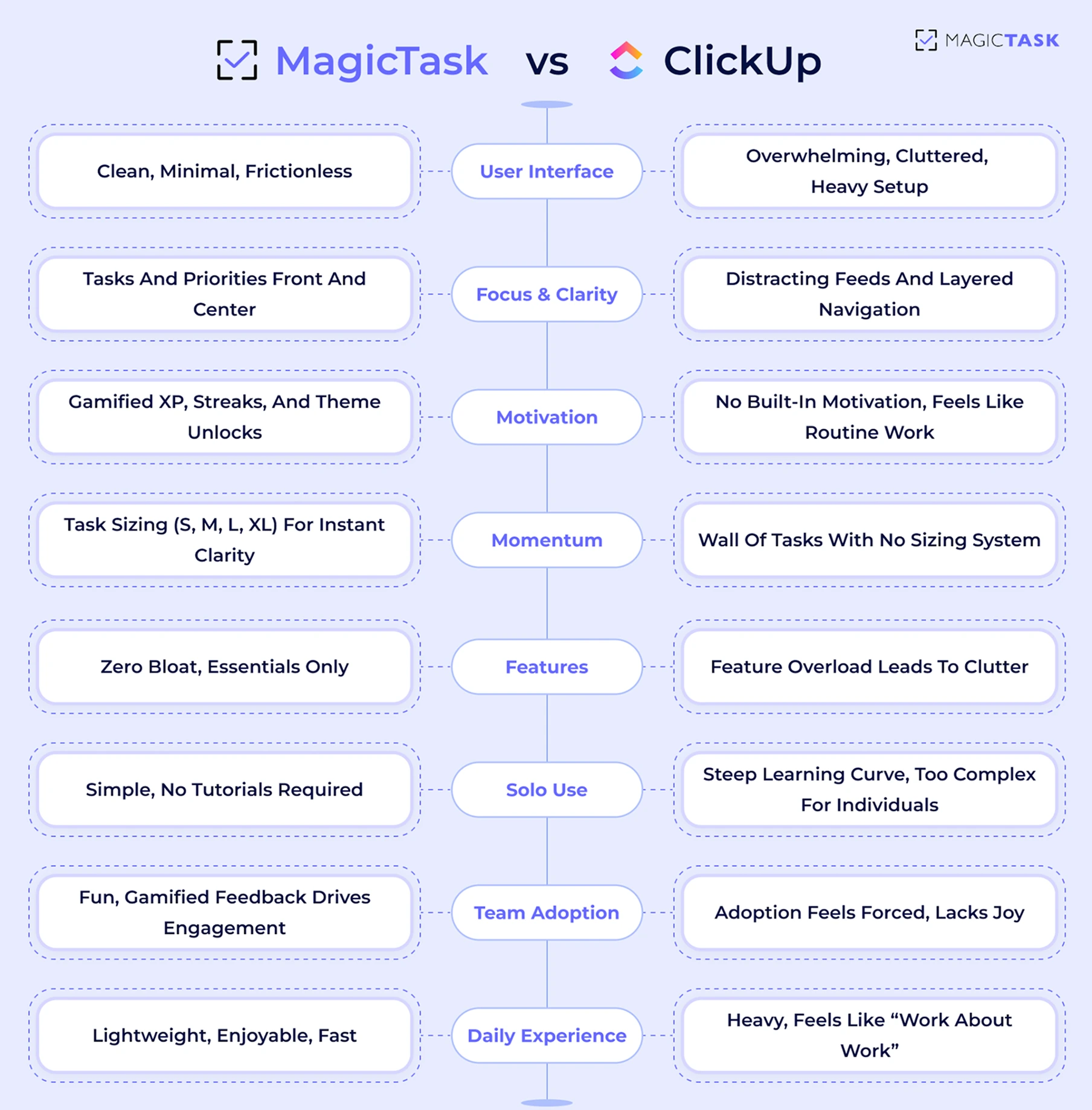
MagicTask vs ClickUp

When teams look for a change, they want better focus, faster workflows, and a tool that doesn’t feel like work.

MagicTask strips away the noise and replaces it with clarity, momentum, and just enough structure to keep everyone moving.

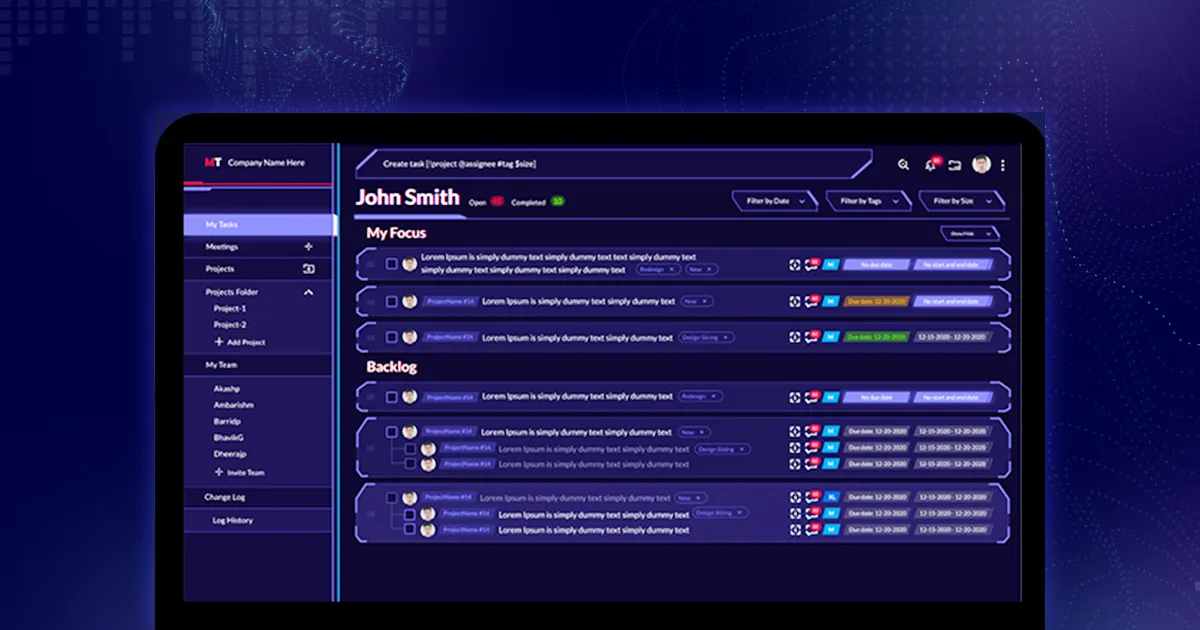
1. Clean and Intuitive UI

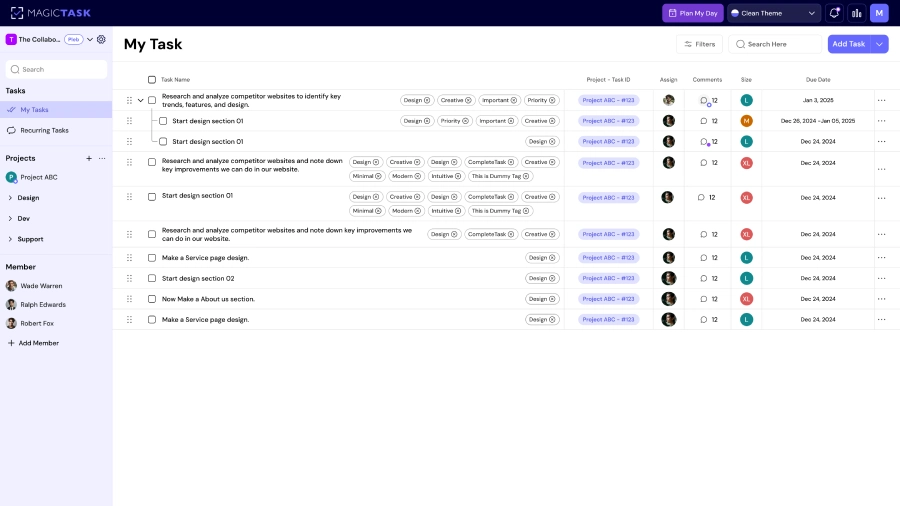
MagicTask is designed to be frictionless from the moment you log in. Where tools like ClickUp overwhelm with sidebars, dropdowns, and nested menus, MagicTask gives you a clean workspace that feels light and fast. No endless configuration. No digging through layers just to update a task.

Everything you need and only what you need is visible at a glance. Your tasks, priorities, and themes are front and center, without noisy team feeds or redundant settings distracting you.

As a result, you spend less time managing your tool and more time actually doing the work. It’s a UI that respects your time and your focus, especially on days when energy is low and clarity is everything.

2. Gamified Experience That Drives Consistency

ClickUp has powerful features, but let’s be honest, it lacks joy. It’s a workhorse, not a motivator. MagicTask changes that by transforming your daily planning into a rewarding, game-like experience, designed to keep you coming back.

Instead of treating productivity as a chore, MagicTask provides you with visual and motivational signals every time you complete a task, plan your day, or stay on track. These aren't just gimmicks; they’re grounded in behavioral science. 

Gamification can increase task completion rates by up to 150% because it taps into how humans are wired: we respond to feedback, rewards, and visible progress.

Here’s how MagicTask builds those habits without the burnout:

  • XP and Leveling: Complete tasks and earn XP. As you level up, your profile evolves with a status that reflects consistency.
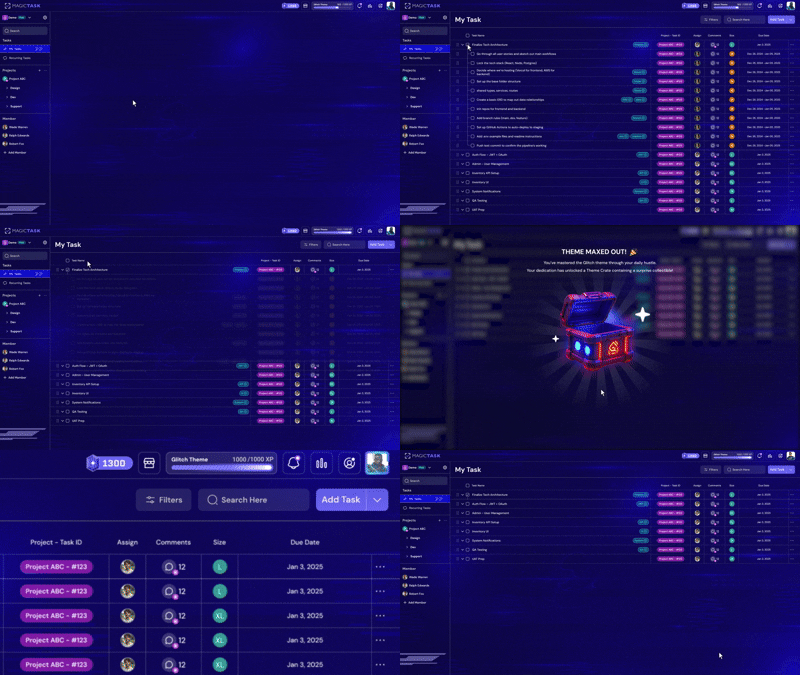
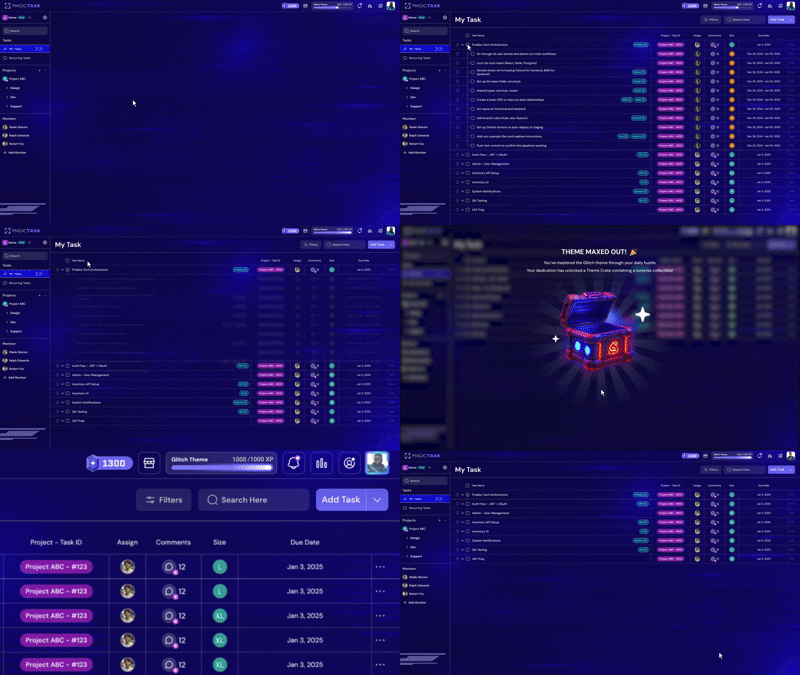
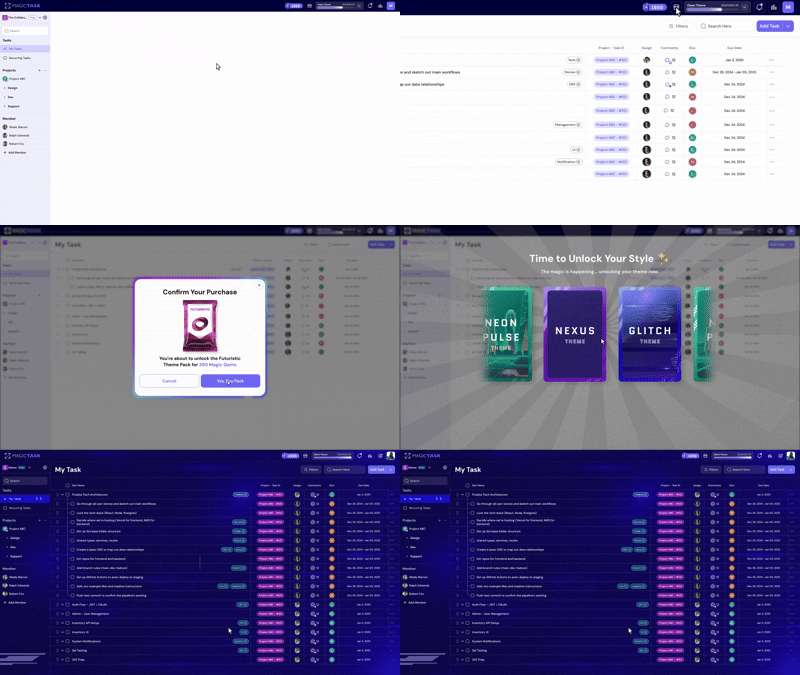
  • Theme Unlocks: Your workspace changes with your effort. The more consistent you are, the more custom themes you unlock, and a personal dashboard that feels earned.
  • Streak Tracking: You’re rewarded for showing up daily, even if you knock out just one task.a
  • Instant Feedback: Small animations, satisfying sounds, and task-complete haptics reinforce progress.
  • Zero Bloat: No badges for badge’s sake. Everything ties back to productivity.

This turns MagicTask into a system that wants you to succeed, one rewarding click at a time.

3. Built for Momentum

When every task feels the same, it’s hard to know where to start. Should you knock out a quick email or dive into a project update? Without clarity, you either overcommit your time or delay getting started altogether.

MagicTask solves this with a simple yet powerful system: task sizing. Every task is assigned a size — S, M, L, or XL — so you can instantly understand the effort required and plan your day accordingly.

This isn’t just about better time estimates. It’s about reducing mental load, improving follow-through, and creating momentum.

Here’s how it works:

Size Task Type Estimated Time Best Used When
S Quick tasks < 15 minutes You have a small window and want fast progress
M Routine or moderate tasks 15–30 minutes You’re in flow and want to keep moving
L Deep focus work 30–60 minutes You’ve carved out time for higher-impact output
XL Large deliverables or projects 2+ hours You need to break it down or time block intentionally

This structure helps you:

  • Plan your day around energy
  • Break down large tasks into doable chunks
  • Finish what you start and feel good doing it

Instead of staring at a wall of to-dos, you get a visual system that nudges you into action. That's how real progress gets built: one clear decision at a time.

4. Zero Bloat With Only the Features You Need

ClickUp tries to cover every use case: docs, goals, dashboards, whiteboards, mind maps, chat, sprint planning, automations, CRM features… the list never ends. But that’s exactly the problem.

Instead of clarity, you get clutter. 

MagicTask takes a different approach. Every feature is intentional and focused on helping you get tasks done without creating more overhead. No hidden menus, no nested views, and no dozens of feature tabs waiting to distract you from your actual work.

You’ll find:

  • A streamlined interface built for speed
  • A task system that prioritizes doing, not configuring
  • Built-in sizing, sorting, and planning
  • Visual rewards to make progress satisfying, not stressful

That way, you actually use the tool. Daily. Without dreading it.

MagicTask is for teams who’ve outgrown complexity, not because they can’t handle it, but because they don’t need it to work better. The bloat has been stripped away, leaving only what helps you finish more with less friction.

5. Simple for Solo Users & Engaging for Teams

Most tools either feel too technical for solo users or too dry for teams to rally around. MagicTask strikes the right balance. It’s frictionless enough that individuals can dive in without a tutorial, yet dynamic enough to keep entire teams motivated and aligned.

There’s no complex onboarding, no steep learning curve, and no rigid hierarchy of spaces and subtasks to decipher.

Instead, users get an interface they can pick up instantly, plus gamified feedback that turns daily progress into something people actually enjoy.

This is how MagicTask moves beyond “just another tool.” It becomes a system your team wants to use, not one they need to be pushed into. And when adoption comes naturally, productivity follows.

How Does MagicTask Keep Users Productive Without Overwhelm?

It’s easy to get buried under a mountain of tasks, especially when your system adds friction instead of reducing it. MagicTask is designed to keep you moving forward, not second-guessing your next step.

Beyond the UI and gamified structure, here’s what continues to keep users consistently productive:

1. Daily Mind Dump + Drag-to-Plan Workflow

Most task tools leave you with a stale to-do list by midday.

MagicTask keeps it dynamic. You start each day with a fresh mind dump, capturing everything, and then drag tasks into order of execution. It’s a ritual that resets your brain and brings clarity without having to rewrite your whole list.

2. Theme-Based Focus Environments

Themes inside MagicTask create a mood that supports focus. Whether it’s a minimalist space vibe or a cyberpunk hacker theme, you’re immersed in a setting that feels motivating, not monotonous.

3. Built-In Positive Reinforcement Loops

MagicTask isn’t shouting notifications at you all day. It rewards progress quietly but meaningfully. Every task checked off feeds into your point system, helping you level up, not just in the app, but in your habit-building mindset. This keeps you showing up, even on the slower days.

These details aren’t just “nice-to-haves”; they’re the behavior design decisions that make MagicTask an execution tool, not just a list.

Is MagicTask Right for Teams That Tried ClickUp and Gave Up?

Absolutely, especially if your team hit a wall with ClickUp’s complexity.

MagicTask was built for those who want to stay productive without needing a user manual.

If ClickUp felt like too many layers, too many features, or just too much of everything, you’re not alone.

Many teams set it up, push for adoption, and then quietly abandon it because it takes too much effort to maintain. MagicTask flips that experience.

It keeps things light, visual, and genuinely enjoyable without sacrificing structure. You can plan your day in minutes, not meetings.

Your team doesn’t need tech-savvy training or onboarding checklists to start using it. And thanks to the built-in gamification, engagement doesn’t just spike at the beginning; it actually sustains.

If your team needs:

  • Higher daily usage and fewer drop-offs
  • A simple, visual way to stay aligned
  • Less clicking and context-switching
  • A system that motivates people to want to use it

…then MagicTask is the next step. It doesn’t try to replace your work, it makes your work feel manageable again.

What Can’t Clickup Offer That MagicTask Does?

ClickUp is powerful, but its strengths become drawbacks for many teams. When every feature, view, and toggle is turned on, it’s easy to lose what's essential: ease of use, motivation, and clarity. MagicTask fills in those gaps. 

Below is a table comparing what MagicTask offers vs. what many users feel ClickUp struggles with.

Feature / Experience MagicTask ClickUp
Simple task sizing
Gamified feedback loops
Feature bloat
Fast task capture from anywhere
Clear priority drag-and-drop sorting
Mood-boosting visuals & minimal distractions
Habit-friendly daily rituals & progression

Conclusion

ClickUp has the power, but too often, it brings the overwhelm with it. Complex configurations, steep learning curves, and bloated dashboards turn a promising tool into just another source of friction.

MagicTask takes a different path.

It’s built for people who want to enjoy getting things done without getting lost in setup, spreadsheets, or nested subtasks. With its lightweight interface, gamified feedback, and habit-friendly flow, it’s more than just a task manager. It’s a system you’ll actually want to use every day.

If ClickUp didn’t work for your team, MagicTask might be exactly what you’ve been looking for.

Ready to switch from complexity to clarity?

Try MagicTask and experience a task system that feels like progress 
How to Manage Tasks Efficiently with the 5-Step Planning Framework

5 step planning framework

Ever notice how some people breeze through projects while others can’t even get started? The difference isn’t talent or luck. It’s the process they use to handle tasks and actually finish them.

You see, most of us wing it when we face something new. We dive in, hope for the best, then wonder why we hit roadblocks or waste hours on the wrong priorities.

But there’s a better way. It’s a simple 5-step framework that changes how you approach any task, whether it’s writing a report or launching a side business.

And with the right tools behind it, this framework helps you get more done with less time and effort.

Let’s dive in.

How to Build an Efficient Task System (Framework + Tool Stack)

An effective task system doesn't require endless tweaking. It needs a repeatable structure you can trust. At the heart of that structure is a 5-step planning framework:

  • Capture everything in one place so nothing falls through the cracks
  • Clarify your tasks so you're not stuck rewriting them later
  • Organize your work by focus areas, not just dates
  • Prioritize what moves the needle instead of chasing noise
  • Plan your day with intention, not reactively

These five steps give you a clear, simple way to manage work at any scale. But here's the truth: just knowing the framework doesn't guarantee success.

Too many professionals start strong, but after a few days, friction builds. Things fall through the cracks, priorities blur, and the system collapses, not because the framework was wrong, but because the tool couldn't keep up.

I recommend using MagicTask because it was built to eliminate that friction. It supports each of these five steps with features designed to feel fast, intuitive, and even enjoyable.

MT app

Think of it like a blackjack system.

If you sit down with a clear strategy, you know when to hit, when to hold, and how much to bet. Follow it with discipline, and you don't need to make emotional decisions. You've already done the thinking.

You just trust the process and run the system. That's how you stay consistent, reduce mistakes, and build long-term success.

Step 1: Stop Relying on Memory, Capture Everything in One Place

Your brain was designed to solve one problem at a time. When you overload it with dozens of unresolved thoughts, your productivity stalls not because you’re doing too little, but because your attention is split across too many invisible threads.

Mind dump

In fact, a Harvard study found that people spend nearly 47% of their waking hours thinking about something other than what they’re doing. That kind of distraction actively makes you feel less satisfied. 

The solution?

Capture everything in one place, ruthlessly and consistently. Offload the mental noise and free your brain to do what it does best: 

Solve → Create → Act

Here’s what effective task capture looks like:

  • Do a complete mind dump at the beginning of each week or day. Get everything out of your head, no filter.
  • Log quick adds throughout the day, before small tasks get buried under context switching.
  • Avoid fragmentation. Don’t scatter tasks across emails, sticky notes, or messaging apps.
  • Use a system that’s accessible anytime. The best capture tool is the one you can reach in seconds.
📌 The problem: When notes live across email threads, whiteboards, random apps, and mental space, they’re easy to forget and hard to act on.

How MagicTask Helps:

MagicTask turns capturing tasks into a zero-friction experience. With its intuitive “Add Task” flow, you can dump a thought, idea, or to-do in seconds, without breaking focus. Add from anywhere, keep your flow moving, and trust that it’s all in one place.

Once everything is captured, you’re no longer carrying your task list around in your brain. You’re free to focus and execute. Now, it’s time to get rid of vague tasks.

Step 2: Eliminate Vague To-Dos — Make Every Task Actionable

Vague tasks look like this:

  • “Project update”
  • “Client outreach”
  • “Website fix”

They lack a clear outcome, a starting point, and direction. They force your brain to figure out the next step every single time you see them. That’s a drain on mental energy, and a recipe for procrastination.

Instead, you need to turn those foggy phrases into concrete, bite-sized actions. 

For example:

  • “Send Q3 client update email draft to marketing for review.”
  • “Follow up with Sam from Acme about contract signature.”
  • “Fix broken image link on homepage CTA section”

Actionable tasks remove ambiguity. You don’t need to think about what it means or where to begin; you just start.

And that’s where task sizing inside MagicTask makes this even easier. As you clarify your task, you also give it a size: S, M, L, or XL. Each one helps you scope effort and plan your day realistically.

Size Task Example
S Quick, under 10 minutes “Email John about file access.”
M Takes up to 30 minutes “Draft client proposal outline”
L Up to 1 hour or multi-step “Build Q4 financial summary deck”
XL Requires deep focus or multiple sessions “Design and build a new onboarding flow”

When every task is specific and right-sized, you avoid decision fatigue, reduce friction, and start finishing more with less stress.

Step 3: Replace Chaos with Structure — Organize for Visibility

Once your tasks are clear and actionable, the next challenge is visibility. Without structure, even the most well-written task list turns into a wall of noise.

Your brain loves context. When tasks are grouped by area of work, personal, client projects, and internal initiatives, it’s easier to focus, filter, and follow through.

Structure doesn’t need to be complex. In fact, simple structures work best:

  • Personal vs. Work folders to keep boundaries clear
  • Client Campaigns vs. Internal Ops for agency teams
  • Content Planning, Bug Fixes, Admin Tasks for startups

Without this level of organization, you end up with one long, disorganized task list. No hierarchy. No way to focus. Just clutter.

MagicTask solves this with a lightweight folder and project system that helps you organize by purpose without overcomplicating the setup. The clean UI means you won’t get lost in tabs, settings, or submenus.

Everything is drag-and-drop and always visible when you need it. You know where things live. And that makes it easier to keep moving.

Step 4: Don’t Do It All — Prioritize What Actually Moves the Needle

When every task feels equally urgent, you fall into reactive mode, jumping from one fire to the next without meaningful progress.

Task organization

The truth is, not everything needs your attention right now. The challenge is figuring out what does.

That’s where strategic prioritization comes in. Tools like the Eisenhower Matrix help you quickly filter through urgency and importance so you can focus on the few tasks that create the most impact.

Here’s how it breaks down:

Quadrant Description Examples
1. Urgent & Important Critical tasks that require immediate attention. Ignoring them causes real consequences.
  • Submit proposal before deadline
  • Fix a production bug
2. Not Urgent & Important High-leverage work that drives long-term results. Easy to postpone, but too valuable to ignore.
  • Plan next quarter’s roadmap
  • Build client strategy
3. Urgent & Not Important Tasks that demand time now but don’t drive much value. Often best delegated or batch-processed.
  • Reply to status emails
  • Confirm calendar invites
4. Not Urgent & Not Important Low-value distractions that feel like “work” but aren’t meaningful. Usually safe to ignore.
  • Tweak color coding
  • Browse dashboard themes

Once you understand this grid, task prioritization becomes less about guesswork and more about deliberate action.

And when you use a tool that lets you quickly drag, sort, and visually review your list, it’s easier to keep those top priorities in sight and in motion.

Step 5: Plan Each Day Like It Matters

A lot of people start their day by opening their inbox and letting someone else’s priorities take over.

Without a plan, even the most productive hours get lost in meetings, distractions, or low-impact busywork.

Daily planning creates a structure that protects your time. It ensures your best energy is spent on the work that actually moves things forward.

It also removes decision fatigue. You’re not scrambling to figure out what to do next every hour.

Here are a few practical methods to structure your day with intention:

  • Time Blocking: Reserve fixed windows for high-focus work, meetings, admin, and breaks. Treat these blocks like appointments that are non-negotiable.
  • Pomodoro Technique: Work in 25-minute sprints followed by short breaks to maintain energy and reduce burnout.
  • Deep Work Blocks: Protect at least one distraction-free block each day for meaningful, cognitively demanding work.

Systems like this only work when they’re easy to use consistently. That’s where MagicTask gives you an edge.

You can drag tasks into your day, sort them by size to match your available time, and see your calendar overlay to avoid overloading your schedule. It’s fast, visual, and built to help you focus, not micromanage.

Why This 5-Step Framework Works Best with MagicTask

Most task systems fail quietly, not because people lack motivation, but because their tools demand too much effort for too little payoff.

You start with energy, create a list, try to organise it… and within a week, the system becomes yet another task to manage.

MagicTask was designed to avoid that spiral. It aligns directly with this 5-step planning framework — but makes it effortless to follow and satisfying to stick with.

The interface stays frictionless. You don’t waste time wrestling with dropdowns or bloated workflows. Everything, from capture to prioritisation, happens fast, so planning doesn’t become a chore.

What seals the habit is gamification. You earn XP, level up your workspace themes, and see visual progress for daily consistency. Instead of waiting for big wins, you get rewarded for showing up, and that’s what makes the system self-reinforcing.

This framework works best not just because it’s clear, but because MagicTask makes it sustainable, fun, and nearly automatic.

Conclusion

A task system doesn’t need to be complicated — it needs to be consistent.

The 5-step planning framework (capture → actionable → organize → prioritize → plan) gives professionals and teams a repeatable way to work with clarity and control. But without the right tool, even the best framework breaks down.

MagicTask turns this system into a habit. It removes friction, rewards follow-through, and keeps everything in one place, so your to-dos stop piling up and start getting done.

If you're ready to stop juggling sticky notes and start managing your day with intention, it’s time to** build your task flow with MagicTask.**

Perfectionism Is Killing Your Productivity: Here’s How to Fix It

Stop perfectionism

If you’ve ever spent hours rewriting an email draft, tweaking a presentation, or reorganising your task list instead of actually starting the work, you’re not alone. Perfectionism feels productive because you’re doing something, but beneath the surface, it quietly drains momentum.  

High-performers often get stuck here. You want every project to be flawless, every detail to be airtight, and every outcome to exceed expectations.

The problem is that the pursuit of “perfect” traps you in an endless loop of overthinking, second-guessing, and unfinished work.

In this blog, you’ll learn why perfectionism stalls productivity, how to reframe your approach to getting things done, and how MagicTask makes consistent progress feel natural, maybe even addictive.

What’s Really Stopping You from Finishing Things?

Perfectionism often disguises itself as ambition, but at its core, it’s usually rooted in fear of failure, judgment, or losing control.

When you demand flawless outcomes, every task begins to feel heavier than it really is.

Instead of taking action, you start analysing every possible angle, drafting and redrafting, and holding off until the “right” moment arrives.

What’s Really Stopping You from Finishing Things

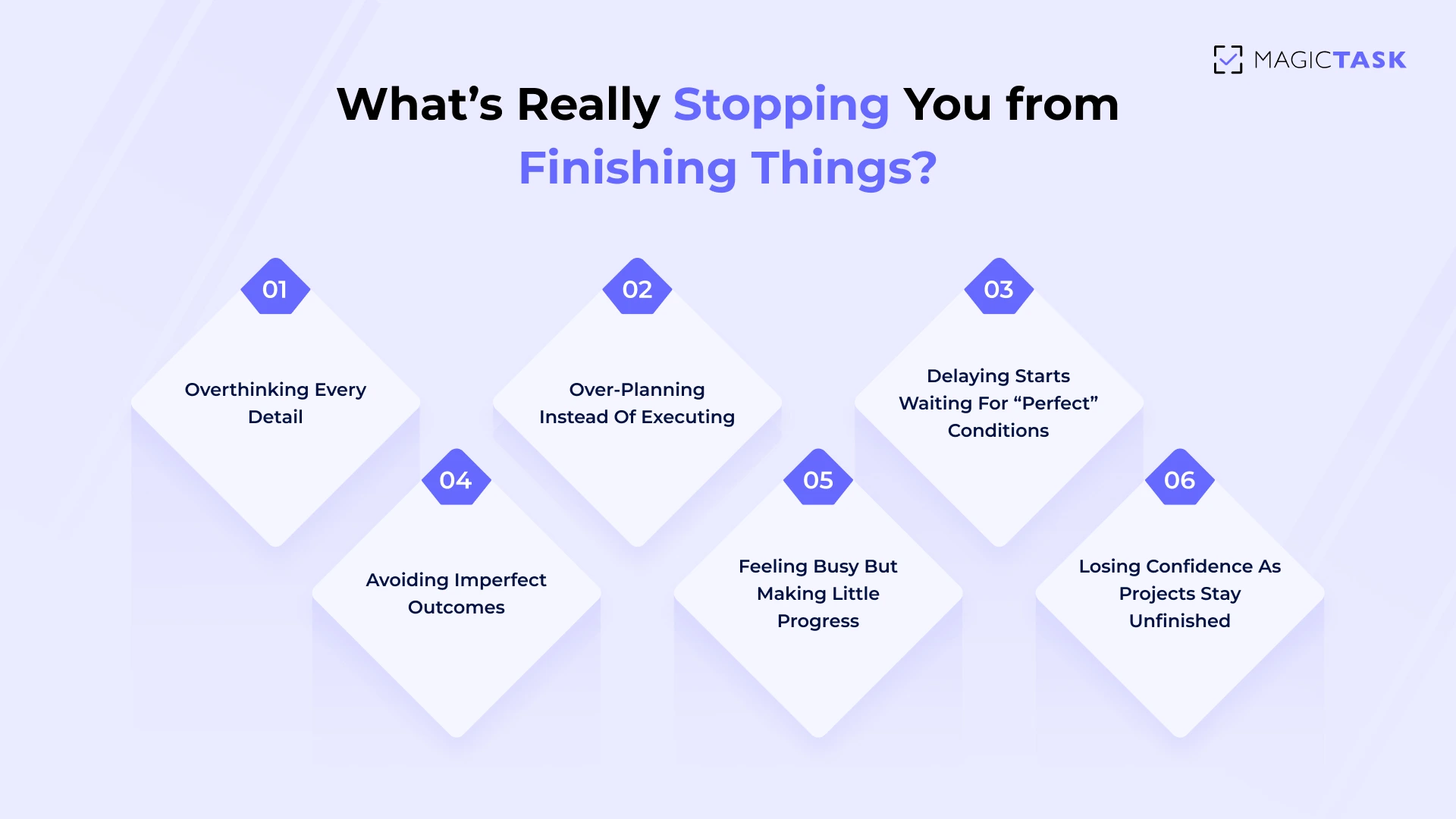
Here’s how perfectionism quietly slows you down:

  • Overthinking every detail until decisions feel impossible to make
  • Over-planning instead of executing, leaving little room for real progress
  • Delaying starts because the “perfect” conditions never seem to arrive
  • Avoiding imperfect outcomes, even when they would move you forward faster

As a result, you feel busy, but the needle barely moves. Your to-do list grows, yet meaningful progress stalls. You may even catch yourself starting multiple projects without finishing any because none of them ever feels “good enough.”

Over time, this constant cycle creates frustration, drains your energy, and erodes your confidence. 

Breaking free from this trap begins with recognising the pattern. It’s your approach that needs rewiring.  

How Do You Break the Perfection Loop and Actually Get Stuff Done?

When you constantly delay finishing because you’re chasing flawless results, progress suffers.

The key is to create systems that help you define success, manage your time, and move forward without second-guessing every decision. 

1. Define What “Done” Looks Like Before You Start

Before you start working on any task, take a moment to define what “done” actually looks like.

Without clear boundaries, perfectionism creeps in, and you end up tweaking endlessly instead of finishing. A clear “definition of done” sets expectations upfront, helps you prioritise, and removes the guesswork from deciding when to stop.

For example, instead of saying, “I’ll work on the client report,” define it as: “The report is considered done when the executive summary, charts, and recommendations are drafted, proofread, and sent for review.”

This simple shift creates clarity, reduces decision fatigue, and makes it easier to move forward confidently without spiralling into endless revisions.

2. Embrace Version 1 Thinking

Perfectionism thrives when you believe your first attempt needs to be flawless. Shifting to a “Version 1” mindset removes that pressure and focuses on getting something out instead of getting it perfect.

The goal isn’t to deliver the final masterpiece immediately — it’s to create a solid foundation you can refine later.

Here’s how to practice Version 1 thinking:

  • Start fast, iterate later – Get the first draft, prototype, or idea out without overanalyzing.
  • Shift focus from perfect to progress – Progress builds momentum, and momentum drives motivation.
  • Set limits – Give yourself boundaries on time and effort, so you don’t spiral into endless edits.

When you allow yourself to create imperfectly at first, you unlock creativity and speed. The final polish can come later, once there’s something tangible to improve. 

3. Time-Box Your Work

Perfectionism often shows up as endless tweaking. One way to break free from this cycle is to time-box your tasks. Instead of working until it “feels right,” you set a strict time limit for completing a task and commit to stopping when the timer ends. 

This forces you to focus on progress, not endless polishing, and builds trust in your ability to finish.

Here’s how different time-boxing approaches work in practice:

Approach How It Works Best For Example
Pomodoro Method Work in 25-minute sprints, followed by a 5-minute break. After four cycles, take a longer 15–30-minute break. Deep work without burnout Writing a blog section in 25 mins
Fixed Deadline Set a clear finish time and stick to it, regardless of outcome. Urgent tasks that can’t drag on Finish pitch slides in 2 hours
Task-Based Limits Assign time based on task size rather than difficulty. Managing multiple priorities 30 mins to review emails, 45 mins for meeting prep

When you box your time, you replace “perfect” with “finished,” which builds momentum and creates natural stopping points. 

4. Let Feedback Replace Internal Pressure

Perfectionism thrives when you keep your work hidden until it feels “ready.” The problem is, that moment rarely comes. Instead of endlessly refining in isolation, shift the focus from self-imposed pressure to external input. 

Sharing your work earlier invites collaboration, gives you fresh perspectives, and speeds up progress.

Here’s how to make feedback your ally: 

  • Share drafts early: Even rough versions provide a starting point for discussion.
  • Seek objective perspectives: External input often highlights what actually matters versus what you’re overthinking.
  • Use feedback loops: Set up regular check-ins or reviews to avoid sitting on work for too long.

The goal is to iterate faster. By getting feedback sooner, you spend less time trapped in the perfection loop and more time improving what truly matters.

How MagicTask Makes It Easier to Start, Focus, and Finish

Breaking free from perfectionism is about having the right system to guide your focus. That’s where MagicTask comes in.

Its gamified design, structured task sizing, and visual progress tracking make it easier to start, stay engaged, and actually finish what you set out to do.

Instead of wrestling with endless to-do lists, you get a tool that encourages action, rewards consistency, and keeps distractions to a minimum.

1. Task Breakdown and Sizing Helps You Start

Perfectionism often kicks in when tasks feel too big, too vague, or too intimidating to begin.

You stare at a long, undefined to-do list and start overthinking: Where do I start? What if I mess this up? That mental friction creates delays, and delays feed procrastination.

MagicTask solves this problem by helping you break large goals into smaller, structured tasks and then assign each one a task size — S, M, L, or XL.

These sizes aren’t just labels; they represent the estimated effort and focus required. Once you define the size, the task stops feeling overwhelming and starts feeling actionable.

Why Task Sizing Works

  • Removes ambiguity: A vague “Finish report” task becomes a series of smaller, defined actions.
  • Creates a natural starting point: You can pick smaller tasks first to build momentum.
  • Improves planning accuracy: You know exactly how much time to allocate based on size.
  • Boosts motivation: Smaller wins add up fast, giving you a sense of consistent progress.
Task Size Effort Level Example Task Impact on Progress
S (Small) 10–15 mins Reply to client email Quick win, builds early momentum
M (Medium) 30–45 mins Draft project outline Manageable focus, steady progress
L (Large) 1–2 hours Create presentation slides Requires deeper concentration
XL (Extra-Large) 3+ hours Finalise quarterly strategy Break into subtasks for efficiency

With this structure, you always know where to begin, how much time to budget, and what success looks like. Instead of chasing “perfect,” you focus on making measurable progress, one task at a time. 

2. Subtasks Are Organized, Not Overwhelming

One of the biggest triggers for perfectionism is seeing a massive project on your to-do list without knowing where to begin. The weight of that single “big task” can make it feel impossible to start. 

MagicTask solves this by letting you break projects into neatly organized subtasks, each one actionable, clear, and manageable.

Instead of dumping everything into one endless checklist, subtasks in MagicTask are grouped logically within their parent task. This structure gives you a visual roadmap, helping you understand what needs to be done first and what can wait. 

There’s no chaos, no scattered notes, and no constant context-switching. You simply focus on the next subtask in line, finish it, and move forward with confidence.

This approach keeps you from overthinking, reduces mental clutter, and turns big, intimidating projects into clear, achievable steps that keep momentum flowing.

3. Daily Planning Flow Keeps You Moving

MagicTask’s daily planning ritual helps you turn intention into action. Start your day by mind-dumping tasks, then drag them into order based on importance and effort. 

With your plan set visually, you avoid overthinking and slip naturally into execution mode. The system reduces mental clutter while keeping priorities in focus.

4. Progress Is Gamified to Rewire Your Mindset

Perfectionism thrives when progress feels invisible. MagicTask flips that dynamic by rewarding consistent action rather than flawless execution.

Each task you complete earns points, unlocks visual animations, and pushes your themes to the next level, creating a feedback loop that makes moving forward feel natural and rewarding.

Gamification works because it connects small wins to tangible rewards, helping you retrain your brain to value progress over perfection. Studies show that organisations using gamified systems experience up to a 90% increase in productivity. Instead of fixating on “perfect,” your focus shifts to completing tasks, building momentum, and celebrating measurable achievements.

Here’s how MagicTask helps you break free from the perfection trap:

  • Points for every task → Builds a sense of accomplishment immediately.
  • Theme-level progression → Visual milestones keep motivation high.
  • Instant feedback cues → Satisfying animations and sounds reinforce action.
  • Consistent reward cycles → Keeps you coming back, even on low-energy days.


MagicTask turns productivity into an addictive loop of achievable wins. Over time, you stop obsessing over flawless results and start training your mind to crave progress instead.

How Does Gamification Shift Your Mindset from Perfect to Progress?

Perfectionism often tricks you into believing you need to “feel ready” before taking action. That mindset leads to delays, overthinking, and endless tweaking. MagicTask turns this on its head by rewarding progress, not perfection. 

Instead of waiting for the “right moment,” you’re motivated to start, act, and complete tasks because each step forward gives you instant feedback and a sense of accomplishment.

Here’s how MagicTask shifts your focus from flawless results to consistent progress:

  • Rewards action, not hesitation – Points are earned for completing tasks, not perfecting them.
  • Theme-level growth – Progression systems make consistent action feel meaningful and visible.
  • Momentum-driven design – Small wins stack up, keeping you engaged and motivated.
  • Positive reinforcement – Animations, sounds, and points create a feedback loop that encourages starting, not stalling.

This shift rewires your brain to crave progress and momentum over flawless outcomes, helping you stay productive without getting stuck in the perfection trap.  

What Does a Productive (But Imperfect) Day Actually Look Like?

A productive day is about steady, intentional progress. When you let go of the need to get everything “just right,” you create space to focus on what truly matters. Instead of wasting time perfecting small details, you build momentum through action and structured planning.

Here’s what a balanced, progress-driven day looks like:

  • Start with a daily mind dump → Capture everything on your mind without filtering or judgment.
  • Time-block your execution → Allocate focused work periods but leave room for flexibility and last-minute changes.
  • Mix deep work with quick wins → Balance high-priority projects with smaller, lighter tasks to maintain energy.
  • Celebrate progress over polish → Done beats perfect every time. Progress compounds faster than waiting for “ideal” results.

By shifting the focus from perfection to completion, you stay consistent, build confidence, and keep your productivity flowing without burning out. 

How Does MagicTask Keep You Consistent Without Overthinking?

Staying consistent isn’t about doing more — it’s about removing friction so you can focus on progress. MagicTask makes this effortless by turning planning into a lightweight ritual instead of a stressful process.

MagicTask Keep You Consistent

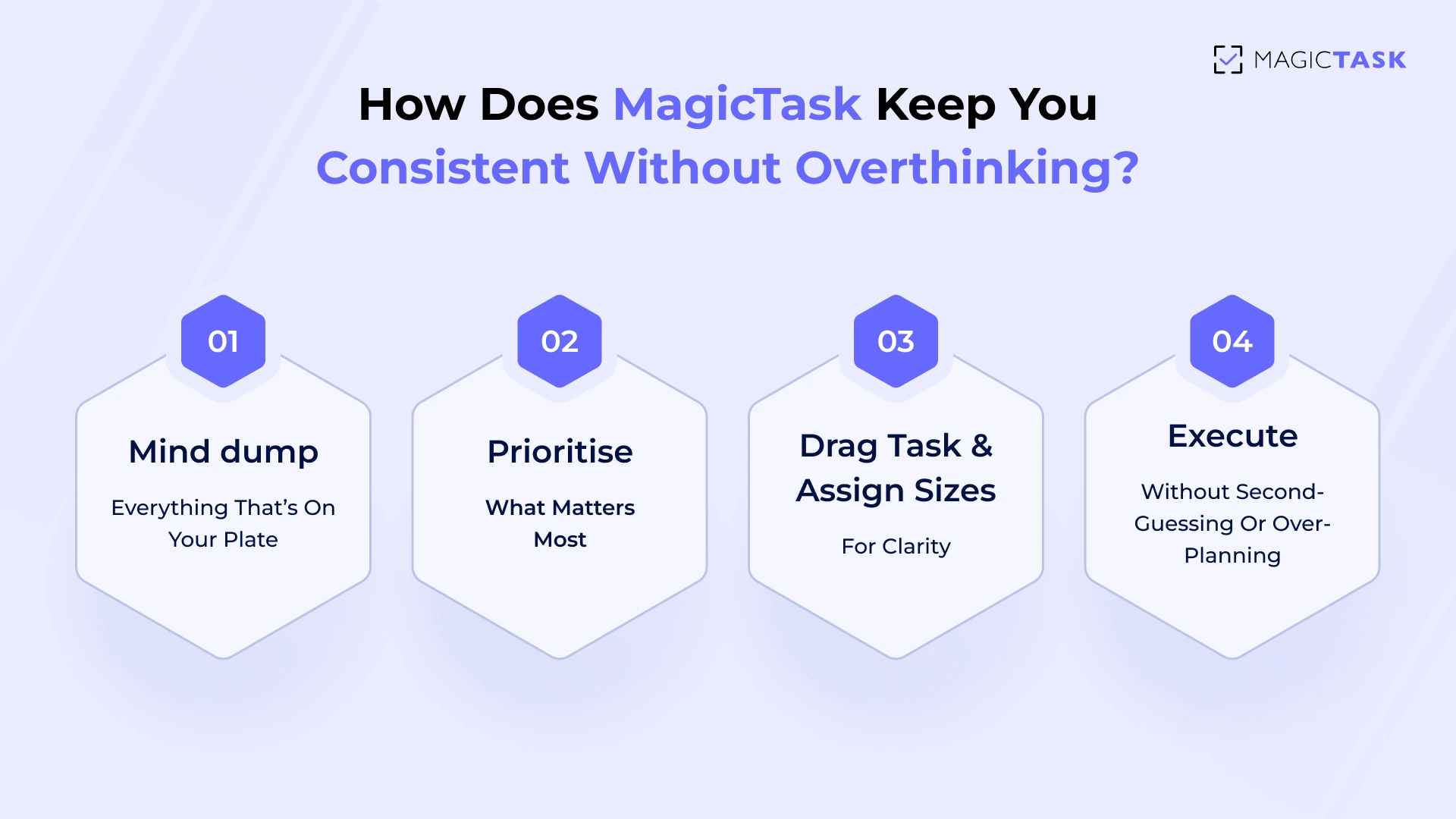
You start your day with a daily planning flow inside MagicTask:

  • Mind dump everything that’s on your plate
  • Prioritise what matters most
  • Drag tasks into order for a clear execution path
  • Execute without second-guessing or over-planning

The clean, distraction-free interface keeps you focused; no bloated dashboards, noisy team feeds, or cluttered views to slow you down. Progress also feels rewarding, thanks to visual gamification. 

Points, levels, and theme upgrades give you instant feedback, which keeps motivation high even on low-energy days.

This combination of structure and simplicity builds a natural rhythm, helping you stay consistent without falling into the perfectionist trap. 

Conclusion

Perfectionism feels like productivity, but it quietly drains your time, energy, and creativity. While you’re stuck polishing details and overthinking outcomes, real progress slips away. It’s not about lowering your standards; it’s about shifting your focus from flawless execution to consistent action.

By using systems that reward momentum, you can maintain high-quality results without getting trapped in endless cycles of tweaking and hesitation.

MagicTask makes this shift seamless. Its lightweight, gamified approach turns productivity into something intuitive and even enjoyable. You’ll stay focused, finish tasks faster, and finally stop perfectionism from holding you back.

Progress beats perfect, and with MagicTask, building that habit becomes effortless.

The Weekly Review Method to Keep Projects and Priorities Aligned 

The Weekly Review Method

Most teams know how to kick off a week with energy. They rally around Monday meetings, sprint planning sessions, and fresh to-do lists.

But by Friday, momentum often fades. Priorities shift midweek. Tasks get forgotten. And what started strong ends with a scramble, or worse, silence. 

It’s not that your team isn’t trying. It’s that without a system to review, reset, and realign, even the most talented teams drift off course.

Without a deliberate pause to review what worked, what didn’t, and what’s next, even high-performing teams lose alignment.

The Weekly Review Method is a simple, repeatable ritual that solves this.

It helps teams clear clutter and commit to the right priorities before the next week steamrolls in.

In this blog, we’ll walk through how Weekly Reviews fix scattered execution, how to run one effectively inside MagicTask, and why building this habit unlocks lasting clarity, consistency, and momentum. 

Why Do Productive Teams Rely on Weekly Reviews?

Weekly reviews are the difference between busy teams and effective ones.

They offer a built-in opportunity to slow down just enough to reflect, reassess, and realign before rushing into the next wave of tasks. Without them, priorities blur, communication breaks down, and teams fall into reactive mode.

1. Weekly Feedback Fuels Engagement

In fact, companies that provide meaningful weekly feedback maintain significantly higher employee engagement.

Gallup reports that 80% of employees who receive weekly feedback remain fully engaged, compared to much lower rates with less frequent check‑ins.

2. A Ritual That Prevents Misalignment

This simple ritual prevents misalignment and task sprawl by forcing a clear-eyed look at what’s been completed, what’s lagging, and what needs to shift. It transforms the usual end-of-week chaos into focused clarity, so the next week starts with purpose, not catch-up. 

3. Driving Accountability Across Teams

Weekly reviews also boost accountability across departments. Instead of relying on scattered check-ins or buried comments, team members surface wins, blockers, and missed handoffs in one shared moment.

4. Clarity and Course-Correction for Leaders

Leaders gain visibility into progress and pain points, making it easier to course-correct, redistribute workloads, or double down on what’s working. 

5. It's About Better Decisions, Not More Work

Ultimately, it’s not about doing more but about making better decisions together, every single week.

What Does an Effective Weekly Review Look Like?

An effective weekly review is about creating space to assess progress, reset priorities, and align the team around what matters most.

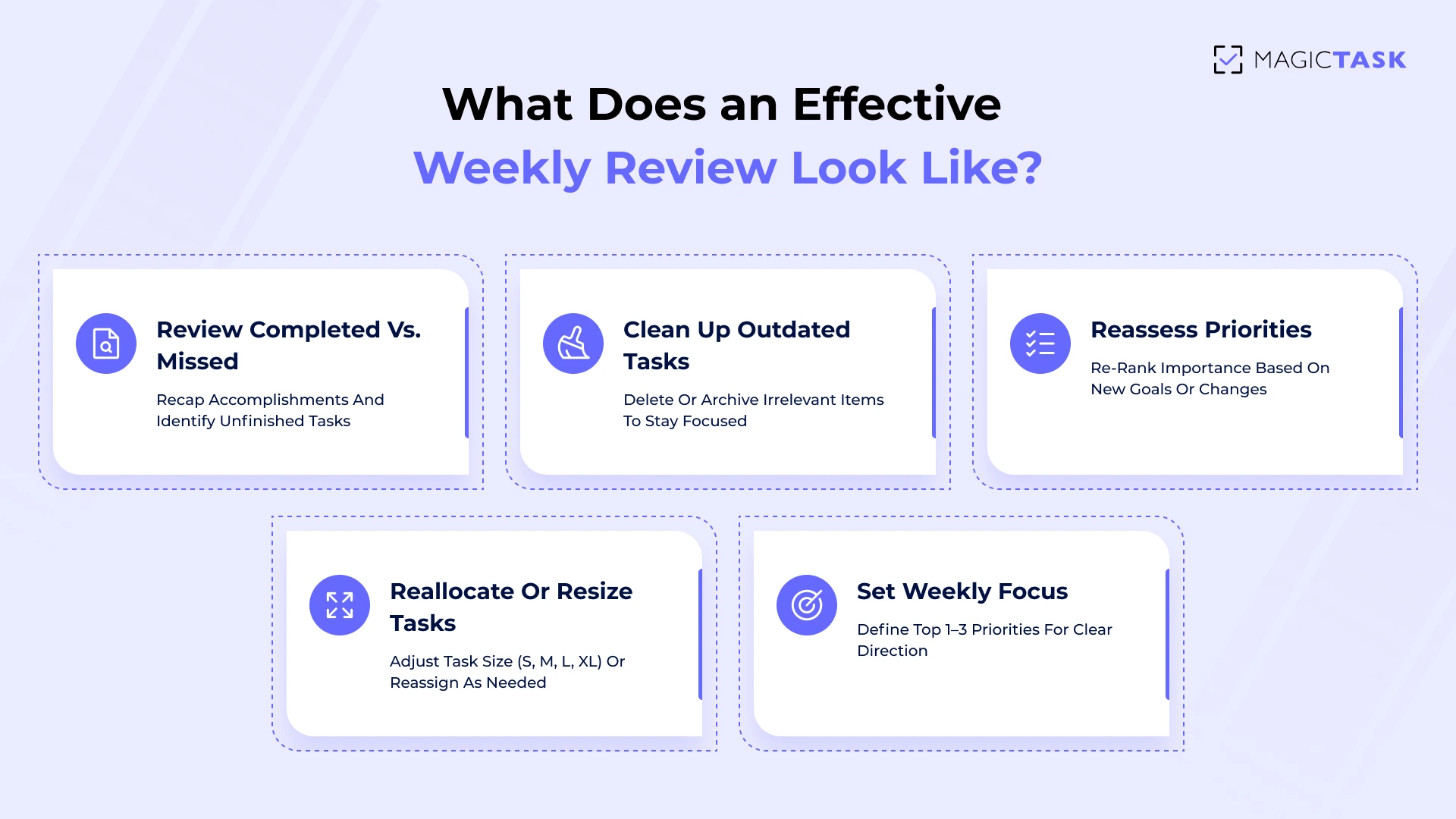
Whether you’re running solo or managing a team, the following steps keep your week grounded and intentional:

What Does an Effective Weekly Review Look Like

  • Review what was completed and what was missed: Start by recapping accomplishments and identifying tasks that were not completed. This creates a clean snapshot of current momentum and bottlenecks.
  • Clean up and close out outdated tasks: Remove clutter by deleting or archiving tasks that are no longer relevant or useful. This improves focus and ensures your task list reflects what actually matters.
  • Reassess priorities for the coming week: Things change fast. Use this time to re-rank what’s most important based on new developments or shifting goals.
  • Reallocate or resize tasks as needed: A task marked “urgent” on Monday might have a lower priority by Friday. Adjust sizes (S, M, L, XL) or reassign them to the right teammate or day.
  • Set a clear focus for the week ahead: Define your top one to three priorities. Clarity here fuels execution and keeps the whole team pulling in the same direction.


How Can You Run a Weekly Review Inside MagicTask?

A good review session creates momentum for the week ahead. You want to see what moved, what stalled, and what needs your attention next. MagicTask gives you the structure to do that without adding more admin work. 

Instead of juggling spreadsheets, Slack threads, and mental checklists, you get one streamlined view that’s built for clarity, speed, and progress.

Here’s how:

1. Review Progress with Folders and Project Views

Start your weekly review by scanning each folder or project view in MagicTask. This gives you a clear picture of how work is organized and where progress stands across departments, clients, or personal goals.

Folders help you track broader categories, while project views let you zoom into detailed workflows. It’s about spotting patterns and making better decisions.

During this step, look for:

  • Tasks that moved forward but didn’t finish
  • Projects where no activity occurred (possible red flags)
  • Tasks assigned to the wrong category or person
  • Unclear priorities or duplications
  • Completed work that deserves recognition or follow-up

Instead of tab-hopping or mentally piecing things together, MagicTask gives you a visual system where everything lives in one place. That means less time sorting and more time realigning everything before the new week begins.

2. Reorder Priorities with Simple Drag-and-Drop

After reviewing progress, it’s time to reset the board. MagicTask’s drag-and-drop system makes reordering tasks fast, frictionless, and visually satisfying, a major upgrade from clunky, multi-step updates in traditional tools.

Instead of rewriting task lists or switching screens, you can reprioritize your workflow in seconds.

Use drag-and-drop to:

  • Move tasks to the top that need immediate focus
  • Shift lower-priority items down the list or into the backlog
  • Group related tasks together for flow
  • Visually separate incomplete work from new initiatives
  • Align solo tasks with team objectives in shared projects

This simple interaction removes cognitive overload. You don’t need to replan everything from scratch. Just adjust what’s changed and move forward with clarity. That’s the power of intentional task flow, made effortless. 

3. Reevaluate Complexity Using Task Sizing

As priorities shift, so should your understanding of how much effort a task will take. MagicTask’s built-in sizing system, Small, Medium, Large, and Extra Large, gives teams a shared language for complexity and time expectations.

During your weekly review, these sizes help you decide what stays on your plate, what needs to move, and what should be delegated.

Here’s how the sizing system works inside MagicTask:

Task Size Description Example
S Quick task, minimal effort Send an email, update a doc title
M Moderate effort, single work session Write meeting notes, fix a bug
L Multi-step task, higher focus needed Create a new landing page
XL Complex, time-intensive, and often split into time blocks Plan product roadmap, design campaign

Using sizing during reviews makes work feel more measurable. It also prevents burnout by creating realistic expectations across the team. Think of it as scoping, just gamified, visual, and far more fun. 

When Should You Schedule Your Weekly Review?

The best time for a weekly review is when your team can pause, reflect, and reset without distractions. Two windows tend to work well: Friday afternoons and Monday mornings. Each has unique benefits depending on your team’s rhythm and workload.

Friday afternoons give your team a chance to wrap up the week, clear lingering tasks, and start the weekend with mental clarity. You return on Monday knowing what matters most.

Monday mornings, on the other hand, serve as a focused kickoff. With a fresh mindset and full participation, teams can reprioritize quickly, avoid chaos, and step into the week with direction.

To make it effective: 

  • Block 30–45 minutes for the review on your team calendar.
  • Choose a recurring time so it becomes habitual.
  • Keep the meeting structured, no rambling status updates.
  • Use MagicTask’s real-time updates so everyone sees the same progress view.
  • Rotate who leads the review to keep it dynamic.

Pro Tip: Set up a recurring task in MagicTask called “Weekly Review.” That way, the task itself becomes a prompt and you earn points just for completing it. Over time, that micro-reward helps transform one small meeting into a high-impact ritual.

What Are the Benefits of Making This a Ritual, Not a One-Off?

A weekly review is a stabilising force. When it becomes a recurring ritual, it anchors your team’s energy and focus. Instead of reacting to shifting priorities or chasing unfinished tasks, teams begin the week knowing exactly where things stand. This clarity leads to more consistent execution and fewer surprises.

Ritualising the review also builds rhythm across departments. Everyone begins operating on the same cadence, making collaboration smoother and updates more predictable.

It eliminates the awkward gaps where tasks fall through the cracks because no one noticed, or because priorities quietly shifted without alignment. 

By continuously cleaning up outdated, irrelevant, or duplicated tasks, you improve the hygiene of your workflow. That’s not just organisational—it’s preventative.

It reduces friction later, avoids redundant work, and keeps the system lean and efficient. Teams stop accumulating clutter that causes technical debt in project management. 

And the most significant shift is that teams stop feeling reactive. Instead of scrambling midweek or drowning in open loops, they gain a moment to pause, assess, and steer together, turning intention into execution with confidence. 

What Makes Weekly Reviews Better with MagicTask

Weekly reviews work.

But how you run them makes all the difference. A clunky system can make the process feel like just another meeting to survive, while the right tool turns it into a fast, energising reset. 

MagicTask is built to make weekly reviews effortless, engaging, and actually enjoyable. It enhances the ritual, so your team sticks with it week after week. Let’s look at how. 

1. Gamified Progress That Builds Weekly Habits

The hardest part of a weekly review? Making it stick. Most teams start strong, then taper off. But MagicTask uses gamification to flip that dynamic.

Each completed task contributes to your theme’s progress and earns productivity points, giving every review session an immediate sense of reward. That dopamine hit makes the ritual feel satisfying, not obligatory.

Instead of merely reviewing to “stay organised,” your team is advancing through a game-like system that visually reflects their momentum. It turns reflection into a reward loop. That’s how good habits are built and kept.

2. A Clean Interface That Feels Fast and Frictionless

No one wants to review tasks inside a cluttered app. MagicTask’s interface strips away the noise and gives you only what you need; nothing more, nothing less. It’s intentionally minimal, so your weekly review flows without distractions or lag. That clarity makes the review process feel more like a reset than a chore.

You’re not digging through dropdowns or clicking through endless tabs. Instead, everything is where you expect it: 

  • Folders and projects grouped clearly by focus area
  • Task sizes are visible at a glance for quick reassessment
  • Smooth animations that give feedback without getting in the way

This kind of intuitive design doesn’t just look good; it encourages you to stick with the system. Because when a tool feels effortless to use, it gets used consistently. 

3. Structure Without the Bloat

Structure is essential for clarity, but too much of it slows teams down.

Many task platforms lean too hard in either direction: they’re either too rigid, with layers of unnecessary complexity, or too loose, leaving teams unsure how to stay aligned. MagicTask finds the sweet spot.

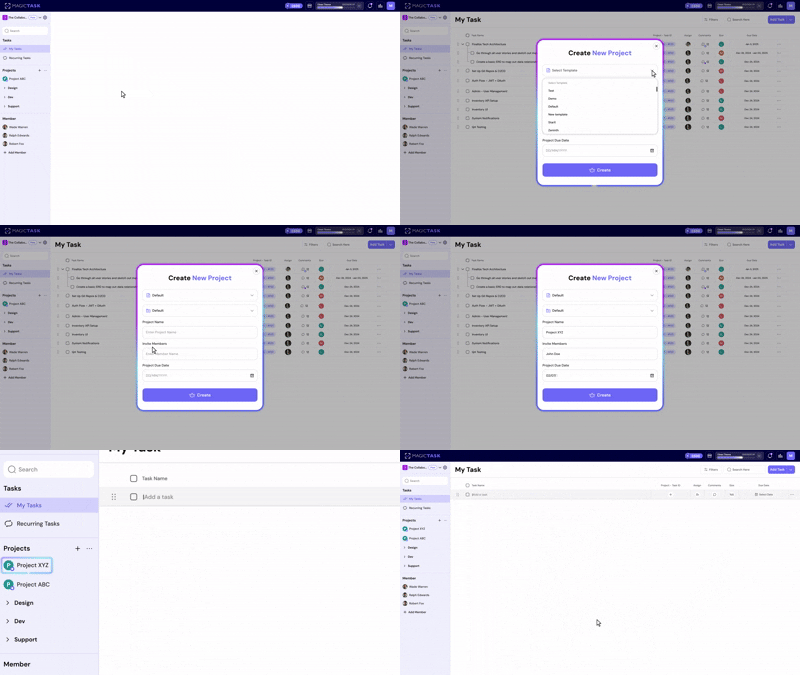
Instead of forcing detailed setups or overwhelming you with configuration menus, it gives you just the right amount of built-in organization.

Features like folders, task sizes, and drag-and-drop ordering let you build structure organically as your week evolves. You don’t have to stop and rethink your system every time priorities shift.

Project creation

During a weekly review, this lightweight structure becomes especially useful:

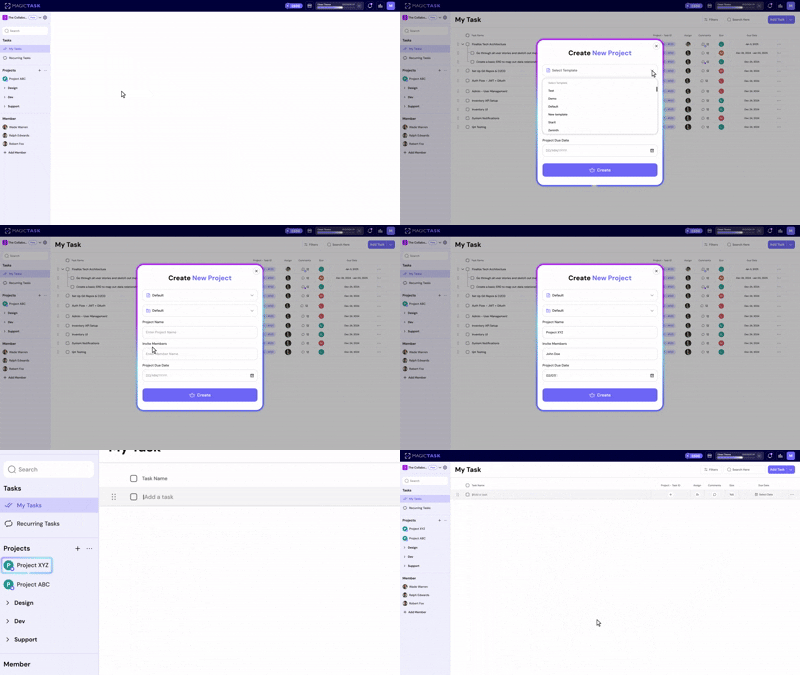
  • Folders help you group tasks by project, department, or initiative, so nothing slips through.
  • Task sizes make it easier to judge scope and rebalance workloads.
  • Drag-and-drop lets you quickly reorder tasks without navigating complicated menus.
  • Project views give teams instant visibility into what’s done, what’s stuck, and what’s next.

With MagicTask, structure becomes a support system. You get clarity without friction, which makes it easier to run consistent, effective weekly reviews.

4. Fits Everyone From Solos to Cross-Functional Squads

Some tools work well for individuals but fall apart in teams. Others are clearly built for enterprise use and overwhelm solo users. MagicTask bridges that divide with surprising elegance.

The same features that support personal consistency, like task sizing, streaks, and theme progression, scale effortlessly for team use.

There's no added complexity, just shared clarity. Cross-functional teams gain visibility into projects, while individual contributors continue to enjoy a motivating, clean, and easy-to-maintain experience. 

You can use it alone to build focus and habits. You can roll it out to your team without hours of training or tool fatigue. Either way, it just fits. 

Conclusion

Most teams don’t fall apart because of bad strategy; they fall apart because no one’s tracking the follow-through. Deadlines slip. Priorities blur. Tasks linger in limbo.

That’s where a Weekly Review makes all the difference. A reset. A repeatable moment to step back, zoom out, and realign.

MagicTask doesn’t just support this habit; it fuels it. With a fast, focused interface, smart structure, and gamified momentum, your Weekly Review becomes less of a chore and more of a checkpoint you actually look forward to.

Build the habit. Make it stick. Try MagicTask today.

Why MagicTask Is the #1 Todoist Alternative

MagicTask Todoist Alternative

Todoist has helped millions stay organized with its clean, checklist-based approach.

But as productivity needs evolve, so do the tools people use to stay on track. What starts as organized tasks often becomes an uninspired busywork.

In 2025, more users are looking for productivity tools that do more than organize. They want motivation, momentum, and a reason to keep going when the dopamine of crossing things off wears off.

That’s where MagicTask comes in. 

It’s a gamified productivity system that makes consistency feel rewarding. With visual themes, satisfying progress loops, and built-in accountability, MagicTask turns your to-do list into something you want to open.

Looking for a Todoist alternative that actually excites you to get things done?

Keep reading. This might just be the upgrade you didn’t know you needed. 

Why Are Users Looking for Todoist Alternatives in 2025?

Many professionals start with Todoist because it's familiar and reliable.

But over time, they find themselves disengaged, not because the app is broken, but because it no longer meets their evolving needs.

Today, users are expecting more from productivity tools. They’re not just looking for task organization, they want something that helps them stay engaged, consistent, and motivated over time.

Here's why many are exploring alternatives: 

  • Over-reliance on checklists can lead to a lack of motivation. While it's great for structure, checking boxes doesn't necessarily inspire action or progress.
  • Minimal visual engagement often leaves users feeling disconnected. A plain interface may feel efficient, but it doesn’t always invite daily use or spark creativity.
  • No built-in behavioral reinforcement means users must rely entirely on self-discipline. Without small wins or feedback loops, it’s easy to fall off.
  • Low team stickiness becomes an issue. New users join but rarely stay, as there’s little that draws them back or builds a habit around the tool.
  • Inconsistent usage patterns emerge. Without reinforcement or novelty, people revert to using the app occasionally, undermining its value as a daily driver.

If structure alone were enough, people wouldn’t be searching. The real challenge is staying engaged, and that’s where Todoist often falls short for today’s users. 

What Makes MagicTask Different from Todoist?

Before switching tools, most users aren’t just looking for “something different”; they want something better.

A task manager that keeps them engaged, works well with teams, and helps them stay consistent.

This is where MagicTask separates itself from checklist-style apps like Todoist.

1. A Gamified Experience That Rewards Progress

You know that tiny hit of satisfaction when you check something off a list? MagicTask takes that feeling and dials it up.

Instead of plain checkboxes, you complete tasks to earn points, level up your visual themes, and watch your productivity literally come to life. Animations respond, themes evolve, and progress becomes something you can see and feel, not just file away. 

It’s rooted in real psychology.

MagicTask Gamified Experience

Gamification works because it rewards behavior in the moment, nudging you to stay consistent, even on the days you’re dragging.

According to research, 89% of employees said gamified tools made them feel more productive, and over 60% said those same tools helped them stay motivated at work.

In MagicTask, tasks feed a loop of progress. The more you work, the more satisfying it becomes. And when that loop is this enjoyable, showing up every day doesn’t feel like a chore. It feels like momentum. 

2. Visual Feedback That Keeps You Engaged

Checking off tasks shouldn’t feel like sending them into a black hole. In MagicTask, every completed item sparks a moment of delight with animations that flutter, sounds that click, and themes that evolve. 

These micro-interactions aren’t just pretty details. They’re subtle reinforcements that tell your brain: “Nice work, keep going.”

This level of feedback helps build momentum, especially on days when the grind feels heavy. It taps into how our minds crave progress we can actually see.

Here’s what that looks like in practice:

  • Animations celebrate completion, offering a hit of satisfaction.
  • Leveling up your theme adds visible rewards for consistent effort.
  • Subtle audio cues and motion reinforce a sense of progress, not pressure.

This is about designing a tool that encourages consistent action, without overwhelming you. MagicTask turns task management into something you enjoy returning to, because you feel your progress, not just log it.

And that shift from passive to participatory is what keeps you engaged long after the to-do list is done.

3. Clean Interface for Individuals and Teams

Some tools make you feel like you need a training manual just to tick off a task. But not MagicTask.

The interface is lightweight, intuitive, and distraction-free, so individuals can focus and teams can move. You won’t find bloated menus or endless nested settings. Instead, you get exactly what you need, when you need it.

MagicTask clean UI

Solo users get a workspace that feels personal, not corporate. Teams get clarity without clutter. And because there’s no steep learning curve, adoption is fast and organic. No hand-holding. No “just give it a few weeks” onboarding excuses.

It’s clean where it counts, and that simplicity makes progress feel effortless. 

4. Smart Task Sizing to Add Structure

Some things take five minutes. Others take half a day and a gallon of coffee.

MagicTask’s built-in task sizing, S, M, L, XL, helps you account for that. Instead of treating everything like a checkbox, you assign effort at the moment of creation. It’s quick, intuitive, and surprisingly powerful.

This structure helps you balance your workload, avoid burnout, and plan your day with more intention. You can also glance at a project folder and instantly get a sense of how much work is ahead; no need to click into every task to gauge complexity.

Here’s how sizing works in MagicTask:

Size Effort Level Example
S Quick (5-15 min) Reply to an email, send a follow-up
M Moderate (30-60 min) Draft a client proposal, run a report
L Deep Work (1-2 hrs) Design a presentation, review analytics
XL Multi-Session Build a new campaign, conduct onboarding

How Does MagicTask Help Users Stay Consistent and Motivated?

Productivity tools often fall short not because they’re missing features, but because they can’t keep users engaged long enough to build habits.

MagicTask was built to solve that. It blends behavioral psychology with intuitive design to make staying consistent feel natural, not forced.

Instead of relying on willpower alone, MagicTask uses simple but powerful mechanics that encourage daily use:

  • Tasks earn points based on size, so you’re rewarded proportionally. Completing an XL task boosts your progress in visible, gamified ways.
  • Themes level up the more you use them, reinforcing your routine. You’re not just managing your tasks; you’re building streaks and watching your environment evolve with your momentum.
  • Friendly competition, either with yourself or within a team, keeps engagement high. It’s a gentle nudge to stay on track, not a pressure cooker.
  • No steep learning curve. The simplicity of MagicTask removes friction. You can jump in, get started, and actually enjoy coming back to it every day.

Staying consistent doesn’t have to feel like a grind. With MagicTask, it feels like progress.

Is MagicTask Suitable for Individuals and Teams?

Absolutely. MagicTask was designed with both solo users and collaborative teams in mind, without forcing either into a one-size-fits-all workflow.

For individuals, MagicTask offers personal structure, visual clarity, and momentum-building features like task sizing and theme progression. You don’t need a team to benefit your tasks, your pace, and your progress.

For teams, the experience scales naturally. You can assign tasks, share projects, and track progress without needing a complex setup or management overhead.

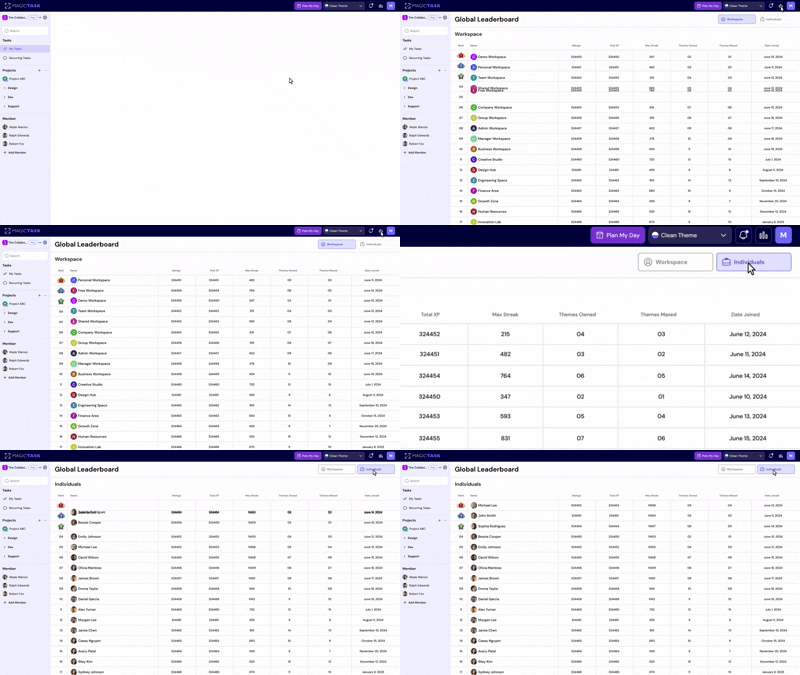
Leaderboard

Optional gamified elements like team leaderboards and point tallies add just enough motivation to keep everyone engaged, without becoming a distraction.

It’s especially well-suited for:

  • Product managers
  • Design teams
  • Engineering squads
  • Creative professionals who juggle speed with structure.


Whether you’re flying solo or leading a fast-moving group, MagicTask adapts to how you work, not the other way around.

What Can You Do in MagicTask That You Can’t in Todoist?

Task apps often share the same DNA: checklists, deadlines, and reminders. But MagicTask was built differently, especially for those who want productivity to feel rewarding, not robotic. While Todoist offers solid task management, it stops short of making the process engaging or fun.

MagicTask takes a bold step forward with features that blend structure and stimulation. It turns productivity into progression, not just another to-do.

Here’s a quick comparison to illustrate the difference:

Feature MagicTask Todoist
Gamified Progression Level up themes and earn points No
Task Completion Animations & Sounds Yes – Dynamic, engaging feedback No
Task Sizing Yes – Built-in for effort estimation Requires workaround
Visual Themes Yes – Themes that evolve with use Limited
Game-like Experience Yes No
Instant Motivation Feedback With points, sounds, and leveling No

Instead of another checkbox app, MagicTask offers you a more interactive, visual, and motivating way to manage your work.  

How Easy Is It to Switch from Todoist to MagicTask?

MagicTask is built to make the transition smooth, intuitive, and quick, so you can move from managing tasks to mastering them without the friction.

Here’s what makes the shift seamless: 

  • Quick onboarding: The interface is intuitive, clean, and welcoming. New users need no more than a few minutes to find their flow.
  • Minimal setup required: You don’t need to configure a dozen settings or integrations just to get started. The core features work out of the box.
  • No complex integrations needed: While MagicTask plays nicely with your calendar, you won’t be forced to connect a dozen tools just to see value.
  • Import/export support: Migration paths will make it easier to transfer projects or task lists, allowing you to pick up where you left off.

If you’ve used Todoist or any task manager before, MagicTask will feel familiar, but better. And if you’re completely new, it’s even easier to dive in.

Either way, you’re not climbing a steep learning curve; you’re stepping into a system designed to support action from the start. 

Who Should Switch from Todoist to MagicTask?

If you’ve ever found yourself starting strong with a task manager only to let it fade into the background, you’re not alone.

MagicTask was built for those who want a system that motivates action, not just records intention.

Here’s who will benefit most from making the switch:

  • Professionals who struggle with consistency. If you’ve bounced between productivity tools and never found one that sticks, MagicTask’s gamified experience helps reinforce habits and keep momentum alive, day after day.
  • Product managers and team leaders. Teams often drop off from tools that feel like a chore. MagicTask’s fun, intuitive UX encourages team participation and maintains high accountability without feeling heavy-handed.
  • Individuals who crave progress. MagicTask is all about seeing and feeling your progress. Visual feedback, point rewards, and leveling systems make every action feel worthwhile.
  • Teams looking for collaboration without the complexity. With optional competition, theme personalization, and a shared view of progress, MagicTask provides teams with clarity and energy, without adding layers of complexity.

If you’re ready to move beyond static checklists and into a system that actively supports how you want to work, MagicTask is the next step.

Conclusion

MagicTask isn’t just another task manager; it’s a rethink of what productivity should feel like.

In a world where traditional tools often fade into the background, MagicTask does the opposite. It energises your day, brings clarity to your work, and rewards you for showing up.

With gamified motivation, a beautifully clean interface, smart task sizing, and features that serve both individuals and teams, it reimagines how you build habits, manage priorities, and enjoy the process.

If Todoist has started to feel like a digital notepad —static, functional, but uninspiring —MagicTask is your upgrade. It’s not just about doing more. It’s about doing better, with more consistency, more fun, and more flow.

Try MagicTask for free and experience how productivity tools should work in 2025. Your tasks and your team will thank you.

How to Capture and Organize Meeting Action Items with MagicTask

Capture and Organize Meeting Action Items with MagicTask

Back-to-back meetings are the norm now. But once the call ends or the conference room clears, what happens next is often… nothing.

Decisions get buried in notebooks. Ownership stays vague. Follow-up tasks, if they’re even written down, sit forgotten until the next weekly check-in. Meetings are meant to move work forward, but more often, they drain time and momentum. 

Executives today spend nearly 23 hours a week in meetings, compared to less than 10 hours in the 1960s. That’s more than double the time, with far less clarity to show for it.

This post shows how to flip that script. Using MagicTask, you can capture key takeaways in real time and turn them into clear, assigned, and prioritized next steps for execution. 

The Meeting Overload Problem (Backed by Data)

Meetings were meant to align teams and move work forward, not dominate the workweek. Despite the time commitment of 23 hours per week, 71% of employees say meetings are unproductive and inefficient.

This disconnect doesn’t just drain morale; it’s expensive. Research estimates that unproductive meetings cost U.S. businesses up to $37 billion annually.

Here’s what’s fueling the overload: 

  • Too many recurring meetings with no clear agenda or purpose
  • Decisions captured inconsistently or not at all
  • No clear owner for follow-up tasks
  • Action items are lost in long email threads or forgotten entirely
  • More time spent reviewing what was said than acting on it

Without a real-time system to translate discussion into direction, meetings stall momentum instead of driving it. 

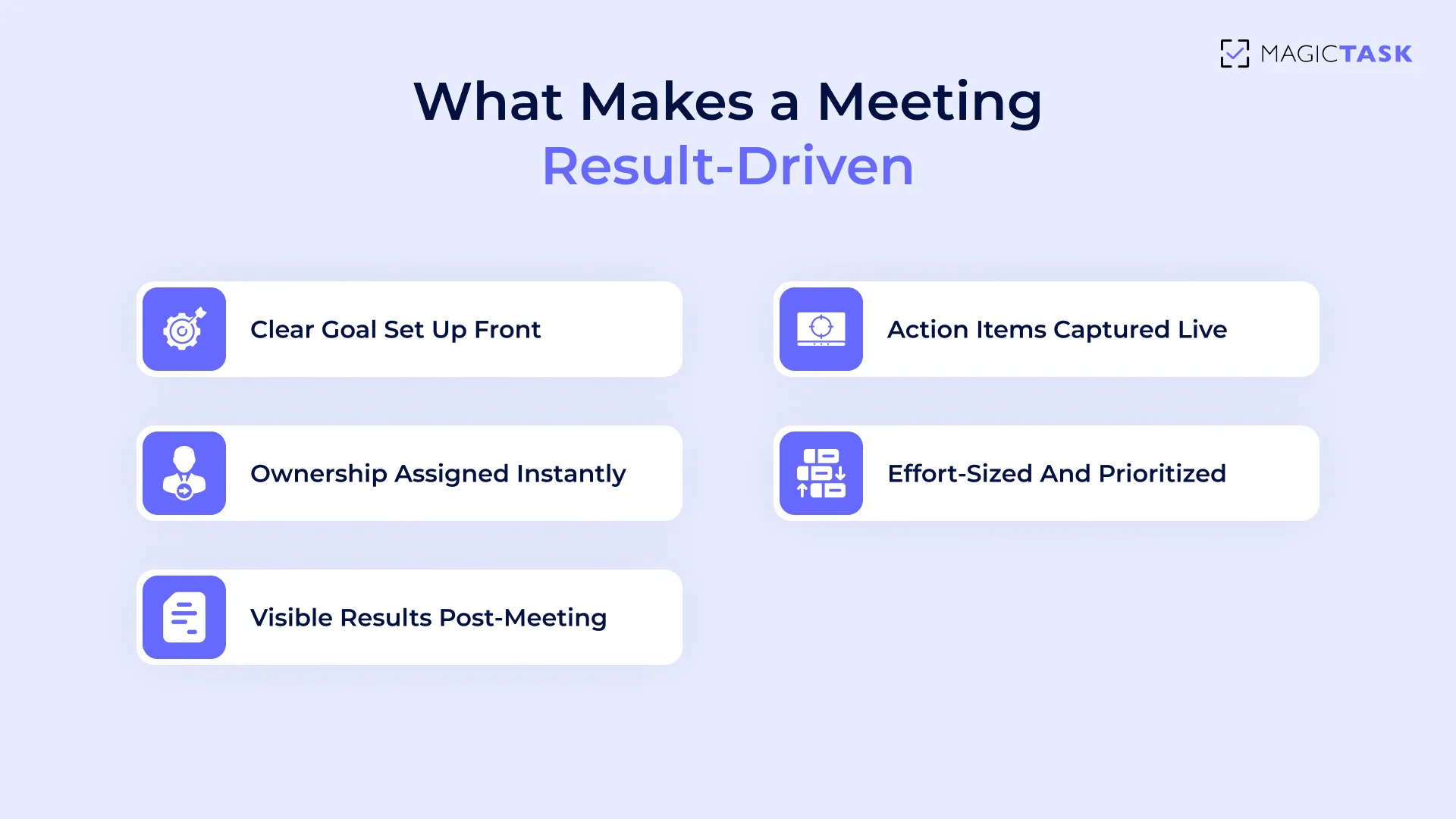
What Makes a Meeting Result‑Driven

Meetings that lead to real progress share a few core traits, and they all center on clarity, ownership, and immediacy.

What Makes a Meeting Result‑Driven

Here’s what separates effective meetings from time-wasters:

  • Clear goals set up front. Every meeting should start with a single question: What outcome are we here to achieve? Without that, it’s just a conversation, not a working session.
  • Action items captured live (not in follow-up emails). Post-meeting notes often get buried or forgotten. Capturing tasks in real time keeps accountability visible and avoids the lag between decision and execution.
  • Ownership is assigned instantly. A task without an owner is just an idea. Effective meetings assign responsibility on the spot, so everyone leaves knowing exactly who’s doing what.
  • Effort-sized and prioritized. Sizing work (S/M/L/XL) provides teams with an instant read on scope, helping to prevent overwhelm and avoid overpromising. Prioritization ensures the most critical tasks don’t get buried.
  • Visible results post-meeting. Progress needs to be seen to matter. When follow-through is visible across the team, it reinforces momentum and reduces the need for more meetings to check status.


These elements turn meetings into launchpads, not just check-ins. 

Capture Action Items Live with MagicTask

Let’s move from principles to practice.

You’ve seen what makes a meeting result-driven, but how do you actually implement that in real time, without juggling apps or scribbling notes you’ll never revisit?

That’s where MagicTask steps in. 

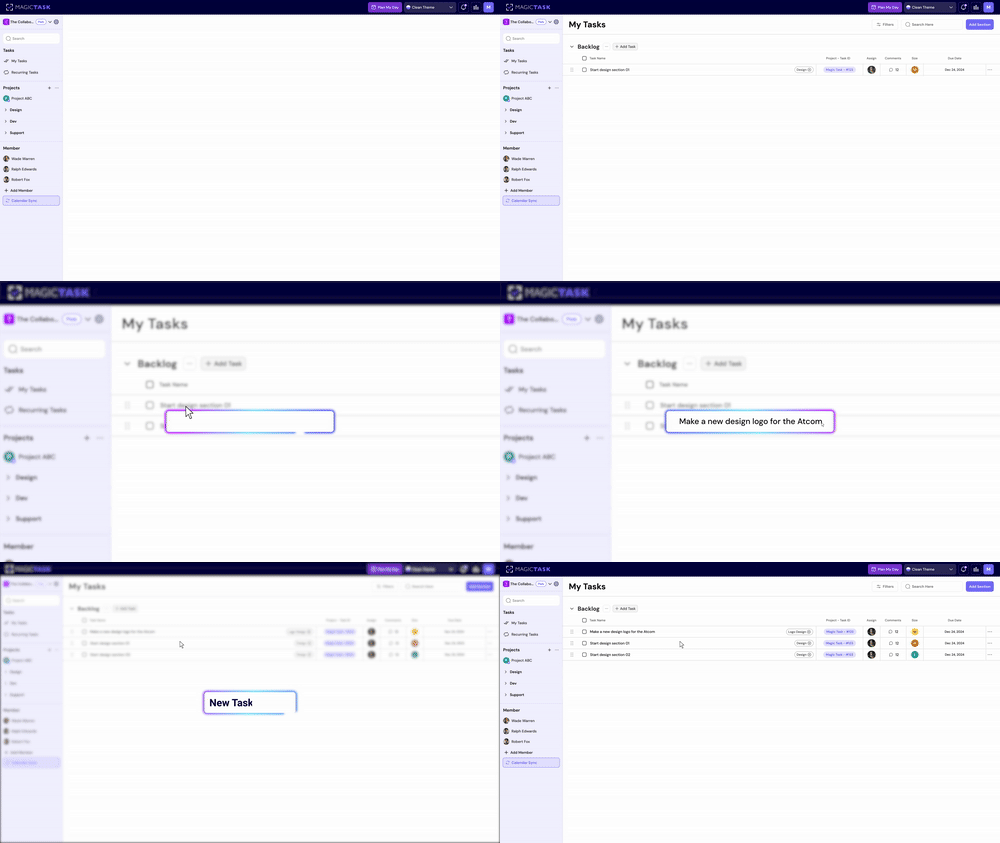
1. Create Tasks in Real Time During the Meeting

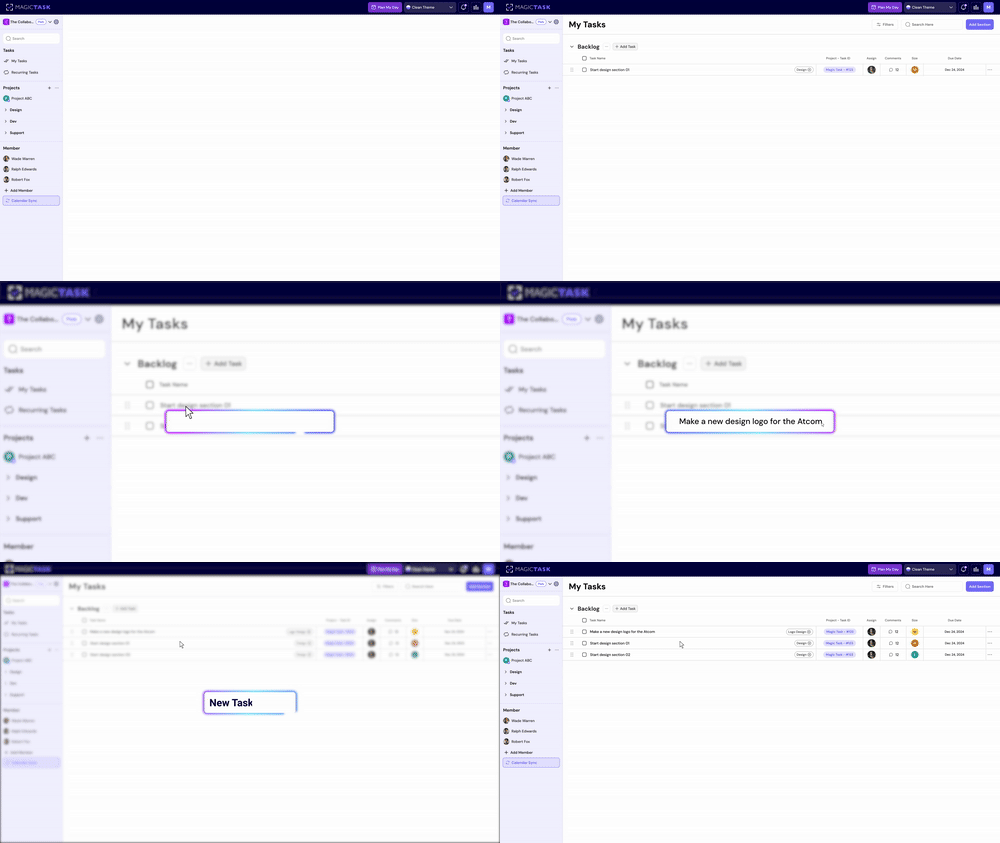
Waiting until after a meeting to log action items leads to missed details, forgotten tasks, and vague follow-ups. With MagicTask, you can create tasks on the spot, while the conversation is fresh. This ensures nothing slips through the cracks and turns every point discussed into a concrete next step.

As tasks are captured live, they move directly into your team’s workflow without any extra transcription, delay, or scattered notes. Instead of reviewing recordings or sifting through meeting minutes later, the outcomes are already in motion before the meeting ends.

Add a new task

2. Use Task Sizing to Estimate Effort on the Spot

Unclear expectations derail execution. One of the quickest ways to prevent that is by assigning effort sizes the moment a task is created. With MagicTask’s built-in S/M/L/XL task sizing, your team can instantly agree on how much effort something will take, without overthinking it. 

This helps reduce friction, aligns team expectations, and prioritizes smarter decisions right from the meeting room.

Here’s how task sizing works in MagicTask:

Task Size Description Example
S Quick win (5–10 mins) Reply to an email
M Moderate task (~30 mins) Write a short report
L Deep focus (1–2 hours) Draft a blog post
XL Complex/multi-phase task (half-day/full-day) Build a campaign strategy doc

3. Assign Ownership and Deadlines Instantly

No more follow-up emails or "who's doing what" confusion.

With MagicTask, you can assign every action item to a person during the meeting, not after. Adding a due date at the same time gives each task immediate clarity, urgency, and accountability.

This real-time delegation avoids delays and sets a clear path forward. Instead of hoping someone takes initiative, you’ve already built it into the system.

What this looks like:

  • A teammate suggests a next step → you create the task on the spot.
  • You assign it to them with a click → add a due date.
  • Now it lives in their task queue, not lost in a meeting recap.

This step alone transforms vague discussions into structured action, without requiring any additional work later.

4. Organize by Folder or Project

Once tasks are captured and assigned, they shouldn’t just float around.

Using MagicTask’s folders or project views, you can immediately group tasks under the right initiative, whether it’s a product launch, marketing sprint, or client deliverable. That structure makes post-meeting follow-through seamless, eliminating the need for manual sorting later.

Here’s what this unlocks:

  • Everyone knows where to look for related tasks.
  • Context stays intact without copy-pasting between tools.
  • Progress can be tracked by project, not just task lists.

That way, you can leave the meeting with your team already aligned on what’s next, who owns it, and where it lives. No chaos or backlog bloat. 

From Meeting Notes to Progress

Meeting notes are only helpful if they lead to action. With MagicTask, every task captured during the meeting automatically enters the right hands in real time.

There’s no waiting for someone to consolidate notes or send a recap email. Assignments appear directly in each team member’s task queue, already sized and prioritized.

This immediate visibility makes a big difference. As team members begin their day, those tasks are already integrated into their planning workflow. Calendar sync ensures they don’t get buried. Instead of toggling between tools or asking “what’s next?”, teammates see exactly what needs to be done and when.

Because everything is structured by folder or project, the context of each task remains intact. You’re not just tracking what was said; you’re tracking how it’s being executed. Teams no longer rely on memory or Slack threads to recall decisions. It’s all there, organized and actionable.

This clarity reduces the need for status updates and redundant follow-ups. As tasks get marked complete, everyone can see the progress. And that’s how real alignment happens. 

Why MagicTask Makes This Stick

Tools often fall short because they require extra effort to manage or lack staying power. What makes MagicTask different is how seamlessly it fits into your team’s daily rhythm, while keeping everyone engaged and accountable. 

1. Gamified Accountability Drives Follow-Through

Traditional task tools often rely on reminders and nudges. But those only go so far when motivation drops. MagicTask taps into a more sustainable approach: gamified accountability. As tasks get completed, users earn points, unlock new themes, and see real-time visual feedback that reinforces progress.

This subtle game loop turns follow-through into something you want to do, not something you should do. It helps team members stay committed without feeling micromanaged, while leaders can see who’s making moves without chasing updates.

Gamification makes consistency feel natural.

2. Clean Interface Means Quick Team Adoption

Even the smartest tools fail if teams won’t use them. That’s why MagicTask was built with a clean, intuitive interface so teams can start using it without a learning curve.

It removes clutter, reduces hesitation, and speeds up task capture right in the flow of conversation. That results in Less friction, more adoption, and faster execution.

Key reasons teams adopt MagicTask quickly:

  • Minimal design reduces cognitive overload
  • Drag-and-drop organization makes task management simple
  • No training required. Teams can jump in and start working
  • Cross-device sync keeps priorities aligned across remote and hybrid setups
  • Real-time updates keep everyone in the loop without micromanaging

The interface isn’t just sleek; it’s frictionless by design. 

3. Fun Themes Maintain Energy and Engagement

Sustaining energy through the workweek isn’t just about motivation—it’s about making the process feel enjoyable. MagicTask uses gamified themes that evolve visually as you complete tasks, helping users feel a sense of progress and novelty every day.

Themes in MT

Each completed task earns points that level up your workspace theme, transforming the interface in small, satisfying ways. It’s not just decoration; it’s a feedback system that rewards consistency and keeps engagement high without distracting from the work.

This playful layer helps prevent burnout and keeps teams mentally refreshed, especially in high-output environments. And when work feels more like a game, showing up daily feels like progress. 

4. Built for Individuals and Teams Without Extra Overhead

Many tools overwhelm solo users with unnecessary features or demand a complex setup to function for teams. MagicTask removes both barriers. As an individual, you can start instantly. You can create tasks, assign sizes (S, M, L, XL), and begin earning points with no configuration required. 

For teams, assigning tasks is just as seamless. Tag a teammate or drop tasks into a shared project folder, and they’ll show up in the correct queue with priority and due dates intact. There’s no onboarding burden or process customization required. MagicTask simply works, whether you’re one person or a team of twenty.

You don’t need layers of permissions, complex dashboards, or hours of onboarding. Tasks, priorities, and folders can be shared effortlessly, ensuring clear ownership and a natural sense of collaboration. Everyone knows what’s next without a manager needing to follow up.

That simplicity lowers friction, builds daily momentum, and creates a shared sense of direction, without adding another process to manage. 

Conclusion

Most meetings end with conversation, not clarity. People nod, take notes, and walk away, only to wonder days later what was actually decided. That’s not a process problem. It’s a follow-through problem.

MagicTask shifts the purpose of meetings from discussion to direction. It gives teams a shared space to capture next steps as they happen, assign responsibility on the spot, and leave with visible momentum, not just intentions.

When action becomes automatic and effort is clear, meetings stop feeling like interruptions and start becoming catalysts.

Try MagicTask and see how meetings transform into tangible progress.

Can’t Focus at Work? Gamification Can Help Beat Distractions

can't focus at work

Distraction is a daily battle, especially when work tools feel more like noise than support. 

Between Slack pings, email threads, and switching between five apps just to get one task done, it’s no surprise that focus feels fractured.

Most people try to fight through it with willpower, timers, or strict routines. But those only go so far when motivation dips. 

The real problem is that most productivity systems aren’t built to keep your attention. They list what needs doing but offer no real reason to stay engaged.

That’s where gamification comes in.

This blog explores how gamification reshapes the way you approach focus and shows how MagicTask uses it to make deep work feel less like effort and more like progress. 

Why It’s So Hard to Stay Focused at Work Today

The frustration isn’t that you don’t care about your work; it’s that staying focused feels like a constant uphill battle, even on tasks you want to finish.

And it’s not just you.

Modern work environments are built for speed, not clarity. You’re expected to juggle emails, chat notifications, meetings, task boards, and long-form work, all at once.

That constant switching breaks concentration and drains mental energy faster than you can refill it.

In the 1920s, psychologist Bluma Zeigarnik discovered something many of us experience daily: incomplete tasks linger in the mind more than completed ones. This is now known as the Zeigarnik Effect.

Zeigarnik Effect

Your brain holds onto unfinished work like an open loop, constantly nudging you to complete it. That nagging feeling when you leave a task half-done? It’s your cognitive system trying to resolve tension.

Now, imagine juggling 10 open loops at once. No wonder focus slips.

Even when you sit down with the best intentions, your brain is pulled in a dozen directions: 

  • Text notifications pop up mid-sentence
  • You open one browser tab and end up with 12
  • You keep shifting between tools, trying to find where the “real” work lives

This scattered setup breeds overthinking. Without clear next steps or visual momentum, it’s easier to procrastinate than to push through.

Traditional task systems don’t help much either; they just display what’s pending, not what’s moving forward.

At the end of it all, you’re left managing tasks manually and forcing focus that never really sticks.

How Gamification Rewires Focus and Attention

Trying to fight distraction with willpower alone is like trying to hold your breath all day. It works briefly, then collapses.

The better strategy is to create an environment that captures your attention, rather than letting it drift. 

1. Focus Becomes a Game Loop

Focus isn’t something you force; it’s something that emerges when effort is met with visible progress.

In behavioral psychology, this is called a feedback loop: 

  • Cue
  • Action
  • Reward

It’s the foundation behind why we stay glued to games, fitness trackers, and habit apps.

Each action leads to a small win. Each win signals progress. That sense of forward motion triggers dopamine, not just from finishing, but from anticipating the reward that follows.

This expectation creates momentum. Focus stops feeling like a chore and starts feeling like progress.

As Nir Eyal, author of Hooked, explains:

“The more effort people invest in a product, the more they value it.”

That effort, when acknowledged and rewarded, becomes intrinsically motivating.

You’re no longer just crossing off tasks; you’re advancing. And when the brain sees evidence of advancement, attention sharpens naturally. 

2. Completion Triggers Dopamine

Every time you complete a task, your brain gets a chemical boost.

Dopamine, the neurotransmitter associated with pleasure and reward, is released not just when you achieve something big, but when you complete even the smallest of actions, like ticking a checkbox or submitting a form.

This isn’t accidental.

Our brains are wired to seek patterns of reward. The more frequently we experience that sense of completion, the more likely we are to repeat the behavior.

That’s why consistent progress that is visible and achievable matters more than occasional grand achievements.

Over time, this creates a self-reinforcing loop:

  • Task completed → dopamine spike → positive emotion
  • Positive emotion → motivation to repeat the behavior
  • Repeated behavior → habit formed

But it only works when the feedback is immediate. If your tools delay or hide progress, your brain doesn’t connect the effort with the outcome. The motivation fades. When progress is visible and immediate, you train your attention to stay engaged. Momentum builds. Focus deepens. 

3. Flow Replaces Friction

Focus feels challenging when every task requires extra thought, such as deciding what to do first, how much time to allocate, and where to begin.

These micro-decisions create friction that adds up fast, especially in environments filled with distractions. 

Flow is a state where you're fully immersed in the task at hand. It’s when the challenge level matches your skill, and distractions fade into the background. You’re not forcing attention; it just happens.

Gamification reduces friction by removing decision fatigue and injecting momentum.

When tasks are clearly defined, progress is visible, and rewards are immediate, your brain shifts from hesitation to action. Completing one small task pulls you naturally into the next.

Instead of wrestling with a to-do list, you enter a rhythm of cue, action, reward. 

That’s the beginning of flow.

What breaks the flow?

  • Unclear priorities
  • Decision fatigue
  • Too many simultaneous tasks
  • Delayed feedback or no reward

What creates flow?

  • Defined task size and scope
  • Fast feedback loops
  • Small wins that lead into the next task
  • A rewarding system that nudges progress

How to Start Using Gamification to Stay Focused (with MagicTask)

You don’t need to overhaul your workflow to stay focused. You just need a system that rewards momentum and reduces friction.

MagicTask integrates gamification into the most minor details of your day, helping you stay focused without relying on willpower or external motivation.

Here’s how to put it to work: 

1. Assign Task Sizes to Reduce Decision Fatigue

When you start the day with a long list of vague tasks, it’s easy to freeze or pick the easiest one just to feel productive. MagicTask solves this by letting you label every task with a size—Small (S), Medium (M), Large (L), or Extra Large (XL). 

These sizes act as built-in difficulty levels that help you plan your day without overthinking.

Instead of guessing what to do next, you look at the task size, check your energy or time window, and start. It’s instant clarity with zero mental load.

Here’s how the sizing works:  

Task sizes with time needed and examples
Task Size Time Needed Example
S (Small) 5–10 minutes Reply to an email
M (Medium) 30 minutes Write a short status update
L (Large) 1–2 hours Draft a blog post
XL (Extra Large) Half a day or a full day Build a product roadmap

Why it works:

  • Removes the friction of choosing what to start
  • Matches tasks to your available energy or time
  • Keeps big projects from feeling overwhelming

How Task Sizing Reduces Mental Overload 

Your brain has a limited amount of mental bandwidth at any given moment.

Cognitive Load Theory, developed by educational psychologist John Sweller, explains that when too much information or complexity is thrown at the brain at once, performance suffers.

You’re more likely to procrastinate, make errors, or abandon tasks entirely. 

That’s exactly what happens with long, unstructured to-do lists.

You stare at a wall of tasks, some tiny, some enormous, and your brain freezes trying to figure out where to start. This mental overwhelm is not a motivation problem. It’s a load problem.

Task sizing is a practical antidote. Instead of tackling vague or unevenly scoped tasks, you break them down into smaller, more manageable tasks.

This structure reduces ambiguity and gives your brain fewer decisions to make. You can scan your task list and start immediately, without falling into analysis paralysis. 

2. Earn Points with Every Completed Task

Every time you complete a task in MagicTask, you earn points. It’s simple, but powerful.

These points serve as instant feedback —a small “win” that tells your brain, “Well done, keep going.”

This isn’t just for fun. It’s based on behavioral reinforcement. When your brain sees progress and reward, it releases dopamine, which makes it more likely you’ll return to the task.

Over time, you begin to associate work with accomplishment, not just effort.

Here’s what this looks like in practice:

  • You check off a Medium task → you get points based on effort
  • Your total score increases visibly on your dashboard
  • Your progress nudges you closer to a theme level-up or visual reward
  • Each small win builds momentum for the next task

You’re not waiting for an end-of-week milestone to feel successful. The system rewards steady daily progress. It’s like turning productivity into a game you actually want to keep playing.  

3. Level Up Themes for Long-Term Motivation

MagicTask takes the satisfaction of progress a step further with Theme Leveling. As you complete tasks and earn points, you unlock visual and sound-based rewards tied to your chosen theme, arcade, gaming, glitch, and more.

Each level unlocks subtle animations, mood shifts, or sound cues that make your workspace feel alive. This transforms routine work into a personalized experience, one that visually reflects your growth.

Why it matters: 

  • Visual evolution keeps the experience fresh and engaging.
  • Sound effects and motion act as feedback loops that reinforce progress.
  • It creates a sense of “place” and identity within your productivity system.

Instead of your task app feeling flat or sterile, it starts to feel like a space that evolves with you, rewarding your consistency without demanding more effort. You’re not just managing tasks, you’re leveling up your workflow. 

4. Use Folders and Projects Like Quests

In MagicTask, folders and projects are mental zones that help you focus deeply. Each folder becomes its own “questline,” giving your work structure, narrative, and intention.

Just like a game separates missions into levels or stages, using folders helps you:

  • Break down complex work into manageable zones
  • Keep context intact for each area of focus (e.g., “Client Work,” “Personal Growth,” “Team Planning”)
  • Shift gears without losing momentum — you're switching quests, not aimlessly tabbing

This mental segmentation makes multitasking less chaotic. You’re progressing through clearly defined zones of attention. Over time, each folder becomes a visual and mental anchor that makes it easier to lock in and execute. 

Why Gamification Works When Other Focus Hacks Don’t

Most productivity systems assume you just need more structure. They offer timers, routines, or accountability hacks to help you stay on task.

The problem?

These all rely on willpower. If your energy dips or your day gets chaotic, they tend to break down.

Gamification, on the other hand, taps into internal drive. It rewards action, not just discipline. You’re not pushing yourself to stay on track. The system pulls you in through visible progress, micro-rewards, and flow.

This is especially true with tools like MagicTask, where a clean UX and subtle game mechanics make work feel engaging, rather than a grind.

To illustrate how this differs from conventional methods like Pomodoro, here’s a quick comparison:

Focus approaches with reliance, benefits, and limitations
Approach What It Relies On How It Helps Where It Struggles
Pomodoro Timer External discipline Creates time-boxed focus sessions Can feel rigid or interruptive
Gamification Loop Internal motivation Makes progress feel satisfying Needs a design that doesn’t distract
Combined Approach Structure + engagement Balances consistency and flow Works best with simple systems

Used effectively, the Pomodoro technique can absolutely help, especially when paired with a gamified system. The timer provides boundaries, while the rewards keep you emotionally invested.

Conclusion

Focus is a system. And in today’s distraction-heavy world, systems win where willpower fails.

Gamification isn’t a gimmick. It’s a behavioral framework grounded in psychology, designed to make progress feel satisfying.
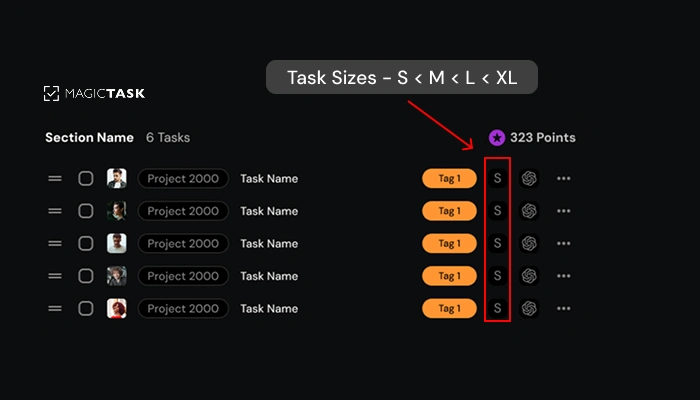
When done right, it doesn’t just help you stay on task; it makes you want to come back and keep going.

MagicTask brings this system to life without clutter or complexity. Task sizes, points, and visual rewards are all designed to help you lock in and follow through.

Instead of forcing discipline, try a system built for how your brain actually works. Try MagicTask and make focus feel effortless.

How to Finish Work Faster: A Proven Framework to Boost Performance 

how to finish work faster

You put in the hours. You jump between meetings, messages, and to-do lists. Yet somehow, as the day ends, it feels like you’ve barely made a dent. Your calendar looks full. Your mind feels spent. But your work? Still… unfinished.

If that sounds familiar, you’re not alone.

Most professionals today are overwhelmed by a lack of closure. You start tasks without a clear finish line. You bounce between priorities. And even when something gets done, there’s little satisfaction because ten more things are waiting.

This guide will help you break that pattern. You’ll discover what’s slowing you down, explore a practical method to help you finish faster, and learn how to stay ahead of your workload without burning out.

Let’s begin with why finishing matters more than ever.

Why Finishing Faster Matters More Than Ever

It’s not just the volume; it’s the velocity. Everything is moving faster, be it deadlines, expectations, or deliverables. Falling behind is a liability.

The modern workday rewards speed with clarity. In a world of shifting priorities and rapid decision-making cycles, those who complete tasks quickly are more trusted, more promotable, and more in control.

Finishing faster frees up space to think, solve bigger problems, and seize opportunities that others miss because they are too busy.

Why Finishing Work Faster Matters

And the benefits go far beyond saving time. When you finish ahead of schedule, you:

  • Reduce mental clutter and decision fatigue
  • Lower your overall stress levels
  • Free up margin for creativity, rest, or strategic work
  • Earn credibility with your team and clients

Here’s what this looks like in practice. A mid-level project manager at a growing SaaS company was constantly overwhelmed. Meetings filled her mornings, tasks filled her afternoons, and nothing ever felt complete.

After shifting to a system that prioritized only three daily outcomes and blocked time to complete each, she cut 10 hours of wasted effort per week. The result is more strategic thinking, faster project delivery, and a team that moves in sync.

Finishing faster is about working with intention. And that starts by identifying what’s slowing you down. Let’s break that down next.

What Causes Delays in Work?

So if finishing faster drives better outcomes, why does it feel so rare?

The truth is, most delays aren’t caused by laziness or lack of talent; they’re rooted in how work gets structured, started, and (often) sidetracked. Before you can speed up, you need to spot the slowdown.

Lack of Clarity About What “Done” Really Means

One of the most common reasons tasks drag on is simple: no one knows what “done” looks like. When you start a project with only a vague goal in mind, like “work on the presentation,” you open the door to confusion, drift, and scope creep.

Take the presentation example. If you don’t first define the key points, audience takeaway, or structure, then every slide becomes a guessing game. This lack of clarity leads to overthinking, backtracking, and excessive time spent on things that may not even matter.

Without a clear endpoint, it’s impossible to pace yourself because you don’t know where the finish line is. And when that happens, it’s easy to underestimate how long a task will take.

Underestimating How Long Work Will Take

Once the goal is fuzzy, time estimation becomes a shot in the dark. People often assume tasks will take far less time than they do, a cognitive bias known as the planning fallacy. You think, “I’ll knock out that draft in 30 minutes,” but two hours later, you're still fine-tuning the intro.

This mismatch between expectations and reality creates a ripple effect: missed deadlines, backlogged priorities, and rushed work. And the more it happens, the harder it becomes to trust your planning, which only feeds the subsequent delay.

Here’s what this looks like in real life:

  • Blocking 1 hour for a task that regularly takes 3
  • Forgetting to account for revision, feedback, or admin time
  • Overstacking the day with 7–10 “quick wins” that aren’t quick
  • Feeling behind by noon and shifting into reactive mode

That’s when perfectionism starts to creep in.

Perfectionism and Constant Tweaking

Even after allocating enough time, the finish line often gets pushed further, not by necessity, but by perfectionism. You polish one slide endlessly. You rewrite a paragraph five times. You spend an extra hour aligning margins or testing three different colour palettes.

At first, it feels like care. But it quickly becomes avoidance disguised as effort. The task was technically done an hour ago, but you’re stuck in a loop trying to make it flawless.

And here’s the deeper problem: Perfectionism doesn't just eat time. It blocks momentum. The brain starts to associate finishing with anxiety or “not good enough,” making it harder to close the loop next time.

This isn’t about sloppiness. It’s about knowing when the work is “good enough to move.” Without that boundary, even the best tasks stall.

What Causes Delays in Work

Context Switching and Notification Overload

Even when the task is straightforward and scoped correctly, staying focused long enough to finish it is another challenge entirely.

Context switching, jumping from one task, platform, or conversation to another, carries a hidden tax. According to a study from the University of Irvine, it takes an average of 23 minutes and 15 seconds to regain full focus after a single interruption.

Now multiply that by a dozen pings per day. What feels like “just a quick reply” becomes hours lost in recovery mode.

Some common patterns:

  • Starting a focused task and getting sidetracked by a Slack message
  • Drafting content while juggling back-and-forth feedback threads
  • Switching between tools (docs, email, chat, calendar) every few minutes
  • Feeling mentally drained without clear progress by the end of the day

Finishing faster is about protecting your focus. Because once attention is split, time follows.

Self-Assessment Checklist

If any of these sound familiar, they may be the exact reasons your workday drags on longer than it should. Use this quick self-check to spot the patterns that slow you down:

  • Do you start tasks without defining what “done” looks like?
  • Do you frequently underestimate how long tasks will take?
  • Do you polish and tweak work long after it’s “good enough”?
  • Do notifications regularly pull you away mid-task?
  • Do you feel like you’re always working but rarely finishing?

Recognizing these patterns is the first step. The next step is building a workflow that avoids them entirely, so you can finish faster without sacrificing quality.

How to Finish Work Faster? 5 Principles High Performers Swear By

If delays are the default, speed becomes a skill, and like any skill, it can be trained.

Principle #1: Define the Smallest Complete Outcome

Speed starts with clarity. One of the biggest time-wasters in any workday is trying to do too much, or worse, trying to do it perfectly from the start.

High performers focus on finishing the smallest complete outcome first. That means identifying the version of the task that delivers value without overextending the effort.

Instead of setting a vague goal like “Finish the entire report,” they’ll frame it as “Write the executive summary” or “Draft the first section with bullet points.” It’s specific, manageable, and most importantly, finishable.

This approach creates quick wins and builds momentum. And when the first piece is done, the rest becomes easier to tackle. Think of it as productive minimalism: do what matters most, then build from there.

Principle #2: Protect Time Like Your Reputation

High performers don’t “find time”; they protect it. One of the fastest ways to finish your work is to stop treating your calendar like a suggestion box. Time blocking works because it turns intentions into visible, structured commitments. When boundaries protect your work, distractions find fewer cracks to seep through.

The key isn’t just assigning time to tasks, but treating those blocks like meetings with your future self, non-negotiable and interruption-free. No Slack pings, no inbox refresh, no “quick question” sidebars. Just focused on work.

Here's a simple breakdown of how time-blocking can support faster execution:

Time Block Task Focus Notes
9:00 – 10:00 AM Strategy Review No meetings, phone silenced
10:15 – 11:00 AM Respond to Feedback Slack only, no email
11:15 – 12:00 PM Proposal Writing Full focus, notifications off

When your calendar reflects your priorities, not just your availability, you finish faster with less mental clutter. And over time, this habit of time protection becomes a reputation for getting things done.

Principle #3: Use Visible Progress to Fuel Motivation

Momentum is one of the most powerful drivers of productivity. When you can see progress happening, you're more likely to stay engaged and finish the work. It’s about noticing forward movement in small steps.
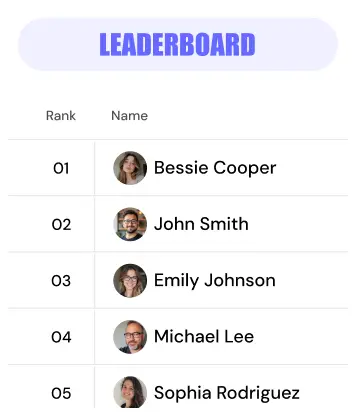
Instead of a checklist that feels flat, visual progress gives your brain a sense of reward. That could be a progress bar slowly filling up, a task list showing completed items lighting up, or even a points counter ticking up as you move through your work.

Here’s what visible progress can look like:

  • A progress bar showing the percentage completion of a project
  • Task lists that visually change when marked complete
  • Leveling up a theme or earning points in your workspace
  • Animations or sound cues that signal a small win
  • A clear history of what’s been accomplished each day

This kind of feedback keeps you motivated without needing a pep talk or a looming deadline. And it’s exactly how MagicTask is designed to make progress feel tangible, rewarding, and worth returning to.

Principle #4: Work in Focused Sprints

Working faster doesn’t mean working longer; it means working smarter. Focused sprints help your brain stay sharp and engaged without burning out. Instead of dragging tasks over several hours with constant distractions, you concentrate deeply for a set period, then take a short break to reset. This improves both the quality and speed of your output.

The 45–15 rule is a simple place to start: work with full attention for 45 minutes, then step away for 15. Over time, these cycles build stamina and flow, helping you move through complex work faster, without exhaustion or wasted energy.

Principle #5: Reflect to Improve Speed Over Time

Finishing faster depends on how well you learn from what’s already been done. A short review at the end of each day or week can help you notice what slowed you down. Maybe research dragged on because there were too many tabs open. Or a draft took longer because the outline wasn’t clear. These patterns only become visible when you reflect.

Here’s how that might play out in a typical work scenario:

Task: Research for Proposal
Took 1.5 hours instead of the planned 30 minutes
Identified issue: too many open tabs and no time cap
Adjustment: Set a 30-minute timer next time
Result: More focused research, stayed on schedule

These micro-adjustments stack over time. Each review gives you a chance to shave off inefficiencies and build smarter routines, helping you finish work faster, with less friction.

How to Finish Work Faster? The 5-Step Fast Finish Method™

Speed comes from structure. The Fast Finish Method™ gives you a simple, repeatable process to bring tasks to completion without dragging them across days. It helps you focus, execute, and close the loop with less effort and more clarity.

Step 1: Choose 1–3 Priority Outcomes

Start your day with a clear target. Pick one to three tasks you will finish today. This focuses your energy on what actually moves the needle.
Pro Tip: Use MagicTask to set and visualize these outcomes in your daily task list.

Step 2: Define What “Done” Looks Like

Ambiguity slows everything down. Instead of saying “Work on deck,” describe the finish line.
Example: “Draft all slides and send for feedback.” When the outcome is specific, you know exactly when to stop and move on.

Step 3: Time-Box Each Task

Set clear limits. Assign a start and end time for each task so you can work with urgency and avoid drift. Use a timer to stay accountable and track your focused minutes.

Step 4: Remove All Distractions

Create a space where focus feels natural:

  • Silence your phone
  • Close unrelated browser tabs
  • Use Do Not Disturb mode on chat tools
  • Keep your workspace clean and intentional

Step 5: Review, Log, and Celebrate Progress

End the day with closure. Write down what you completed and take a moment to acknowledge the win.
Example: “Finished the proposal and sent it off, closed the laptop at 5 PM and went for a walk.”
That sense of completion helps you build momentum for the next day.

How MagicTask Helps You Finish Work Faster and Perform Better

MagicTask helps you finish faster, not through pressure, but by making progress visible, manageable, and motivating.

One of the most practical ways it does this is through task sizing. Instead of treating every item on your list as equal, you categorize tasks based on their scope — Small, Medium, Large, or Extra Large. This gives your day structure, helps you stay realistic, and reduces the risk of overload.

Task Size Description Example
S Quick win, takes 5–10 mins Reply to an email
M Medium task, ~30 mins Write a short report
L Deep focus, 1–2 hours Draft a blog post
XL Complex or multi-phase task Build out a campaign or strategy doc

No more overcommitting to massive to-do lists. You see your day clearly, sized appropriately, and mentally prepared for what’s ahead.

Every completed task earns visual points, contributes to level-ups, and feeds your overall theme. That feedback loop feels good, and it keeps you going. It’s like watching your progress work for you, not just vanish once a checkbox is ticked.

There’s also a structure built into the system. Daily planning is simple: start with 1–3 priorities, time-box them, and stay inside your focus bubble. MagicTask’s design helps you stay in flow longer without toggling between apps or losing time to set up.

And the impact? One user reduced their average task time by 25% just by sticking to daily priorities and using the built-in focus tools.

MagicTask is a system that reinforces speed, clarity, and satisfaction. And that’s how you finish work faster without working longer.

Conclusion

Most people think finishing faster means doing more in less time. But that’s rarely sustainable or satisfying. What actually works is clearer goals, tighter boundaries, and a system that shows you real progress as you go.

Start small. Choose one principle from this guide and make it part of your daily flow. You don’t need a productivity overhaul; just consistent action inside the right system.

Ready to experience faster progress without burning out? Try MagicTask for free and see how much more you can finish and enjoy each day.

Stop Forcing Productivity & Turn It Into a Daily Habit Instead

stop forcing productivity

If you're still relying on bursts of motivation to get things done, you're on the fast track to burnout.

Forcing productivity can work for a while. However, if things continue to slip, the issue is probably not a lack of motivation. It’s how your day is set up.

What you need is rhythm. Something steady. Quiet. Repeatable.

Habits beat motivation every time. When the right ones are in place, you're not waking up and negotiating with yourself. You just move.

But habits don’t build themselves. You need a system that makes them easier to stick with.

In this post, we’ll explore how consistency works, what helps habits form, and how the right tools can make productivity feel automatic instead of forced.

Why You’re Struggling to Stay Productive (Even With Good Intentions)

Productivity doesn’t crumble because you lack ambition; it crumbles because motivation is a limited resource. It spikes unpredictably and disappears under pressure, making it a poor foundation for daily work.

Instead of installing repeatable systems, most people default to motivation-chasing. This leads to a predictable loop: a rush of focus, followed by inconsistency, then drop-off.

Not because the task was too big, but because there was nothing in place to keep you going when the buzz wore off.

🧠 Did you know?
Research from Harvard University estimates we make 35,000 decisions per day.

That constant context-switching contributes to: 

Without a simple way to reduce friction and reinforce progress, even the best intentions fade.

The fix is building smarter. A system that carries the momentum for you, especially when your mood, motivation, or mental bandwidth won’t. 

What It Takes to Make Productivity a Habit

Most productivity advice focuses on effort, emphasizing the importance of waking up earlier, pushing harder, and staying disciplined. But what drives long-term output isn’t intensity. It’s consistency.

The key is designing behavior that repeats without negotiation. That’s where the habit loop comes in, a concept made famous by Charles Duhigg:

Cue → Routine → Reward 

It’s how brushing your teeth every morning became automatic. Not because you love it, but because the loop is frictionless. The same loop applies to your workday. The smoother the entry, the more likely you are to repeat it.

Let’s say your goal is to write more. Instead of saying, “I’ll write every day,” try:

  • Cue: Make coffee
  • Routine: Write one paragraph
  • Reward: Check off the task in your task management platform

This small loop does more than help you check off tasks. It shapes who you believe you are.

Over time, the repetition of showing up (even briefly) rewires how you see yourself. You’re not just someone trying to be productive. You become productive.

James Clear calls this “identity-based habits,” and it’s why consistency carries far more power than intensity.

 The science backs it up: according to a study, forming a new habit takes an average of 66 days.

But those days don’t have to be perfect or heroic. You don’t need to sprint through marathons of productivity. 

What matters is repetition: 66 small, repeated decisions that reinforce the same behavior. One paragraph written. One task completed. One check-in was honored.

 Habits, at their core, aren’t about willpower; they’re about building rhythm. And once that rhythm takes hold, the habit sticks even when motivation fades.

Why Traditional Task Management Systems Can't Help You Build Habits

But even with the right habit loop in mind, many people still fall off track. The reason is the tools they’re using. Most task management systems were built to organize work, not to reinforce behavior. 

They track what you’ve done, not how consistently you’re doing it. And when it comes to building habits, that difference is everything. 

Let’s look at why most tools fall short.

Why Traditional Task Management Systems Can't Help You Build Habits

1. Completion Is the Goal, Not the Behavior

Most task management tools are built around the checkbox. The task is either done or it isn't; it's either complete or incomplete.

But habit-building isn’t binary. It’s not just about what got finished today, but how consistently you showed up to do it.

This framing creates a subtle trap: You feel accomplished only when you finish something big. Smaller efforts, such as jotting down notes or researching for 15 minutes, often feel invisible.

Over time, this discourages the very behaviors and habits that are built on frequency, rather than intensity.

Habits grow through repetition, not milestones. But when tools only celebrate the milestone, they ignore the muscle you’re building through daily motion.

2. Checkboxes Don’t Give You a Reason to Return

Traditional task systems treat productivity like a transaction: you check the box, get a temporary hit of satisfaction, and move on.

But that fleeting dopamine hit doesn’t last, and it doesn’t create loyalty to the system.

The deeper issue is that these tools rarely motivate you to come back tomorrow. There's no emotional reward loop, no visual progress, no sense of advancement beyond today’s to-dos.

And without reinforcement, daily consistency tends to slip.

Here’s what most traditional tools lack:

  • Progress feedback: You don’t see how today builds toward a bigger outcome
  • Emotional reward: No animations, levels, or themes to keep things engaging
  • Streak protection: One missed day, and it feels like you’ve lost momentum
  • Personal investment: The system doesn’t grow with you; it's static

Without ongoing incentives, even the most effective systems tend to get abandoned. Not because they’re broken but because they’re forgettable. 

3. High Friction = Low Return

Most traditional task management tools make you work just to get organized.

You spend more time clicking, tagging, dragging, and color-coding than actually executing. That friction, slight as it seems, adds up.

And when every tiny decision requires effort, your brain starts to resist using the tool altogether.

You open the app and are met with:

  • A wall of overdue tasks
  • Confusing project hierarchies
  • Decision paralysis from too many views and filters

This is resistance disguised as planning.

High-friction systems demand too much mental effort upfront and offer too little clarity in return. Instead of making your day easier, they become just another chore on your list.

4. No Built-In Rhythm for Daily Use

A productive habit needs rhythm, a consistent loop that brings you back each day. But most task management systems don’t encourage that kind of flow. They’re designed for project tracking, not daily engagement.

You open the app, and it looks the same every time, no matter what you’ve accomplished or how your energy feels today.

There’s no gentle nudge to reset, no structure to ease you into the day, no satisfying way to close the loop.

Without a built-in cadence, like a morning check-in or an end-of-day reflection, even the most ambitious plans get buried under yesterday’s leftovers. Productivity becomes reactive. You start your day catching up instead of starting fresh.

5. Progress Isn’t Obvious or Encouraging

Most tools show you what’s left to do, not how far you’ve come. That’s a problem.

When progress is buried behind flat checkmarks or long to-do lists, your brain doesn’t register a reward. There’s no visible momentum, no built-in way to feel proud of the effort you’ve already put in. You finish a task, and… that’s it. Next?

This lack of feedback makes it more difficult to remain emotionally invested. Without clear markers of growth or small wins that feel meaningful, consistency becomes a grind.

You’re doing the work, but it never quite feels like you’re getting anywhere. Over time, that feeling chips away at motivation because it’s invisible. 

How MagicTask Helps Turn Productivity into a Daily Habit

Let’s shift from the problem to the fix.

The real solution is designing a system that pulls you in. One that makes progress feel rewarding, not draining.

MagicTask is a gamified task management platform that turns daily productivity into a habit loop that’s consistent, motivating, and easy to return to, even when your willpower isn’t on your side. 

1. Starts Small, Stays Consistent

Big goals often feel heavy because they’re front-loaded with pressure. MagicTask counters that by helping you start smaller on purpose.

Each task can be sized S, M, L, or XL, so you're not staring down an intimidating to-do list. You're choosing achievable steps that build momentum.

Logging just 1 to 3 small tasks a day shifts the focus from “get everything done” to “get one thing moving.”

That creates consistency. And consistency builds confidence. Before long, you’re not forcing productivity; you’re flowing with it.

Here’s how MagicTask’s task sizing helps you stay in motion:

Task Size Example Task Time Estimate Impact on Momentum
S Reply to email 5–10 minutes Instant win, builds flow
M Write a meeting summary 20–30 minutes Feels productive, not draining
L Draft a proposal outline 45–60 minutes Tangible progress
XL Launch campaign assets 90+ minutes Major milestone, confidence boost

Instead of chasing perfection, you’re collecting progress. That’s how habits form and stick.

2. Daily Planning as a Ritual

Consistency starts with how you begin your day.

MagicTask encourages a simple, repeatable check-in process that takes just 10–15 minutes but creates structure for the rest of your work.

This micro-routine has three parts:

Mind Dump → Prioritize → Execute
  • Mind Dump: Clear out everything cluttering your mind. No filters, just unload.
  • Prioritize: Identify what matters today. Sort by task size or urgency.
  • Execute: Focus on just 1–3 tasks. Finish them and feel the win.

Doing this every morning forms a rhythm. You stop scrambling. You start planning with clarity.

Over time, this routine lowers the mental friction that causes task avoidance and makes showing up each day feel automatic.

3. Reinforces Positive Feedback Loops

Most task systems end with a checkbox. MagicTask turns that moment into something your brain looks forward to.

Every completed task:

  • Earns you points tied to your profile
  • Contributes to leveling up your current theme
  • Triggers subtle animations or effects as a reward

These elements provide emotional payoff. That little spark of satisfaction each time you finish something builds a loop your brain wants to repeat. 

It’s not about gamification for show. It’s about reinforcing the feeling of progress so it sticks.

And when the work feels good, you come back. Not out of pressure, but because your brain remembers the win. 

4. Builds Real Daily Rhythm

When productivity becomes a familiar rhythm, it stops feeling forced. With MagicTask, that rhythm starts the moment you log in. The day opens with 2–3 right-sized tasks, small enough to tackle quickly and clear enough to feel meaningful.

Each completed task earns points, advances your theme, and provides a brief moment of progress. These are cues that reinforce action. The cycle repeats day after day, not through pressure but through a satisfying cadence.

This kind of ritual turns scattered effort into steady momentum. Over time, it builds the habit of showing up.

Why This System Works When Motivation Runs Out

Most systems are built with your best days in mind. MagicTask is built for your average ones.

When energy is low and the to-do list feels endless, it's not willpower that gets you through; it’s the design of the system around you.

MagicTask makes it easier to start because the next step is always small, always visible, and always rewarding. You don’t have to dig for your priorities or muster enthusiasm from scratch.

The interface nudges you forward with cues you’ve already trained your brain to respond to: a daily check-in, a few S-sized tasks, a visual theme waiting to level up.

Progress becomes automatic, not because you're trying harder, but because the friction is gone. There’s no pressure to perform, just an open invitation to return and take the next tiny step.

That’s the difference. When motivation dips, MagicTask doesn’t punish you. It meets you where you are and keeps you moving. 

Conclusion: The Habit Is the Win

You don’t need to overhaul your routine or chase the perfect system. What matters is building a rhythm that helps you show up consistently, without overthinking it.

That’s where MagicTask comes in.

It’s designed to support habit-building in a way that feels natural, with just enough structure to keep you moving and enough flexibility to fit how you actually work.

Ready to stop forcing productivity and build real momentum?

Sign up for MagicTask and see how it fits into your day.

Why Your Team Hates Status Update Meetings (And How to Fix It)

Team Hates Status Update Meetings

You don’t need another meeting to figure out what’s going on. However, status updates keep sneaking onto your calendar, disguised as stand-ups, check-ins, or syncs.

You hop on Zoom, wait for a few late joiners, and sit through 20 minutes of updates that could have been skimmed from a decent dashboard, if one actually existed.

It’s not that your team avoids accountability. They simply don’t have a clear way to indicate what’s been done, what’s in progress, and what’s still pending.

So meetings fill the gap. They stand in for visibility. They replace trust with “just circling back.”

The result? They break focus, kill momentum, and leave everyone wondering why staying aligned takes so much effort.

The real issue isn’t the meeting. It’s how your team tracks and sees its work.

The good news? That part’s fixable.

Let’s break it down.

Why Your Team Hates Meetings?

People don’t hate meetings because of who’s in them. They hate them because of how they’re run.

Status updates, in particular, are repeat offenders when it comes to killing momentum and morale. Here are some reasons why your team hates these status meetings:

1. Constant Interruptions Break Focus

Every time a team member pauses their work to give an update, their mental flow is disrupted.

What looks like a quick “Can you give me a status?” might seem harmless, but cognitively, it’s expensive.

Research found that it takes an average of 23 minutes and 15 seconds to return to deep focus after an interruption.

These interruptions don’t just delay progress; they multiply fatigue.

A developer writing code, a designer working through UI challenges, or a marketer building a campaign brief, all of them rely on uninterrupted time blocks to make meaningful progress. Frequent check-ins chip away at that flow, scattering the day into tiny, disjointed fragments.  

Even more frustrating?

These interruptions often happen not because the work isn’t getting done, but because there’s no way to see the work in motion. So the interruptions persist. And that’s where things start to feel personal.

Why Your Team Hates Meetings

2. Updates That Feel Like Micromanagement

When status updates become too frequent or too specific, they start to feel less like collaboration and more like surveillance.

Even with the best intentions, asking a team member to justify every move can come across as a lack of trust.

And trust, once chipped away, is hard to rebuild. 

It’s not that team leads want to micromanage. It’s that the system isn’t giving them confidence that things are progressing. So they lean on manual check-ins to fill the gap.

But that strategy backfires by demotivating the very people doing the work.

Here’s how status updates start to feel like control instead of support:

  • “Where are you on this?” feels accusatory without context.
  • Daily reports often become a performance log, rather than a progress tool.
  • Repeated updates on small tasks imply you don’t trust team autonomy.
  • Asking for proof of work drains morale more than it delivers insight.

Eventually, people stop being proactive, not because they’re disengaged, but because they feel like their efforts are constantly under a microscope.

That disengagement leads to the next layer of the problem.  

3. Reporting on What’s Already Done

After finishing a task, your team wants to move forward, not circle back to narrate what just happened.

But traditional status update meetings often force precisely that: a recap of work that’s already complete, logged, or visible elsewhere. It’s a cognitive detour that adds no value.

Repetition like this compounds fatigue. Especially for high-performing teams, having to say they did something after they’ve already done it feels like a waste of time.

This backward-looking structure introduces unnecessary friction:

  • It breaks the momentum on what matters next.
  • It shifts energy from creation to explanation.
  • It sends the signal that the work isn’t real until it’s re-reported.

Team members start mentally checking out of update meetings.

And when that happens, the root issue grows: a growing lack of trust in the system itself.

4. Over-Reporting from Lack of Trust

When trust is low, status updates cease to be informative; they become performative.

Team members start over-explaining, over-documenting, and over-sharing in an attempt to prove they’re being productive. Not because they want to, but because the system forces them to.

Instead of confidence in the workflow, you get a culture of self-justification. Every minor update becomes a mini-pitch to defend one’s output. And that slows everything down.

Here’s what this often leads to:

  • Excessive tagging in comments to stay visible
  • Long Slack messages explaining simple actions
  • Duplicating updates across platforms (task manager, chat, meetings)
  • Playing defense instead of working forward

This behavior doesn’t stem from laziness or poor communication. It’s a symptom of a broken system.

A system where visibility is earned through repetition, not built into the work itself.

And that’s the heart of the issue: it’s not the team that’s broken. It’s the system that demands constant reassurance.

What a Healthy Status System Looks Like

So if constant updates, interruptions, and over-reporting are the real problems, then what’s the solution? It’s a better system.

A healthy status setup doesn’t rely on nudges, pings, or micromanagement. It creates an environment where progress is visible by default, updates don’t feel like a chore, and your team stays aligned without constant check-ins.

A well-designed task system eliminates the friction of constant check-ins because it’s built around visibility, autonomy, and flow, rather than micromanagement.

When your team knows what’s happening without needing to interrupt each other, productivity rises, trust deepens, and status updates take care of themselves.

Let’s break down what this looks like in practice:

Traditional Tools vs Healthy System Alternatives
Element Traditional Tools Healthy System Alternative
Task Visibility Buried in emails, Slack threads, or docs Centralised and live inside the actual workflow
Progress Feedback Requires verbal updates or spreadsheets Auto-updating based on task movement and status
Update Mechanism Real-time meetings, messages, pings Async check-ins, visible boards, notifications
Team Autonomy Tasks are checked only after follow-ups Self-managed with trust, minimal oversight
System Purpose Record-keeping and accountability Collaboration and clarity

A strong system replaces the need for repetitive status meetings altogether.

By building this visibility directly into the workflow, your team can operate with fewer interruptions and greater intention. 

How MagicTask Replaces Annoying Updates with Built-In Visibility

When visibility is built into the system itself, meetings lose their urgency, and micromanagement loses its grip.

That’s not just theory. It’s precisely how MagicTask works in the real world.

Let’s look at how it replaces the need for status updates with something smarter, simpler, and built for how your team works. 

1. Sized Tasks, Clearer Expectations

One of the most frustrating parts of traditional status updates is the ambiguity.

A task labeled “Work on landing page” could mean 20 minutes of layout tweaks, or three days of deep copywriting and design.

Without context, managers ask questions. Team members repeat themselves. Everyone loses time.  

MagicTask addresses this with a simple yet powerful feature: task sizing.

When every task is labeled as Small (S), Medium (M), Large (L), or Extra-Large (XL), it instantly conveys the scope and effort required. No extra meetings. No long Slack threads. 

task sizes

Here’s how sizing adds instant clarity:

  • S: Quick wins like sending an email or fixing a typo.
  • M: A focused task, maybe a 30–60 minute work block.
  • L: A multi-step item, such as drafting a proposal.
  • XL: A project-sized effort, something that spans days and needs to be broken down.

It’s subtle, but incredibly effective.

MagicTask’s clean interface turns this sizing into visual cues, so managers know what’s moving and where attention is needed, without having to ask.  

2. Progress That Speaks for Itself

Traditional tools rely on verbal updates or manual status changes to communicate progress. This not only drains time but creates a constant overhead, especially for teams juggling multiple priorities.

MagicTask flips that model. Progress is built into the system itself.

Here’s how it works:

  • Each completed task adds points to your profile, contributing to your overall productivity score.
  • As you accumulate points, you level up themes, customizable visual environments that evolve as you complete tasks.
  • These visible markers of progress remove the need to explain every movement. Everyone, from team leads to individual contributors, can see momentum in action.

No more “What’s the status?” pings.

Instead, the system shows forward motion with clarity and motivation built right in. Points and progress are functional.

They replace verbal check-ins with a system that celebrates consistent work without micromanagement. 

3. Clarity Without Calls: Folders and Project Views

Forget scattered boards and messy spreadsheets. Teams can keep work organized by using folders for each project, client, or department. Inside each one, you’ll see:

  • What’s active (with task sizes like S, M, L, XL)
  • Who’s doing what
  • What’s done
  • What’s coming up

No more chasing updates or digging through Slack threads. With a quick glance, team leads get a clear view of progress and where help is needed.

It’s alignment without the interruption, clarity without another meeting.

4. One Place for Planning, Prioritizing, and Clearing Mental Clutter

Juggling tasks across sticky notes, chats, and docs is a recipe for chaos, and meetings often become the bandage for that chaos. 

MagicTask eliminates the need for scattered systems by giving every team member a unified workspace.

At the heart of this is the Mind Dump feature.

It’s a fast, judgment-free zone to offload everything on your mind, be it ideas, blockers, or reminders, without worrying about categorization.

Once captured, you can turn that mental clutter into organized, actionable tasks.

leaderboard

From there, you can:

  • Prioritize using drag-and-drop
  • Size tasks for realistic planning (S/M/L/XL)
  • Group related work into folders
  • Schedule key items on your calendar view

Everything from brainstorming to execution lives in one place, so instead of prepping for meetings, your team is already aligned. 

5. Async Flow with Pomodoro and Calendar Integration

Meetings often try to compensate for one thing: disconnection.

When teammates aren’t sure who’s doing what or when, it’s tempting to drop in with a “quick sync.” But those syncs pile up, stealing time and attention.

MagicTask eliminates that need by supporting true asynchronous workflows.

The built-in Pomodoro Timer (feature coming soon) helps individuals focus intensely in short, manageable bursts, with no context switching, no distractions.

When paired with the Calendar Integration, tasks are automatically time-blocked into your day, allowing everyone to work in flow without overlapping or interrupting.

You can:

  • See who's in a focused session (and avoid pinging them)
  • Auto-sync tasks to your calendar and stay on track
  • Run your day with intention, not interruption

This async flow creates a rhythm that respects each team member’s time while keeping everyone aligned. No meetings needed. 

What This Looks Like in Practice

Let’s say you’re managing a four-person team working on a product launch. It’s Tuesday morning, and you need a quick status update before reporting to leadership.  

Without a system like MagicTask, you'd likely start by pinging each team member individually. Then, schedule a quick standup or Zoom call to gather updates. 

Each conversation brings a variation of the same theme, “I’m still working on X”, with little clarity on actual progress. After the call, you're left manually updating your notes, piecing together status reports based on vague responses and incomplete context. 

Now compare that with a workflow built inside MagicTask:

  • You open the shared project folder
  • You see that three tasks moved from “In Progress” to “Done” yesterday
  • Two team members earned XP from completing milestone tasks
  • One task is marked XL and 60% complete, visible without needing to ask
  • Your calendar shows focus blocks synced to upcoming deliverables

No messages. No meetings. Just visibility.

Workflow Comparison: Without vs With MagicTask
Situation Without MagicTask With MagicTask
Manager needs updates Interrupts 4 team members Opens project folder and sees real-time progress
Understanding progress Relies on vague verbal updates Visual task progress and point system updates
Clarity on next steps Requires back-and-forth clarification Subtasks and sizes are clearly mapped out
Team experience Feels micromanaged and disrupted Feels trusted and uninterrupted
Meeting frequency Daily or frequent check-ins Reduced or eliminated thanks to built-in visibility

Conclusion: Don’t Patch the Problem, Replace It

If your team dreads status meetings, the problem isn’t discipline. It’s design. When work is visible, updates take care of themselves. When it’s not, meetings fill the gap.

MagicTask helps you close that gap for good. With real-time visibility built in, your team can stay aligned without the need for constant check-ins or calendar clutter.

Cut the noise. Keep the flow.

Start using MagicTask and make progress the new default.