





Todoist has helped millions stay organized with its clean, checklist-based approach.
But as productivity needs evolve, so do the tools people use to stay on track. What starts as an organized list can turn into busywork.
In 2026, more people are looking for productivity tools that do more than organize. They want motivation, momentum, and a reason to keep going when the dopamine of crossing things off wears off.
That’s where MagicTask comes in.
It’s a gamified task and project management platform that makes consistency feel rewarding. With Realms to explore, Dungeons to clear, boss fights and chest rewards, MagicTask turns your to-do list into something you want to open.
Looking for a Todoist alternative that actually excites you to get things done?
Keep reading. This might just be the upgrade you didn’t know you needed.
Why Are Users Looking for Todoist Alternatives in 2026?
Many professionals start with Todoist because it's familiar and reliable.
But over time, they find themselves disengaged, not because the app is broken, but because it no longer meets their evolving needs.
Today, users are expecting more from productivity tools. They’re not just looking for task organization, they want something that helps them stay engaged, consistent, and motivated over time.
Here's why many are exploring alternatives:
- Over-reliance on checklists can lead to a lack of motivation. While it's great for structure, checking boxes doesn't necessarily inspire action or progress.
- Minimal visual engagement often leaves users feeling disconnected. A plain interface may feel efficient, but it doesn’t always invite daily use or spark creativity.
- Karma isn’t for everyone. Todoist does reward consistency with points, levels and streaks. But it’s a score, and it can take points away when tasks slip. Some people want rewards that feel more like a game.
- Team habits are hard to build. If a tool doesn’t give people a reason to come back, new teammates drift away.
- Inconsistent usage patterns emerge. Without reinforcement or novelty, people revert to using the app occasionally, undermining its value as a daily driver.
If structure alone were enough, people wouldn’t be searching. The real challenge is staying engaged, and that’s where a different approach can help.
How Todoist Karma Works
To be fair to Todoist, it does have a gamified layer. Karma gives you points for adding and completing tasks, using features like labels, reminders and recurring dates, and hitting daily or weekly goals. Your points move you through levels from Beginner up to Enlightened, and a trend graph shows how your week went. Tasks left five or more days overdue cost you points, and you can set days off, use vacation mode, or turn Karma off entirely.
Karma is a scorecard for your productivity. MagicTask takes a different route: your work powers a game you play.
What Makes MagicTask Different from Todoist?
Before switching tools, most users aren’t just looking for “something different”; they want something better.
A task manager that keeps them engaged, works well with teams, and helps them stay consistent.
This is where MagicTask separates itself from checklist-style apps like Todoist.
1. A Gamified Experience That Rewards Progress
You know that tiny hit of satisfaction when you check something off a list? MagicTask takes that feeling and dials it up.
Pick a Realm, and each task you finish fills your progress bar and moves you through your Dungeon toward the next chest. Take on the boss to open it and win skins, pets and backgrounds for your avatar. Daily login streaks earn MagicTokens, and badges and Easter Eggs turn up along the way.
It’s rooted in real psychology.
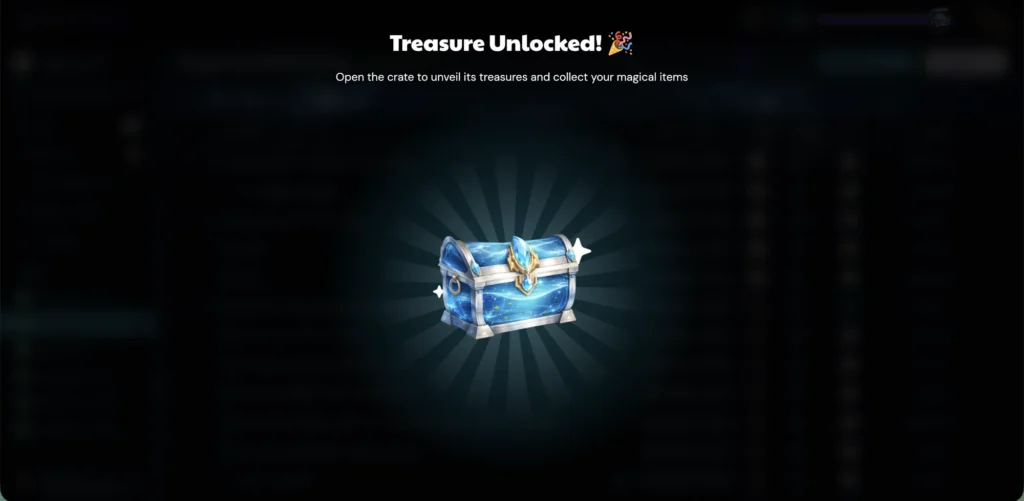
Gamification works because it rewards behavior in the moment, nudging you to stay consistent, even on the days you’re dragging.
According to research, 89% of employees said gamified tools made them feel more productive, and over 60% said those same tools helped them stay motivated at work.
In MagicTask, tasks feed a loop of progress. The more you work, the more satisfying it becomes. And when that loop is this enjoyable, showing up every day doesn’t feel like a chore. It feels like momentum.
2. Visual Feedback That Keeps You Engaged
Checking off tasks shouldn’t feel like sending them into a black hole. In MagicTask, every completed item sparks a moment of delight with animations, sounds, and a progress bar that brings the next chest closer.
These micro-interactions aren’t just pretty details. They’re subtle reinforcements that tell your brain: “Nice work, keep going.”
This level of feedback helps build momentum, especially on days when the grind feels heavy. It taps into how our minds crave progress we can actually see.
Here’s what that looks like in practice:
- Animations celebrate completion, offering a hit of satisfaction.
- Chest rewards add visible prizes for consistent effort.
- Subtle audio cues and motion reinforce a sense of progress, not pressure.
This is about designing a tool that encourages consistent action, without overwhelming you. MagicTask turns task management into something you enjoy returning to, because you feel your progress, not just log it.
And that shift from passive to participatory is what keeps you engaged long after the to-do list is done.
3. Clean Interface for Individuals and Teams
Some tools make you feel like you need a training manual just to tick off a task. But not MagicTask.
The interface is lightweight, intuitive, and distraction-free, so individuals can focus and teams can move. You won’t find bloated menus or endless nested settings. Instead, you get exactly what you need, when you need it.
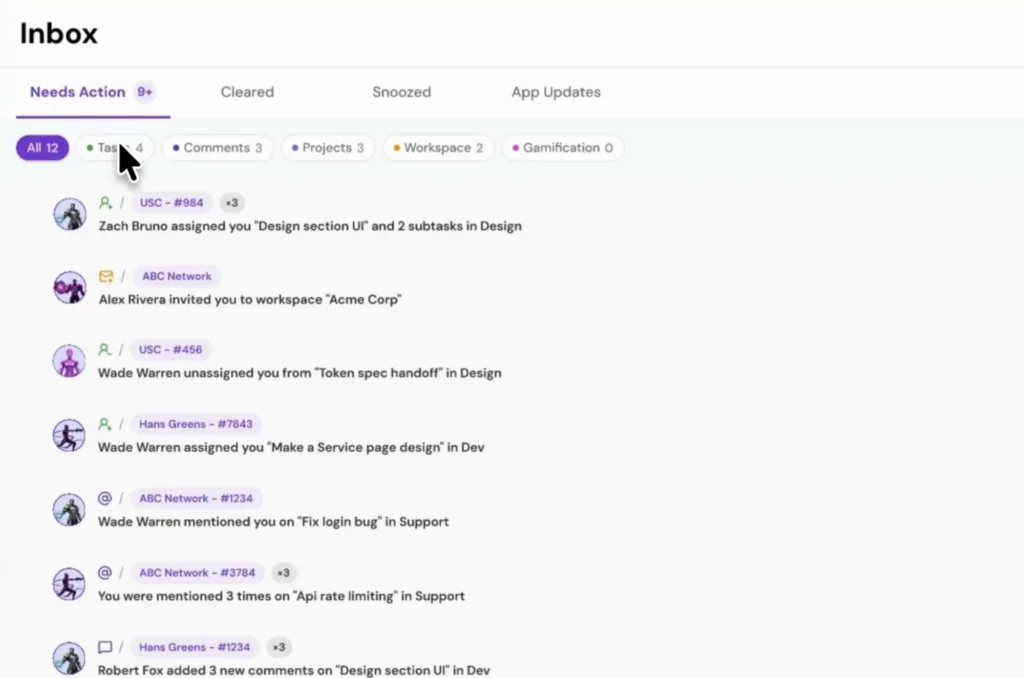
Solo users get a workspace that feels personal, not corporate. Teams get clarity without clutter. And because there’s no steep learning curve, adoption is fast and organic. No hand-holding. No “just give it a few weeks” onboarding excuses.
It’s clean where it counts, and that simplicity makes progress feel effortless.
4. Smart Task Sizing to Add Structure
Some things take five minutes. Others take half a day and a gallon of coffee.
MagicTask’s built-in task sizing, S, M, L, XL, helps you account for that. Instead of treating everything like a checkbox, you assign effort at the moment of creation. It’s quick, intuitive, and surprisingly powerful.
This structure helps you balance your workload, avoid burnout, and plan your day with more intention. You can also glance at a project and instantly get a sense of how much work is ahead; no need to click into every task to gauge complexity.
Here’s how sizing works in MagicTask:
| Size | What it usually means |
|---|---|
| S | Quick and simple. Little thinking needed, like replying to an email or updating a file. |
| M | Needs some focus or a few steps, like drafting a short brief or reviewing a design. |
| L | Takes real concentration or several parts, like writing a report or planning a campaign. |
| XL | Big or complex work that’s worth breaking into subtasks, like launching a feature or rebuilding a page. |
How Does MagicTask Help Users Stay Consistent and Motivated?
Productivity tools often fall short not because they’re missing features, but because they can’t keep users engaged long enough to build habits.
MagicTask was built to solve that. It blends behavioral psychology with intuitive design to make staying consistent feel natural, not forced.
Instead of relying on willpower alone, MagicTask uses simple but powerful mechanics that encourage daily use:
- Every task moves you forward. Finished tasks fill your progress bar and bring the next chest closer.
- Daily login streaks reward the habit. Showing up each day earns MagicTokens and builds a streak worth protecting.
- Friendly competition is on the way. Workspace leaderboards are coming soon, for teams who like a gentle nudge.
- No steep learning curve. The simplicity of MagicTask removes friction. You can jump in, get started, and actually enjoy coming back to it every day.
Staying consistent doesn’t have to feel like a grind. With MagicTask, it feels like progress.
Is MagicTask Suitable for Individuals and Teams?
Absolutely. MagicTask was designed with both solo users and collaborative teams in mind, without forcing either into a one-size-fits-all workflow.
For individuals, MagicTask offers personal structure, visual clarity, and momentum-building features like task sizing and chest rewards. You don’t need a team to benefit. Your tasks, your pace, your progress.
For teams, the experience scales naturally. You can assign tasks, share projects, and track progress without needing a complex setup or management overhead.

Shared projects, assigned tasks and project analytics keep everyone on the same page, and workspace leaderboards are coming soon.
It’s especially well-suited for:
- Product managers
- Design teams
- Engineering squads
- Creative professionals who juggle speed with structure.
Whether you’re flying solo or leading a fast-moving group, MagicTask adapts to how you work, not the other way around.
How Do MagicTask and Todoist Compare?
Task apps often share the same DNA: checklists, deadlines, and reminders. But MagicTask was built differently, especially for those who want productivity to feel rewarding, not robotic.
Todoist offers solid task management and a light layer of gamification through Karma. MagicTask goes further and builds the whole experience around a game. Here’s how they compare:
| Feature | MagicTask | Todoist |
|---|---|---|
| Gamification | A game built around your work: pick a Realm, clear Dungeons, take on boss fights and win chest rewards | Karma: a points-and-levels score for your productivity |
| What you earn | Skins, pets and backgrounds for your avatar from chests, plus badges, Easter Eggs and MagicTokens from daily login streaks | Karma points, eight levels from Beginner to Enlightened, level badges, and a mystery theme at Enlightened |
| Streaks and goals | Daily login streaks earn MagicTokens | Daily and weekly task goals with streaks; vacation mode and days off protect them |
| Penalties | None. Rewards you earn can’t be lost | Lose Karma for tasks five or more days overdue (Karma can be turned off) |
| Effort estimates | S, M, L and XL sizes on every task | Task duration in minutes or hours (Pro and Business) |
| Calendar | Time Blocking syncs with Google Calendar. Your meetings show next to your blocks, and every block you create is added to Google. It never edits or deletes an event it didn’t create | Google and Outlook Calendar. Events show read-only in Today and Upcoming, and scheduled tasks sync to a separate “Todoist” calendar |
| Recurring tasks | Yes | Yes |
| Progress tracking | Individual, project and workspace analytics | Productivity view with Karma level and trend |
| Mobile apps | iOS and Android | iOS and Android, plus desktop apps |
Instead of another checkbox app, MagicTask offers you a more interactive, visual, and motivating way to manage your work.
How Easy Is It to Switch from Todoist to MagicTask?
MagicTask is built to make the transition smooth, intuitive, and quick, so you can move from managing tasks to mastering them without the friction.
Here’s what makes the shift seamless:
- Quick onboarding: The interface is intuitive, clean, and welcoming. New users need no more than a few minutes to find their flow.
- Minimal setup required: You don’t need to configure a dozen settings or integrations just to get started. The core features work out of the box.
- No complex integrations needed: Time Blocking syncs with Google Calendar when you’re ready, but you don’t need to connect anything to get started.
- Quick to fill: Paste in your task list to create tasks in one go, then add sizes and due dates as you go.
If you’ve used Todoist or any task manager before, MagicTask will feel familiar, but better. And if you’re completely new, it’s even easier to dive in.
Either way, you’re not climbing a steep learning curve; you’re stepping into a system designed to support action from the start.
Who Should Switch from Todoist to MagicTask?
If you’ve ever found yourself starting strong with a task manager only to let it fade into the background, you’re not alone.
MagicTask was built for those who want a system that motivates action, not just records intention.
Here’s who will benefit most from making the switch:
- Professionals who struggle with consistency. If you’ve bounced between productivity tools and never found one that sticks, MagicTask’s gamified experience helps reinforce habits and keep momentum alive, day after day.
- Product managers and team leaders. Teams often drop off from tools that feel like a chore. MagicTask’s fun, intuitive UX encourages team participation and maintains high accountability without feeling heavy-handed.
- Individuals who crave progress. MagicTask is all about seeing and feeling your progress. Visual feedback, chest rewards and daily streaks make every action feel worthwhile.
- Teams looking for collaboration without the complexity. With shared projects, avatar customization, and a shared view of progress, MagicTask provides teams with clarity and energy, without adding layers of complexity.
If you’re ready to move beyond static checklists and into a system that actively supports how you want to work, MagicTask is the next step.
Conclusion
MagicTask isn’t just another task manager; it’s a rethink of what productivity should feel like.
In a world where traditional tools often fade into the background, MagicTask does the opposite. It energizes your day, brings clarity to your work, and rewards you for showing up.
With gamified motivation, a beautifully clean interface, smart task sizing, and features that serve both individuals and teams, it reimagines how you build habits, manage priorities, and enjoy the process.
If Todoist has started to feel like a digital notepad —static, functional, but uninspiring —MagicTask is your upgrade. It’s not just about doing more. It’s about doing better, with more consistency, more fun, and more flow.
Start your 14-day free trial, with no credit card required, and see how productivity can feel in 2026. Your tasks and your team will thank you.


