





To achieve our long-term plans and goals, we need to plan the daily tasks that help us reach there. We can rarely reach our dreams and ambitions without executing a well-defined time-bound plan. The tasks that we perform daily and the small achievements we make every day determine how we'll reach there.
This is where a proper daily schedule becomes useful. Many busy people, from founders to freelancers, use one to stay on top of their work.
Here’s how a daily schedule helps, and how to build one in MagicTask.
What Is a Daily Schedule?
A daily schedule is a way of planning your tasks for the day and the time you've allocated. In straightforward terms, you can consider it a timetable for a given day.
A typical daily schedule lists all the activities the person plans to do on a given day in the order they're planning to do. Users may also add additional notes alongside the tasks to help them complete them. For instance, they may add a grocery list if shopping is on their daily schedule. If they need to call or meet someone, they may add that person’s contact details next to the task.
While it is similar to a to-do list, a daily schedule is a bit more complex. A to-do list lists down all the tasks as a reminder. Making a daily schedule involves a bit more planning and includes tasks just for one day. The daily schedule is also time-bound. Unlike a to-do list, users take more time to create their daily schedule. They consider their projects, personal and professional lives, long-term plans and goals, and other aspects.
The Importance of A Daily Schedule
Here's why you should use a daily schedule to manage your tasks:
A daily schedule helps you reach your long-term goals.

Without a well-defined daily schedule, you'd be picking tasks at random to do. With this approach, you may keep putting off or forgetting tasks that help you with your long-term goals. You may remember to publish an article or evaluate your employees but forget to work on the business plan for the next few years.
A daily schedule makes you think about your plans every day and include tasks that move you toward them.
It helps you remember the essential tasks for the day.
Suppose you keep choosing what to do next throughout the day; it's very likely that you may forget to do a couple of them. Some may be irrelevant or something you can put off for another day, but eventually, you may miss out on something important. It could be working on an article that you had to submit the day before or picking up the cake for your kid's birthday party.
When you plan the day upfront, the important tasks are far less likely to slip.
A daily schedule helps you pace your energy through the day.
Planning a daily schedule is about more than just completing all the tasks in a day. It's also about ensuring you get enough breaks and are in the most productive state. Without a daily schedule, you may run behind on tasks all day without a clear idea of how much you have to do.
With a daily schedule, you know how much you have left to do and how much time each of the tasks will take. With this, you can decide if you need to increase the pace or slow down and take a break.
A daily schedule makes the day feel calmer.
When you know what’s coming next, you spend less time scrambling at the end of the day or worrying about what you’ve forgotten. Keeping regular start and finish times can also make it easier to protect your evenings and get enough rest.
A daily schedule reduces your cognitive load.
A daily schedule reduces the number of daily decisions you have to make. While creating a daily schedule, you'd be calculating the time you have and how much each of your tasks will take. You don’t have to keep juggling your to-do list in your head. After you finish a task, you don't have to calculate and figure out which task you need to do.
It will help you focus on the task instead of getting distracted by the rest of your assignments.
A daily schedule helps you better manage your time.

'Failing to plan is planning to fail' – the saying is very much true for an average day. Without a solid plan, you may spend more time on something trivial, leaving you less time for the rest. There's also the chance that you will start doing something and remember that you missed out on an important task. Then you switch to that, dropping whatever you were doing in the first place. These back-and-forths waste time and leave you with less done by the end of the day.
A daily schedule gives you a clear plan and order of work, which helps you avoid distractions and move on smoothly with your day.
Creating and working with a daily schedule helps you understand yourself better.
A daily schedule helps you plan your day well, but it also enables you to track how much you have achieved. It can help you understand how much time a task took you. This approach can help you know your skills and abilities better over time.
A daily schedule can help you create more accurate plans and schedules in the long run. Over time, you’ll get better at estimating how long tasks take, which makes it easier to avoid overloading your day.
A daily schedule can motivate you to finish your tasks.
A daily schedule builds commitment; when you add a new task, you're telling yourself that you'd complete it. This motivates you to complete your tasks for the day. Seeing all of your planned tasks completed will encourage you to do so the next day.
Creating a daily schedule gives you a big picture of your tasks and projects.
Creating daily schedules forces you to look at all your projects and plans. It makes you look at the status of every large and long-term project you have and make sure you're on track.
7 Steps to Create A Daily Schedule With MagicTask
MagicTask is a task and project management app with a game built in. Here's how you can create a daily schedule within MagicTask.
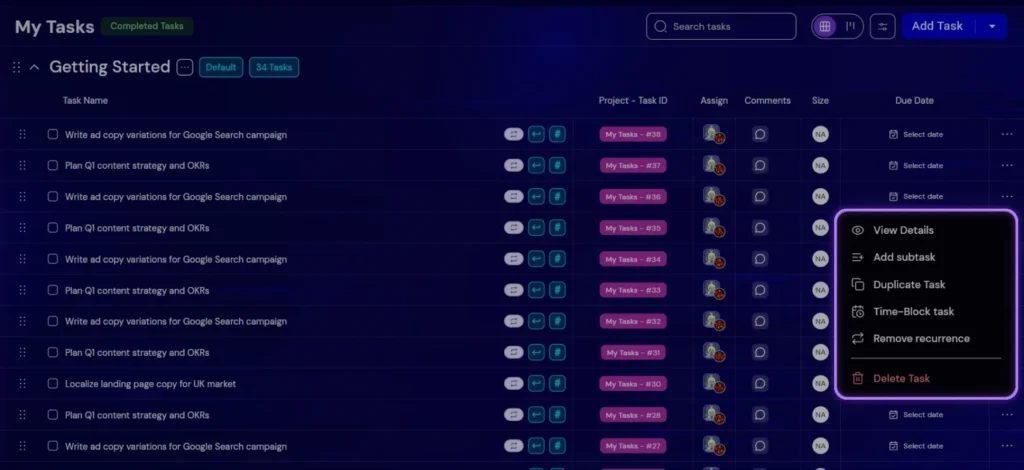
1. Create a task for everything you have to do
Whenever you have something to do, open MagicTask and add them as a task. The Getting Things Done method may be an excellent approach to do this. Add every random thought in your head as a task when you're just getting started. Then go back through the whole list and plan them out. Describe each of the tasks and add them in MagicTask. If you have references for these tasks or any other information you want to add, put it as a comment or a description.
For instance, add their name and contact information if you have to call someone. If you're planning to write an article, add the brief and references.
If you have a large task, for instance, building a mobile app, add the steps as subtasks.
2. Add deadlines and due dates to the tasks
Once you have the tasks on MagicTask, consider all of its aspects and add deadlines and due dates. MagicTask lets you add start and end dates as well as due dates to each of the tasks.
These dates, while simple, help you figure out what to add to your daily schedule. You can glance through all the tasks in the app and figure out which ones are late, which ones are pending, and which ones you need to do asap.
3. Add tags to your tasks
Tags let you group tasks your own way, for example personal vs. work, or by client. You can then use filters to see just the tasks you need.
4. Mark the size of the task
This is another tool in MagicTask with which users can quickly get a picture of their pending tasks. Users can mark their tasks as 'S,' 'M,' 'L,' and 'XL,' and the app will display them right next to them. Sizes are a relative estimate of effort, so you can see at a glance which tasks are quick wins and which need real focus.
5. Set up recurring tasks
It could be conducting your employee evaluation or calculating the salaries – recurring tasks help you automate MagicTask. Like any other task, you can add descriptions and tags and mark their size. Set them up once and they show up on schedule, in the time zone of the person they’re assigned to.
6. Block time for today’s tasks
Create sections that suit how you work, like Backlog for later and Focus for today. Each morning, move today’s tasks into Focus.
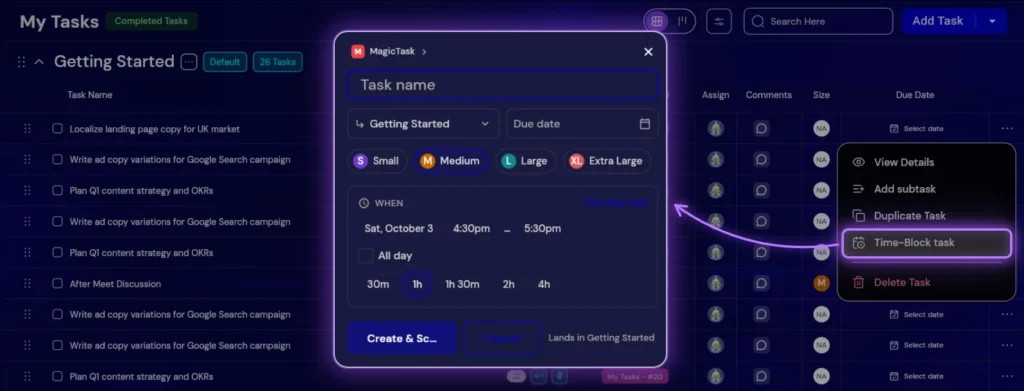
Then use Time Blocking to turn them into a schedule. It puts a weekly calendar beside your tasks, so you can drag each one into a time slot. Give a big task more than one block if it needs it. If you connect Google Calendar, every block also appears there as an event.
7. Once completed, move on to the next task
Once you finish a task, mark the task as complete. Just click the check box on the left side of the task, and MagicTask moves it to your completed tasks, and your Dungeon progress moves forward too.
Create Your Perfect Daily Schedule With MagicTask
MagicTask gives you everything you need to plan your day: tasks, due dates, sizes, recurring tasks and Time Blocking, all in one place. Try MagicTask and build tomorrow’s schedule tonight.


